Looking Beyond the Logitech Signature Slim MK955 Wireless? 6 Alternatives Worth a Look
As an Amazon Associate we earn from qualifying purchases. Links on this page are affiliate links.
The Logitech Signature Slim MK955 Wireless Combo offers a laptop-style typing experience with quiet keys and secure Logi Bolt connectivity. It includes a dedicated Copilot key for Windows AI workflows and supports switching between three devices via Bluetooth or the USB receiver. If you need logitech signature slim mk955 business alternatives, consider that this model is designed for specific enterprise features that may not fit every desk.
Some users might prefer a different size, a solar-powered keyboard, or a more compact layout for limited space. The alternatives listed here were chosen because their specifications overlap with the original product. You will find options with full-size layouts, rechargeable batteries, or silent switches. Each entry matches the core wireless functionality while offering distinct physical dimensions or power sources. This selection helps you find a combo that aligns with your specific workspace requirements without sacrificing essential connectivity.
How alternatives compare to MK955
Logitech MK750 Wireless Solar Combo
The Logitech MK750 Solar Combo drops the Bluetooth flexibility and dedicated Copilot key found on the MK955. Instead, it offers a maintenance-friendly design with a solar-powered keyboard and long-lasting mouse batteries. This combo is heavier at three pounds and slightly wider, making it less portable but more stable for a fixed desk. If you prioritize low maintenance over multi-device switching and AI shortcuts, this solar-powered setup provides reliable productivity without frequent battery changes. It suits users who want a secure wireless connection without the complexity of pairing multiple devices.
Logitech MK345 Full-Size Wireless Combo
The Logitech MK345 Full-Size Wireless Combo simplifies your setup by removing Bluetooth and Logi Bolt connectivity options. It relies on basic wireless technology, which reduces cost and complexity but limits you to a single device connection. This combo is larger and heavier than the slim MK955, offering a traditional full-size layout that prioritizes typing comfort over portability. It lacks the quiet clicking and AI shortcuts of the MK955. This option is ideal for standard office environments where reliability and simplicity matter more than advanced features like multi-device switching or secure enterprise connectivity.
Logitech MK270 Full-Size Wireless Combo
The Logitech MK270 Full-Size Wireless Combo strips away the premium features of the MK955, including Bluetooth, Logi Bolt security, and the Copilot key. It uses basic wireless connectivity and offers a traditional full-size layout. This combo is slightly heavier and wider than the MK955, focusing on essential functionality rather than advanced multitasking. It lacks the quiet typing and clicking technology, making it noisier in shared spaces. This choice suits users who need a reliable, no-frills wireless setup for Windows without the need for multi-device switching or AI integration. It is a practical option for basic office tasks.
Arteck Ultra Compact Wireless Combo
The Arteck Ultra Compact Wireless Combo offers a significantly smaller footprint than the MK955, measuring 11.1 inches in length compared to 17.6 inches. It uses a single wireless receiver, eliminating Bluetooth flexibility but simplifying connectivity for single-port setups. This combo is rechargeable, unlike the battery-powered MK955, and features an ergonomic design for comfort. It lacks the quiet clicking technology and AI shortcuts of the MK955. This option is best for users with limited desk space who value portability and a compact design over advanced features like multi-device switching or enterprise-grade security.
Logitech Wireless Solar Keyboard and Mouse
The Logitech Wireless Solar Keyboard and Mouse provides a solar-powered keyboard similar to the MK750, offering long-term maintenance benefits over the battery-powered MK955. It lacks Bluetooth connectivity and the dedicated Copilot key, focusing instead on reliable solar charging and durable mouse batteries. This combo is slightly wider and taller than the MK955, providing a stable presence on your desk. It is ideal for Windows users who want to minimize battery changes and do not need multi-device switching or advanced AI workflows. It suits offices where simplicity and longevity are more important than portability or specialized shortcuts.
Macally Compact Wireless Keyboard and Mouse
The Macally Compact Wireless Keyboard and Mouse is designed for small desks, with a mini form factor that is much smaller than the MK955. It features silent keys and clicking, offering a quieter experience than the MK955, which already has quiet technology. This combo lacks Bluetooth and Logi Bolt connectivity, relying on basic wireless connections. It does not include AI shortcuts or multi-device switching capabilities. This option is best for users who prioritize a small footprint and quiet operation in cluttered workspaces. It is a practical choice for those who need essential wireless functionality without the bulk of a full-size combo.
Quick picks
Our 7 picks

Logitech Signature Slim MK955 Wireless Combo
Best for: Windows business users needing AI shortcuts
- Connectivity
- Logi Bolt receiver, Bluetooth
- Multi-Device Pairing
- 3 devices
- Color
- Black
- Operating System
- Windows
- Noise Level
- Silent
- Dimensions
- 17.6 × 5.8 × 2.5 inches
View on Amazon: Logitech Signature Slim MK955 Wireless Combo Affiliate link
This business combo pairs a slim, laptop-style keyboard with a silent mouse. It features a dedicated Microsoft Copilot key for Windows AI workflows. Connectivity includes Logi Bolt and Bluetooth for switching between three devices. The mouse uses SmartWheel technology for precise or fast scrolling. Quiet typing and clicking help maintain focus in shared office spaces.
Pros
- Dedicated Copilot key for Windows AI integration
- Logi Bolt and Bluetooth connectivity for three devices
- SmartWheel mouse with precise and fast scrolling modes
- Quiet typing and silent touch mouse clicks
Cons
- No solar power option in this specific edition
- Battery powered model requires periodic battery replacement
- Limited to Windows layout and ecosystem features
Good fit if
- You need dedicated AI workflow shortcuts on your keyboard
- You require secure Logi Bolt wireless connectivity
- You prefer quiet typing and clicking in an office
Skip if
- You need a macOS compatible layout
- You want a solar powered keyboard option
- You need a mouse with high DPI gaming specs
Verdict: Logitech Signature Slim MK955 Copilot Edition is ideal for Windows users who want built-in AI shortcuts and secure wireless connectivity. It suits those who prioritize quiet operation and multi-device switching in a business setting.
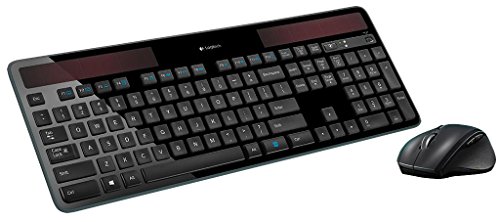
Logitech MK750 Wireless Solar Combo
Best for: low-maintenance office productivity
- Connectivity
- Advanced wireless Unifying
- Power Source
- Solar (keyboard)
- Color
- Black
- Dimensions
- 19 × 7.9 × 1.4 inches
- Weight
- 3 pounds
View on Amazon: Logitech MK750 Wireless Solar Combo Affiliate link
The Logitech MK750 is a black wireless keyboard and mouse combo designed for sustained productivity. The keyboard uses solar power, eliminating battery changes. The Marathon Mouse offers a 3-year battery life. It uses advanced wireless Unifying technology for a single receiver connection. This setup suits users who want low maintenance and reliable performance in office environments.
Pros
- Solar-powered keyboard eliminates battery replacements
- Marathon Mouse lasts up to 3 years on batteries
- Advanced wireless Unifying technology for single receiver use
- Full-size layout for standard typing
Cons
- Heavier build at 3 pounds
- Requires adequate light for solar charging
- No Bluetooth connectivity listed
Good fit if
- You want to avoid changing keyboard batteries
- You prefer a single wireless receiver for both devices
- You need a durable full-size keyboard for daily office work
Skip if
- You need Bluetooth connectivity for multiple device switching
- You prefer a lightweight, portable setup for travel
- You work in low-light conditions without reliable ambient light
Verdict: Logitech MK750 Solar Wireless Combo delivers a maintenance-friendly setup for desk-bound workers. It fits users who value solar efficiency and long-lasting mouse batteries over portability.

Logitech MK345 Full-Size Wireless Combo
Best for: Standard office typing and basic wireless use
- Connectivity
- 2.4 GHz, USB-A Nano Receiver
- Keyboard Form Factor
- Full-size
- Ergonomic Features
- Integrated palm rest
- Color
- Black
- Dimensions
- 20 × 7.52 × 1.73 inches
- Weight
- 1.1 pounds
View on Amazon: Logitech MK345 Full-Size Wireless Combo Affiliate link
The Logitech MK345 is a full-size wireless keyboard and mouse combo designed for reliable daily use. It features 2.4 GHz connectivity with a 10-meter range, ensuring stable performance across Windows, macOS, and ChromeOS. The keyboard includes a palm rest and spill-resistant design, while the contoured mouse supports right-handed users. Battery life reaches up to 3 years for the keyboard and 18 months for the mouse, making it a low-maintenance option for office environments.
Pros
- Full-size layout with integrated palm rest
- Spill-resistant keyboard design
- Up to 3 years keyboard battery life
- Contoured right-handed mouse for comfort
- Plug-and-play setup for multiple OS
Cons
- No Bluetooth or multi-device switching
- No solar charging capability
- Standard mouse without advanced tracking features
Good fit if
- You need a reliable, full-size keyboard for daily typing
- You want long battery life without frequent changes
- You prefer a simple plug-and-play wireless setup
Skip if
- You require Bluetooth connectivity for multiple devices
- You need a compact or space-saving design
- You prefer solar-powered or rechargeable batteries
Verdict: Logitech MK345 Full-Size Wireless Combo delivers dependable performance for users who prioritize typing comfort and long battery life over advanced connectivity options. It is ideal for standard office setups where simplicity and reliability matter most.

Logitech MK270 Full-Size Wireless Combo
Best for: Users needing a reliable full-size wireless setup
- Connectivity
- Wireless USB-A Nano Receiver
- Keyboard Form Factor
- Full-size
- Color
- Black
- Dimensions
- 20.1 × 6.22 × 1.81 inches
- Weight
- 1.05 pounds
View on Amazon: Logitech MK270 Full-Size Wireless Combo Affiliate link
The Logitech MK270 is a full-size wireless keyboard and mouse combo designed for reliable, everyday productivity. It features a standard layout with a number pad and F-keys, plus a spill-resistant design for durability. The USB receiver connects up to 33 feet away, while the 36-month keyboard battery life reduces maintenance. It includes eight multimedia hotkeys for quick access to common tasks, making it a practical tool for office environments.
Pros
- Full-size layout with number pad and arrow keys
- 36-month keyboard battery life with on/off switches
- Spill-resistant design and durable keys
- Eight multimedia hotkeys for instant access
- Reliable wireless connection up to 33 feet
Cons
- No Bluetooth or multi-device switching capability
- No rechargeable battery; requires standard AA/AAA replacements
- Basic mouse with no customizable buttons
Good fit if
- You need a full-size keyboard with a number pad
- You want long battery life without frequent charging
- You prefer a simple plug-and-play setup
Skip if
- You require Bluetooth connectivity for multiple devices
- You need a compact or tenkeyless layout
- You want a rechargeable battery system
Verdict: Logitech MK270 Full-Size Wireless Combo is a solid choice for users who prioritize reliability and a traditional layout over advanced features like Bluetooth or rechargeability.

Arteck Ultra Compact Wireless Combo
Best for: small desks and single-port setups
- Connectivity
- 2.4 GHz USB receiver
- Keyboard Form Factor
- Ultra Compact Slim
- Ergonomic Features
- Ergonomic mouse
- Power Source
- Built-in rechargeable battery
- Color
- Black
- Operating System
- Windows
View on Amazon: Arteck Ultra Compact Wireless Combo Affiliate link
This Arteck combo features an ultra-compact stainless steel keyboard and an ergonomic mouse. It uses a single nano USB receiver for both devices, saving a port. The rechargeable lithium battery offers up to six months of keyboard life and four months for the mouse per charge. It is designed for Windows and fits small desks.
Pros
- Stainless steel keyboard body for durability
- Single USB receiver connects both devices
- Rechargeable battery lasts up to six months
- Ergonomic mouse design reduces stress
Cons
- Compact size limits key spacing
- No Bluetooth connectivity listed
- Windows operating system only
Good fit if
- You need a small footprint for your desk
- You want to save USB ports
- You prefer a durable metal keyboard surface
Skip if
- You require full-size key layout
- You need multi-device Bluetooth switching
- You use a Mac computer
Verdict: Arteck Ultra Compact Wireless Combo is a space-saving option for Windows users who value portability and a single receiver setup. It suits those with limited desk space who do not need Bluetooth flexibility.
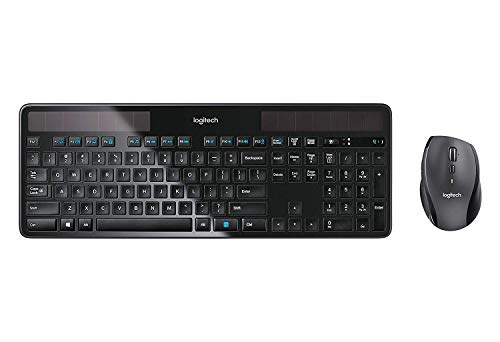
Logitech Wireless Solar Keyboard and Mouse
Best for: Windows users seeking solar-powered keyboards
- Connectivity
- Wireless Unifying
- Power Source
- Solar-powered (keyboard)
- Color
- Black
- Operating System
- Windows
- Dimensions
- 18 × 8 × 2 inches
- Weight
- 3 pounds
View on Amazon: Logitech Wireless Solar Keyboard and Mouse Affiliate link
The Logitech MK750 is a wireless keyboard and mouse combo designed for Windows users. It features a solar-powered keyboard that charges via indoor or outdoor light, removing the need for battery replacements. The included marathon mouse offers a three-year battery life. Both devices use Logitech Unifying technology for reliable connectivity. This set suits those who want low-maintenance power solutions in a sleek black design.
Pros
- Solar-powered keyboard charges with indoor or outdoor light
- Marathon mouse provides three-year battery life
- Uses Logitech Unifying wireless technology
- Optimized key layout for Windows systems
Cons
- No Bluetooth connectivity listed
- Not compatible with macOS
- Heavier build at three pounds
Good fit if
- You want a keyboard that never needs battery changes
- You use Windows systems exclusively
- You prefer a single USB receiver for both devices
Skip if
- You need multi-device Bluetooth switching
- You use a Mac computer
- You require a compact or portable form factor
Verdict: Logitech MK750 Solar Wireless Combo delivers reliable solar charging and long-lasting mouse power for Windows users. It fits offices where battery maintenance is a priority.
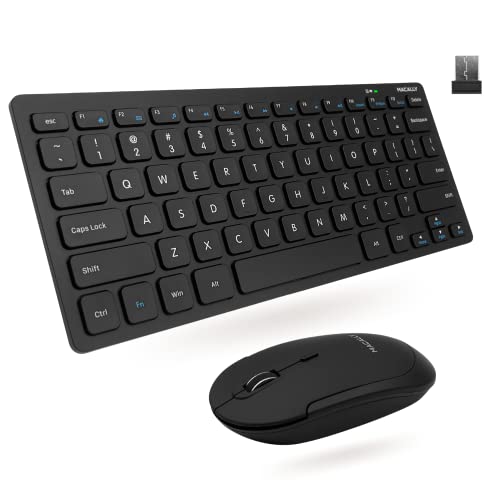
Macally Compact Wireless Keyboard and Mouse
Best for: small desks and quiet workspaces
- Connectivity
- 2.4 GHz RF (USB dongle)
- Keyboard Form Factor
- Compact
- Switch Type
- Slim scissor flex
- Mouse DPI
- 800 / 1200 / 1600 DPI
- Color
- Black
- Noise Level
- Silent
View on Amazon: Macally Compact Wireless Keyboard and Mouse Affiliate link
This compact keyboard and mouse combo saves desk space while maintaining reliable connectivity. It uses a single 2.4 GHz USB dongle for a stable 30-foot range. The keyboard features 78 slim scissor flex keys with 12 shortcuts. The mouse offers three DPI settings for precise control. It is designed for users who need a small footprint without sacrificing basic functionality.
Pros
- Compact form factor saves desk space
- 2.4 GHz wireless with 30-foot range
- Quiet mouse clicks for silent operation
- Adjustable DPI settings (800/1200/1600)
Cons
- No Bluetooth connectivity option
- No solar charging capability
- Standard plastic build quality
Good fit if
- You need a small keyboard for a limited desk area
- You prefer quiet mouse clicks in a shared office
- You want a simple plug-and-play wireless setup
Skip if
- You require Bluetooth connectivity for multiple devices
- You need a full-size keyboard with numpad
- You want a keyboard with solar charging
Verdict: Macally Mini Wireless Keyboard & Mouse is a practical choice for users who prioritize a small footprint and quiet operation. It fits best on cluttered desks where space is at a premium.
Specifications side by side
| Spec | Logitech Signature Slim MK955 Wireless Combo | Logitech MK750 Wireless Solar Combo | Logitech MK345 Full-Size Wireless Combo | Logitech MK270 Full-Size Wireless Combo | Arteck Ultra Compact Wireless Combo | Logitech Wireless Solar Keyboard and Mouse | Macally Compact Wireless Keyboard and Mouse |
|---|---|---|---|---|---|---|---|
| Connectivity | Logi Bolt receiver, Bluetooth | Advanced wireless Unifying | 2.4 GHz, USB-A Nano Receiver | Wireless USB-A Nano Receiver | 2.4 GHz USB receiver | Wireless Unifying | 2.4 GHz RF (USB dongle) |
| Keyboard Form Factor | not stated | not stated | Full-size | Full-size | Ultra Compact Slim | not stated | Compact |
| Ergonomic Features | not stated | not stated | Integrated palm rest | not stated | Ergonomic mouse | not stated | not stated |
| Multi-Device Pairing | 3 devices | not stated | not stated | not stated | not stated | not stated | not stated |
| Power Source | not stated | Solar (keyboard) | not stated | not stated | Built-in rechargeable battery | Solar-powered (keyboard) | not stated |
| Switch Type | not stated | not stated | not stated | not stated | not stated | not stated | Slim scissor flex |
| Mouse DPI | not stated | not stated | not stated | not stated | not stated | not stated | 800 / 1200 / 1600 DPI |
| Form Factor | not stated | not stated | Full-Size | Full-Size | Compact | not stated | Mini |
| Design | not stated | not stated | not stated | not stated | Ergonomic | not stated | not stated |
| Color | Black | Black | Black | Black | Black | Black | Black |
| Operating System | Windows | not stated | not stated | not stated | Windows | Windows | not stated |
| Noise Level | Silent | not stated | not stated | not stated | not stated | not stated | Silent |
| Dimensions | 17.6 × 5.8 × 2.5 inches | 19 × 7.9 × 1.4 inches | 20 × 7.52 × 1.73 inches | 20.1 × 6.22 × 1.81 inches | 11.1 × 5.28 × 0.55 inches | 18 × 8 × 2 inches | 0.79 × 1.18 × 0.5 inches |
| Weight | not stated | 3 pounds | 1.1 pounds | 1.05 pounds | not stated | 3 pounds | 12 ounces |
| Size | One Size | not stated | 1 Pack | 1 Pack | Ultra Compact Slim | not stated | Compact Combo |
| Model | 920-013271 | 920-004861 | 920-006481 | 920-008813 | HW086 | not stated | RFCOMPACTKEYCB |
Frequently asked questions
Which Logitech wireless combo is best for Windows business users who need AI shortcuts?
The Logitech Signature Slim MK955 Wireless Combo is the top choice for this need. It features a dedicated Copilot key for Windows AI workflows. The combo uses secure Logi Bolt connectivity and supports switching between three devices. This setup suits professionals who prioritize quiet operation and efficient multi-device management in a business environment.
What is the best low-maintenance wireless keyboard and mouse combo for an office?
The Logitech MK750 Solar Wireless Combo is ideal for low-maintenance office productivity. It features a solar-powered keyboard that reduces battery changes. The mouse also offers long-lasting power. This combo weighs three pounds and fits users who value solar efficiency and reliability over portability or advanced Bluetooth connectivity options.
Which wireless keyboard combo is best for small desks and single-port setups?
The Arteck Ultra Compact Wireless Combo is designed for small desks and single-port setups. It uses a single USB receiver for connectivity, saving ports. The combo is rechargeable and features an ergonomic design. It is a space-saving option for Windows users who value portability and do not require Bluetooth flexibility.
What is the best budget-friendly full-size wireless keyboard and mouse combo?
The Logitech MK270 Full-Size Wireless Combo is a solid budget choice. It provides reliable performance with a traditional layout. The combo uses standard wireless connectivity rather than Bluetooth or rechargeable batteries. It weighs just over one pound and suits users who prioritize dependability and a familiar typing experience over advanced features.
Which wireless keyboard and mouse combo is best for quiet workspaces?
The Macally Compact Wireless Keyboard and Mouse is designed for quiet workspaces. It features silent keys to minimize noise during use. The combo has a mini form factor that saves desk space. It weighs only twelve ounces and fits best on cluttered desks where a small footprint and quiet operation are priorities.
What is the best standard office wireless keyboard combo for typing comfort?
The Logitech MK345 Full-Size Wireless Combo delivers dependable performance for standard office typing. It prioritizes typing comfort and long battery life. The combo uses standard wireless connectivity and features a full-size layout. It weighs 1.1 pounds and is ideal for setups where simplicity and reliability matter more than advanced connectivity options.