Logitech vs Seenda Keyboard and Mouse Combos: Which Brand Fits You?
As an Amazon Associate we earn from qualifying purchases. Links on this page are affiliate links.
Choosing between a logitech vs seenda keyboard and mouse combo depends on your power needs and device variety. Both sets offer wireless convenience and full-size layouts for comfortable typing. The main difference lies in their connectivity and power systems. Logitech uses solar charging and a single wireless standard, while Seenda provides dual Bluetooth and 2.4 GHz options with a rechargeable battery. This affects how you connect and maintain your gear.
Key differences
| Aspect | Logitech MK750 Wireless Solar Combo | Seenda Full-Size Multi-Device Wireless Combo |
|---|---|---|
| Connectivity | Advanced wireless Unifying | 2.4 GHz USB and Bluetooth |
| Power Source | Solar (keyboard) | Built-in rechargeable battery |
| Multi-Device Pairing | Not listed | 3 devices |
| Switch Type | Not listed | Scissor switch |
| Mouse DPI | Not listed | 1000 / 1600 / 2400 DPI |
| Weight | 3 pounds | 1.43 pounds |
Which one should you choose?
Choose Logitech MK750 Wireless Solar Combo if
- You prefer a keyboard powered by ambient light to avoid charging cables.
- You want a simpler setup with a single wireless standard for your devices.
- You value a heavier, more stable base for your typing surface.
Choose Seenda Full-Size Multi-Device Wireless Combo if
- You need to switch seamlessly between three different devices.
- You use both Windows and Mac systems and need broad compatibility.
- You prefer a lighter, more portable kit for travel or small desks.
Verdict: The Logitech MK750 suits users who want a low-maintenance, solar-powered setup for a single PC. The Seenda SKM64-3 is better for multitaskers who juggle multiple devices and operating systems. Your choice depends on whether you prioritize power independence or device versatility.
Solar Power vs Multi-Device Switching
Power Source
The Logitech MK750 Wireless Solar Combo uses a solar-powered keyboard, harvesting light to operate without traditional battery changes. The mouse relies on a three-year battery life. In contrast, the Seenda SKM64-3 features a built-in rechargeable battery for the entire set. It offers 200 hours of use and recharges via USB-C in three hours. The Seenda also includes an auto-sleep mode and an on/off switch to extend longevity. If you prefer zero battery maintenance, Logitech wins. For flexible charging options, Seenda is better.
Connectivity
Logitech employs Advanced Wireless Unifying technology for its mouse and keyboard. This allows pairing multiple devices to one receiver, but the data does not specify multi-device switching capabilities or Bluetooth support. The Seenda SKM64-3 offers dual connectivity modes: 2.4 GHz USB and Bluetooth. It supports switching between three devices simultaneously via USB-A, BT1, and BT2 channels. This makes Seenda ideal for users managing multiple computers or operating systems. Logitech focuses on a single receiver approach, while Seenda provides broader device flexibility.
Compatibility
The Seenda combo is designed for wide compatibility, supporting Windows 11/10/8/7/XP via 2.4G USB and macOS, iOS, and Android via Bluetooth. It features a dual OS layout ready for both Windows and Apple keyboards. Logitech’s specifications list Advanced Wireless Unifying technology but do not explicitly detail cross-platform OS support in the provided data. Seenda’s explicit support for Mac, iOS, and Android makes it the stronger choice for hybrid users. Logitech remains a solid option for Windows-centric setups.
Switch Type
Seenda utilizes scissor-switch keys for its keyboard, which reduce typing noise and enhance comfort. This mechanism is often found in laptops and provides a quiet, responsive typing experience. The Logitech MK750 data does not specify the switch type used in its solar keyboard. Seenda also features a noiseless mouse click. For users in shared spaces or libraries, the quiet operation of Seenda’s scissor switches offers a clear advantage. Logitech’s specific acoustic profile is not detailed in the provided specifications.
Build and Portability
The Seenda SKM64-3 is built with stainless steel and premium materials, featuring a slim profile of 0.12 inches for the keyboard. It weighs 1.43 pounds, making it highly portable. The Logitech MK750 weighs 3 pounds and has a larger footprint. Seenda’s metal build resists wear and fits easily into bags. Logitech’s heavier construction suggests durability but less portability. If you need a lightweight set for travel or cafe work, Seenda is the superior choice. Logitech is better for a stationary desk setup.
Mouse DPI
The Seenda mouse offers adjustable DPI settings of 1000, 1600, and 2400. This allows you to switch between precision and speed depending on your task. The Logitech MK750 data does not list specific DPI values for its Marathon Mouse. While Logitech mice are known for reliability, Seenda provides visible customization for cursor speed. For users who need to adjust sensitivity for different applications, Seenda’s adjustable DPI is a practical feature. Logitech’s mouse performance specs are not detailed here.
Which combo fits your workflow?
Users with mixed Windows and Mac devices
The Seenda combo supports triple device switching via Bluetooth and 2.4G USB. It works with Windows, macOS, iOS, and Android. You can switch between three systems seamlessly. The dual OS layout means no relearning keys. This versatility makes it ideal for hybrid workers who juggle multiple platforms daily.
Buyers wanting minimal battery maintenance
The Logitech MK750 keyboard uses solar power to operate. You do not need to replace batteries for the keyboard. The mouse features a three-year battery life. This setup reduces power management tasks. If you prefer a system that runs on light and long-life cells, this combo suits your need for low maintenance.
Those needing quiet typing in shared spaces
Seenda uses scissor-switch keys for quieter operation. The mouse offers noiseless clicks to prevent distractions. These features help in libraries, offices, or late-night sessions. The ergonomic stand also enhances comfort during long typing sessions. If noise reduction is a priority, this design supports a quieter work environment.
The products compared
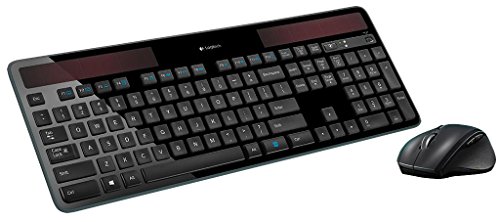
Logitech MK750 Wireless Solar Combo
Best for: users seeking low-maintenance wireless setups
- Connectivity
- Advanced wireless Unifying
- Power Source
- Solar (keyboard)
- Color
- Black
- Dimensions
- 19 × 7.9 × 1.4 inches
- Weight
- 3 pounds
View on Amazon: Logitech MK750 Wireless Solar Combo Affiliate link
The Logitech MK750 combines a solar-powered keyboard with a wireless mouse using Unifying technology. The keyboard harvests light for power, while the mouse offers a 3-year battery life. This black combo measures 19 inches long and weighs 3 pounds. It suits users seeking low maintenance and reliable wireless connectivity without frequent charging or battery changes.
Pros
- Keyboard powered by ambient light
- 3-year battery life for the mouse
- Advanced Unifying wireless technology
- Compact black design
Cons
- No Bluetooth connectivity listed
- Requires Unifying receiver
- Heavier build at 3 pounds
Good fit if
- You want to avoid changing keyboard batteries
- You prefer a single receiver for devices
- You need a durable wireless setup
Skip if
- You require Bluetooth connectivity
- You want a portable lightweight keyboard
- You need a mouse with rechargeable battery
Verdict: Logitech MK750 Solar Wireless Combo is ideal for users who prioritize long-term battery efficiency and convenient wireless pairing over portability or Bluetooth flexibility.
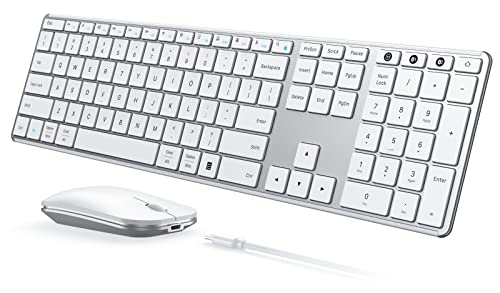
Seenda Full-Size Multi-Device Wireless Combo
Best for: Hybrid Windows and Mac users
- Connectivity
- 2.4G USB, Bluetooth
- Keyboard Form Factor
- Full-size
- Ergonomic Features
- Ergonomic stand
- Multi-Device Pairing
- 3 devices
- Power Source
- Built-in battery
- Switch Type
- Scissor switch
View on Amazon: Seenda Full-Size Multi-Device Wireless Combo Affiliate link
The Seenda SKM64-3 is a full-size wireless keyboard and mouse combo featuring dual OS layouts for Windows and Mac. It offers triple device connectivity via 2.4 GHz USB and Bluetooth, allowing you to switch between three systems. The set includes a rechargeable battery providing 200 hours of use and a silent mouse with adjustable DPI. Its slim metal build suits users who need portability across multiple platforms.
Pros
- Triple device pairing via 2.4 GHz USB and two Bluetooth channels
- Dual Windows and Mac keyboard layouts for cross-platform use
- 200-hour battery life with Type-C fast recharge
- Silent scissor-switch keys and noiseless mouse clicks
- Adjustable mouse DPI at 1000, 1600, and 2400 levels
Cons
- 2.4 GHz USB mode works with Windows only, not Mac
- Full-size keyboard occupies more desk space than compact layouts
- No solar charging capability unlike some premium competitors
Good fit if
- You switch between Windows and Mac devices frequently
- You need a quiet setup for shared offices or libraries
- You prefer a slim, metal build that fits in bags
Skip if
- You require solar-powered keyboard functionality
- You need a compact or tenkeyless keyboard layout
- You use Windows exclusively and want a simpler 2.4 GHz only setup
Verdict: The Seenda SKM64-3 Wireless Combo fits hybrid workers who need seamless switching between Windows and Mac systems without desk clutter. Its long battery life and silent operation make it practical for shared spaces.
Specifications side by side
| Spec | Logitech MK750 Wireless Solar Combo | Seenda Full-Size Multi-Device Wireless Combo |
|---|---|---|
| Connectivity | Advanced wireless Unifying | 2.4G USB, Bluetooth |
| Keyboard Form Factor | not stated | Full-size |
| Ergonomic Features | not stated | Ergonomic stand |
| Multi-Device Pairing | not stated | 3 devices |
| Power Source | Solar (keyboard) | Built-in battery |
| Switch Type | not stated | Scissor switch |
| Mouse DPI | not stated | 2400 DPI |
| Form Factor | not stated | Full-Size |
| Color | Black | White Silver |
| Operating System | not stated | Mac, Windows |
| Noise Level | not stated | Silent |
| Dimensions | 19 × 7.9 × 1.4 inches | 16.9 × 4.33 × 0.79 inches |
| Weight | 3 pounds | 1.43 pounds |
| Model | 920-004861 | JP-064-3 |
| Size | not stated | Full Size |
Frequently asked questions
Is the Logitech MK750 suitable for users who want to avoid battery changes?
Yes, the Logitech MK750 Wireless Solar Combo is designed for low-maintenance use. The keyboard features solar charging that harvests light to operate, eliminating the need for frequent battery replacements. This makes it an ideal choice for users prioritizing long-term battery efficiency and convenient wireless pairing over portability.
Does the Seenda combo work with both Windows and Mac computers?
Yes, the Seenda Full-Size Multi-Device Wireless Combo supports both operating systems. It is built for hybrid workers who need seamless switching between Windows and Mac systems. The dual OS layout allows you to switch between three systems without desk clutter, making it practical for shared spaces.
What connectivity options does the Seenda keyboard offer?
The Seenda SKM64-3 uses Bluetooth and 2.4G USB connectivity. This dual connection method allows you to pair with multiple devices easily. It supports switching between three systems, including Windows, macOS, iOS, and Android, providing flexibility for users with varied device ecosystems.
How heavy is the Logitech MK750 wireless keyboard and mouse set?
The Logitech MK750 Wireless Solar Combo weighs three pounds. Its dimensions are 19 inches in length, 7.9 inches in width, and 1.4 inches in height. This full-size layout provides a stable typing experience, though it is less portable than lighter alternatives.
Is the Seenda keyboard quiet enough for office use?
Yes, the Seenda SKM64-3 is noted for its silent operation. This feature makes it practical for shared spaces where noise might be distracting. The full-size layout ensures comfortable typing while maintaining a low acoustic profile, which is beneficial for hybrid workers in collaborative environments.
What color options are available for these wireless combos?
The Logitech MK750 is available in black. The Seenda Full-Size Multi-Device Wireless Combo comes in white silver. These color choices allow you to match your desk setup or personal preference, ensuring the hardware blends well with your workspace aesthetic.
Which combo is better for users with mixed operating systems?
The Seenda combo is better for mixed OS users. It supports triple device switching via Bluetooth and 2.4G USB. This allows seamless transitions between Windows, macOS, iOS, and Android. The Logitech MK750 focuses on solar power and wireless convenience rather than multi-device OS switching.