Logitech Wireless Solar Keyboard Mouse Review: Specs, Pros and Cons
As an Amazon Associate we earn from qualifying purchases. Links on this page are affiliate links.
This logitech wireless solar keyboard mouse review covers the K750 combo, a black input set designed for Windows users who want to reduce battery maintenance. The defining specs are its solar-powered keyboard and its wireless connectivity via Logitech Unifying technology. The keyboard charges using indoor or outdoor light, while the mouse relies on a long-lasting internal battery. This pairing offers a unified wireless experience for your desktop. You get a complete set that connects to your PC with minimal dongles. The design is sleek, measuring 18 inches long and weighing 3 pounds total. It is built for continuous use without frequent power swaps.
What stands out
- Solar-powered keyboard that charges from indoor and outdoor light
- Logitech Unifying wireless technology for single-dongle connectivity
- Marathon mouse with a 3-year battery life
- Optimized key layout for Windows operating systems
Who it fits
Good fit for
You should consider this combo if you want a low-maintenance setup on a Windows PC. The solar keyboard is ideal for desks near windows or under bright office lights, as it eliminates battery replacements for the typing device. The 3-year mouse battery means you rarely need to worry about that component either. If you prefer a single USB receiver to connect both devices and want a clean, black aesthetic, this spec sheet fits your needs.
Who should skip it
Skip this option if you use a Mac, as the layout is optimized for Windows. You should also look elsewhere if you need Bluetooth connectivity, as this device uses Logitech Unifying wireless technology, which requires a specific USB receiver. If you work in very dark environments where the solar panel cannot gather enough light, the keyboard may not charge efficiently. Additionally, if you prefer mechanical switches or a different key feel, the optimized layout here may not suit your typing preferences.
Verdict: This combo is a practical, spec-driven choice for Windows users who value long battery life and solar convenience. It delivers reliable wireless performance with minimal maintenance.
Key specs explained
Power Source: Solar-powered (keyboard)
The keyboard charges using both indoor and outdoor light. This feature eliminates the need for battery replacements. You never have to swap out AA or AAA cells for the main typing device. It ensures continuous operation even if ambient light is low due to smart power management. This is ideal if you want to reduce maintenance. Compare this to standard keyboards that rely solely on disposable batteries or internal rechargeable cells that need a cable.
Connectivity: Wireless Unifying
Both the keyboard and mouse use Logitech Unifying technology. This allows you to connect multiple devices to a single USB receiver. You get seamless connectivity without needing separate dongles for each input device. This reduces clutter on your desk and ensures efficient performance. It is useful if you have limited USB ports. Compare this to keyboards that require separate wireless connections or wired setups that tether you to your computer.
Extended Battery: 3-year battery life (mouse)
The included marathon mouse offers an impressive three-year battery life. This ensures long-lasting, uninterrupted use without frequent charging or battery changes. You can rely on consistent performance for daily tasks. This is beneficial if you dislike the hassle of managing power for your pointing device. Compare this to standard mice that may require monthly or weekly battery changes. This spec highlights the efficiency of the mouse component in the combo.
Operating System: Windows
The keyboard features an optimized key layout specifically designed for Windows systems. This ensures comfortable typing and modern aesthetics tailored to that environment. You get the correct placement for Windows-specific keys. This is essential if you primarily use Windows software. Compare this to keyboards designed for macOS or generic layouts that may lack specific system keys. It guarantees compatibility with your operating system without additional configuration.
Design and build quality
According to the listing, the keyboard features a sleek black finish that complements modern desk aesthetics. The layout is optimized for Windows systems, which means you get standard key placement without needing to adjust your muscle memory. This design choice ensures immediate usability for anyone already familiar with Windows environments. The mouse shares this coordinated look, creating a unified visual experience across your input devices.
The physical dimensions are listed as 18 inches in length, 8 inches in width, and 2 inches in height. These measurements suggest a full-sized keyboard that sits comfortably on most desks without encroaching on your mouse space. The total weight is 3 pounds. This mass provides stability during typing, reducing the chance of the keyboard sliding around on smooth surfaces. You do not need to worry about the unit shifting under your hands during vigorous use.
The build supports wireless connectivity via Logitech Unifying technology. This allows both the keyboard and the mouse to connect through a single receiver. You benefit from efficient performance and seamless switching between devices. The materials and construction focus on durability and ease of use. The solar-powered design integrates cleanly into the chassis, hiding the charging mechanism while keeping the profile low. This approach maintains a clean desk setup without visible wires or bulky battery compartments.
Setup and daily workflow
Setup involves pairing both devices using Logitech Unifying technology. This single receiver handles both the keyboard and the mouse, reducing the number of USB ports you need to occupy. The system is designed for Windows operating systems, so you should verify your computer runs a compatible version before installation. The keyboard relies on solar power, meaning you place it in any lighting condition to charge. Indoor or outdoor light works, so you do not need a direct sunlight spot. The device includes smart power management to keep functioning in low light. You never need to replace batteries for the keyboard. The mouse uses a different power source. It features marathon wireless technology that provides up to three years of battery life. This means you rarely need to worry about charging or swapping cells for the pointing device. The combo weighs three pounds and measures eighteen inches by eight inches by two inches. This size fits standard desks without taking up excessive space. Daily use is straightforward. You type on the optimized Windows layout, which keeps standard key placements familiar. The mouse tracks smoothly thanks to the wireless connection. You benefit from continuous operation without frequent maintenance. The solar keyboard charges itself, and the mouse lasts for years. This combination reduces clutter from cables and battery packs. You get a clean desk setup with minimal interruption to your workflow.
Check compatibility and setup needs
You must verify your computer runs Windows, as the listing specifies this operating system. The keyboard layout is optimized for Windows, so using it with macOS or Linux may require manual key remapping. You need a free USB port for the Unifying receiver, which pairs both devices. While the keyboard is solar-powered, the mouse relies on internal batteries that last three years. You should keep spare AA batteries on hand for eventual replacement. The combo occupies minimal desk space, measuring 18 by 8 inches. It fits well alongside other wireless options if you prioritize low maintenance. You do not need to worry about charging cables for the keyboard, but you must manage the single USB receiver. This set suits users who want to reduce battery swaps but still need reliable wireless connectivity for daily tasks.
Check before you buy
- Verify your computer runs the Windows operating system.
- Ensure you have a free USB port for the receiver.
- Keep spare AA batteries for the mouse replacement.
- Confirm you prefer a fixed keyboard layout.
The product at a glance
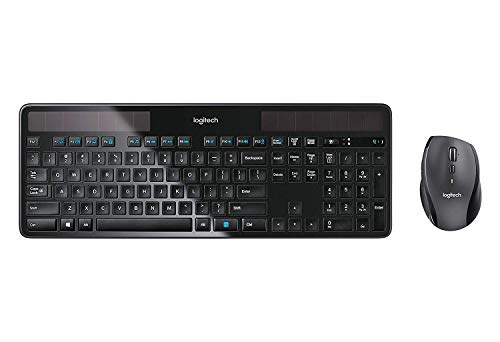
Logitech Wireless Solar Keyboard and Mouse
Best for: Windows users wanting battery-free keyboards
- Connectivity
- Wireless Unifying
- Power Source
- Solar-powered (keyboard)
- Color
- Black
- Operating System
- Windows
- Dimensions
- 18 × 8 × 2 inches
- Weight
- 3 pounds
View on Amazon: Logitech Wireless Solar Keyboard and Mouse Affiliate link
This Logitech combo pairs a solar-charged keyboard with a wireless mouse using Unifying technology. The keyboard harnesses indoor or outdoor light to eliminate battery swaps, while the mouse offers a three-year battery life. It connects via a single USB receiver for Windows systems. The black set measures 18 by 8 inches and weighs 3 pounds. It suits users seeking low-maintenance peripherals for daily office work.
Pros
- Solar-powered keyboard charges in indoor or outdoor light
- Marathon mouse provides three-year battery life
- Unifying wireless technology connects both devices with one receiver
Cons
- Weight of 3 pounds makes the set less portable
- Optimized only for Windows operating systems
- No Bluetooth connectivity listed in specifications
Good fit if
- You want to avoid replacing keyboard batteries
- You use Windows computers for daily tasks
- You prefer a single USB receiver for multiple devices
Skip if
- You need cross-platform compatibility with macOS
- You require Bluetooth wireless connectivity
- You need a lightweight, portable setup
Verdict: Logitech K750 Solar Wireless Keyboard and Mouse delivers reliable, low-maintenance input for Windows desks. It fits users who prioritize battery-free keyboards and long-lasting mice over portability.
Specifications side by side
| Spec | Logitech Wireless Solar Keyboard and Mouse |
|---|---|
| Connectivity | Wireless Unifying |
| Power Source | Solar-powered (keyboard) |
| Color | Black |
| Operating System | Windows |
| Dimensions | 18 × 8 × 2 inches |
| Weight | 3 pounds |
Frequently asked questions
Does the Logitech solar keyboard work without batteries?
Yes, the keyboard uses a rechargeable power source charged by light. You do not need to insert AA or AAA cells for operation. Indoor or outdoor light keeps the unit powered. This design removes the need for frequent battery replacements, offering a low-maintenance experience for your daily typing tasks.
Is this keyboard compatible with Mac or Linux?
The listing specifies Windows as the operating system. The layout is optimized for Windows systems. Using it with macOS or Linux may require manual key remapping. You should verify your computer runs Windows to ensure full compatibility and standard key placement without adjusting your muscle memory or software settings.
How large is the Logitech solar keyboard?
The keyboard measures 18 inches in length, 8 inches in width, and 2 inches in height. It weighs 3 pounds total as part of the combo. These dimensions fit standard desks. The black finish complements modern aesthetics. You get a full-sized layout that occupies a consistent footprint on your workspace.
What connectivity technology does this set use?
It uses wireless connectivity via Logitech Unifying technology. A single receiver handles both the keyboard and the mouse. This reduces the number of USB ports you need to occupy. You plug one receiver into your computer to pair both devices, simplifying your desk setup and cable management.
Can the keyboard charge in low light conditions?
Yes, the keyboard charges using both indoor and outdoor light. You never have to swap out batteries for the main typing device. It ensures continuous operation even if ambient light is limited. This feature eliminates the need for battery replacements, allowing you to type reliably without worrying about power levels.
Does the set include a mouse?
Yes, the product is a keyboard and mouse combo. The mouse pairs with the same Unifying receiver as the keyboard. This single receiver handles both devices. You get a complete input set designed for Windows desks, prioritizing battery-free keyboards and long-lasting mice over portability for your daily computing needs.
Is the keyboard suitable for Windows users?
It is best for Windows users wanting battery-free keyboards. The layout is optimized for Windows systems. You get standard key placement without needing to adjust your muscle memory. This design choice ensures a familiar typing experience. You should verify your computer runs Windows to ensure full compatibility and standard key placement.