LUKCOZMO 6-Key Wireless Macro Pad vs LUKCOZMO 12-Key Macro Pad (2026): Key Differences
As an Amazon Associate we earn from qualifying purchases. Links on this page are affiliate links.
When comparing the lukcozmo 6 key macro pad programmable vs 12 key macro pad programmable, you face a choice between compact efficiency and expanded control. Both units offer wireless connectivity, RGB backlighting, and programmable media knobs. They share a mechanical build and support multiple operating systems via a USB drive interface. The main difference lies in the number of keys and physical dimensions. You need to decide if your workflow requires six keys or twelve.
Key differences
| Aspect | LUKCOZMO 6-Key Wireless Macro Pad with Knob | LUKCOZMO 12-Key Macro Pad |
|---|---|---|
| Form Factor | 6-key macro pad | 12-key macro pad |
| Dimensions | 4.02 x 2.24 x 1.46 inches | 5 x 2.84 x 1.46 inches |
| Weight | 4.8 ounces | 4.16 ounces |
| Media Controls | 1 Volume Knob | 2 Programmable Knobs |
| Key Capacity | 6 keys | 12 keys |
Which one should you choose?
Choose LUKCOZMO 6-Key Wireless Macro Pad with Knob if
- You need a smaller footprint for a limited desk space
- You prefer a slightly heavier unit for stability
- You only require one media control knob
Choose LUKCOZMO 12-Key Macro Pad if
- You want double the programmable keys for complex macros
- You need two knobs for simultaneous media or zoom control
- You prefer a lighter device that is easier to carry
Verdict: The 6-key model suits users who prioritize a minimal footprint and sufficient keys for basic tasks. The 12-key model is better for those who need more macro slots and dual knobs for advanced control. Choose based on how many keys and knobs your specific workflow requires.
6-Key vs 12-Key Macro Pad Specs
Form factor size
The LUKCOZMO 6-Key Wireless Macro Pad with Knob measures 4.02 inches in length, 2.24 inches in width, and 1.46 inches in height. It weighs 4.8 ounces. The LUKCOZMO 12-Key Macro Pad is larger, measuring 5 inches in length and 2.84 inches in width, while sharing the same 1.46-inch height. The 12-key model weighs slightly less at 4.16 ounces. If you need a smaller footprint for a cramped desk, the 6-key version is more compact. However, the 12-key pad offers more keys in a slightly wider layout. You should choose based on your available desk space and how many keys you actually need for your workflow.
Key count
The primary difference lies in the number of programmable keys. The LUKCOZMO 6-Key Wireless Macro Pad with Knob provides six keys for your macros and shortcuts. The LUKCOZMO 12-Key Macro Pad doubles this count, offering twelve keys. Both models support non-conflict key presses, allowing you to hold multiple keys simultaneously for complex macros. The 12-key pad gives you more room for dedicated functions like media controls, copy-paste commands, or game combos without crowding. If you only use a few macros, the 6-key pad is sufficient. If you rely on many shortcuts, the 12-key model provides better organization and accessibility.
Media controls
Both macro pads include a volume knob for media control. The LUKCOZMO 6-Key Wireless Macro Pad with Knob features a single knob, which you can assign to volume adjustment or other custom functions. The LUKCOZMO 12-Key Macro Pad stands out by including two programmable knobs. This dual-knob design allows you to control different functions simultaneously, such as volume and scrolling or zooming. Having two knobs provides enhanced control and workflow efficiency. If you frequently adjust multiple audio or navigation settings, the 12-key model is superior. For simple volume control, the single knob on the 6-key pad is adequate.
Backlighting
Both the LUKCOZMO 6-Key Wireless Macro Pad with Knob and the LUKCOZMO 12-Key Macro Pad feature RGB backlighting. You can individually adjust the RGB led backlight for each key press action display mode and turn it on or off using the configuration software. This software is provided on a USB flash drive and features a user-friendly interface with a real-time floating window. Both models allow you to set one-key macros with interval times, such as for password entry. Since both offer the same RGB customization capabilities, there is no difference in lighting performance between the two options.
Connectivity
Both macro pads support wireless connectivity and USB Type-C wired connections. The LUKCOZMO 6-Key Wireless Macro Pad with Knob connects via wireless and includes a 1-meter USB cable. The LUKCOZMO 12-Key Macro Pad also offers both wireless receiver and Type-C 1-meter cable options. Both models are HID driver-free after initial setup on Windows, allowing plug-and-play use on Linux, Mac OS, Windows, and Pi. They also feature a memory function, so you do not need to reprogram them when moving to another computer. Both provide flexible connectivity for various usage scenarios.
Choose your LUKCOZMO macro pad
Users needing maximum key density
The 12-key model provides twice as many programmable buttons for complex workflows. It includes two media knobs for enhanced control over volume and scrolling. The larger footprint allows for more efficient key mapping without sacrificing accessibility, making it ideal for power users who need extensive shortcuts at their fingertips.
Users prioritizing compact desk space
This 6-key pad measures just 4.02 inches long, leaving more room for your mouse. It weighs 4.8 ounces and features a single volume knob. The smaller form factor is perfect for minimal setups or portable use. You get essential macro functions in a package that takes up significantly less desktop real estate.
Users wanting dual knob control
Only the 12-key version includes two programmable knobs. This allows you to assign separate controls for tasks like volume adjustment and scrolling or zooming. If you frequently manage multiple parameters simultaneously, having two dedicated dials improves efficiency and reduces reliance on keyboard shortcuts for media and system adjustments.
The products compared
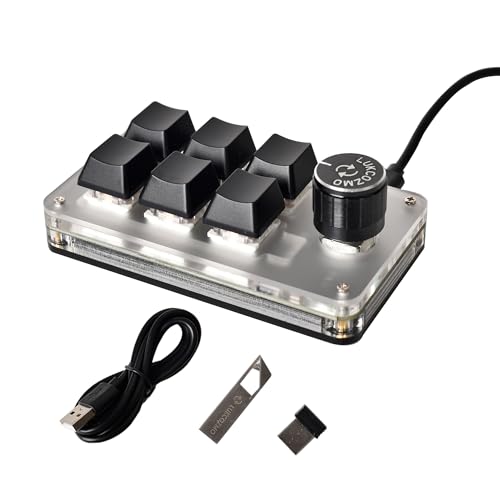
LUKCOZMO 6-Key Wireless Macro Pad with Knob
Best for: Compact wireless control with a volume knob
- Form Factor
- 6-key macro pad
- Connectivity
- Bluetooth, 2.4GHz, USB-C
- Backlighting
- RGB
- Media Controls
- Volume Knob
- Use
- Gaming
- Color
- Black
View on Amazon: LUKCOZMO 6-Key Wireless Macro Pad with Knob Affiliate link
This LUKCOZMO macro pad features six keys, RGB backlighting, and a volume knob. It connects via wireless or USB Type-C. The compact design measures 4.02 by 2.24 inches and weighs 4.8 ounces. You can program keys using included software. The floating window helps you track key functions. This small pad saves desktop space while offering programmable efficiency for work or gaming.
Pros
- Compact 6-key layout saves space
- Includes volume knob for media control
- RGB backlighting with adjustable modes
- Wireless and USB Type-C connectivity
- Programmable via included software
Cons
- Only six keys limit complex workflows
- No Bluetooth option for wireless use
- Software provided on USB drive
Good fit if
- You need a small keypad for OSU or gaming
- You want a volume knob for quick media control
- You prefer a wireless connection without Bluetooth
Skip if
- You require more than six programmable keys
- You need Bluetooth connectivity for your devices
- You want a larger pad for extensive shortcuts
Verdict: LUKCOZMO 6-Key Wireless Macro Pad fits users who need a compact, wireless keypad with a volume knob for focused tasks. It is ideal for gamers or professionals who want to save desk space without sacrificing essential shortcut controls.

LUKCOZMO 12-Key Macro Pad
Best for: users needing 12 keys and dual knobs
- Form Factor
- 12-key macro pad
- Connectivity
- Wireless, USB-C
- Backlighting
- RGB
- Media Controls
- Volume Knob
- Color
- White
- Dimensions
- 5 × 2.84 × 1.46 inches
View on Amazon: LUKCOZMO 12-Key Macro Pad Affiliate link
This LUKCOZMO macro pad offers 12 programmable keys and dual knobs for precise control. It features RGB backlighting and supports both wireless and wired Type-C connectivity. The device includes a memory function to save settings across different computers. Its compact white design fits easily on your desk. This setup is ideal for users who need extra keys for gaming or productivity tasks without taking up much space.
Pros
- 12 non-conflict programmable keys
- Dual programmable knobs for volume and scrolling
- RGB backlighting with individual key adjustment
- Wireless and wired Type-C connectivity
- Memory function stores settings for portability
Cons
- Setup software requires extraction from USB drive
- Only includes one Type-C cable
- No dedicated media keys separate from macro functions
Good fit if
- You need multiple programmable keys for gaming combos
- You want dual knobs for volume and scrolling control
- You work across Windows, Mac, and Linux systems
Skip if
- You prefer a single knob for simpler control
- You want a larger keyboard with full key layout
- You need Bluetooth connectivity instead of wireless receiver
Verdict: The LUKCOZMO 12-Key Wireless Macro Pad provides extensive programmability with 12 keys and dual knobs, making it a practical tool for gamers and power users who need efficient shortcuts.
Specifications side by side
| Spec | LUKCOZMO 6-Key Wireless Macro Pad with Knob | LUKCOZMO 12-Key Macro Pad |
|---|---|---|
| Form Factor | 6-key macro pad | 12-key macro pad |
| Connectivity | Bluetooth, 2.4GHz, USB-C | Wireless, USB-C |
| Backlighting | RGB | RGB |
| Media Controls | Volume Knob | Volume Knob |
| Use | Gaming | not stated |
| Color | Black | White |
| Dimensions | 4.02 × 2.24 × 1.46 inches | 5 × 2.84 × 1.46 inches |
| Weight | 4.8 ounces | 4.16 ounces |
| Model | AX18-K06-VT1-BT-RGB | MQ-AX18-K12-VT2-RGB |
Frequently asked questions
Which LUKCOZMO macro pad is better for a small desk?
The 6-key model is the better choice for tight spaces. It measures 4.02 inches in length and weighs 4.8 ounces. This compact size saves desk space while providing essential shortcut controls. The 12-key version is larger at 5 inches long and may not fit smaller setups as well.
Do both pads have wireless connectivity?
Yes, both the 6-key and 12-key LUKCOZMO pads feature wireless connectivity. This allows you to place them anywhere on your desk without cable clutter. You get the same wireless freedom regardless of which key count you choose, ensuring a clean workspace for your keyboard setup.
Can I control volume with both devices?
Yes, both units include media controls via a volume knob. The 6-key model has one knob, while the 12-key model offers dual knobs. You can adjust volume and other media functions easily without reaching for your main keyboard. This feature is standard on both compact wireless options.
What is the difference in key count?
The primary difference is the number of programmable buttons. The first option has 6 keys, while the second has 12 keys. You get twice as many shortcuts with the 12-key model. This extra space allows for more complex command mappings if you need more dedicated controls for your workflow.
Do they both have RGB lighting?
Yes, both macro pads feature RGB backlighting. You can customize the lighting effects on either device to match your setup. This aesthetic feature is available on both the 6-key and 12-key versions, allowing you to choose based on functionality rather than lighting capabilities.
Which one is lighter?
The 12-key macro pad is lighter at 4.16 ounces. The 6-key model weighs 4.8 ounces. Despite having fewer keys, the 6-key version is slightly heavier. You might prefer the lighter 12-key unit if you move your macro pad frequently or want a less dense feel on your desk.
Are both pads considered mini form factors?
Yes, both devices are classified as mini form factors. They are designed to sit neatly beside your main keyboard without taking up excessive space. This compact design ensures they remain unobtrusive while providing accessible shortcuts. You get the same small footprint style regardless of whether you choose six or twelve keys.