Mechanical Keyboard Design Explained: Split, Southpaw and Typewriter
As an Amazon Associate we earn from qualifying purchases. Links on this page are affiliate links.
What design means on a mechanical keyboard
Design here means the shape and layout of the board, not its color. Most mechanical keyboards are a flat rectangle with the number pad on the right. Three design families change that: ergonomic boards (split halves or angled rows) that let your wrists stay straighter, left-handed or southpaw boards that move the number pad to the left, and typewriter boards that use round keycaps for a vintage look.
Our top example is the EPOMAKER Split70, a wireless split board with a knob, hot-swap switches and QMK/VIA that still feels like a normal gaming keyboard. The 6 boards below are examples from listings and maker specs, not tested picks.
Four designs compared
Split
Two separate halves you can move apart, like the EPOMAKER Split70 and Kinesis Freestyle Edge. Best for shoulder and wrist posture; expect a period of adjustment.
Angled one-piece
Rows angle out from the center in a single board, like the X-Bows layout on the Maketheone M. A smaller change than a full split.
Southpaw
The number pad sits on the left, as on the RK L98. Useful if you enter numbers with your left hand or want the mouse closer.
Typewriter
Round keycaps and usually clicky switches, like the AULA F2088 and YSCP. A look and sound choice; the layout stays standard.
Is a special design worth it?
Who needs it
Choose an ergonomic split or angled board if you type for hours and feel wrist or shoulder strain; tenting, as on the Kinesis lift kit, adds more relief. Choose a southpaw board if you do a lot of number entry with your left hand. Choose a typewriter board if the vintage look and click matter to you.
Who can skip it
Stay with a standard layout if you switch between computers often, share a desk, or play games that need a familiar key position. Split and angled boards can slow you down at first, and typewriter boards are loud.
Design terms
Split keyboard
A keyboard in two halves that can be placed apart to match shoulder width.
Tenting
Raising the inner edges of a split board so hands sit at an angle, as with the Kinesis lift kit.
Southpaw
A layout with the number pad on the left side.
Butterfly layout
Key rows angled outward from the center in one piece, used by X-Bows.
Round keycaps
Circular caps that copy old typewriters; most typewriter boards accept standard caps too.
Palm support
A rest in front of the keys; the Kinesis includes a detachable one.
Quick picks
Our 6 picks

EPOMAKER Split70 Wireless Ergonomic Keyboard
Best for: First split keyboard
- Design
- Ergonomic (what this guide is about)
- Switch Type
- Wisteria Linear V2
- Form Factor
- 70%
- Connectivity
- Bluetooth 5.0, 2.4GHz, USB-C
- Backlighting
- RGB
- Keycap Material
- PBT
View on Amazon: EPOMAKER Split70 Wireless Ergonomic Keyboard Affiliate link
EPOMAKER's Split70 is our top example of an ergonomic design: a 70% board split into two halves that can sit apart or be linked by a cable. It keeps a knob, hot-swap sockets, creamy linear switches, PBT caps with Mac modifiers, a 5-layer gasket stack and QMK/VIA, and connects to 5 devices over Bluetooth 5.0, 2.4 GHz or USB-C.
Pros
- Halves can be spaced to shoulder width
- Wireless with QMK/VIA
- Hot-swap
Cons
- Split layouts take time to learn
- No number pad
Good fit if
- You want a split board that still feels like a gaming keyboard
- You remap layers
Skip if
- You want a classic one-piece layout
- You need a number pad
Verdict: The most approachable split mechanical design here.

Kinesis Freestyle Edge RGB Plus Tactile Split Keyboard
Best for: Wrist comfort
- Design
- Ergonomic (what this guide is about)
- Switch Type
- Tactile
- Backlighting
- RGB
- Hot-Swap Support
- Hot-Swappable
- Operating System
- Mac
View on Amazon: Kinesis Freestyle Edge RGB Plus Tactile Split Keyboard Affiliate link
Kinesis' Freestyle Edge RGB Plus is a split mechanical keyboard with hot-swap tactile switches, RGB, full programming, a detachable palm support, a lift kit for tenting, and Mac keycaps in the box. The listing adds few details beyond its title.
Pros
- Tenting lift kit included
- Palm support
- Mac keycaps
Cons
- Highest price here
- Thin listing details
Good fit if
- You want tenting for wrist comfort
- You use a Mac and a PC
Skip if
- You want a budget split
- You want wireless
Verdict: The premium split example with tenting.

Maketheone 80% Butterfly Mechanical Keyboard
Best for: Desk typists
- Design
- Ergonomic (what this guide is about)
- Switch Type
- Gateron Brown
- Form Factor
- 80%
- Connectivity
- USB-C wired
- Backlighting
- White
View on Amazon: Maketheone 80% Butterfly Mechanical Keyboard Affiliate link
The Maketheone M uses the X-Bows butterfly layout: the key rows angle out from the center so wrists stay straighter, in a wired 80% frame with Gateron Brown tactile switches, hotkeys and white backlight.
Pros
- One-piece angled layout
- Tactile switches
- Lower price than split boards
Cons
- Listing gives few specs
- Layout needs practice
Good fit if
- You want an ergonomic angle without two halves
- You like tactile switches
Skip if
- You want wireless
- You want detailed specs
Verdict: An angled one-piece ergonomic design.

RK L98 Left-Handed Wireless Keyboard
Best for: Data entry with a mouse
- Design
- Left-Handed (what this guide is about)
- Switch Type
- Linear Cream Switch
- Form Factor
- 90%
- Connectivity
- 2.4GHz, Bluetooth 5.0, USB-C
- Backlighting
- RGB
- Keycap Material
- PBT
View on Amazon: RK L98 Left-Handed Wireless Keyboard Affiliate link
The RK L98 is the left-handed (southpaw) example: the number pad sits on the left of a 98-key gasket board, freeing room for the mouse on the right. It has a knob and display, hot-swap Cream linears, PBT caps and an 8,000 mAh battery rated for 310 hours with RGB off.
Pros
- Number pad on the left
- 8,000 mAh
- Gasket with PBT
Cons
- Southpaw layout feels odd at first
- About 2.5 lb
Good fit if
- You use the number pad with your left hand
- You want the mouse closer
Skip if
- You type numbers with your right hand
- You want a small board
Verdict: The left-side number pad design.
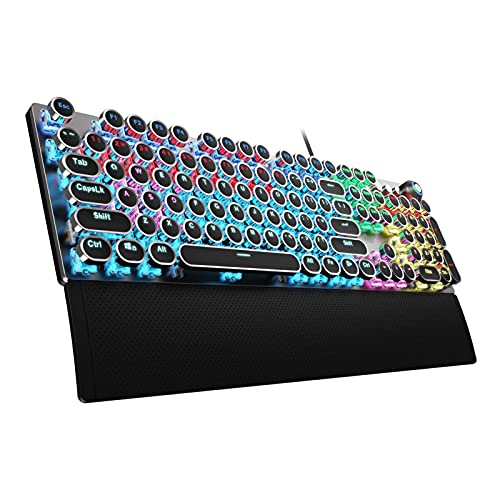
AULA Typewriter Mechanical Keyboard with Blue Switches
Best for: Retro desks
- Design
- Typewriter (what this guide is about)
- Switch Type
- Mechanical blue
- Form Factor
- 104 Keys
- Connectivity
- USB wired
- Backlighting
- Rainbow LED
- Keycap Material
- Double-shot injection molded
View on Amazon: AULA Typewriter Mechanical Keyboard with Blue Switches Affiliate link
The AULA F2088 shows the typewriter design: a wired 104-key board with round double-shot keycaps, Blue clicky switches, an aluminum panel, a media knob and a magnetic wrist rest.
Pros
- Round keycaps
- Wrist rest
- Knob
Cons
- Loud
- Rainbow LED only
Good fit if
- You want a retro look that is still practical
- You like a click
Skip if
- You share a quiet room
- You want wireless
Verdict: A practical typewriter design.

YSCP 104-Key Retro Typewriter Keyboard
Best for: Trying the style
- Design
- Typewriter (what this guide is about)
- Switch Type
- Blue Switch
- Form Factor
- 104 Keys
- Connectivity
- Wired USB
- Backlighting
- Rainbow / RGB
- Keycap Material
- Dual-color injection-molded
View on Amazon: YSCP 104-Key Retro Typewriter Keyboard Affiliate link
YSCP's black typewriter board is the low-cost take on the style: round dual-color keycaps that can be swapped for standard ones, Blue clicky switches, RGB backlight with sidelights and a wired connection.
Pros
- Low price
- RGB sidelights
- Swappable caps
Cons
- Only 26-key anti-ghosting
- Loud
Good fit if
- You want to try the typewriter look cheaply
- You want RGB
Skip if
- You need full anti-ghosting
- You need quiet keys
Verdict: A budget typewriter design.
Specifications side by side
| Spec | EPOMAKER Split70 Wireless Ergonomic Keyboard | Kinesis Freestyle Edge RGB Plus Tactile Split Keyboard | Maketheone 80% Butterfly Mechanical Keyboard | RK L98 Left-Handed Wireless Keyboard | AULA Typewriter Mechanical Keyboard with Blue Switches | YSCP 104-Key Retro Typewriter Keyboard |
|---|---|---|---|---|---|---|
| Switch Type | Wisteria Linear V2 | Tactile | Gateron Brown | Linear Cream Switch | Mechanical blue | Blue Switch |
| Form Factor | 70% | not stated | 80% | 90% | 104 Keys | 104 Keys |
| Connectivity | Bluetooth 5.0, 2.4GHz, USB-C | not stated | USB-C wired | 2.4GHz, Bluetooth 5.0, USB-C | USB wired | Wired USB |
| Backlighting | RGB | RGB | White | RGB | Rainbow LED | Rainbow / RGB |
| Keycap Material | PBT | not stated | not stated | PBT | Double-shot injection molded | Dual-color injection-molded |
| Case Material | not stated | not stated | not stated | not stated | Aluminium alloy | not stated |
| Hot-Swap Support | Hot-Swappable | Hot-Swappable | not stated | Hot-Swappable | not stated | not stated |
| Mounting Style | Gasket Mount | not stated | not stated | Gasket Mount | not stated | not stated |
| Media Controls | Volume Knob | not stated | not stated | Volume Knob | Volume Knob | not stated |
| Use | Gaming | not stated | not stated | Gaming | Gaming | Gaming |
| Design | Ergonomic | Ergonomic | Ergonomic | Left-Handed | Typewriter | Typewriter |
| Color | Black | Hotswap Tactile + Lift Kit | Brown | Sage Blue | Black | Clicky Blue Switches | Cool Black |
| Operating System | Mac | Mac | not stated | not stated | not stated | not stated |
| Ergonomic Features | not stated | not stated | not stated | not stated | Wrist Rest | not stated |
| Dimensions | 14.7 × 4.65 × 1.56 inches | not stated | not stated | 16 × 5.7 × 1.7 inches | 17.1 × 4.84 × 1.5 inches | 13.8 × 4.96 × 1.38 inches |
| Weight | not stated | not stated | not stated | 2.51 pounds | 2.25 pounds | 1.1 pounds |
| Model | Split70 | not stated | 008574012221 | L98 | F2088 | HJK917-7 |
| Size | not stated | not stated | not stated | Linear Cream Switch | Round Keycaps | not stated |
If you want to see how the same idea applies outside keyboards, our page with design explained for washing machines covers how the term is used there.
Frequently asked questions
Are split mechanical keyboards hard to learn?
Expect an adjustment period, mostly for keys near the split such as B, Y and 6.
Do left-handed keyboards change the letter keys?
No. Southpaw boards like the RK L98 keep the normal letter layout and move only the number pad.
Is a typewriter keyboard ergonomic?
Not especially; it keeps a standard layout. Its round caps and clicky switches change the look and sound.
Which design helps most with wrist pain?
A split board with tenting, such as the Kinesis Freestyle Edge with its lift kit, changes wrist angle the most.