MEETION K9330 Review: Wave Keyboard With a Separate Number Pad
As an Amazon Associate we earn from qualifying purchases. Links on this page are affiliate links.
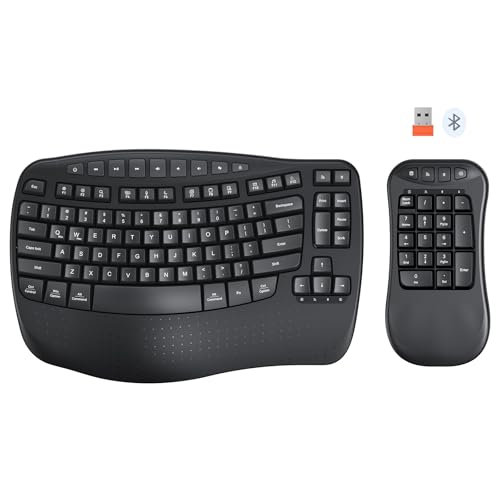
The MEETION K9330 suits you if you enter numbers often but want the freedom to move the number pad or put it away. It was $29.99 at our last check, with a wave key layout, a separate numeric keypad, a built-in wrist rest and both 2.4GHz and Bluetooth connections. The "split" in its name means the number pad separates, not that the main keys split for each hand. We have not tested this keyboard, so this review relies on its listed specs and what they mean for you.
What stands out
- Separate numeric keypad
- Wave key layout
- Built-in curved wrist rest
- Shared 2.4GHz receiver
- Dedicated Bluetooth channels
Who it fits
Good fit for
It fits accountants, data entry workers and left-handed users who want the number pad on the side that suits them. It also helps on a small desk, since you can put the number pad away when you do not need it.
Who should skip it
Skip it if you want a true two-piece split for your hands or mechanical switches. The listing does not describe a mechanical key type, so do not assume one.
Verdict: A flexible choice if the movable number pad is what you want. The listing leaves out key type, power and system support, so confirm those first.
MEETION K9330 key specs explained
Separate numeric keypad
You can place the keypad left or right, or remove it from your desk. Moving it can bring the main keys closer to center, which is the main benefit here.
Wave key layout
The keys follow a curve meant to match how your fingers stretch and bend. MEETION says this eases fatigue, but it gives no evidence, and comfort varies.
2.4GHz and Bluetooth
One shared orange USB receiver runs the keyboard and keypad together. Each part also has its own Bluetooth channel, so you can pair them separately.
Built-in wrist rest
A curved rest is built into the keyboard to support your wrists. The listing does not describe its material, so check the feel if that matters to you.
Adjustable tilt feet
Feet on the front and back let you set your typing angle. That gives you more options than a keyboard with one fixed height.
MEETION K9330 design and build
This black model has rounded edges, a wave layout and a separate keypad, sold as Wave BK2. The keyboard and keypad can be rearranged to suit your desk or stored apart when space is tight.
The listing does not give dimensions, weight or materials. It also does not name the key type, so check the product page if you have a preference.
MEETION K9330 setup and everyday use
Plug in the shared USB receiver for plug-and-play use with both parts. If you prefer, you can pair the keyboard and keypad separately over Bluetooth and move between devices.
The listing does not say how it is powered or which systems it supports. Check those before buying, especially if you work on a Mac or another less common setup.
What to check before you buy the MEETION K9330
Stock was listed as low at our last check, so confirm availability and price. Also check battery type, battery life and operating system support, since the listing leaves those out.
Make sure the "split" description matches what you want. This model separates the number pad from the keyboard, and it is not a split layout for each hand.
The product at a glance
MEETION Wave Ergonomic Split Keyboard
Best for: Flexible number pad setups
- Connectivity
- 2.4 GHz, Bluetooth
- Design
- Ergonomic, Left-Handed
- Ergonomic Features
- Wrist Rest
View on Amazon: MEETION Wave Ergonomic Split Keyboard Affiliate link
The MEETION K9330 is a wave-style wireless keyboard with a separate numeric keypad and a built-in curved wrist rest. A shared 2.4GHz receiver runs both parts, and each also has a dedicated Bluetooth channel. Adjustable feet set your angle, and the keypad can sit on either side or be put away.
Pros
- Separate number pad
- Wave key layout
- 2.4GHz and Bluetooth
- Built-in wrist rest
Cons
- Low stock at our last check
- Key type not listed
- Power and system support not listed
Good fit if
- You enter numbers often
- You want to move the keypad
Skip if
- You want a true split for your hands
- You want mechanical switches
Verdict: A flexible option for data entry and left-handed setups.
Specifications side by side
| Spec | MEETION Wave Ergonomic Split Keyboard |
|---|---|
| Connectivity | 2.4 GHz, Bluetooth |
| Design | Ergonomic, Left-Handed |
| Ergonomic Features | Wrist Rest |
| Color | Wave BK2 |
| Model | K9330 |
If you prefer alternative hardware designs, you can compare this layout against the victrola wave review.
Frequently asked questions
Is the MEETION K9330 a split keyboard?
Its number pad separates from the main keyboard. It is not a split layout for each hand.
Can left-handed users move the number pad?
Yes. MEETION says the keypad can be placed on the left.
Does it have Bluetooth?
Yes. The keyboard and keypad each have a dedicated Bluetooth channel, plus a shared 2.4GHz receiver.
Does it have a wrist rest?
Yes. It has a built-in curved wrist rest.
Is it mechanical?
The listing does not describe a mechanical key type, so check the product page.