MEETION vs Seenda Keyboard and Mouse Combos: Which Brand Fits You?
As an Amazon Associate we earn from qualifying purchases. Links on this page are affiliate links.
In this MEETION vs seenda keyboard and mouse combo comparison, you will see two distinct approaches to wireless input devices. Both offer 2.4GHz wireless connectivity for desktops and laptops. The main difference lies in their power and connection flexibility. MEETION uses disposable batteries and a single receiver, while Seenda features a rechargeable battery and dual Bluetooth channels for multi-device switching.
Key differences
| Aspect | MEETION Director-D Ergonomic Keyboard and Mouse | Seenda Full-Size Multi-Device Wireless Combo |
|---|---|---|
| Connectivity | 2.4GHz wireless only (single receiver) | 2.4GHz USB and Bluetooth (dual BT channels) |
| Power Source | AA and AAA disposable batteries | Built-in rechargeable battery via USB-C |
| Multi-Device Support | Single device connection | Switch between three devices |
| Keyboard Switch Type | Wave-shaped keys | Scissor-switch keys |
| Mouse DPI Levels | Four adjustable levels | 1000 / 1600 / 2400 DPI |
Which one should you choose?
Choose MEETION Director-D Ergonomic Keyboard and Mouse if
- You prefer a keyboard with a dedicated ergonomic wrist rest and wave-shaped keys for reduced finger fatigue.
- You want a simple plug-and-play setup with a single USB receiver for a desktop or laptop.
- You are comfortable using disposable AA and AAA batteries and do not need Bluetooth connectivity.
Choose Seenda Full-Size Multi-Device Wireless Combo if
- You frequently switch between Windows, macOS, or mobile devices and need multi-device pairing.
- You want a slim, portable design with a rechargeable battery that avoids frequent battery replacements.
- You prefer silent scissor-switch keys and a noiseless mouse for quiet environments.
Verdict: Choose MEETION if you prioritize ergonomic comfort with a wrist rest and simple single-device wireless use. Choose Seenda if you need multi-device Bluetooth switching and a rechargeable, portable design for hybrid work. Both are valid wireless combos, but they serve different workflow needs.
MEETION vs Seenda Spec Comparison
Connectivity options
MEETION Director-D relies exclusively on a 2.4GHz USB receiver for a stable, plug-and-play connection. It does not support Bluetooth, limiting you to devices with available USB-A ports. Seenda offers significantly more flexibility with dual-mode connectivity. You can connect via 2.4GHz USB or use Bluetooth 4.0 or higher. This allows you to pair with tablets, phones, and Macs without dongles. Seenda also supports triple-device switching, letting you toggle between three screens instantly. If you use multiple devices or operate in an environment with limited USB ports, Seenda’s Bluetooth capability provides a clear advantage in setup versatility.
Power source
The MEETION combo uses disposable batteries for maximum portability without charging infrastructure. The keyboard requires two AAA batteries, while the mouse needs one AA battery. This setup ensures you can always swap in fresh power, though you must keep replacements on hand. Seenda features a built-in rechargeable battery that charges via USB-C. It offers 200 hours of use and fully recharges in three hours. This eliminates the ongoing cost and waste of disposable cells. For users who travel frequently or want to reduce clutter, Seenda’s rechargeable design is more convenient. However, MEETION’s battery approach works well if you prefer never managing charge cycles.
Keyboard form factor
MEETION Director-D features an ergonomic wave-key design with a dedicated hard plastic wrist rest. The keys are shaped to align with your fingers’ natural movement, promoting a relaxed stretch. This layout aims to reduce finger fatigue during long typing sessions. Seenda uses a standard full-size layout with scissor-switch keys and an ergonomic stand. While it lacks the specialized wave shape, the scissor mechanism provides a responsive, quiet typing experience. Seenda’s design is more traditional, making it easier to adapt if you are used to standard keyboards. MEETION’s unique wave keys offer a distinct ergonomic benefit for those seeking specialized finger support.
Mouse precision
Both mice offer adjustable DPI settings to match your workflow. MEETION provides four adjustable DPI levels, controlled via a convenient top button. This allows you to customize precision for various tasks, from detailed work to fast navigation. Seenda offers three specific DPI options: 1000, 1600, and 2400. This range covers most standard office and home use cases. Seenda’s mouse also features noiseless clicks, which is beneficial in shared spaces like libraries or quiet offices. MEETION does not specify click noise levels. If you prioritize silent operation, Seenda has the edge. Otherwise, both provide adequate precision for everyday computing tasks.
Build materials
Seenda constructs its keyboard with stainless steel and premium materials, resulting in a slim, durable profile. The keyboard is only 0.12 inches thick, making it highly portable and resistant to wear. The mouse is also slim at 0.9 inches. MEETION uses sturdy, smooth plastic for its wrist rest and keyboard body. It is not filled with soft material, providing firm support. MEETION’s build is robust but lacks the metal construction of Seenda. Seenda’s metal chassis offers a more premium feel and better durability for travelers. MEETION’s plastic design is functional but less distinctive in material quality.
Which MEETION or Seenda Combo Fits You
Users needing multi-device switching and Mac support
Seenda supports Bluetooth and 2.4GHz modes, allowing connection to three devices. It works with macOS, iOS, and Android. MEETION lacks Bluetooth and only supports Windows and newer macOS. If you switch between a laptop, tablet, and desktop, Seenda’s triple pairing saves time and reduces cable clutter on your desk.
Typists prioritizing ergonomic support and physical keys
MEETION features wave-shaped keys and a hard plastic wrist rest to reduce finger fatigue. Seenda uses a slim scissor-switch design with a small stand. MEETION’s ergonomic contour offers more stable wrist support. If you type for long hours and need dedicated physical comfort features, MEETION’s design is better suited for you.
Buyers preferring replaceable batteries over charging
MEETION runs on one AA and two AAA batteries. Seenda uses a built-in rechargeable battery requiring a Type-C cable. If you prefer swapping disposable cells instead of managing charge cycles, MEETION fits your workflow. This option avoids the need to keep a charging cable handy for the keyboard and mouse combo.
Users wanting a portable, slim metal design
Seenda weighs 1.43 pounds with a stainless steel build. MEETION weighs 2.78 pounds with a bulkier plastic construction. Seenda is thinner and lighter, making it easier to carry in a bag. If portability and a sleek aesthetic matter, Seenda’s compact form factor and durable metal materials are the superior choice for travel.
The products compared

MEETION Director-D Ergonomic Keyboard and Mouse
Best for: Ergonomic typing with stable wireless connection
- Connectivity
- 2.4GHz wireless
- Keyboard Form Factor
- Full-size
- Ergonomic Features
- Wave keys, hard plastic wrist rest
- Power Source
- 2 AAA keyboard, 1 AA mouse
- Design
- Ergonomic
- Color
- Black
View on Amazon: MEETION Director-D Ergonomic Keyboard and Mouse Affiliate link
The MEETION Director-D-2 features wave-shaped keys and a hard plastic wrist rest for ergonomic support. It uses a 2.4GHz wireless connection with a single receiver, offering a range up to 33 feet. The mouse includes four adjustable DPI levels for precision. It requires one AA and two AAA batteries. This combo is designed for Windows and macOS users seeking a stable, plug-and-play setup.
Pros
- Wave-shaped keys align with natural finger movement
- Hard plastic wrist rest provides firm support
- 2.4GHz wireless connection with 33ft range
- Four adjustable DPI levels on the mouse
Cons
- Not Bluetooth-enabled
- Requires three disposable batteries
- Not compatible with Windows 8.1 or older macOS
Good fit if
- You want ergonomic support for typing
- You prefer a stable 2.4GHz connection
- You use Windows 10/11 or macOS 10.12+
Skip if
- You need Bluetooth connectivity
- You want a rechargeable battery
- You use Windows 8.1 or older macOS
Verdict: MEETION Ergonomic Wave Keyboard Mouse Combo suits users who prioritize ergonomic key shapes and a reliable 2.4GHz wireless connection over Bluetooth flexibility.
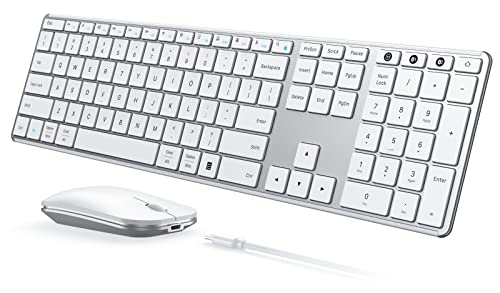
Seenda Full-Size Multi-Device Wireless Combo
Best for: multi-OS users needing quiet typing
- Connectivity
- 2.4G USB, Bluetooth
- Keyboard Form Factor
- Full-size
- Ergonomic Features
- Ergonomic stand
- Multi-Device Pairing
- 3 devices
- Power Source
- Built-in battery
- Switch Type
- Scissor switch
View on Amazon: Seenda Full-Size Multi-Device Wireless Combo Affiliate link
The Seenda SKM64-3 is a full-size wireless keyboard and mouse combo designed for multi-device users. It supports triple connectivity via 2.4GHz USB and two Bluetooth channels, allowing seamless switching between Windows, Mac, iOS, and Android systems. The keyboard features scissor switches and an ergonomic stand, while the mouse offers adjustable DPI settings up to 2400. Its slim metal build and long battery life make it suitable for hybrid workers and students who need reliable, quiet input across different operating systems.
Pros
- Triple device connectivity for switching between three systems
- Scissor-switch keys for quiet and responsive typing
- Adjustable mouse DPI up to 2400
- Compatible with Windows, macOS, iOS, and Android
- 200-hour battery life with Type-C charging
Cons
- 2.4GHz USB mode restricted to Windows only
- Full-size layout requires more desk space
- No mention of dedicated media keys
Good fit if
- You switch between Windows and Mac computers
- You need a quiet keyboard for shared spaces
- You want a durable metal build for travel
Skip if
- You require 2.4GHz support on non-Windows devices
- You prefer a compact tenkeyless layout
- You need a mouse with more than 2400 DPI
Verdict: Seenda SKM64-3 Wireless Combo is a practical choice for users who frequently toggle between multiple operating systems and value a quiet, durable typing experience.
Specifications side by side
| Spec | MEETION Director-D Ergonomic Keyboard and Mouse | Seenda Full-Size Multi-Device Wireless Combo |
|---|---|---|
| Connectivity | 2.4GHz wireless | 2.4G USB, Bluetooth |
| Keyboard Form Factor | Full-size | Full-size |
| Ergonomic Features | Wave keys, hard plastic wrist rest | Ergonomic stand |
| Multi-Device Pairing | not stated | 3 devices |
| Power Source | 2 AAA keyboard, 1 AA mouse | Built-in battery |
| Switch Type | not stated | Scissor switch |
| Mouse DPI | not stated | 2400 DPI |
| Form Factor | Full-Size | Full-Size |
| Design | Ergonomic | not stated |
| Color | Black | White Silver |
| Operating System | Mac, Windows | Mac, Windows |
| Noise Level | not stated | Silent |
| Weight | 2.78 pounds | 1.43 pounds |
| Dimensions | not stated | 16.9 × 4.33 × 0.79 inches |
| Size | Wave | Full Size |
| Model | Director-D-2 | JP-064-3 |
Frequently asked questions
Is the MEETION Director-D ergonomic?
Yes, it features an ergonomic wave design. The keys are shaped to follow natural finger movement, which can reduce strain during long typing sessions. This model prioritizes physical comfort and a stable 2.4GHz wireless connection over Bluetooth flexibility. It is a solid choice if you value ergonomic key shapes and reliable connectivity.
Does the Seenda combo work with Mac?
Yes, the Seenda SKM64-3 supports multiple operating systems, including macOS. It also works with iOS and Android devices. This makes it a practical choice for users who frequently toggle between different platforms. The Bluetooth connectivity allows for easy pairing with Apple computers and other mobile devices without needing extra adapters.
Which keyboard is quieter?
The Seenda combo is noted for its quiet typing experience. It is designed for users who value a durable yet silent input method. The MEETION model does not specify noise levels in its data. If quiet operation is a priority for your workspace, the Seenda option is the better fit.
How heavy is the MEETION keyboard?
The MEETION Director-D weighs 2.78 pounds. This weight contributes to its stability on your desk, preventing it from sliding during vigorous typing. The ergonomic wave design is paired with this substantial build to ensure it stays in place while you work. It is a black model designed for desktop use.
Does Seenda have a full-size layout?
Yes, the Seenda SKM64-3 is a full-size keyboard. It includes a number pad and standard layout dimensions. The specific measurements are 16.9 inches in length and 4.33 inches in width. This layout is ideal if you need numeric input for spreadsheets or data entry tasks regularly.
Can I connect multiple devices to Seenda?
Yes, the Seenda combo supports multi-device switching. You can connect up to three devices simultaneously using Bluetooth. This allows you to switch between your computer, tablet, and phone easily. It is a versatile option for users who manage several gadgets and need quick access to each one.