NLOFIN 16-Key Macro Keyboard Review: Who It Fits and Who Should Skip It
As an Amazon Associate we earn from qualifying purchases. Links on this page are affiliate links.
This nlofin programmable keyboard review covers the NLOFIN 16-Key Macro Keyboard. It is a compact, wired input device designed for users who need extra keys without taking up desk space. The unit features 16 keys and connects via USB Type-C. It stands out for its aluminum case and Gateron low-profile mechanical switches. These switches offer a smoother feel and faster response than standard options. The keyboard also includes an OLED display and supports QMK/VIAL remapping. You can customize six layers of macros to fit your workflow. This design prioritizes functionality and portability for specific user groups.
What stands out
- 16-key layout with 6 customizable macro layers
- Gateron low-profile mechanical switches for smooth actuation
- Aluminum case for durability and stability
- QMK/VIAL support for deep customization
- OLED display for real-time configuration feedback
Who it fits
Good fit for
This keyboard suits gamers who want dedicated macro keys without cluttering their setup. It also fits designers who need quick access to software shortcuts. The compact size works well for users with limited desk space. The aluminum build appeals to those who want a sturdy, premium feel. Low-profile switches help users who prefer a flatter typing angle. The wired connection ensures consistent latency for competitive play. If you need a reliable, dedicated macro pad, this is a strong option.
Who should skip it
You should look elsewhere if you need wireless connectivity. This model uses a USB Type-C wired connection only. It does not support Bluetooth or 2.4GHz wireless modes. Users who travel frequently may find the wired cable limiting. It is also not ideal for those who prefer tall, clicky switches. The low-profile design may feel too shallow for some typists. If you require a full-sized keyboard with number pad, this 16-key layout is too small for your needs.
Verdict: The NLOFIN 16-Key Macro Keyboard offers a sturdy aluminum build and flexible macro customization for users who need compact, dedicated keys. It is a solid choice for gamers and designers who value wired reliability and low-profile switches.
Key specs explained for this macro pad
Form Factor: 16-key
This compact layout gives you sixteen programmable keys in a small footprint. It saves desk space compared to full-size boards. You can assign macros for shortcuts, media controls, or gaming commands. It suits users who need extra inputs without cluttering their workspace. Compare this size to larger 21-key or 60% boards if you have limited room.
Switch Type: Gateron low-profile
These switches sit closer to the desk surface, reducing finger travel distance. This design often allows for faster actuation and a smoother keystroke. You may find this comfortable for rapid typing or gaming sessions. Low-profile switches differ from standard tall mechanical switches. Check if you prefer the tactile feel of standard switches or the speed of this lower profile.
Backlighting: RGB
This feature provides customizable colored lighting under the keys. You can adjust colors to match your setup or use dynamic effects. RGB lighting helps you locate keys in dark environments. It also adds visual appeal to your desk. Unlike single-color LEDs, RGB allows for individual key customization. Consider this if you want personalization rather than simple white or blue backlighting.
Connectivity: USB Type-C wired
The device connects via a modern USB Type-C cable for data and power. This ensures a stable, lag-free connection for gaming or professional work. You do not need to worry about battery life or Bluetooth interference. Type-C is reversible and widely supported. Compare this to older micro-USB ports or wireless models that may introduce latency or require charging.
Case Material: Aluminum
The aluminum case provides rigidity and reduces flex during heavy use. It adds durability and a premium feel compared to plastic housings. The metal construction also helps with heat dissipation. You get a solid unit that stays in place on your desk. This material choice distinguishes it from budget plastic macro pads. Check if you value structural integrity and weight in your peripherals.
Design and build details
According to the listing, the NLOFIN 16-Key Macro Keyboard features an aluminum case. This material choice suggests a rigid structure that resists flexing during heavy use. The unit is available in gray, white, or black finishes. You can select the color that matches your existing setup. The compact form factor means it occupies minimal desk space. This makes it easy to place next to your main keyboard without cluttering your workspace.
The keycaps are made of DSA-profile plastic with a concave surface. This shape is designed to fit the natural curvature of your fingertips. The switches are Gateron low-profile mechanical units. They are described as providing a smoother and more comfortable feel compared to standard switches. The semi-transparent PC material allows the RGB lighting to diffuse evenly. This creates a consistent glow across the keys rather than bright spots around individual switches.
A detachable USB Type-C cable connects the device to your computer. The bottom includes four anti-slip pads to keep the pad stable on your desk. An OLED display is listed as a feature, allowing you to view settings directly on the hardware. The overall build focuses on durability and a clean aesthetic. The aluminum frame adds weight, which helps prevent the unit from sliding around during intense gaming or macro execution.
Setup and daily use guide
You connect the NLOFIN 16-Key Macro Keyboard to your computer using the included detachable USB Type-C cable. The listing specifies Windows as the supported operating system, so you will need a compatible PC to utilize its features. The device relies on wired connectivity for data transfer, which ensures a stable connection without the need for battery charging or wireless pairing. This direct link is ideal for users who want a plug-and-play experience without latency concerns.
For setup, you will use the VIAL software to configure the key mappings. The listing notes that the keyboard supports QMK/VIAL remapping and allows for six customizable layers. You can save these layer configurations directly to the device, meaning your custom shortcuts persist even if you move the pad to another computer. The OLED display on the unit provides visual feedback, helping you confirm which layer is currently active or monitor specific macro statuses.
In daily use, the compact 16-key layout saves significant desk space compared to full-size boards. The aluminum case and four anti-slip pads keep the unit stable on your surface. The Gateron low-profile switches offer a smoother feel, which may reduce finger fatigue during long sessions. You can adjust the RGB lighting to match your setup, as the dynamic effects are diffused evenly through the switches. The ergonomic keycap shape is designed to fit the natural curvature of your fingers, promoting comfortable use for gaming or productivity tasks.
Before you buy this macro pad
You should verify your desk space before purchasing. This compact unit saves room, but you must ensure it fits alongside your primary keyboard. Check your operating system compatibility. The listing specifies Windows support. You need a Windows PC to utilize the QMK/VIAL remapping and layer configurations. macOS or Linux users may face limitations unless community drivers are available. Prepare for regular cleaning. The concave keycaps and semi-transparent PC material collect dust. Use compressed air or a soft cloth to maintain the OLED display and switch area. Consider your cable management. The detachable USB Type-C interface requires a free port. You may need a short extension if your ports are crowded. This device complements your main setup rather than replacing it. It adds functionality for gaming or design work. Ensure you have the software ready for layer programming. This macro pad is an accessory, not a standalone solution. It works best when integrated into an existing workflow.
Check before you buy
- Confirm Windows OS compatibility for full feature access.
- Measure desk space to ensure it fits your layout.
- Check for available USB Type-C ports on your PC.
- Verify software availability for QMK/VIAL layer programming.
The product at a glance
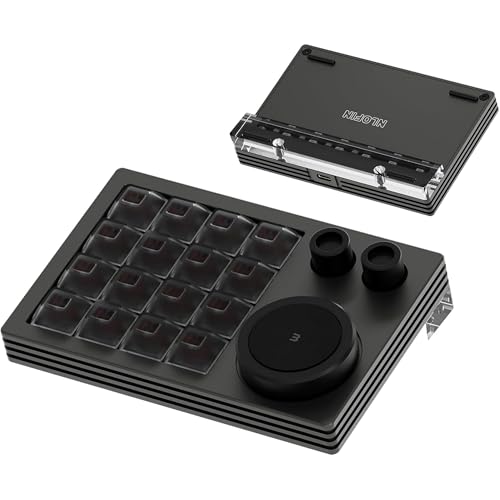
NLOFIN 16-Key Macro Keyboard
Best for: compact macro keypads
- Switch Type
- Gateron low-profile
- Form Factor
- 16-key
- Connectivity
- USB Type-C wired
- Backlighting
- RGB
- Case Material
- Aluminum
- Use
- Gaming
View on Amazon: NLOFIN 16-Key Macro Keyboard Affiliate link
This 16-key macro keyboard features Gateron low-profile mechanical switches and an aluminum case. It connects via USB Type-C and includes an OLED display for layer management. You can customize six layers using VIAL software. The compact design saves desktop space while offering RGB lighting. It suits users who need quick access to shortcuts or macros without a full-sized board.
Pros
- Gateron low-profile mechanical switches
- Aluminum case construction
- OLED display for layer info
- V/QMK programmable via VIAL
- Detachable USB Type-C cable
Cons
- USB wired connection only
- 16-key layout limits typing
- Windows operating system support
Good fit if
- You need dedicated macro keys
- You want a compact desktop setup
- You prefer low-profile switches
Skip if
- You need wireless connectivity
- You require a full keyboard
- You use macOS primarily
Verdict: NLOFIN 16-Key Macro Keyboard fits users who need a compact, programmable keypad with low-profile switches. It is ideal for gamers or designers who rely on shortcuts.
Specifications side by side
| Spec | NLOFIN 16-Key Macro Keyboard |
|---|---|
| Switch Type | Gateron low-profile |
| Form Factor | 16-key |
| Connectivity | USB Type-C wired |
| Backlighting | RGB |
| Case Material | Aluminum |
| Use | Gaming |
| Operating System | Windows |
| Color | Gray |
Frequently asked questions
Is the NLOFIN 16-Key Macro Keyboard compatible with Mac?
The listing specifies Windows as the supported operating system. You should verify your computer's OS before purchasing. The device may not function correctly on macOS without additional drivers or software support. Stick to Windows PCs to ensure full compatibility with the macro programming features.
What switches does the NLOFIN 16-Key use?
The product description highlights low-profile switches. These switches typically offer a shorter travel distance than standard mechanical keys. This design allows for faster actuation, which benefits gamers and designers who rely on rapid shortcut inputs. The exact switch model is not detailed in the provided specs.
Does this macro pad come with a wrist rest?
The provided data does not mention an included wrist rest. The unit is a standalone 16-key keypad. You may need to purchase a separate wrist rest if you prefer ergonomic support during long sessions. The aluminum case provides a solid base, but no extra padding is listed.
Can I use this keyboard for gaming?
Yes, the product is listed for gaming use. The compact layout allows you to assign macros for complex in-game commands. This frees up your main keyboard keys for movement and other actions. The low-profile switches are suited for rapid inputs common in competitive gaming scenarios.
What colors are available for this macro keyboard?
The listing mentions gray, white, or black finishes as available options. The specific item ranked first is gray. You can choose a color that matches your existing desk setup. The aluminum case construction is consistent across the available color options.
How do I program the macros on this device?
The device relies on software for macro assignment. You will need to install the provided utility on your Windows PC. The software allows you to map specific key combinations to the sixteen keys. This process enables custom shortcuts for applications, media, or gaming functions.
Is the USB cable detachable?
Yes, the listing specifies a detachable USB Type-C cable. This feature allows you to easily replace the cable if it becomes damaged. It also makes the device more portable when traveling. You can use any standard USB Type-C cable for connection if needed.