Razer Reclusa X Mini 65% vs Razer Huntsman Mini 60% Clicky (2026): Key Differences
As an Amazon Associate we earn from qualifying purchases. Links on this page are affiliate links.
When comparing razer reclusa x mini 65 vs huntsman mini 60 clicky, you see two compact Razer keyboards designed for gaming. Both units offer per-key RGB lighting and wired connectivity. The main difference lies in their layout and switch technology. The Huntsman Mini uses a 60% layout with optical clicky switches. The Reclusa X Mini features a 65% layout with tactile mechanical switches and hot-swappable support. This affects both desk space and customization options.
Key differences
| Aspect | Razer Huntsman Mini 60% Clicky Optical Keyboard | Razer Reclusa X Mini 65% Hot-Swappable Keyboard |
|---|---|---|
| Form Factor | 60% | 65% |
| Switch Type | Razer Optical Clicky | Razer Orange Tactile Gen-3 |
| Hot-Swap Support | not listed | Hot-Swappable |
| Keycap Material | Doubleshot PBT | Doubleshot ABS |
| Case Material | Aluminum | not listed |
Which one should you choose?
Choose Razer Huntsman Mini 60% Clicky Optical Keyboard if
- You prefer a smaller 60% layout to maximize desk space.
- You want the tactile click sound of optical switches.
- You prioritize durable PBT keycaps with a textured finish.
Choose Razer Reclusa X Mini 65% Hot-Swappable Keyboard if
- You need arrow keys and a navigation cluster in a compact form.
- You want to easily swap switches without soldering.
- You prefer a tactile, quieter typing experience for mixed use.
Verdict: Choose the Huntsman Mini if you want a minimal 60% footprint with clicky optical switches. Pick the Reclusa X Mini if you need extra keys and the ability to customize switches. Both provide solid gaming performance with distinct tactile feedback styles.
Layout, Switches, and Build Comparison
Form Factor and Layout
The Razer Reclusa X Mini uses a 65% layout, which keeps the arrow keys and navigation cluster while saving desk space. This design offers a practical balance for users who need direction keys without a full-sized board. In contrast, the Razer Huntsman Mini adopts a strict 60% layout, removing all dedicated navigation and function keys to maximize space efficiency. If you rely on arrow keys for gaming or typing, the Reclusa X Mini provides immediate access without layering. The Huntsman Mini requires you to use function layers for those inputs, which may slow down specific workflows. Your preference depends on whether you prioritize compactness or convenient key access.
Switch Technology and Feedback
These keyboards utilize fundamentally different actuation methods. The Huntsman Mini features Razer Optical Clicky switches that use light-based actuation. This technology registers key presses at the speed of light, offering a 30% shorter actuation distance of 1.5 mm compared to other clicky switches. You get satisfying audible feedback with this tactile response. The Reclusa X Mini uses Razer Orange Tactile Mechanical Switches Gen-3. These are designed for quieter actuation and precise feedback, suitable for FPS, MOBA, and RPG games. The optical switches in the Huntsman Mini offer a distinct speed advantage, while the mechanical switches in the Reclusa X Mini provide a traditional tactile bump with reduced noise.
Hot-Swap Support
Customization is a major differentiator between these two models. The Razer Reclusa X Mini features a socketed PCB that supports both 3-pin and 5-pin mechanical switches. This hot-swappable design allows you to upgrade or modify switches quickly and without tools, appealing to enthusiasts who want to tweak their typing experience. The Razer Huntsman Mini does not list hot-swap capabilities in its specifications. Its Razer Optical Clicky switches are fixed to the board. If you plan to experiment with different switch types or replace a faulty switch easily, the Reclusa X Mini is the clear choice for flexibility.
Keycap Material and Durability
Both keyboards use doubleshot keycaps, but the materials differ. The Razer Huntsman Mini is equipped with oil-resistant doubleshot PBT keycaps. PBT is a high-grade plastic known for its textured finish and durability, making it less prone to long-term grime buildup and shine. The Razer Reclusa X Mini uses premium doubleshot ABS keycaps with fade-resistant legends and a distinctive 3-tone colorway. ABS keycaps typically offer a smoother feel initially but may develop shine over time. If you prefer a textured, durable surface that resists wear and oil, the PBT caps on the Huntsman Mini are superior. If you prefer a smoother texture, the ABS caps on the Reclusa X Mini may be preferable.
Build Quality and Acoustics
The construction materials and internal dampening vary between the two. The Razer Huntsman Mini features a matte aluminum top frame, which provides increased structural integrity and a premium feel. The Razer Reclusa X Mini utilizes a PPS plate, custom stabilizers, and dual-layer silicone dampening. This combination is designed to reduce resonance and create cleaner acoustics with a plush bottom-out. While the Huntsman Mini offers a solid aluminum build, the Reclusa X Mini focuses on refined sound and feel through its dampening layers. If you value a rigid metal chassis, the Huntsman Mini wins. If you prioritize a quieter, more refined typing sound, the Reclusa X Mini has the advantage.
Choose Your Compact Razer Keyboard
Users needing arrow keys and customization
The Reclusa X Mini includes a 65% layout, preserving arrow keys and navigation clusters for practical daily use. Its hot-swappable sockets allow easy switch upgrades without soldering. You also get tactile Gen-3 switches for precise feedback and south-facing RGB LEDs that improve compatibility with aftermarket keycap sets.
Gamers wanting faster actuation speeds
The Huntsman Mini features optical clicky switches with a 1.5 mm actuation distance, which is 30% shorter than legacy mechanical options. This design registers key presses at the speed of light. You get oil-resistant doubleshot PBT keycaps and a matte aluminum top frame for structural integrity and durability.
Typists preferring tactile clicky feedback
This model uses Razer Optical Clicky switches that provide satisfying, audible feedback with every keystroke. The aluminum construction adds weight and stability, reducing flex during intense typing sessions. You also benefit from fully programmable macros via Razer Hypershift, allowing complex commands to be executed with simple keypress combinations.
The products compared
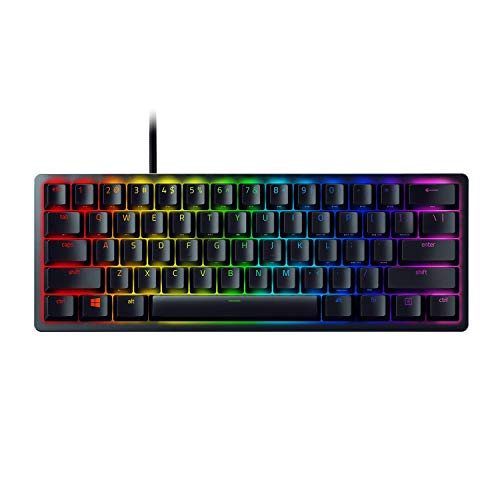
Razer Huntsman Mini 60% Clicky Optical Keyboard
Best for: compact gaming setups needing tactile feedback
- Switch Type
- Razer Optical Clicky
- Form Factor
- 60%
- Connectivity
- Wired
- Backlighting
- RGB
- Keycap Material
- Doubleshot PBT
- Case Material
- Aluminum
View on Amazon: Razer Huntsman Mini 60% Clicky Optical Keyboard Affiliate link
This 60% keyboard uses Razer Optical Clicky switches with a 1.5 mm actuation distance, registering presses 30% faster than legacy mechanical options. It features an aluminum top frame and oil-resistant doubleshot PBT keycaps. The layout is wired and includes RGB backlighting. It suits gamers who want compact size and tactile feedback without needing extra function keys.
Pros
- Razer Optical Clicky switches with 1.5 mm actuation distance
- Aluminum top frame for structural integrity
- Oil-resistant doubleshot PBT keycaps
- 16.8 million color RGB backlighting
Cons
- 60% layout lacks dedicated arrow and function keys
- Wired connectivity only
- No wireless option available
Good fit if
- You need a compact keyboard for a small desk
- You prefer tactile clicky feedback for typing or gaming
- You want durable PBT keycaps that resist grime
Skip if
- You require a wireless connection for your setup
- You need dedicated arrow keys or a numpad
- You prefer linear or silent switch types
Verdict: Razer Huntsman Mini 60% Clicky delivers fast optical actuation and a durable aluminum build for gamers who prioritize speed and compactness over extra keys.

Razer Reclusa X Mini 65% Hot-Swappable Keyboard
Best for: compact gaming setups and switch customization
- Switch Type
- Razer Orange Tactile Gen-3
- Form Factor
- 65%
- Connectivity
- detachable USB-C
- Backlighting
- Razer Chroma RGB
- Keycap Material
- Doubleshot ABS
- Hot-Swap Support
- Hot-Swappable
View on Amazon: Razer Reclusa X Mini 65% Hot-Swappable Keyboard Affiliate link
The Razer Reclusa X Mini is a compact 65% mechanical keyboard designed for gaming and productivity. It features Razer Orange Tactile Gen-3 switches and hot-swappable sockets for easy customization. The build includes PPS plate construction, dual-layer silicone dampening, and doubleshot ABS keycaps. South-facing LEDs and Chroma RGB lighting enhance visibility. It connects via wired USB-C with a 1000Hz polling rate for responsive input.
Pros
- Hot-swappable PCB supports 3-pin and 5-pin switches
- Razer Orange Tactile Gen-3 switches for precise feedback
- South-facing LEDs improve aftermarket keycap compatibility
- PPS plate and silicone dampening reduce resonance
Cons
- Wired USB-C connection limits wireless freedom
- ABS keycaps may develop shine over time
- No mention of Bluetooth or multi-device pairing
Good fit if
- You want to swap switches without soldering
- You need a compact 65% layout for desk space
- You prefer tactile switches for gaming and typing
Skip if
- You require a wireless or Bluetooth connection
- You prefer full-size keyboards with numpads
- You want PBT keycaps for texture durability
Verdict: The Razer Reclusa X Mini 65% Keyboard offers a customizable, tactile typing experience in a compact form factor. It fits users who value hot-swap flexibility and precise switch feedback for gaming and daily tasks.
Specifications side by side
| Spec | Razer Huntsman Mini 60% Clicky Optical Keyboard | Razer Reclusa X Mini 65% Hot-Swappable Keyboard |
|---|---|---|
| Switch Type | Razer Optical Clicky | Razer Orange Tactile Gen-3 |
| Form Factor | 60% | 65% |
| Connectivity | Wired | detachable USB-C |
| Backlighting | RGB | Razer Chroma RGB |
| Keycap Material | Doubleshot PBT | Doubleshot ABS |
| Case Material | Aluminum | not stated |
| Hot-Swap Support | not stated | Hot-Swappable |
| Use | Gaming | Gaming |
| Color | Black | not stated |
| Dimensions | 19.8 × 2.6 × 10.8 inches | 12.2 × 4.02 × 1.47 inches |
| Weight | 1 pounds | 1.56 pounds |
| Size | Keyboard | not stated |
| Model | RZ03-03390500-R3U1-cr | RZ03-05980200-R3U1 |
Frequently asked questions
Does the Razer Reclusa X Mini have a numpad?
No, it does not. The Reclusa X Mini uses a 65% layout, which is smaller than full-size boards. It includes arrow keys and navigation clusters but omits the number pad. This keeps the footprint compact while retaining essential directional controls for gaming and typing.
Can I change switches on the Huntsman Mini?
No, the data does not list hot-swap support for this model. The Huntsman Mini features clicky optical switches that are fixed in place. If you want to customize switches without soldering, you would need to look at the Reclusa X Mini, which explicitly supports hot-swapping.
Which keyboard is lighter to carry?
The Razer Huntsman Mini is lighter. It weighs one pound, while the Reclusa X Mini weighs 1.56 pounds. If you prioritize portability and a lighter load for your gaming bag, the Huntsman Mini offers a more compact and light option for travel or desk swaps.
Are the keycaps made of PBT on both models?
The Huntsman Mini explicitly uses PBT keycaps for durability. The Reclusa X Mini data does not specify the keycap material. You should assume the Huntsman Mini offers known PBT benefits, while the Reclusa X Mini focuses on hot-swap flexibility rather than material specifics in the provided specs.
Does the Reclusa X Mini support wireless connections?
The provided data does not mention wireless capabilities for the Reclusa X Mini. It lists hot-swap support and a 65% layout but omits connectivity details beyond the form factor. The Huntsman Mini is confirmed as wired. You should check the full manual for wireless options on the Reclusa model.
What is the difference in width between the two keyboards?
The Huntsman Mini is narrower at 10.8 inches wide. The Reclusa X Mini is wider at 12.2 inches. The extra width on the Reclusa accommodates the 65% layout, including arrow keys and navigation clusters, which the 60% Huntsman Mini omits to save space.
Is the Huntsman Mini suitable for typing-heavy work?
It is designed primarily for gaming. The Huntsman Mini features clicky optical switches for fast actuation and tactile feedback. While you can type on it, the clicky nature and 60% layout may not suit everyone. The Reclusa X Mini offers hot-swap flexibility for potentially quieter or different switch types.
Do both keyboards have RGB backlighting?
Yes, both models include RGB backlighting. The Huntsman Mini features per-key RGB lighting for customization. The Reclusa X Mini also supports RGB effects. This allows you to match your setup’s aesthetic on either board, regardless of whether you choose the 60% or 65% layout.