Razer vs Corsair: Gaming Mice Compared by Specs
As an Amazon Associate we earn from qualifying purchases. Links on this page are affiliate links.
When you compare a razer vs corsair gaming mouse for MMOs, you find two distinct approaches. Both offer many programmable buttons and right-handed ergonomic shapes designed for complex macros. The main difference lies in connectivity and sensor technology. One model uses wireless options with a high-end optical sensor, while the other relies on a wired connection with a customizable slider system for its side buttons. You should choose based on your preference for wireless freedom versus physical button adjustability.
Key differences
| Aspect | Razer Naga V2 HyperSpeed Wireless MMO Mouse | Corsair Scimitar RGB Elite Wired MMO Mouse |
|---|---|---|
| Connectivity | 2.4 GHz Wireless and Bluetooth | Wired |
| Sensor | Focus Pro 30K | PixArt PMW3391 (18,000 DPI) |
| Switch Lifespan | 60 million clicks | 50 million clicks |
| Button Adjustability | Fixed ergonomic position | Patented Key Slider Control System |
| Dimensions | 4.71 x 2.96 x 1.71 inches | 6.89 x 4.49 x 0.1 inches |
Which one should you choose?
Choose Razer Naga V2 HyperSpeed Wireless MMO Mouse if
- You want wireless freedom with Bluetooth or low-latency 2.4 GHz options
- You prefer a sensor rated for 30K DPI with glass tracking support
- You need a longer switch lifespan of up to 60 million clicks
Choose Corsair Scimitar RGB Elite Wired MMO Mouse if
- You want to physically adjust the position of your side buttons
- You prefer a wired connection for zero latency concerns
- You need a mouse with a dedicated finger rest for palm support
Verdict: The Razer Naga V2 suits users who prioritize wireless flexibility and the highest sensor specifications. The Corsair Scimitar RGB Elite is better for those who value the ability to customize button placement and prefer a wired setup. Your choice depends on whether wireless performance or physical button adjustability matters more to your workflow.
Razer vs Corsair MMO Mouse Specs
Connectivity options
The Razer Naga V2 HyperSpeed offers dual wireless modes, supporting both 2.4 GHz HyperSpeed and Bluetooth connections. This allows you to switch between low-latency gaming and power-saving modes. The Corsair Scimitar RGB Elite is a wired-only device, relying on a braided cable for a constant connection. While the wired setup eliminates battery anxiety and potential wireless interference, the Razer provides flexibility for desk setups where cables are cumbersome. If you prefer a clutter-free workspace or need to switch devices easily, the wireless capability of the Razer is a distinct advantage over the fixed wired connection of the Corsair.
Sensor technology
Sensor accuracy is critical for precise aiming. The Razer Naga V2 HyperSpeed features the Focus Pro 30K optical sensor, which supports tracking on a wider variety of surfaces, including glass. This modern sensor uses intelligent functions to enhance aim and control. The Corsair Scimitar RGB Elite uses the PixArt PMW3391 sensor with a maximum DPI of 18,000 and adjustable in 1 DPI steps. While the Corsair sensor is highly accurate and customizable, the Razer’s newer 30K sensor offers superior surface compatibility. For users who play on glass desks or varied mousepads, the Razer sensor provides a practical edge in versatility.
Button customization
Both mice target MMO and MOBA players with extensive button counts. The Razer Naga V2 HyperSpeed includes 19 programmable buttons, including a side panel and traditional left/right clicks. The Corsair Scimitar RGB Elite offers 17 fully programmable buttons. A key difference is the Corsair’s patented Key Slider Control System, which allows you to physically reposition the 12 side buttons to fit your grip and finger reach. The Razer buttons are ergonomically positioned but fixed. If your hand size or grip style requires specific button placement, the Corsair’s adjustable slider system offers a tangible advantage in comfort and accessibility.
Switch lifespan
Switch durability affects long-term reliability. The Razer Naga V2 HyperSpeed uses Gen 2 mechanical mouse switches with gold-plated contact points, rated for up to 60 million clicks. This design reduces degradation over time. The Corsair Scimitar RGB Elite uses Omron switches rated for 50 million clicks. Both ratings exceed typical usage requirements for most gamers. The Razer offers a slightly higher click tolerance and corrosion-resistant contacts, which may extend the lifespan in high-intensity scenarios. For the average user, both switches are highly durable, but the Razer holds a slight technical advantage in rated longevity and material quality.
Battery life
Battery endurance is a major factor for wireless mice. The Razer Naga V2 HyperSpeed delivers up to 400 hours of battery life on Bluetooth and 250 hours on 2.4 GHz HyperSpeed mode. The Corsair Scimitar RGB Elite is wired, so it has no battery to charge. While the Corsair never requires charging, the Razer’s battery life is sufficient for weeks of regular use on a single charge. For users who prioritize freedom from cables and do not mind occasional charging, the Razer’s battery performance is robust. The Corsair’s lack of a battery is a benefit for those who want zero maintenance, but the Razer’s endurance is impressive for a wireless device.
Which MMO Mouse Fits Your Setup
Wireless freedom seekers
You need a clutter-free desk. This Razer model offers dual wireless connectivity via 2.4 GHz HyperSpeed and Bluetooth. You get up to 400 hours of battery life on Bluetooth, ensuring long sessions without interruption. The Focus Pro 30K sensor tracks accurately on various surfaces, including glass, providing reliable performance without cable drag.
Adjustable button users
You prefer a wired connection for consistent latency. The Corsair Scimitar features a patented Key Slider Control System that lets you reposition its twelve side buttons. This customization ensures the controls fit your specific grip style. The 18,000 DPI optical sensor offers precise tracking with adjustable resolution steps for exact cursor control during intense gameplay.
Macro-heavy MMO players
You require maximum command options. This mouse provides nineteen programmable buttons, giving you an extensive arsenal for mapping complex macros. The ergonomically positioned buttons allow easy access to essentials. Combined with mechanical Gen 2 switches rated for sixty million clicks, it delivers durability and flexibility for heavy MMO usage and advanced command execution.
Palm grip comfort seekers
You prioritize physical support during long sessions. The Corsair Scimitar has a contoured shape designed to fit your palm comfortably. It includes a dedicated right-side finger rest for added stability. The braided cable and sturdy construction ensure durability. This design suits users who want a secure hold and consistent support regardless of their hand size or grip style.
The products compared

Razer Naga V2 HyperSpeed Wireless MMO Mouse
Best for: MMO players needing 19 programmable buttons
- Connectivity
- 2.4 GHz HyperSpeed, Bluetooth
- Weight
- 3.35 ounces
- Programmable Buttons
- 19
- Sensor
- Focus Pro 30K
- Battery Life
- Up to 400 hours
- Use
- Gaming
View on Amazon: Razer Naga V2 HyperSpeed Wireless MMO Mouse Affiliate link
The Razer Naga V2 HyperSpeed is a wireless MMO mouse with 19 programmable buttons. It uses the Focus Pro 30K optical sensor for tracking on surfaces including glass. Connectivity includes 2.4 GHz HyperSpeed and Bluetooth. Battery life reaches 400 hours on Bluetooth and 250 hours on 2.4 GHz. The mechanical switches offer a 60 million click lifespan. This mouse suits MMO players who need many macros.
Pros
- 19 programmable buttons for complex macros
- Focus Pro 30K optical sensor tracks on glass
- 400-hour battery life on Bluetooth
- HyperSpeed Wireless 2.4 GHz for low latency
- Mechanical switches rated for 60 million clicks
Cons
- Heavier at 3.35 ounces compared to standard mice
- Wired alternative Scimitar RGB Elite lacks wireless flexibility
- Requires Razer Synapse App for optimization
Good fit if
- You play MMOs or MOBAs requiring many key binds
- You want wireless freedom with long battery life
- You need a side-mounted button array
Skip if
- You prefer a lightweight mouse under 3 ounces
- You only use standard left and right clicks
- You want a wired mouse to avoid charging
Verdict: Razer Naga V2 HyperSpeed Wireless MMO Mouse is the right pick for MMO players who need 19 buttons and wireless convenience. It fits users who value battery longevity and side-mounted controls for complex game commands.
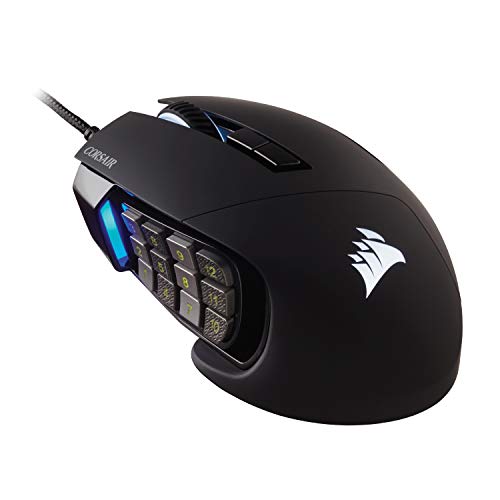
Corsair Scimitar RGB Elite Wired MMO Mouse
Best for: MMO players needing many buttons
- Connectivity
- Wired
- Maximum DPI
- 18,000 DPI
- Programmable Buttons
- 17
- Sensor
- PixArt PMW3391
- Backlighting
- RGB
- Use
- Gaming
View on Amazon: Corsair Scimitar RGB Elite Wired MMO Mouse Affiliate link
The Corsair Scimitar RGB Elite is a wired gaming mouse designed for MMO and MOBA players. It features a PixArt PMW3391 sensor with 18,000 DPI and 17 programmable buttons. The side buttons are adjustable via a Key Slider system. Its contoured shape includes a finger rest for palm grip support. This mouse suits users who need many buttons for complex macros.
Pros
- 18,000 DPI PixArt PMW3391 sensor
- 17 programmable buttons
- Adjustable side buttons
- 50 million click Omron switches
Cons
- Wired connection limits mobility
- 4.3 ounces is heavier than wireless peers
- No wireless capability
Good fit if
- You play MMOs or MOBAs
- You need many programmable buttons
- You prefer a wired connection
Skip if
- You want wireless freedom
- You prefer lightweight mice under 60g
- You need a symmetrical shape
Verdict: Corsair Scimitar RGB Elite MMO Mouse offers precise tracking and extensive button customization for dedicated MMO players. It fits those who prioritize button count and sensor accuracy over portability.
Specifications side by side
| Spec | Razer Naga V2 HyperSpeed Wireless MMO Mouse | Corsair Scimitar RGB Elite Wired MMO Mouse |
|---|---|---|
| Connectivity | 2.4 GHz HyperSpeed, Bluetooth | Wired |
| Maximum DPI | not stated | 18,000 DPI |
| Weight | 3.35 ounces | not stated |
| Programmable Buttons | 19 | 17 |
| Sensor | Focus Pro 30K | PixArt PMW3391 |
| Battery Life | Up to 400 hours | not stated |
| Backlighting | not stated | RGB |
| Use | Gaming | Gaming |
| Color | Black | Black |
| Game Genre | MMO | MMO |
| Operating System | not stated | Mac |
| Dimensions | 4.71 × 2.96 × 1.71 inches | 6.89 × 4.49 × 0.1 inches |
| Size | Naga V2 HyperSpeed (Mouse) | 1 Count (Pack of 1) |
| Model | RZ01-03600100-R3U1 | CH-9304211-AS |
Frequently asked questions
Which mouse is better for small hands?
The Razer Naga V2 HyperSpeed is the more compact choice. It measures 4.71 inches in length and weighs 3.35 ounces. This makes it easier to control for users with smaller grips. The Corsair Scimitar RGB Elite is significantly larger at 6.89 inches long and heavier at 4.3 ounces. You should choose the Razer model if you prefer a lighter, smaller device for precise movements.
Does the Razer mouse support Bluetooth?
Yes, the Razer Naga V2 HyperSpeed supports Bluetooth connectivity. This feature allows you to connect to multiple devices easily. It also supports 2.4 GHz wireless for low-latency gaming. The Corsair Scimitar RGB Elite does not offer wireless options. It is a wired-only mouse, so you must keep it plugged in during use. Bluetooth support is exclusive to the Razer model in this comparison.
Which mouse has RGB lighting?
The Corsair Scimitar RGB Elite features RGB backlighting. This allows you to customize the lighting effects to match your setup. The Razer Naga V2 HyperSpeed does not list RGB lighting in its specifications. If customizable lighting is important to you, the Corsair model is the clear choice. Both mice are black, but only the Corsair offers visible light effects.
Is the Corsair mouse wireless?
No, the Corsair Scimitar RGB Elite is a wired mouse. It requires a physical connection to your computer to function. This ensures consistent power and data transmission without battery concerns. The Razer Naga V2 HyperSpeed is wireless, offering freedom of movement. If you need a wired connection for stability, the Corsair mouse fits your needs. Otherwise, consider the wireless Razer option.
Which mouse is heavier?
The Corsair Scimitar RGB Elite is heavier. It weighs 4.3 ounces, providing a solid feel on your desk. The Razer Naga V2 HyperSpeed weighs 3.35 ounces, making it lighter. Weight preference is subjective, but the Corsair offers a denser build. The Razer model is lighter, which may reduce fatigue during long sessions. Choose based on your preferred grip weight.
Are these mice left-handed compatible?
No, both mice are designed for right-handed users. The Razer Naga V2 HyperSpeed has an ergonomic shape optimized for right-hand grip. The Corsair Scimitar RGB Elite also features a right-handed ergonomic design. Neither model includes ambidextrous features or left-hand specific button layouts. If you are left-handed, you may need to look for other models. These options are strictly for right-handed gamers.
Which mouse is better for MMOs?
Both mice are optimized for MMO gaming. The Razer Naga V2 HyperSpeed offers 19 programmable buttons for complex commands. It also provides wireless convenience. The Corsair Scimitar RGB Elite offers extensive button customization and precise tracking. It is wired, ensuring no signal lag. If you prioritize wireless freedom, choose Razer. If you prefer wired stability and RGB, choose Corsair.
What is the width difference between the mice?
The Corsair Scimitar RGB Elite is wider at 4.49 inches. The Razer Naga V2 HyperSpeed is narrower at 2.96 inches. This width difference affects how the mouse sits in your palm. The Corsair offers a broader surface for button access. The Razer is more streamlined. Your hand size and grip style will determine which width feels more comfortable for extended gaming sessions.