RedThunder 60% Wired Keyboard Honeycomb vs RedThunder 75% Wireless Keyboard Mouse (2026): Key Differences
As an Amazon Associate we earn from qualifying purchases. Links on this page are affiliate links.
The redthunder 60 wired keyboard honeycomb vs 75 wireless keyboard mouse comparison highlights two distinct layouts from the same brand. Both kits include a honeycomb shell mouse and RGB lighting. The main difference lies in connectivity and layout efficiency. You must decide between a compact wired 60% design or a more functional wireless 75% option with dedicated media keys. This choice impacts your desk space and workflow flexibility significantly.
Key differences
| Aspect | RedThunder 60% Wired Keyboard and Honeycomb Mouse Combo | RedThunder 75% Wireless Keyboard and Mouse Combo |
|---|---|---|
| Connectivity | Wired USB | 2.4G Wireless |
| Form Factor | 60% (61 Keys) | 75% (84 Keys) |
| Power Source | Not listed | Rechargeable batteries |
| Media Controls | Not listed | Dedicated media keys |
Which one should you choose?
Choose RedThunder 60% Wired Keyboard and Honeycomb Mouse Combo if
- You need maximum mouse movement space on a small desk
- You prefer a simple wired connection without charging
Choose RedThunder 75% Wireless Keyboard and Mouse Combo if
- You want a wireless setup with rechargeable batteries
- You need dedicated arrow keys and media controls for productivity
Verdict: The 60% wired combo suits gamers who prioritize desk space and direct connectivity. The 75% wireless model is better for users who need media keys and freedom from cables. Choose based on whether you value compactness or functional layout.
Layout and Connectivity Comparison
Form factor
The RedThunder 60% Wired Keyboard offers a 61-key layout that removes the numpad to maximize desk space for mouse movement. This is a common choice for FPS gamers who need room. The RedThunder 75% Wireless Keyboard keeps the arrow keys and function row while still removing the numpad. It has 84 keys total. This layout is more practical for general use because you retain dedicated media and navigation keys. If you need those extra keys for work or gaming shortcuts, the 75% layout is the better choice. The 60% layout is strictly for minimalists who want the smallest footprint possible.
Connectivity
The 60% keyboard uses a wired connection via a waterproof braid USB cable. This ensures stable data transmitting and eliminates any latency or battery concerns. The 75% keyboard connects via 2.4G wireless using a single USB receiver shared by both the keyboard and mouse. This wireless option allows for a cleaner desk setup without cables cluttering your space. However, you must manage battery levels for the wireless model. The wired keyboard requires a cable running to your PC, which some users find restrictive. If you prefer zero latency and no charging, the wired option is superior. If you want cable freedom, the wireless receiver is the way to go.
Battery life
The 75% wireless keyboard includes a 1850 mAh battery for the keyboard and a 500 mAh battery for the mouse. It offers smart energy-saving functions that put the devices to sleep after two minutes of inactivity. You can use them continuously for eight hours with the lights on. The 60% wired keyboard does not have a battery, so you do not need to charge it. It draws power directly from the USB port. For users who hate remembering to charge devices, the wired keyboard is the clear winner. You never have to worry about power levels. The wireless combo offers convenience but requires regular charging via the original cable.
Backlighting
Both keyboards feature RGB backlighting. The 60% wired keyboard allows you to adjust the brightness and breathing speed of the lights. You can choose from various light colors and modes, including permanent lighting. The 75% wireless keyboard offers four dynamic backlight modes, seven solid color lights, and vibrant RGB rainbow lighting. It also includes green indicator lights for Caps Lock and lock status. The mouse on the wireless kit has RGB lighting that cycles through seven colors automatically and cannot be adjusted manually. The wired keyboard gives you more control over the lighting effects and brightness levels.
Mouse sensor
Both kits include a mouse with a honeycomb shell design weighing 65 grams. The mouse in the 60% wired combo uses a high-precision optical sensor. It has a sensitivity of 7200 DPI, a 12000fps scan rate, and a 1000Hz polling rate. It can withstand 40G acceleration and 400IPS tracking speed. The data for the mouse in the 75% wireless combo does not specify these technical sensor details. It only mentions the weight and ergonomic design. Because the wired combo provides specific performance metrics for the sensor, it offers more transparency for users who care about tracking precision and speed.
Which layout and connectivity suits you best
FPS gamers needing maximum mouse space
The 60% layout removes all extra keys to maximize desk real estate. This gives you more room for wide mouse movements during fast-paced games. The wired connection ensures zero latency. You get a stable link without worrying about battery levels or signal interference during intense sessions.
Users wanting arrow keys and wireless freedom
The 75% layout keeps dedicated arrow keys and media controls, making it more practical for general use than the 60% model. You get wireless convenience via a single USB receiver. The rechargeable batteries offer eight hours of continuous use with lighting on, balancing work and play.
Buyers preferring wired reliability and simplicity
You get a straightforward wired setup with no charging needed. The keyboard features water-resistant core protection and anti-interference magnets for stable data transmission. The gold-plated interface and waterproof braided cable are built for durability. You avoid the complexity of pairing wireless devices or managing charge cycles.
The products compared
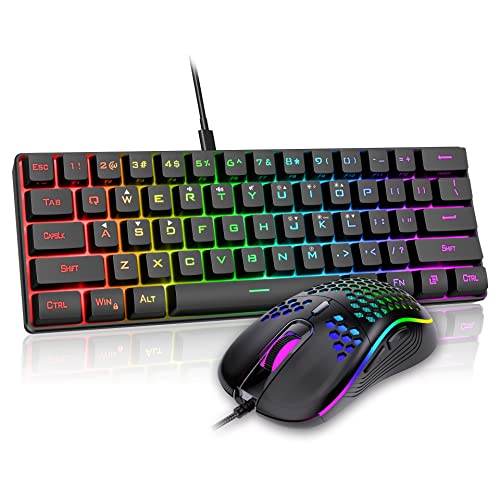
RedThunder 60% Wired Keyboard and Honeycomb Mouse Combo
Best for: compact desktops and lightweight mouse grip
- Form Factor
- 60%
- Connectivity
- Wired
- Backlighting
- RGB
- Use
- Gaming
- Color
- Black
- Shell Design
- Honeycomb
View on Amazon: RedThunder 60% Wired Keyboard and Honeycomb Mouse Combo Affiliate link
This RedThunder K62 combo pairs a 60% keyboard with a lightweight mouse. The keyboard features RGB backlighting and a wired USB connection. The mouse has a honeycomb shell weighing 65 grams. It includes a 7200 DPI optical sensor. This setup suits gamers who want a compact desktop with extra mouse space. It connects via a waterproof braided cable.
Pros
- 60% compact keyboard layout saves desk space
- Mouse weighs 65 grams with honeycomb shell
- RGB backlighting with adjustable brightness
- Mouse sensor reaches 7200 DPI
Cons
- Wired connection limits cable management freedom
- No wireless option in this specific model
- 60% layout lacks dedicated media keys
Good fit if
- You need a small footprint for your desk
- You prefer a lightweight mouse for fast movements
- You want RGB lighting for your setup
Skip if
- You require a wireless keyboard and mouse
- You need a full-size keyboard with numpad
- You prefer a heavier mouse for stability
Verdict: RedThunder K62 60% Wired Keyboard and Mouse offers a compact wired solution for gamers needing extra mouse space. It fits users who prioritize a lightweight mouse and a small keyboard footprint over wireless convenience.

RedThunder 75% Wireless Keyboard and Mouse Combo
Best for: Compact gaming setups needing arrow keys
- Form Factor
- 75%
- Connectivity
- 2.4G wireless
- Backlighting
- RGB rainbow
- Keycap Material
- Two-color injection ABS
- Use
- Gaming
- Color
- Black
View on Amazon: RedThunder 75% Wireless Keyboard and Mouse Combo Affiliate link
The RedThunder K84 is a 75% wireless keyboard and mouse combo. It features a 1850 mAh keyboard battery and a 500 mAh mouse battery. The keyboard uses two-color injection ABS keycaps and offers RGB rainbow backlighting. The mouse has a honeycomb shell and weighs 65 grams. It connects via a single 2.4G USB receiver. This setup suits users who want a compact layout with dedicated media keys and arrow keys.
Pros
- 75% layout retains arrow and media keys
- 1850 mAh keyboard battery for long use
- 65-gram honeycomb shell mouse reduces fatigue
- Two-color injection ABS keycaps resist fading
Cons
- Mouse RGB lighting cycles automatically with no manual control
- Keyboard and mouse share a single USB receiver
- No Bluetooth connectivity for multi-device pairing
Good fit if
- You want a compact 75% layout with arrow keys
- You prefer a lightweight mouse for extended sessions
- You need a single receiver for both devices
Skip if
- You require manual RGB color customization on the mouse
- You need Bluetooth connectivity for multiple devices
- You prefer a full-size keyboard with a numeric pad
Verdict: RedThunder K84 75% Wireless Combo offers a practical 75% layout and lightweight mouse for gamers who value compactness and battery life. It fits users who want dedicated keys without the bulk of a full-size board.
Specifications side by side
| Spec | RedThunder 60% Wired Keyboard and Honeycomb Mouse Combo | RedThunder 75% Wireless Keyboard and Mouse Combo |
|---|---|---|
| Form Factor | 60% | 75% |
| Connectivity | Wired | 2.4G wireless |
| Backlighting | RGB | RGB rainbow |
| Keycap Material | not stated | Two-color injection ABS |
| Use | Gaming | Gaming |
| Color | Black | Black |
| Shell Design | Honeycomb | Honeycomb |
| Operating System | Mac | not stated |
| Power Source | not stated | Rechargeable |
| Weight | 15.2 ounces | 1.43 pounds |
| Size | 2-in-1 Wired Keyboard + Mouse | 84-Key |
| Model | K62 | K84 |
Frequently asked questions
Does the RedThunder 60% keyboard support Mac?
Yes, the RedThunder K62 wired keyboard is compatible with Mac operating systems. This allows you to use the compact 61-key layout with Apple computers without needing additional drivers. The wired connection ensures stable performance across different platforms.
Is the 75% keyboard wireless or Bluetooth only?
The RedThunder K84 75% keyboard is wireless and uses rechargeable batteries for power. This setup gives you freedom from cables while maintaining a reliable connection. You do not need to worry about frequent battery changes thanks to the rechargeable design.
What is the total weight of the 60% combo?
The RedThunder K62 60% wired keyboard and mouse combo weighs 15.2 ounces. This lightweight design is ideal for users who prefer a minimal desk footprint. The honeycomb shell on the mouse further reduces the overall heft for easier handling.
Does the 75% keyboard include arrow keys?
Yes, the RedThunder K84 75% wireless keyboard includes a dedicated arrow key cluster. This layout keeps the compact form factor while providing essential navigation keys. It is a practical choice for gamers who need quick access to directional controls.
Do both kits feature RGB lighting?
Yes, both the RedThunder 60% wired and 75% wireless kits feature RGB backlighting. This allows you to customize the visual appearance of your keyboard. The lighting adds a modern aesthetic to your gaming setup without compromising functionality.
Which mouse design is included in these kits?
Both kits include a mouse with a honeycomb shell design. This structure helps reduce the weight of the mouse, making it easier to move quickly. The lightweight grip is beneficial for gamers who require precise and fast mouse movements.
Is the 60% keyboard suitable for gaming?
Yes, the RedThunder K62 is designed specifically for gaming use. The compact 60% layout maximizes desk space for wide mouse movements during fast-paced games. The wired connection ensures zero latency, which is critical for competitive gaming performance.
What is the key count on the 75% keyboard?
The RedThunder K84 75% wireless keyboard features an 84-key layout. This configuration retains essential keys like arrows and function rows while removing the numpad. It offers a balanced compromise between compactness and full functionality for most users.