SteelSeries Apex 7 Full-Size Blue or SteelSeries Apex Pro TKL Wireless? Which SteelSeries Model to Buy
As an Amazon Associate we earn from qualifying purchases. Links on this page are affiliate links.
When comparing the steelseries apex pro tkl wireless vs apex 7 full size blue, you face a choice between modern wireless tech and a classic wired layout. Both models feature SteelSeries’ signature OLED smart display for quick adjustments. The main difference lies in their form factor and connectivity. The Apex 7 is a full-size wired board with tactile blue switches. The Apex Pro TKL Wireless is a tenkeyless board with adjustable magnetic switches and dual wireless options.
Key differences
| Aspect | SteelSeries Apex 7 Full-Size Blue Switch | SteelSeries Apex Pro TKL Wireless Gen 3 |
|---|---|---|
| Form Factor | Full Length | TKL |
| Connectivity | Wired | 2.4GHz, Bluetooth |
| Switch Type | Blue Switch | OmniPoint 3.0 HyperMagnetic |
| Backlighting | RGB | Not listed |
| Case Material | Aircraft-grade aluminum alloy | Not listed |
Which one should you choose?
Choose SteelSeries Apex 7 Full-Size Blue Switch if
- You prefer a full-size layout with a number pad
- You want tactile and clicky mechanical switches
- You prefer a wired connection for consistent latency
Choose SteelSeries Apex Pro TKL Wireless Gen 3 if
- You need wireless freedom via 2.4GHz or Bluetooth
- You want adjustable actuation points for faster response
- You prefer a compact tenkeyless design for more mouse space
Verdict: Choose the Apex 7 if you need a full-size keyboard with tactile blue switches and a wired connection. Pick the Apex Pro TKL Wireless if you value wireless connectivity and the ability to adjust actuation points. Both boards share the OLED display feature for easy settings management.
Apex 7 vs Apex Pro TKL Wireless
Connectivity options
The SteelSeries Apex Pro TKL Wireless Gen 3 offers flexible connection choices through its Quantum 2.0 Dual Wireless system. You can connect via lag-free 2.4GHz for gaming or use Bluetooth for other devices. In contrast, the SteelSeries Apex 7 Full-Size Blue Switch is a wired keyboard. The data does not list wireless capabilities for the Apex 7. If you need to move your keyboard or reduce cable clutter, the wireless model provides that freedom. The wired model keeps you tethered to your PC.
Form factor size
The SteelSeries Apex 7 Full-Size Blue Switch features a full-length layout measuring 17.2 inches wide. It includes all standard keys, which is useful if you rely on a numeric keypad. The SteelSeries Apex Pro TKL Wireless Gen 3 uses a TKL form factor. This removes the number pad, resulting in a more compact footprint. A TKL layout saves desk space and allows more room for mouse movement. You should choose the full-size model if you need numpad access, or the TKL version if you prioritize a smaller footprint.
Switch technology
The SteelSeries Apex Pro TKL Wireless Gen 3 uses OmniPoint 3.0 HyperMagnetic switches. These Hall Effect switches offer 40 levels of adjustable actuation. This allows you to customize how deep you press a key to register a signal. The SteelSeries Apex 7 Full-Size Blue Switch uses traditional Blue Switches. These are tactile and clicky switches with a fixed actuation point. The adjustable actuation on the Pro model offers precise control for gaming, while the fixed Blue switches provide a classic mechanical feel for typing.
Build material
Both keyboards emphasize durability through their construction materials. The SteelSeries Apex 7 Full-Size Blue Switch is built with an aircraft-grade aluminum alloy case. This provides stability and a premium feel. The data for the SteelSeries Apex Pro TKL Wireless Gen 3 does not explicitly list the case material. It focuses on the internal switch technology and wireless features instead. If a sturdy aluminum frame is important to you, the Apex 7 data confirms this specification clearly.
Backlighting features
The SteelSeries Apex 7 Full-Size Blue Switch features RGB illumination with 16.8 million colors per key. This allows for extensive customization of your keyboard's look. The SteelSeries Apex Pro TKL Wireless Gen 3 also includes RGB lighting, though the data does not specify the exact color count or per-key capabilities. Both models include an OLED smart display for quick settings adjustments. You can track game info or media controls directly from the display on either keyboard. The Apex 7 data is more specific about its lighting range.
Which SteelSeries Keyboard Fits You
Competitive gamers needing speed and wireless freedom
The Apex Pro TKL Wireless Gen 3 uses OmniPoint 3.0 HyperMagnetic switches with adjustable actuation levels. Its Rapid Trigger and Rapid Tap features reduce latency for faster response. You also get Quantum 2.0 Dual Wireless connectivity via 2.4GHz or Bluetooth, offering flexibility without wires. This setup prioritizes speed and modern performance for intense play.
Users wanting a full layout with tactile feedback
The Apex 7 Full-Size offers a complete layout with Blue Switches that provide a tactile and clicky feel. It features a durable aircraft-grade aluminum alloy case and a premium magnetic wrist rest for comfort. You get dedicated media controls and USB passthrough. This model suits those who prefer a traditional full-size keyboard with physical feedback.
Buyers preferring a wired connection for stability
If you prefer a wired setup, the Apex 7 Full-Size is the clear choice. It connects directly via USB, ensuring no wireless interference. The Blue Switches deliver distinct tactile clicks for satisfying typing. The included OLED display helps you adjust settings quickly. This keyboard provides a stable, wired experience with full-size utility and ergonomic support.
The products compared
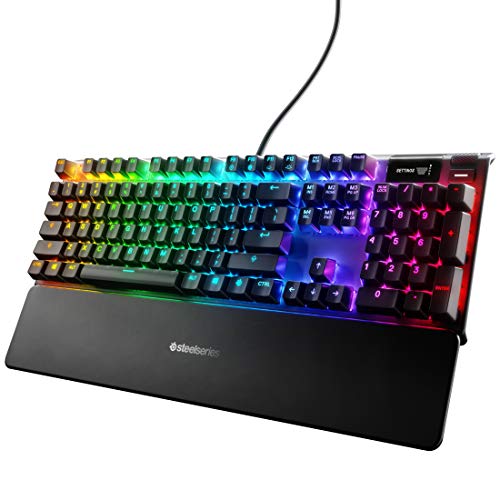
SteelSeries Apex 7 Full-Size Blue Switch
Best for: Full-size setups needing tactile switches and OLED display
- Switch Type
- Blue Switch
- Form Factor
- Full Length
- Backlighting
- RGB
- Case Material
- Aircraft-grade aluminum alloy
- Use
- Gaming
- Dimensions
- 5.5 × 17.2 × 1.6 inches
View on Amazon: SteelSeries Apex 7 Full-Size Blue Switch Affiliate link
The SteelSeries Apex 7 is a full-size mechanical keyboard featuring tactile and clicky blue switches. It includes an OLED smart display for adjusting settings and tracking game info. The chassis is built from aircraft-grade aluminum alloy for stability. You get a premium magnetic wrist rest for palm support. This model suits users who want a durable, feature-rich board with physical media controls.
Pros
- Full-size layout with tactile and clicky blue switches
- Integrated OLED smart display for settings and info
- Aircraft-grade aluminum alloy case for durability
- Premium magnetic wrist rest included
Cons
- Full-size dimensions require more desk space
- Wired connection only, no wireless option
- Heavier build at 2.1 pounds
Good fit if
- You need a full-size keyboard with number pad
- You prefer tactile and clicky switch feedback
- You want an OLED display for quick settings
Skip if
- You need wireless connectivity
- You want a compact or tenkeyless layout
- You prefer linear or quiet switch types
Verdict: SteelSeries Apex 7 Full-Size Blue is a sturdy full-size board with tactile switches and an OLED display. It fits users who want physical controls and a number pad on a stable aluminum chassis.

SteelSeries Apex Pro TKL Wireless Gen 3
Best for: compact gaming setups and speed
- Switch Type
- OmniPoint 3.0 HyperMagnetic
- Form Factor
- TKL
- Connectivity
- 2.4GHz, Bluetooth
View on Amazon: SteelSeries Apex Pro TKL Wireless Gen 3 Affiliate link
The SteelSeries Apex Pro TKL Wireless uses OmniPoint 3.0 HyperMagnetic switches with 40 levels of adjustable actuation. It features Rapid Trigger and Rapid Tap for faster response. The TKL form factor saves desk space. You can connect via 2.4GHz wireless or Bluetooth. An OLED display shows settings. This keyboard suits gamers who want compact size and precise switch control.
Pros
- OmniPoint 3.0 HyperMagnetic switches with 40 levels of adjustable actuation
- Rapid Trigger and Rapid Tap for faster key registration
- TKL form factor for space saving
- Dual wireless connectivity with 2.4GHz and Bluetooth
- OLED Smart Display for settings
Cons
- TKL layout lacks a number pad
- No wired USB connection option listed
- No dedicated media keys mentioned
Good fit if
- You need a compact keyboard for limited desk space
- You want adjustable actuation points for different game types
- You prefer wireless freedom with Bluetooth support
Skip if
- You require a full-size keyboard with a number pad
- You prefer mechanical switches with tactile clicks
- You need a wired-only connection for zero latency
Verdict: SteelSeries Apex Pro TKL Wireless offers precise switch control in a compact form. It fits players who value speed and desk space over a number pad.
Specifications side by side
| Spec | SteelSeries Apex 7 Full-Size Blue Switch | SteelSeries Apex Pro TKL Wireless Gen 3 |
|---|---|---|
| Switch Type | Blue Switch | OmniPoint 3.0 HyperMagnetic |
| Form Factor | Full Length | TKL |
| Connectivity | not stated | 2.4GHz, Bluetooth |
| Backlighting | RGB | not stated |
| Case Material | Aircraft-grade aluminum alloy | not stated |
| Use | Gaming | not stated |
| Dimensions | 5.5 × 17.2 × 1.6 inches | not stated |
| Weight | 2.1 pounds | not stated |
| Size | Full Length | TKL |
| Color | Blue – Tactile & Clicky | Single-Coloured |
| Model | 64621 | not stated |
Frequently asked questions
Which keyboard is better for typing?
The SteelSeries Apex 7 Full-Size Blue Switch is the better choice for typing. It features tactile blue switches that provide clear feedback and audible clicks. This mechanical feel helps you confirm each keystroke. The full-size layout also includes a number pad for data entry. You will find this physical feedback more satisfying than the compact options available in other models.
Does the Apex Pro TKL Wireless support Bluetooth?
Yes, the SteelSeries Apex Pro TKL Wireless Gen 3 supports Bluetooth connectivity. It uses the Quantum 2.0 Dual Wireless system to offer flexible connection choices. You can connect via lag-free 2.4GHz for gaming or use Bluetooth for other devices. This dual capability allows you to switch between your gaming PC and other computers easily without needing extra dongles.
What is the weight of the Apex 7?
The SteelSeries Apex 7 Full-Size Blue Switch weighs 2.1 pounds. This weight comes from its sturdy aluminum chassis, which provides stability during intense gaming sessions. The solid build helps keep the keyboard from sliding around on your desk. You get a substantial feel that matches its full-size dimensions and robust construction designed for long-term durability.
Is the Apex 7 full-size or tenkeyless?
The SteelSeries Apex 7 Full-Size Blue Switch is a full-size keyboard. It measures 17.2 inches in width and includes a complete number pad. This layout is ideal if you need extra keys for spreadsheets or gaming macros. It offers a traditional typing experience with all standard keys, unlike the compact tenkeyless design found in the Apex Pro TKL Wireless model.
Can I adjust the actuation on the Apex Pro?
The SteelSeries Apex Pro TKL Wireless Gen 3 allows you to adjust actuation. It uses OmniPoint 3.0 HyperMagnetic switches with adjustable actuation levels. This feature lets you customize how far you press a key to register a input. You can set it for speed or precision depending on your game. This technical flexibility is a key advantage for competitive players seeking faster response times.
Does the Apex 7 have an OLED display?
Yes, the SteelSeries Apex 7 Full-Size Blue Switch includes an OLED smart display. This screen allows you to make quick adjustments to settings without using software. You can check audio levels or other system info directly on the board. It adds a layer of convenience for users who want physical controls and immediate visual feedback while they game or work.
Which model is more compact?
The SteelSeries Apex Pro TKL Wireless Gen 3 is the more compact model. It features a tenkeyless form factor that saves desk space. This design removes the number pad to create a smaller footprint. It fits players who value speed and desk space over a number pad. The reduced size also allows more room for mouse movement, which is helpful for low-sensitivity gaming setups.