Strikonx Aula L99 Wireless Mechanical Review: Who It Fits and Who Should Skip It
As an Amazon Associate we earn from qualifying purchases. Links on this page are affiliate links.
This strikonx aula l99 wireless mechanical review covers a 96% layout keyboard featuring a 3.98-inch smart touch screen. It combines a large 8000mAh battery with tri-mode connectivity, including Bluetooth 5.1 and 2.4GHz wireless options. The device supports hot-swappable switches and uses PBT keycaps for durability. You get a visual command center that displays time, battery, and system status. This setup aims to merge traditional typing efficiency with modern smart desktop features for users who value both function and interface clarity.
What stands out
- 3.98-inch smart touch screen for system status and custom animations
- 8000mAh battery for extended wireless use without frequent charging
- Tri-mode connectivity with USB-C, 2.4GHz, and Bluetooth 5.1
- Full-key hot-swappable design for easy switch customization
- Six-layer soundproof filling for a quieter typing experience
Who it fits
Good fit for
You should consider this keyboard if you want a large 96% layout that includes a numpad but lacks the bulk of a full-size board. The integrated touch screen appeals to users who appreciate visual feedback for battery and connection status. Gamers and office workers who switch between multiple devices will benefit from the tri-mode connectivity and three-device Bluetooth support. The hot-swappable switches allow for personalized typing feels without soldering.
Who should skip it
You should look elsewhere if you need a compact keyboard with fewer keys, as the 96% layout still occupies significant desk space. Users who prefer a silent typing experience without software configuration might find the six-layer dampening insufficient for extreme quietness requirements. Additionally, the driver software only supports Windows in wired mode, limiting macro programming flexibility for Mac users or those who prefer wireless driver access. If you dislike screens on your peripherals, this feature may feel unnecessary.
Verdict: The Strikonx Aula L99 offers a unique blend of a large 96% layout and a smart touch screen for users who want enhanced desktop control. Its tri-mode connectivity and hot-swappable switches add versatility for various setups.
Key specs explained
Form Factor: 96%
This layout keeps the number pad and function row while reducing the overall footprint. You get full functionality without the bulk of a full-size board. It saves desk space, making it ideal for gamers who need room for mouse movements or office workers with limited surfaces. Compare this to tenkeyless designs if you do not need numeric keys for data entry.
Connectivity: USB-C wired, 2.4GHz wireless, BT5.1
Tri-mode support lets you switch between wired charging, low-latency 2.4GHz wireless for gaming, and Bluetooth 5.1 for multi-device setups. You can connect up to three Bluetooth devices and toggle between them. This flexibility suits users who share a desk with a laptop or tablet. Wired mode ensures stability during competitive play or when the battery runs low.
Switch Type: Caramel Latte
These pre-lubricated switches are designed to deliver a smooth travel path and a distinct acoustic signature. The factory lubrication reduces friction, creating a consistent feel with every press. You benefit from a quieter, more refined typing experience right out of the box. This option suits those who prefer a creamy sound profile without the need for manual maintenance or custom lube applications.
Keycap Material: PBT
Polybutylene terephthalate keycaps are known for their durability and resistance to shine. Unlike ABS plastic, PBT maintains a matte texture over time, preventing the glossy finish that develops with heavy use. This material offers better longevity and a tactile grip that aids in typing accuracy. It is a practical choice for users who prioritize long-term wear resistance and a consistent feel.
Design and build details
The Strikonx Aula L99 features a 96% layout that retains the number pad and function row while reducing the overall footprint. This design saves desk space, making it suitable for gamers who need room for mouse movement. The listing notes a 3.98-inch smart touch screen. This display shows time, battery level, and connection status. It also supports custom animations and integrates a calculator. You can wake the screen by pressing any key.
According to the listing, the keyboard uses a gasket mount structure with an extended silicone pad. This setup aims to provide a softer, more elastic typing feel. Six layers of sound-dampening filling are included to reduce cavity noise. The switches are described as pre-lubricated Caramel Latte units. The keycaps are made of PBT material for durability. Transparent keycaps are also included for a personalized look. The device supports hot-swappable switches for easy replacement.
The finish comes in options like Black&Red or Creamy Color. The listing states the keyboard includes RGB backlighting with 16 million colors. You can control these effects through the screen, software, or shortcut keys. The build focuses on a creamy sound profile and visual customization. These design choices suggest a device intended for users who value both tactile feedback and desktop aesthetics. The large 8000mAh battery supports long-term use without frequent charging.
Setup and everyday use
You connect the Strikonx Aula L99 via USB-C wired, 2.4GHz wireless, or Bluetooth 5.1. The Bluetooth mode lets you pair with up to three devices. This tri-mode setup gives you flexibility for a PC, Mac, laptop, tablet, or phone. You switch between these connections to match your workflow. The large 8000mAh battery supports long work sessions and high-intensity gaming. You do not need to worry about frequent recharges. However, you must use the original cable. The listing advises against using fast charging to protect the battery health. A protective film covers the 3.98-inch smart touch screen. You should remove this film before use. The screen displays time, battery level, and connection status. You can also view custom animations or use the integrated calculator and touchpad. Pressing any key wakes the screen instantly. For deeper control, you use the AULA driver software. This software allows macro programming for all keys. Note that the driver only supports Windows systems and requires a wired connection. The keyboard features hot-swappable switches for 3-pin or 5-pin options. You can replace switches without soldering. You must turn off the power before changing switches. The gasket mount structure and six-layer soundproof filling provide a soft typing feel. The PBT keycaps resist fading over time. You can switch RGB backlight colors and effects using the screen, software, or shortcut keys. This setup creates a stable and customizable daily input device.
Before you buy this keyboard
You need to check your computer’s operating system before purchasing. The driver software only supports Windows when used in wired mode. You cannot program macros on Mac or Linux systems. You must also remove the protective film from the touch screen before first use. This step is essential for clear visibility. The large 8000mAh battery requires care. You should only use the original cable for charging. Fast charging is not recommended and may damage the unit. You should also turn off power when swapping switches. This prevents electrical issues. The hot-swap feature lets you change switches without soldering. This adds flexibility if you want different actuation forces. This keyboard fits well alongside other 96% options if you want a touch screen. It is less suitable if you need cross-platform macro support. You should verify your desk space for the 96% layout. The screen adds height and visual complexity. This model is best for Windows users who want smart features.
Check before you buy
- Confirm your computer runs Windows for full driver support
- Remove the protective film from the touch screen
- Use only the original cable to avoid fast charging damage
- Turn off power before swapping any mechanical switches
The product at a glance
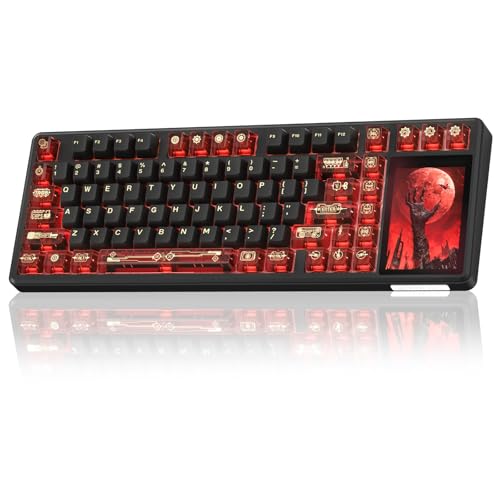
Strikonx L99 96% Wireless Keyboard
Best for: Users wanting a smart screen and large battery
- Switch Type
- Caramel Latte
- Form Factor
- 96%
- Connectivity
- Bluetooth 5.1, 2.4GHz wireless, USB-C
- Hot-Swap Support
- Yes (3-pin/5-pin)
- Backlighting
- RGB
- Keycap Material
- PBT
View on Amazon: Strikonx L99 96% Wireless Keyboard Affiliate link
The Strikonx Aula L99 is a 96% wireless mechanical keyboard featuring a 3.98-inch smart touch screen. It connects via USB-C, 2.4GHz, or Bluetooth 5.1 to up to three devices. The large 8000mAh battery supports long sessions. Hot-swappable switches and PBT keycaps allow for customization. The gasket mount design aims for a soft typing feel. This keyboard suits users who want a smart display and high capacity.
Pros
- 3.98-inch smart touch screen for status and controls
- 8000mAh battery for extended wireless use
- Full hot-swappable PCB for switch customization
- Tri-mode connectivity including Bluetooth 5.1
- Gasket mount with six-layer sound dampening
Cons
- Driver software only supports Windows in wired mode
- Requires original cable; fast charging is not supported
- Touch screen requires a driver for custom animations
Good fit if
- You want a built-in display for system status
- You prefer hot-swappable switches for DIY changes
- You need a large battery for long work sessions
Skip if
- You use a Mac and need full software control
- You prefer a smaller tenkeyless layout
- You want fast charging capabilities
Verdict: Strikonx Aula L99 Wireless Mechanical Keyboard fits users who value a smart screen and high battery capacity. It is a solid choice for Windows gamers and typists who enjoy customization.
Specifications side by side
| Spec | Strikonx L99 96% Wireless Keyboard |
|---|---|
| Switch Type | Caramel Latte |
| Form Factor | 96% |
| Connectivity | Bluetooth 5.1, 2.4GHz wireless, USB-C |
| Hot-Swap Support | Yes (3-pin/5-pin) |
| Backlighting | RGB |
| Keycap Material | PBT |
| Mounting Style | Gasket Mount |
| Use | Gaming |
| Color | Black&Red |
| Model | L99 |
If you need matching desk audio, the hildcroa wireless earbuds review covers hardware specs for portable sound.
Frequently asked questions
Is the Strikonx Aula L99 good for gaming?
Yes, it is designed for gaming. The 96% layout saves desk space, giving you more room for mouse movement. It includes a 2.4GHz wireless option for low latency. The hot-swappable switches let you change them easily for better performance.
Does this keyboard work with Mac or Linux?
No, the driver software only supports Windows. You cannot program macros on Mac or Linux systems. You must use Windows for full customization features. The keyboard still works as a standard input device on other operating systems.
How long does the battery last on the L99?
It has a large 8000mAh battery. This capacity supports long usage between charges. You get tri-mode connectivity, including Bluetooth 5.1 and 2.4GHz wireless. The battery life is suitable for heavy daily use without frequent recharging.
Can I change the switches on this keyboard?
Yes, the board supports hot-swappable switches. You can remove and replace switches without soldering. This feature allows you to customize the typing feel. You can try different switch types to find your preferred actuation and sound.
What type of keycaps does the Strikonx L99 use?
It uses PBT keycaps for durability. PBT material is resistant to shine and wear. This ensures the keycaps last longer than ABS alternatives. The Black&Red color scheme provides a distinct visual style for your setup.
Does the keyboard have a screen?
Yes, it features a 3.98-inch smart touch screen. You can use this screen to view system info or customize settings. The screen adds a unique tech element to the board. You must remove the protective film before first use.
How many devices can I connect via Bluetooth?
You can pair with up to three devices. The Bluetooth 5.1 mode allows easy switching between them. This tri-mode setup works well with PCs, laptops, tablets, or phones. You can switch connections quickly without unplugging cables.