Best Koolertron Macro Pads: 4 Models Compared
As an Amazon Associate we earn from qualifying purchases. Links on this page are affiliate links.
Koolertron's current line is programmable macro pads rather than full keyboards: one design sold with 4 to 16 hot-swap blue-switch keys and one to three knobs. These pads sit beside your keyboard and send shortcuts, text or media commands with one press. Our top pick is the 6-key, 1-knob pad, because it has enough keys for a typical shortcut set, a knob, RGB and 6 stored layers. The 4-key pad is the cheapest, the 16-key pad has the most keys and three knobs, and the 12-key pad sits between them. We compared Koolertron listings and published specs, not hands-on testing.
Our top pick: Koolertron 6-Key Macro Keypad.
Quick picks
Our 4 picks
Koolertron 6-Key Macro Keypad
Best for: Everyday shortcuts
- Switch Type
- Mechanical Blue
- Form Factor
- 6-key
- Backlighting
- RGB
- Hot-Swap Support
- Hot-Swappable
- Media Controls
- Volume Knob
- Use
- Gaming
View on Amazon: Koolertron 6-Key Macro Keypad Affiliate link
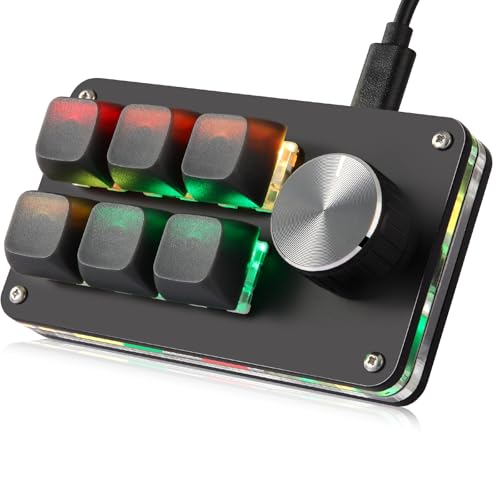
The Koolertron 6-key, 1-knob macro pad is the balanced pick: six hot-swap blue-switch keys plus a knob, each programmable, with up to 16 macros of up to 500 characters and 6 stored layers. RGB color and breathing are set in the same tool as the keys, either a web page (Windows 7-11 and macOS) or an app (Windows 10/11 and macOS); Koolertron says it does not work with Linux.
Pros
- 6-key pad: six keys plus a knob
- Six stored layers on the 6-key model
- Hot-swap blue switches
Cons
- Blue switches click loudly
- No Linux support
Good fit if
- You want a few shortcuts plus volume or zoom on a knob
- You switch between apps with layers
Skip if
- You use Linux
- You want silent keys
Verdict: The Koolertron pad with enough keys for most shortcut sets.

Koolertron Macro Programmable Keypad, One Handed Programmable Mechanical Keyboard, RGB Blue Switch Hot Swappable, 4 Keys 1 Knob Backlit Keypad for Working and Gaming, Black
Best for: A few shortcuts
- Backlighting
- RGB
- Switch Type
- Blue Switch
- Hot-Swap Support
- Hot-Swappable
- Media Controls
- Volume Knob
- Use
- Gaming
- Color
- Black
The Koolertron 4-key, 1-knob pad (HCY-K004) is the cheapest and smallest: four programmable blue-switch keys and a knob, with the same 16-macro, 500-character, 6-layer memory and web or app setup as the larger pads. It suits copy/paste, mute and push-to-talk style tasks. The 4-key listing does not repeat the RGB line the other pads include.
Pros
- HCY-K004: lowest price
- Same 6-layer memory as larger pads
- Knob for volume or scrolling
Cons
- Only 4 keys per layer
- HCY-K004 listing does not mention RGB
Good fit if
- You need a handful of shortcuts
- Desk space is tight
Skip if
- You want many one-press commands
- You want RGB confirmed
Verdict: A cheap 4-key pad for a few daily shortcuts.

Koolertron Macro Programmable Keypad, One Handed Programmable Mechanical Keyboard, RGB Blue Switch Hot Swappable, 16 Keys 3 Knob Backlit Keypad for Working and Gaming, Black
Best for: Editing and streaming
- Backlighting
- RGB
- Switch Type
- Blue Switch
- Hot-Swap Support
- Hot-Swappable
- Media Controls
- Volume Knob
- Use
- Gaming
- Color
- Black
The Koolertron 16-key, 3-knob pad (HCY-K016) has the most controls: 16 programmable hot-swap blue-switch keys and three knobs, for editing, streaming or game hotkeys. It shares the 16-macro, 500-character limit and 6 layers with the smaller pads, so with 16 keys per layer the macro count, not the keys, is the limit. Setup is by web or app on Windows and macOS.
Pros
- HCY-K016: 16 keys, 3 knobs
- Three knobs for volume, zoom and scrub
- 6 layers on the HCY-K016
Cons
- 16-macro limit shared across the whole pad
- Priciest Koolertron pad
Good fit if
- You edit video or audio and want several knobs
- You want one key per command
Skip if
- You need more than 16 macros
- You want a small pad
Verdict: The Koolertron pad for editing desks that need several knobs.
Koolertron Macro Programmable Keypad, One Handed Programmable Mechanical Keyboard, RGB Blue Switch Hot Swappable, 12 Keys 2 Knob Backlit Keypad for Working and Gaming, Black
Best for: Mid-size shortcut sets
- Backlighting
- RGB
- Switch Type
- Blue Switch
- Hot-Swap Support
- Hot-Swappable
- Media Controls
- Volume Knob
- Use
- Gaming
- Color
- Black
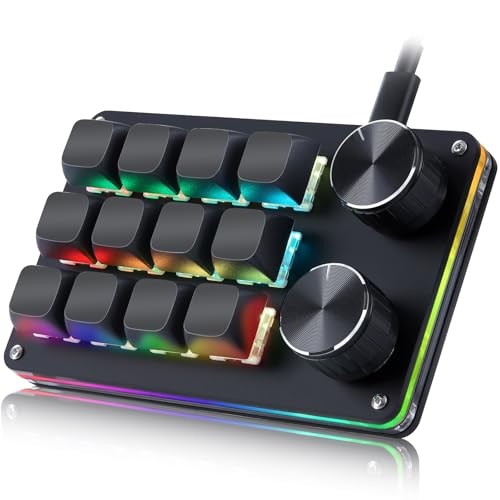
The Koolertron 12-key, 2-knob pad sits between the 6-key and 16-key models: 12 programmable hot-swap blue-switch keys, two knobs, RGB with breathing, 16 macros of up to 500 characters and 6 layers, set on the web or in the Windows/macOS app. Its offer data is a few weeks old, so check price and stock first.
Pros
- 12-key pad: two knobs
- RGB and breathing effect
- Hot-swap blue switches on the 12-key pad
Cons
- Offer data is a few weeks old
- No Linux support listed
Good fit if
- You want more keys than the 6-key pad without the 16-key size
- You want two knobs
Skip if
- You want the freshest stock data
- You need silent switches
Verdict: A middle-size pad with two knobs.
Specifications side by side
| Spec | Koolertron 6-Key Macro Keypad | Koolertron Macro Programmable Keypad, One Handed Programmable Mechanical Keyboard, RGB Blue Switch Hot Swappable, 4 Keys 1 Knob Backlit Keypad for Working and Gaming, Black | Koolertron Macro Programmable Keypad, One Handed Programmable Mechanical Keyboard, RGB Blue Switch Hot Swappable, 16 Keys 3 Knob Backlit Keypad for Working and Gaming, Black | Koolertron Macro Programmable Keypad, One Handed Programmable Mechanical Keyboard, RGB Blue Switch Hot Swappable, 12 Keys 2 Knob Backlit Keypad for Working and Gaming, Black |
|---|---|---|---|---|
| Switch Type | Mechanical Blue | not stated | not stated | not stated |
| Form Factor | 6-key | not stated | not stated | not stated |
| Backlighting | RGB | not stated | not stated | not stated |
| Hot-Swap Support | Hot-Swappable | Hot-Swappable | Hot-Swappable | Hot-Swappable |
| Media Controls | Volume Knob | Volume Knob | Volume Knob | Volume Knob |
| Use | Gaming | Gaming | Gaming | Gaming |
| Color | Black | Black | Black | Black |
| Dimensions | 6 × 1.5 × 1.5 inches | 6 × 1.5 × 1.5 inches | 6 × 1.5 × 1.5 inches | 6 × 1.5 × 1.5 inches |
| Size | 6-key (1 Knob) | 4-key (1 Knob) | 16-key (3 Knob) | 12-key (2 Knob) |
| Model | not stated | HCY-K004 | HCY-K016 | not stated |
The Koolertron lineup
HCY-K004: 4 keys, 1 knob.
6-key: 6 keys, 1 knob, RGB.
12-key: 12 keys, 2 knobs, RGB.
HCY-K016: 16 keys, 3 knobs.
All: hot-swap blue switches, 16 macros of up to 500 characters, 6 layers, web or app setup for Windows and macOS.
Where Koolertron fits
Koolertron prices its pads with the budget macro-pad brands such as BTXETUEL and LUKCOZMO, and sells one design in four sizes, which makes it easy to pick by key count. Choose the 4- or 6-key pad for a few daily shortcuts, and the 12- or 16-key pad if you edit media and want knobs for scrubbing and zoom. Buyers who need wireless pads or Linux support should look at other brands.
Choosing a Koolertron macro pad
-
Key count
4, 6, 12 or 16 keys per layer; 6 layers on every model.
-
Knobs
One knob on the 4- and 6-key pads, two on the 12-key, three on the 16-key.
-
Macro limit
Every model stores up to 16 macros of up to 500 characters, so plain key shortcuts are the best use of the larger pads.
-
Setup
Web setup for Windows 7-11 and macOS, app setup for Windows 10/11 and macOS; Linux is not supported.
-
Switches
All use clicky blue switches on hot-swap sockets, so you can fit quieter switches later.
-
Size data
The listings copy one size (6 x 1.5 x 1.5 in) onto every model; it cannot be right for all of them.
Frequently asked questions
Is a Koolertron macro pad a keyboard?
It is a small add-on pad for shortcuts and macros, used next to your main keyboard.
How many macros can a Koolertron pad store?
Up to 16 macros of up to 500 characters each, on every key count.
Do Koolertron macro pads work on Mac?
Yes, both the web setup and the app support macOS; Linux is not supported.
Can I change the switches on a Koolertron pad?
Yes, Koolertron lists hot-swap sockets, and the keycaps and switches are removable.
Which Koolertron pad has the most knobs?
The 16-key HCY-K016, with three knobs.