Koolertron 6-Key Macro Keypad Review (2026): A Spec-Based Look
As an Amazon Associate we earn from qualifying purchases. Links on this page are affiliate links.
The Koolertron 6-key macro keypad is a small one-hand pad with six mechanical keys and one knob, about 6 by 1.5 inches. This listing uses blue switches, which click, and the sockets are hot-swappable, so keycaps and switches can be pulled and replaced. Our pick for whom: someone who wants a few one-press shortcuts for work or games, plus a knob for volume or scrolling, without a large board. It holds up to 16 macros of up to 500 characters each and six layers of key settings stored on the pad. Setup runs in a web tool on Windows 7 to 11 and macOS or in a desktop app on Windows 10/11 and macOS; Linux is not supported. Facts come from Koolertron's listing, not hands-on testing.
What stands out
- 6-key pad: 6 keys plus 1 knob
- Blue clicky switches, hot-swap
- 16 macros, 500 characters each
- 6 layers stored on the pad
- Web or app setup; no Linux
Who it fits
Good fit for
Office users, streamers and gamers who want a handful of shortcut keys and a knob in a tiny footprint.
Who should skip it
Linux users, people in shared quiet rooms, and anyone who needs dozens of keys.
Verdict: A tidy, flexible shortcut pad for small jobs; the blue switches are loud.
Koolertron 6-key specs explained
6 keys + 1 knob
Each key and the knob take any command.
Blue switches
Clicky mechanical switches, removable.
Hot-swap
Switches and keycaps come out without soldering.
16 macros
Up to 500 characters per macro.
6 layers
Stored on the pad, switched in web or app.
Size
About 6 x 1.5 x 1.5 in.
6-key pad build
The pad is a black bar of six keys with a knob, about 6 inches long and 1.5 inches deep, small enough to sit between keyboard and mouse or beside a drawing tablet. All keycaps and switches can be removed, so the blue switches can be traded for quieter ones. RGB lighting color can be set in the web tool or software, with a breathing effect that can be turned on or off. Koolertron gives no weight or cable length.
Setting up the 6-key pad
Each of the six keys and the knob can be assigned a shortcut, a key combination or a macro of up to 500 characters, enough for text snippets or code templates. Six layers give 36 key settings in all, switched from the web page or app. Settings are stored on the pad. Choose the 6-key Koolertron for a few shortcuts and a knob at a low price; choose the HUION Keydial Mini if you want 18 keys, a dial and Bluetooth for drawing work.
Koolertron 6-key: before you buy
Check these points first:
Check before you buy
- Six Koolertron keys and a knob are enough
- Blue switch clicks on the 6-key pad are OK
- You run Windows or macOS, not Linux
- You are fine setting macros in a web tool
The product at a glance
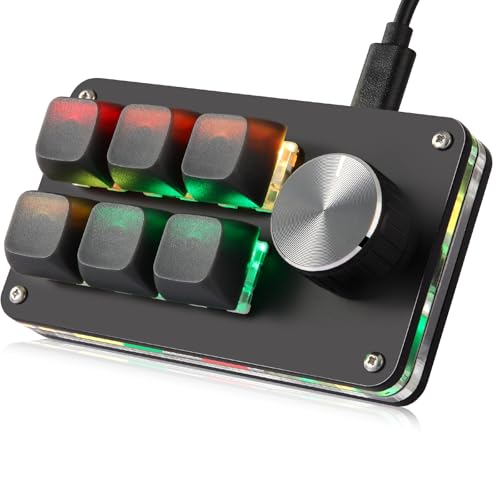
Koolertron 6-Key Macro Keypad
Best for: Small macro pad
- Switch Type
- Mechanical Blue
- Form Factor
- 6-key
- Backlighting
- RGB
- Hot-Swap Support
- Hot-Swappable
- Media Controls
- Volume Knob
- Use
- Gaming
View on Amazon: Koolertron 6-Key Macro Keypad Affiliate link
Koolertron 6-key macro keypad (blue switch, 1 knob): a compact hot-swap shortcut pad with 16 macros of up to 500 characters, six layers and RGB.
Pros
- Knob plus six keys
- Hot-swap switches
- Long text macros
Cons
- Blue switches are loud
- No Linux support
- No weight listed
Good fit if
- You want a few shortcuts
- You like a volume knob
Skip if
- You use Linux
- You need many keys
Verdict: A small, flexible shortcut pad.
Specifications side by side
| Spec | Koolertron 6-Key Macro Keypad |
|---|---|
| Switch Type | Mechanical Blue |
| Form Factor | 6-key |
| Backlighting | RGB |
| Hot-Swap Support | Hot-Swappable |
| Media Controls | Volume Knob |
| Use | Gaming |
| Color | Black |
| Dimensions | 6 × 1.5 × 1.5 inches |
| Size | 6-key (1 Knob) |
If you came here looking for a keypad that locks a door rather than one that runs macros, our yale digital keypad deadbolt review covers that product.
Frequently asked questions
How many macros does the Koolertron 6-key keypad store?
Up to 16 macros, each up to 500 characters.
Is the Koolertron 6-key keypad hot-swappable?
Yes. The 6-key pad's switches and keycaps are removable.
Does the Koolertron 6-key pad work on Linux?
No. Koolertron lists Windows and macOS only for the 6-key pad.
What switches are on the Koolertron 6-key pad?
Blue mechanical switches, which are clicky.
How many layers does the 6-key keypad have?
Six layers, stored on the Koolertron pad.