Best SOLAKAKA Mechanical Keyboards: 3 Models Compared
As an Amazon Associate we earn from qualifying purchases. Links on this page are affiliate links.
This guide compares 3 SOLAKAKA mechanical keyboards to help you find the best model for your setup. We evaluate each option strictly by the specifications published on the listings, focusing on practical features like connectivity and layout. SOLAKAKA offers compact and 96% layouts with RGB backlighting and gasket mount designs. The top pick is the SOLAKAKA 96% Wireless Mechanical Keyboard, which leads because it provides dedicated volume controls and screen feedback for users who value tactile adjustments.
Quick picks
| # | Product | Best for | Price |
|---|---|---|---|
| 1 | SOLAKAKA 96% Wireless Mechanical Keyboard Best overall | Users wanting screen feedback and volume controls | Check price of SOLAKAKA 96% Wireless Mechanical Keyboard on Amazon |
| 2 | SOLAKAKA 96% Wireless Gasket Mechanical Keyboard Best budget | Compact layouts with number pads and hot-swap support | Check price of SOLAKAKA 96% Wireless Gasket Mechanical Keyboard on Amazon |
| 3 | SOLAKAKA A75 Compact Wireless Keyboard Also great | Compact setups requiring a media knob | Check price of SOLAKAKA A75 Compact Wireless Keyboard on Amazon |
Our 3 picks

SOLAKAKA 96% Wireless Mechanical Keyboard
Best for: Users wanting screen feedback and volume controls
- Form Factor
- 96%
- Connectivity
- 2.4GHz, BT 5.0, USB-C
- Backlighting
- RGB
- Keycap Material
- Double-shot PBT
- Hot-Swap Support
- Hot-Swappable
- Mounting Style
- Gasket Mount
View on Amazon: SOLAKAKA 96% Wireless Mechanical Keyboard Affiliate link
The SOLAKAKA A99 Pro is a 96% wireless mechanical keyboard featuring a built-in LCD screen and a metal volume knob. It supports tri-mode connectivity via Bluetooth 5.0, 2.4GHz, and USB-C, allowing you to switch between five devices. The gasket mount structure and hot-swappable switches provide a customizable typing experience. With an 8000mAh battery and double-shot PBT keycaps, it suits users who want advanced controls and durability.
Pros
- Tri-mode connectivity for up to five devices
- Integrated LCD display for system status
- Metal multifunctional volume knob
- Full hot-swappable 3/5-pin switch support
- 8000mAh battery with long endurance
Cons
- Web driver requires a wired connection for setup
- South-facing LEDs may limit switch compatibility
- LCD screen reduces available key space
Good fit if
- You want a dedicated volume knob and LCD screen
- You need to switch between multiple devices frequently
- You prefer a gasket mount for a softer typing feel
Skip if
- You require a standard Bluetooth app for configuration
- You prefer a smaller 75% layout for more desk space
- You want north-facing LEDs for maximum switch support
Verdict: The SOLAKAKA A99 Pro 96% Wireless Keyboard fits users who value tactile controls and screen feedback. Its gasket mount and hot-swap capability make it ideal for typists who want a refined, customizable experience without sacrificing connectivity options.
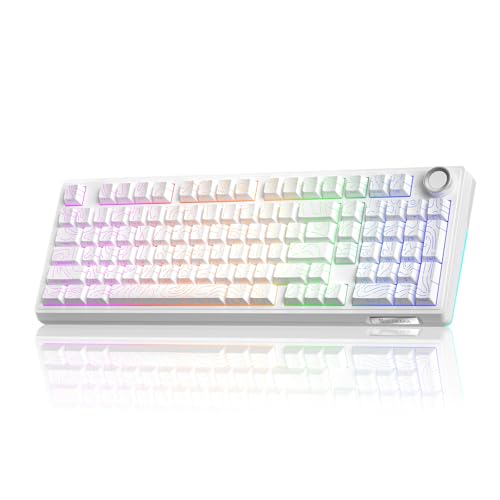
SOLAKAKA 96% Wireless Gasket Mechanical Keyboard
Best for: Compact layouts with number pads and hot-swap support
- Form Factor
- 96%
- Connectivity
- Bluetooth 5.0, 2.4GHz, USB-C wired
- Backlighting
- RGB
- Keycap Material
- Double-shot PBT
- Hot-Swap Support
- Hot-Swappable
- Mounting Style
- Gasket Mount
View on Amazon: SOLAKAKA 96% Wireless Gasket Mechanical Keyboard Affiliate link
The SOLAKAKA KI99 Pro is a 96% wireless mechanical keyboard with triple-mode connectivity via Bluetooth 5.0, 2.4GHz, or USB-C. It features a 10,000mAh battery, hot-swappable switches, and a gasket mount with five-layer noise reduction. The included multifunctional knob and customizable RGB lighting make it suitable for users seeking a compact layout with extensive customization options for gaming or office work.
Pros
- Triple-mode connectivity including Bluetooth 5.0, 2.4GHz, and USB-C wired
- 10,000mAh battery capacity for extended wireless use
- Hot-swappable PCB supports 3/5-pin switch replacement without soldering
- Gasket mount structure with five-layer noise reduction
- Multifunctional knob for volume and media control
Cons
- 96% layout lacks dedicated number pad
- Driver software required for full customization
- Non-silent version available in standard configuration
Good fit if
- You want a compact 96% layout with a number pad
- You need a large battery for wireless gaming
- You prefer hot-swappable switches for customization
Skip if
- You require a full-size keyboard with a dedicated numpad
- You prefer silent switches for quiet environments
- You want a keyboard without software dependencies
Verdict: The SOLAKAKA KI99 Pro 96% Wireless Keyboard suits users who need a compact layout with a number pad and long battery life. Its hot-swap capability and gasket mount offer flexibility for custom typing experiences.

SOLAKAKA A75 Compact Wireless Keyboard
Best for: Compact setups requiring a media knob
- Switch Type
- LEOBOG reaper
- Form Factor
- 75%
- Connectivity
- 2.4GHz, Bluetooth 5.0, USB-C wired
- Backlighting
- RGB
- Keycap Material
- Double injection, heat sublimation PBT
- Hot-Swap Support
- Hot-Swappable
View on Amazon: SOLAKAKA A75 Compact Wireless Keyboard Affiliate link
The SOLAKAKA A75 is a compact 75% mechanical keyboard featuring a multifunction metal knob and tri-mode connectivity. It supports 2.4GHz, Bluetooth 5.0, and USB-C wired connections for up to five devices. The board uses a gasket mount structure with LEOBOG Reaper switches and hot-swappable sockets. A 4000mAh battery powers the RGB backlighting and double injection PBT keycaps. This model suits users who want a space-saving layout with dedicated media controls.
Pros
- Tri-mode connectivity with simultaneous support for up to five devices
- Gasket mount structure with IXPE and PO sound-absorbing materials
- Hot-swappable PCB supporting 3-pin and 5-pin switches
- Multifunction metal knob for volume and brightness adjustments
- 4000mAh battery capacity for extended wireless use
Cons
- 75% layout omits the number pad for users needing numeric input
- Customization software only supports Windows, limiting Mac and iOS configuration
- South-facing switches may restrict compatibility with some thick keycaps
Good fit if
- You need a compact keyboard that retains arrow keys
- You want a physical knob for quick volume or brightness control
- You prefer hot-swappable switches for easy customization
Skip if
- You require a full-size keyboard with a dedicated number pad
- You primarily use Mac or iOS and need native software support
- You prefer a wired-only connection without wireless options
Verdict: The SOLAKAKA A75 Compact 75% Keyboard fits users who want a space-saving layout with a metal knob and hot-swap capability. It is ideal for those who value tri-mode connectivity and a gasket mount feel.
Specifications side by side
| Spec | SOLAKAKA 96% Wireless Mechanical Keyboard | SOLAKAKA 96% Wireless Gasket Mechanical Keyboard | SOLAKAKA A75 Compact Wireless Keyboard |
|---|---|---|---|
| Switch Type | not stated | not stated | LEOBOG reaper |
| Form Factor | 96% | 96% | 75% |
| Connectivity | 2.4GHz, BT 5.0, USB-C | Bluetooth 5.0, 2.4GHz, USB-C wired | 2.4GHz, Bluetooth 5.0, USB-C wired |
| Backlighting | RGB | RGB | RGB |
| Keycap Material | Double-shot PBT | Double-shot PBT | Double injection, heat sublimation PBT |
| Hot-Swap Support | Hot-Swappable | Hot-Swappable | Hot-Swappable |
| Mounting Style | Gasket Mount | Gasket Mount | Gasket Mount |
| Media Controls | Volume Knob | not stated | Volume Knob |
| Use | Gaming | Gaming | Gaming |
| Operating System | Mac, Windows | not stated | Mac, Windows |
| Noise Level | not stated | Silent | not stated |
| Dimensions | not stated | not stated | 12.8 × 5.51 × 1.73 inches |
| Color | Milk Coffee Brown | Contour-Style White | Gradient-BluePurple |
| Model | A99 Pro | KI99PRO | A75-Gradient-BluePurple |
| Size | not stated | Non-Silent Version | not stated |
SOLAKAKA Keyboards Compared
All three models feature wireless connectivity, RGB backlighting, and gasket mount construction. This shared design ensures a consistent typing feel and modern lighting across the lineup. You can choose based on layout size and specific control needs rather than basic build quality.
The SOLAKAKA A99 Pro offers a 96% layout with a dedicated volume knob and screen feedback. The KI99 Pro also uses a 96% layout but focuses on silent performance and battery life. For smaller desks, the A75 provides a compact 75% form factor with a metal volume knob. Each model supports hot-swappable switches for easy customization.
Who SOLAKAKA Keyboards Suit
SOLAKAKA covers three form factors, from the compact A75 at 12.8 inches to the full-size 96% A99 Pro and KI99 Pro. All models include RGB backlighting and gasket mounts for a consistent feel. You can choose based on space needs, with options ranging from 75% to 96% layouts. Each keyboard supports hot-swappable switches and wireless connectivity. While the A75 and A99 Pro offer volume knobs, the KI99 Pro does not. The brand currently lacks 60% or tenkeyless sizes in this list. All models support Mac and Windows systems.
If you need an integrated display rather than a standalone board, compare specs for the best tablets with keyboard.
How to choose the right SOLAKAKA keyboard
-
Check layout size first
Start by measuring your desk space. The SOLAKAKA A75 measures 12.8 inches in length, making it the most compact option for tight setups. The other two models use a 96% layout, which retains a number pad while saving space compared to full-size boards. If you need numeric input, the 96% models are the practical choice. If you prioritize maximum desk real estate, the smaller A75 is the better fit. Measure your available width before deciding.
-
Verify wireless connectivity
All three SOLAKAKA models rely on wireless connectivity, meaning you will need to manage charging or battery replacement. This setup reduces cable clutter on your desk. You should ensure your workspace has easy access to a charging cable or power source. The wireless nature allows you to move the keyboard freely. Consider your charging habits and whether you prefer a corded connection for zero latency during competitive gaming sessions.
-
Look for hot-swap sockets
Hot-swap support allows you to change mechanical switches without soldering. All models in this list feature hot-swappable sockets. This specification is crucial if you want to experiment with different switch feels or replace a faulty switch later. It offers long-term customization flexibility. You do not need technical soldering skills to modify the board. This feature makes the keyboard more adaptable to your changing preferences over time.
-
Evaluate mounting style
Every model here uses a gasket mount design. This construction method suspends the PCB within the case, which typically reduces vibration and creates a softer typing sound. It is a consistent feature across the entire lineup. You do not need to compare this spec between models since they all share it. The gasket mount contributes to a refined tactile experience. It is a key factor for users who prioritize acoustic quality and typing comfort.
-
Check for media controls
Physical media controls add convenience for daily tasks. The A99 Pro and A75 both include a dedicated volume knob. This allows you to adjust audio levels without using software or keyboard shortcuts. The KI99 Pro lacks this specific physical control in its listed attributes. If you frequently adjust volume during gaming or meetings, the knob is a significant practical advantage. Check the attribute list to confirm which model includes this hardware feature.
Frequently asked questions
Does the SOLAKAKA A99 Pro support Mac and Windows?
Yes, the SOLAKAKA A99 Pro supports both Mac and Windows operating systems. This compatibility allows you to use the keyboard across different devices without needing separate hardware. The wireless connectivity ensures easy switching between platforms while maintaining full functionality for typing and gaming tasks.
Is the SOLAKAKA A75 keyboard compatible with mechanical switches?
Yes, the SOLAKAKA A75 features hot-swappable support for mechanical switches. This means you can change individual switches without soldering, allowing for easy customization of your typing feel. You can experiment with different switch types to find the perfect balance of tactile feedback and sound profile.
Which SOLAKAKA model includes a volume knob?
Both the SOLAKAKA A99 Pro and the A75 include a volume knob for media controls. This physical control lets you adjust audio levels quickly without navigating software menus. It provides tactile feedback for precise volume adjustments, which is useful during gaming sessions or media consumption.
What mounting style do SOLAKAKA keyboards use?
All three SOLAKAKA models use a gasket mount style. This construction method suspends the PCB between the top and bottom cases, reducing vibration and creating a softer, more flexible typing feel. It helps isolate the switches from the case, resulting in a cleaner acoustic profile.
Does the SOLAKAKA KI99 Pro have silent switches?
The SOLAKAKA KI99 Pro is available in a non-silent version, while other variants may offer silent options. You should check the specific listing for the silent version if quiet typing is a priority. The gasket mount and wireless connectivity remain consistent across the different switch configurations.
How large is the SOLAKAKA A75 keyboard?
The SOLAKAKA A75 measures 12.8 inches in length, 5.51 inches in width, and 1.73 inches in height. This compact 75% form factor saves significant desk space compared to the 96% models. It is ideal for users with limited workspace who still want arrow keys and function rows.
Do SOLAKAKA keyboards feature RGB backlighting?
Yes, all models in the SOLAKAKA lineup feature RGB backlighting. This allows you to customize the color and lighting effects to match your setup or mood. The consistent inclusion of RGB across the range ensures visual customization is available regardless of which layout or size you choose.