SOLAKAKA 96% Wireless Mechanical Keyboard or SOLAKAKA 96% Wireless Gasket Mechanical Keyboard? Which SOLAKAKA Model to Buy
As an Amazon Associate we earn from qualifying purchases. Links on this page are affiliate links.
This comparison looks at the solakaka a99 pro mechanical keyboard vs ki99 pro 96 wireless options. Both models share a 96% layout, gasket mounting, and triple-mode connectivity. They also offer hot-swappable switches and double-shot PBT keycaps. The main difference lies in their battery capacity and interface. The A99 Pro includes an LCD screen and metal knob with an 8000mAh battery. The KI99 Pro relies on a larger 10,000mAh battery but lacks the visual display.
Key differences
| Aspect | SOLAKAKA 96% Wireless Mechanical Keyboard | SOLAKAKA 96% Wireless Gasket Mechanical Keyboard |
|---|---|---|
| Battery Capacity | 8000mAh | 10,000mAh |
| Visual Interface | LCD screen with metal knob | No screen; knob only |
| PCB Structure | Standard gasket with cushioning pads | 1.2mm flex-cut PCB with PC board |
| Noise Level | Creamy sound (not listed as silent) | Silent version available |
| Color Options | 3 colors | 6 colors |
Which one should you choose?
Choose SOLAKAKA 96% Wireless Mechanical Keyboard if
- You want an LCD screen to check battery and connection status at a glance
- You prefer a metal knob for direct volume and lighting control without software
- You are satisfied with 8000mAh battery life for your usage patterns
Choose SOLAKAKA 96% Wireless Gasket Mechanical Keyboard if
- You need the longest possible battery life with 10,000mAh capacity
- You prefer a silent typing experience with the available silent switch option
- You want more color variety to match your desk setup
Verdict: Choose the A99 Pro if you value immediate visual feedback and tactile knob control. Pick the KI99 Pro if maximum battery endurance and a quieter typing profile are your priorities. Both keyboards deliver similar core performance through their gasket mounts and hot-swap capabilities.
Battery and Display Comparison
Battery Capacity
The SOLAKAKA A99 Pro includes an 8000mAh rechargeable battery. This capacity provides approximately 61 hours of use when the backlighting is active. If you turn off the lights, the battery lasts around 170 hours. The SOLAKAKA KI99 Pro features a larger 10,000mAh battery. This higher capacity reduces how often you need to charge the device. It ensures reliable performance during long work sessions or gaming marathons without frequent interruptions. A larger battery generally means longer uptime between charges for both wireless and wired use cases.
Display and Controls
The SOLAKAKA A99 Pro stands out with an integrated LCD display. This screen shows the date, time, battery level, connected system, and connection mode. It also features a multifunctional metal knob for adjusting volume, switching systems, and changing lighting modes. The SOLAKAKA KI99 Pro lacks a display. It relies on a multifunctional knob for volume and media control. While both have knobs, the A99 Pro offers more visual feedback through its screen. This allows you to check status without using software or other devices.
Switch Options
The SOLAKAKA A99 Pro comes with LEOBOG star vector switches. These are pre-lubricated for smooth typing. The SOLAKAKA KI99 Pro offers two switch options: a Non-Silent Version and a Silent Switch. The data indicates the KI99 Pro supports silent switches, which reduces noise during typing. The A99 Pro does not mention a silent switch variant in its provided specifications. If you prefer a quieter typing experience, the KI99 Pro provides a specific option for that. The A99 Pro focuses on vector switches for smoothness.
PCB Design
The SOLAKAKA KI99 Pro uses a 1.2mm flex-cut PCB made of PC material. This design contributes to a unique sound resonance and enhanced typing feel. It also supports flexible customization for switch replacement. The SOLAKAKA A99 Pro utilizes a PCB with single-key slotting. This process helps in noise dampening when combined with the five layers of cushioning pads. Both designs aim to improve acoustics and feel. The KI99 Pro highlights the flex-cut aspect, while the A99 Pro emphasizes the slotting process for stability and noise reduction.
Software Access
The SOLAKAKA A99 Pro uses a web driver accessible at solakakadriver.com. You must use a wired connection to access this webpage for customization. It allows setting sleep time, key mapping, and adding GIF images to the screen. The SOLAKAKA KI99 Pro supports driver software for reprogramming keys, adjusting RGB effects, and macro programming. The data does not specify if the KI99 Pro requires a web driver or a downloadable application. Both offer customization, but the A99 Pro explicitly mentions a web-based approach requiring a wired link.
Choose the SOLAKAKA Model for You
Users wanting screen and knob control
The A99 Pro includes an LCD display showing battery, time, and connection status. It also features a multifunctional metal knob for volume and lighting adjustments. You get direct visual feedback and tactile controls without needing software for basic settings, making daily interaction more intuitive and efficient.
Users prioritizing battery life and silence
The KI99 Pro offers a larger 10,000mAh battery for longer usage between charges. It is available in a silent switch version to reduce typing noise. This combination provides extended power and a quieter environment, ideal for shared spaces or users who prefer a softer acoustic profile during long sessions.
Users needing broad device compatibility
The A99 Pro supports up to five simultaneous device connections and works with Windows, iOS, Mac, and Android systems. This broad compatibility allows you to switch seamlessly between a desktop, laptop, tablet, and phone. You retain full functionality across multiple operating systems without pairing limitations.
The products compared

SOLAKAKA 96% Wireless Mechanical Keyboard
Best for: Users wanting hardware controls and status display
- Form Factor
- 96%
- Connectivity
- 2.4GHz, BT 5.0, USB-C
- Backlighting
- RGB
- Keycap Material
- Double-shot PBT
- Hot-Swap Support
- Hot-Swappable
- Mounting Style
- Gasket Mount
View on Amazon: SOLAKAKA 96% Wireless Mechanical Keyboard Affiliate link
The SOLAKAKA A99 Pro is a 96% wireless mechanical keyboard featuring a gasket mount structure and an LCD screen with a metal knob. It connects via Bluetooth 5.0, 2.4GHz, or USB-C. The board includes an 8000mAh battery, hot-swappable switches, and PBT keycaps. You get programmable functions through a web driver. This model suits users who want detailed status visibility and customizable hardware without installing software.
Pros
- 96% layout with 97 keys and numeric keypad
- Tri-mode connectivity with 5-device memory
- Gasket mount with five layers of cushioning
- Full hot-swappable for 3/5-pin switches
- LCD screen and metal knob for controls
Cons
- Web driver requires a wired connection to access
- Side RGB lighting adds to power consumption
- No dedicated software application for configuration
Good fit if
- You want a metal knob for volume and mode control
- You need to monitor battery and connection status on the LCD
- You prefer gasket mounting for a softer typing feel
Skip if
- You require a dedicated desktop application for programming
- You prefer a smaller tenkeyless layout without a numpad
- You want a keyboard with a simpler, non-LCD design
Verdict: The SOLAKAKA A99 Pro 96% Gasket Keyboard fits users who value tactile feedback and hardware controls. The LCD screen and metal knob provide immediate access to settings without needing a computer connection.
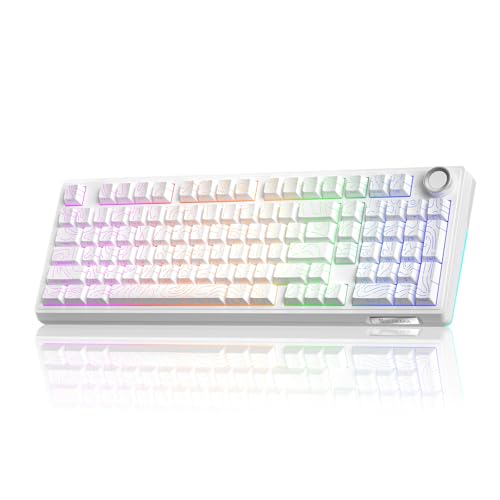
SOLAKAKA 96% Wireless Gasket Mechanical Keyboard
Best for: compact layouts with gasket mount and knob
- Form Factor
- 96%
- Connectivity
- Bluetooth 5.0, 2.4GHz, USB-C wired
- Backlighting
- RGB
- Keycap Material
- Double-shot PBT
- Hot-Swap Support
- Hot-Swappable
- Mounting Style
- Gasket Mount
View on Amazon: SOLAKAKA 96% Wireless Gasket Mechanical Keyboard Affiliate link
The SOLAKAKA KI99 Pro is a 96% wireless mechanical keyboard with a gasket mount and five-layer noise reduction. It features hot-swappable switches, double-shot PBT keycaps, and a multifunctional knob. Triple-mode connectivity includes Bluetooth 5.0, 2.4GHz, and USB-C. The 10,000mAh battery supports long use. Driver software allows RGB and macro customization. This model suits users who want a compact layout with a tactile knob and customizable switches.
Pros
- 96% layout with multifunctional knob for volume and media control
- Gasket structure with five-layer noise reduction for a creamy typing feel
- 10,000mAh battery with Bluetooth 5.0, 2.4GHz, and USB-C wired options
- Hot-swappable 1.2mm PCB supports 3/5-pin switch replacement without soldering
- Double-shot PBT keycaps for wear resistance and clear legends
Cons
- Non-Silent Version switches may produce louder clicks than silent alternatives
- No LCD screen or metal knob found on the comparable A99 Pro model
- Driver software required for full RGB and macro customization
Good fit if
- You want a compact 96% layout with a dedicated volume knob
- You prefer a gasket mount for improved typing acoustics
- You need hot-swappable switches for easy customization
Skip if
- You require an LCD screen or metal knob for device control
- You prefer silent switches for quiet office environments
- You want a full-size keyboard without a compact layout
Verdict: SOLAKAKA KI99 Pro 96% Wireless Gasket Keyboard fits users who prioritize a gasket mount and hot-swap capability over an LCD screen. It is ideal for those who want a compact layout with a multifunctional knob and customizable switches.
Specifications side by side
| Spec | SOLAKAKA 96% Wireless Mechanical Keyboard | SOLAKAKA 96% Wireless Gasket Mechanical Keyboard |
|---|---|---|
| Form Factor | 96% | 96% |
| Connectivity | 2.4GHz, BT 5.0, USB-C | Bluetooth 5.0, 2.4GHz, USB-C wired |
| Backlighting | RGB | RGB |
| Keycap Material | Double-shot PBT | Double-shot PBT |
| Hot-Swap Support | Hot-Swappable | Hot-Swappable |
| Mounting Style | Gasket Mount | Gasket Mount |
| Media Controls | Volume Knob | not stated |
| Use | Gaming | Gaming |
| Operating System | Mac, Windows | not stated |
| Noise Level | not stated | Silent |
| Color | Milk Coffee Brown | Contour-Style White |
| Model | A99 Pro | KI99PRO |
| Size | not stated | Non-Silent Version |
Frequently asked questions
Does the SOLAKAKA A99 Pro support Mac and Windows?
Yes, the A99 Pro is compatible with both Mac and Windows operating systems. This dual support allows you to use the keyboard with various computers without needing specific drivers. You can switch between platforms easily, making it a versatile choice for users with mixed device setups.
Is the SOLAKAKA KI99 Pro silent?
The standard version of the KI99 Pro is not silent, as it is listed as the non-silent version. However, the product data notes a silent noise level attribute, which likely refers to the available switch options. You can choose silent switches for quieter typing if that is your priority.
Can I change the switches on the SOLAKAKA 96% keyboards?
Yes, both the A99 Pro and the KI99 Pro are hot-swappable. This feature lets you remove and replace mechanical switches without soldering. You can customize the feel and sound of your keyboard by installing different switch types, allowing for personalization based on your typing preferences.
What mounting style do these SOLAKAKA keyboards use?
Both models feature a gasket mount design. This mounting style isolates the PCB from the case using soft gaskets, which reduces vibration and creates a softer, more flexible typing feel. You will notice a distinct acoustic profile and reduced bottom-out harshness compared to traditional mounting methods.
Does the A99 Pro have a volume knob?
Yes, the A99 Pro includes a multifunctional metal knob for media controls. You can use this knob to adjust volume levels and manage lighting effects directly on the keyboard. This hardware control provides immediate access to settings without needing to use your computer or software.
What backlighting options are available on these keyboards?
Both the A99 Pro and the KI99 Pro offer RGB backlighting. You can customize the colors and lighting effects to match your setup or mood. The RGB feature adds visual appeal and helps you see keys in low-light conditions, enhancing the overall user experience during gaming or work.