The 9 Best YIVU Split Mechanical Keyboards in 2026
As an Amazon Associate we earn from qualifying purchases. Links on this page are affiliate links.
YIVU sells compact split keyboards for people who want each hand on its own half and do not mind learning a smaller layout. Our top pick is the Corne V4, because it arrives with pre-lubed linear switches, hot-swap sockets for 3-pin or 5-pin switches and QMK/Vial programming for $89 at our last check. The cheapest entry is the $45 Corne V4 barebone kit, but that price leaves out switches and keycaps. For fewer cables, compare the wireless Sofle and Corne Wireless. These 9 picks rely on listed specs and prices. We have not typed on them.
Our top pick: YIVU Corne Split 40% Mechanical Keyboard.
Quick picks
Our 9 picks
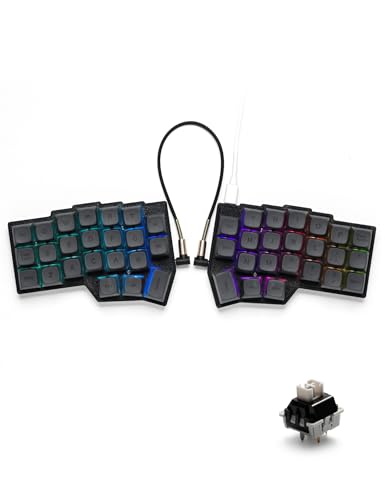
YIVU Corne Split 40% Mechanical Keyboard
Best for: Most split-keyboard buyers
- Switch Type
- Pre-lubricated linear
- Form Factor
- 40% split ortholinear
- Connectivity
- USB-C wired
- Backlighting
- RGB
- Hot-Swap Support
- Hot-Swappable
- Use
- Gaming
View on Amazon: YIVU Corne Split 40% Mechanical Keyboard Affiliate link
The Corne V4 is our top pick for most people. This wired 40% split board uses a 3x6 layout with three thumb keys per hand, and it arrives with pre-lubed 40g linear switches. Its hot-swap sockets accept 3-pin or 5-pin switches, and Vial handles remapping and 45 preset lighting modes.
Pros
- Ready to use with pre-lubed switches
- Hot-swap for 3-pin and 5-pin switches
- QMK/Vial programmable
- Puller included
Cons
- Wired only
- Layout takes time to learn
Good fit if
- You want a ready-to-use split board
- You want to remap keys in a graphical tool
Skip if
- You want a number row
- You need wireless
Verdict: The easiest place to start with YIVU.

YIVU Corne Split Ergonomic Barebone Kit
Best for: Builders with spare parts
- Connectivity
- Wired
- Backlighting
- RGB
- Case Material
- 3D printed
- Hot-Swap Support
- Hot-Swappable
- Design
- Ergonomic
- Color
- Black
View on Amazon: YIVU Corne Split Ergonomic Barebone Kit Affiliate link
This barebone Corne V4 kit was the lowest-priced product here at our last check, but the price leaves out MX switches and keycaps. You get the two split halves, an interconnect cable and a 3D printed case. The hot-swap PCB takes 3-pin or 5-pin switches, and it supports QMK/Vial.
Pros
- Lowest price here at last check
- Hot-swap PCB needs no soldering
- QMK/Vial programmable
- Per-key RGB
Cons
- Switches and keycaps cost extra
- 3D printed case
Good fit if
- You already own switches and keycaps
- You enjoy building
Skip if
- You want a ready-to-use board
- You want a metal or molded case
Verdict: Good value if you already have parts to use.

YIVU 40% Wired Split Keyboard
Best for: Experienced layer users
- Switch Type
- Linear
- Form Factor
- 40%
- Connectivity
- USB wired
- Backlighting
- RGB
- Keycap Material
- PBT
- Hot-Swap Support
- Hot-Swappable
View on Amazon: YIVU 40% Wired Split Keyboard Affiliate link
This 3x5 board has fewer keys than the Corne V4 because it drops the outer column. It keeps three thumb keys per hand, and it arrives with PBT keycaps and 40g pre-lubed linear switches. It is hot-swappable for 3-pin and 5-pin switches, uses a 1.5-meter USB-C cable and supports QMK/Vial.
Pros
- PBT keycaps
- Hot-swap for 3-pin and 5-pin switches
- QMK/Vial programmable
- Lower price than the Corne V4
Cons
- Fewer keys mean more use of layers
- Wired only
Good fit if
- You want a very small layout
- You are comfortable with layers
Skip if
- You are new to split keyboards
- You want an outer column
Verdict: Best for people already comfortable with layers.

YIVU Corne 40% Split Mechanical Keyboard
Best for: An alternative to the Corne V4
- Switch Type
- Pre-lubed linear
- Form Factor
- 40%
- Connectivity
- Wired Type-C
- Backlighting
- RGB
- Hot-Swap Support
- Hot-Swappable
- Design
- Ergonomic
View on Amazon: YIVU Corne 40% Split Mechanical Keyboard Affiliate link
The Corne V4.1 keeps the 3x6 columnar-stagger layout and adds south-facing per-key RGB. It works with 3-pin and 5-pin MX-style switches and arrives with pre-lubed linear switches. The Vial software works on the web or desktop for real-time remapping, and the connection is wired by USB-C.
Pros
- Vial on web or desktop
- South-facing RGB
- Hot-swap for 3-pin and 5-pin switches
- Pre-lubed linear switches
Cons
- Same price as the Corne V4 at last check
- Stock was low at last check
Good fit if
- You want the V4.1 revision
- You use non-shine-through keycaps
Skip if
- You need wireless
- You want more keys
Verdict: A close alternative to the Corne V4 if it is available.

YIVU 36-Key Unibody Ortholinear Keyboard
Best for: A one-piece compact layout
- Form Factor
- 40%
- Connectivity
- Wired USB-C
- Hot-Swap Support
- Hot-Swappable
- Use
- Gaming
- Design
- Ergonomic
- Operating System
- Mac, Windows
View on Amazon: YIVU 36-Key Unibody Ortholinear Keyboard Affiliate link
The Unibody has a 36-key ortholinear layout, but in one piece rather than two halves. That keeps the two sides at a fixed distance, so it is easy to place and move around. It has a hot-swappable PCB, QMK/VIA support, a low-profile wired design and support for Mac, Windows and Linux.
Pros
- One-piece design
- QMK/VIA programmable
- Hot-swappable PCB
- Works on Mac, Windows and Linux
Cons
- You cannot adjust the distance between hands
- Only 36 keys
Good fit if
- You want a compact board in one piece
- You do not want a linking cable
Skip if
- You want to separate the halves
- You are new to small layouts
Verdict: A tidy option if you want the layout without two pieces.

YIVU Corne Low Profile Split Keyboard
Best for: Wired low-profile typing
- Switch Type
- Low-profile linear
- Form Factor
- 40%
- Connectivity
- USB-C wired
- Backlighting
- RGB
- Hot-Swap Support
- Hot-Swappable
- Design
- Ergonomic
View on Amazon: YIVU Corne Low Profile Split Keyboard Affiliate link
The Corne LP is the wired low-profile version. It has a 3x6 layout and pre-lubed low-profile linear switches with 40g actuation, plus a two-in-one puller. It accepts low-profile switches, so regular MX switches are not what its listing describes. Vial handles remapping and lighting.
Pros
- Low-profile switches
- 40g actuation force
- Vial programmable
- Puller included
Cons
- Costs $30 more than the Corne V4 at last check
- Listing describes low-profile switch support
Good fit if
- You prefer slim keyboards
- You like a light actuation force
Skip if
- You own regular MX switches
- You want the lowest price
Verdict: Choose it if slim keys matter more than saving money.
YIVU Borne 4x6 Split Keyboard
Best for: Easing into split keyboards
- Switch Type
- MX mechanical
- Form Factor
- 60% Split
- Connectivity
- USB-C
- Backlighting
- RGB
- Keycap Material
- PBT
- Design
- Ergonomic
View on Amazon: YIVU Borne 4x6 Split Keyboard Affiliate link
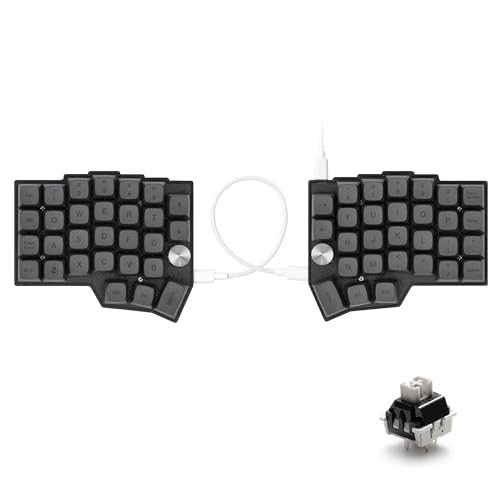
The Borne extends the Corne layout to 4x6 and adds two aluminum rotary knobs you can program for volume, scrolling or zooming. It uses an STM32F401 chip, QMK/Vial, south-facing RGB and hot-swap sockets for 3-pin or 5-pin MX switches. YIVU calls it ready to use, and its halves connect by USB-C.
Pros
- Extra row of keys
- Two programmable knobs
- Hot-swap for 3-pin and 5-pin switches
- South-facing RGB
Cons
- Costs more than the 3x6 Corne boards
- Larger than a 40% board
Good fit if
- You want a number row
- You want knobs for volume or zooming
Skip if
- You want the smallest layout
- You want wireless
Verdict: The easiest step up for people worried about 40% layouts.

YIVU Sofle Wireless Silent Split Keyboard
Best for: Quiet wireless typing
- Switch Type
- Silent mechanical
- Form Factor
- Split columnar
- Connectivity
- 2.4GHz wireless
- Hot-Swap Support
- Hot-Swappable
- Design
- Ergonomic
- Color
- White
View on Amazon: YIVU Sofle Wireless Silent Split Keyboard Affiliate link
The Sofle is a wireless split board with silent mechanical switches and a 2.4GHz USB receiver. It has a columnar-staggered layout, a hot-swappable PCB and QMK/Vial support for remapping and macros. It is a single-mode wireless design, so its listing does not offer Bluetooth.
Pros
- Silent mechanical switches
- 2.4GHz wireless
- Hot-swappable PCB
- QMK/Vial compatible
Cons
- 2.4GHz only, with no Bluetooth listed
- Stock was low at last check
Good fit if
- You work in a shared office
- You want a cable-free desk
Skip if
- You need Bluetooth
- You want to keep USB ports free
Verdict: The YIVU to choose for quiet, cable-free typing.

YIVU Corne 40% Wireless Low-Profile Split Keyboard
Best for: Portable wireless setups
- Form Factor
- 40% split
- Connectivity
- 2.4GHz wireless
- Keycap Material
- PBT
- Hot-Swap Support
- Hot-Swappable
- Design
- Ergonomic
- Operating System
- Mac, Windows
View on Amazon: YIVU Corne 40% Wireless Low-Profile Split Keyboard Affiliate link
The Corne Wireless is the most expensive pick here. It combines a 46-key 40% layout with a 2.4GHz USB dongle and a slim 1.72cm profile, plus low-profile PBT keycaps. VIA handles remapping in a web interface without installing an app, and it has hot-swappable sockets.
Pros
- 2.4GHz wireless
- Slim 1.72cm profile
- VIA web remapping
- Low-profile PBT keycaps
Cons
- Highest price here at last check
- No Bluetooth listed
Good fit if
- You want to travel with a split board
- You want no cable between you and your laptop
Skip if
- You want to spend less
- You need Bluetooth
Verdict: Worth the extra money if you want the slimmest wireless option here.
Specifications side by side
| Spec | YIVU Corne Split 40% Mechanical Keyboard | YIVU Corne Split Ergonomic Barebone Kit | YIVU 40% Wired Split Keyboard | YIVU Corne 40% Split Mechanical Keyboard | YIVU 36-Key Unibody Ortholinear Keyboard | YIVU Corne Low Profile Split Keyboard | YIVU Borne 4x6 Split Keyboard | YIVU Sofle Wireless Silent Split Keyboard | YIVU Corne 40% Wireless Low-Profile Split Keyboard |
|---|---|---|---|---|---|---|---|---|---|
| Switch Type | Pre-lubricated linear | not stated | Linear | Pre-lubed linear | not stated | Low-profile linear | MX mechanical | Silent mechanical | not stated |
| Form Factor | 40% split ortholinear | not stated | 40% | 40% | 40% | 40% | 60% Split | Split columnar | 40% split |
| Connectivity | USB-C wired | Wired | USB wired | Wired Type-C | Wired USB-C | USB-C wired | USB-C | 2.4GHz wireless | 2.4GHz wireless |
| Backlighting | RGB | RGB | RGB | RGB | not stated | RGB | RGB | not stated | not stated |
| Keycap Material | not stated | not stated | PBT | not stated | not stated | not stated | PBT | not stated | PBT |
| Case Material | not stated | 3D printed | not stated | not stated | not stated | not stated | not stated | not stated | not stated |
| Hot-Swap Support | Hot-Swappable | Hot-Swappable | Hot-Swappable | Hot-Swappable | Hot-Swappable | Hot-Swappable | not stated | Hot-Swappable | Hot-Swappable |
| Use | Gaming | not stated | Gaming | not stated | Gaming | not stated | not stated | not stated | not stated |
| Design | Ergonomic | Ergonomic | Ergonomic | Ergonomic | Ergonomic | Ergonomic | Ergonomic | Ergonomic | Ergonomic |
| Color | Black | Black | not stated | White | Black and white | White | Black | White | Black and White |
| Operating System | not stated | not stated | not stated | not stated | Mac, Windows | not stated | not stated | Mac, Windows | Mac, Windows |
| Dimensions | 5.5 × 3.86 × 1.1 inches | 5.51 × 3.87 × 1.11 inches | 4.5 × 3.8 × 1.1 inches | 5.51 × 3.87 × 1.11 inches | 10 × 4.33 × 0.67 inches | 5.51 × 3.87 × 1.33 inches | 5.51 × 4.2 × 1.11 inches | 5.51 × 3.87 × 1.11 inches | 5.51 × 3.87 × 0.68 inches |
| Model | not stated | not stated | not stated | not stated | not stated | YIVU CorneLP46 | YU-B60 | Sofle | Corne |
How YIVU's lineup breaks down
Most of these boards are built around the Corne idea: a 40% split layout with three thumb keys per hand. The Corne V4 and V4.1 use a 3x6 layout, while the smaller 36-key board uses 3x5. The Corne LP swaps to low-profile switches, and the Corne Wireless goes low-profile with a 2.4GHz dongle.
Other designs change the formula. The Borne adds an extra row and two rotary knobs, the Sofle offers silent switches and 2.4GHz wireless, and the Unibody keeps a split-style key arrangement in a single 36-key piece.
How YIVU compares with other split keyboards
YIVU's main appeal is that it sells ready-to-use versions of designs often associated with DIY builds. Most of these boards include switches and support QMK with Vial or VIA, so you can remap them without flashing firmware by hand.
The trade-off is a smaller layout. With only 36 to 46 keys on most models, you will rely on layers for numbers and symbols, and that takes practice. Several listings also repeat similar dimensions and do not make clear whether they mean one half or the full package, so do not plan your desk around them.
You might also want to review the best roland electronic keyboards for your next purchase.
How to choose a YIVU keyboard
-
Be honest about the learning curve
A 40% split board moves many keys onto layers. If you want number and function keys always available, a larger keyboard may be a better choice. The Borne's 4x6 layout is the closest to a middle ground here.
-
Choose 3x5 or 3x6
The 3x6 layout adds an outer column for keys such as Shift or Ctrl, so it is easier to switch to. The 3x5 layout has fewer keys and asks more from your layers.
-
Check low-profile compatibility
The Corne LP and Corne Wireless use a low-profile design, and the Corne LP needs low-profile switches. If you already own regular MX switches, choose a model that lists 3-pin or 5-pin MX support instead.
-
Decide if wireless is worth it
The Sofle and Corne Wireless both use a 2.4GHz USB receiver rather than Bluetooth, so plan to keep a USB port free. All the other picks here are wired.
Frequently asked questions
What is the best YIVU keyboard?
The Corne V4 is our top pick for most people because it is ready to use, hot-swappable and supports QMK/Vial. Its 3x6 layout also keeps an outer column of keys.
What is the cheapest YIVU keyboard here?
The Corne V4 barebone kit was the lowest at $45 at our last check. You must buy MX switches and keycaps separately, so the complete cost is higher.
Is there a wireless YIVU split keyboard?
Yes. The Sofle and Corne Wireless both connect through a 2.4GHz USB receiver. Neither listing mentions Bluetooth.
Can I remap keys without coding?
These listings describe remapping through Vial or VIA, which use a graphical interface. You can set layers, macros and shortcuts there without writing firmware yourself.
Will a split keyboard stop wrist pain?
We cannot promise that. A split design lets you place each half at shoulder width, but comfort varies by person. See a healthcare professional about ongoing pain.