YIVU Corne Split 40% Mechanical Keyboard Review: Specs, Pros and Cons
As an Amazon Associate we earn from qualifying purchases. Links on this page are affiliate links.
This yivu corne v4 wired split mechanical keyboard review covers a 40% ortholinear layout designed for ergonomic typing. The split design allows you to adjust spacing, tilt, and rotation to fit your hands. It uses a 3x6 column staggered layout with three thumb keys per side. The switches are pre-lubricated linear types with a 40g trigger pressure. This combination aims to reduce wrist fatigue during long sessions. You get full programmability through QMK and Vial software. The build includes hot-swappable sockets for easy switch customization.
What stands out
- Split 40% ortholinear layout with adjustable spacing and tilt
- Pre-lubricated linear switches with 40g trigger pressure
- Hot-swappable 3/5-pin socket support for Cherry MX style switches
- Full QMK/Vial programmability for remapping all keys
- 16.8 million color RGB backlighting with 45 preset modes
Who it fits
Good fit for
This keyboard suits typists and gamers who want to reduce wrist strain. The adjustable split design helps you find a comfortable hand position. Hot-swappable sockets let you customize switches without soldering. Full programmability via Vial allows you to create custom layers for faster workflows. If you prefer a compact 40% footprint and enjoy tweaking your setup, this model fits your needs. The wired connection ensures stable performance during intense sessions.
Who should skip it
You should look elsewhere if you need wireless connectivity, as this model is USB-C wired only. The layout is a 40% ortholinear split, which may feel cramped if you prefer a full-sized keyboard. The TRS cable for connecting the two halves does not support hot-swapping, so you must power down to adjust it. If you require Bluetooth or 2.4GHz wireless options, this product does not offer them. Standard numpad users will also find this layout too small.
Verdict: The YIVU Corne V4 offers a highly customizable, ergonomic split experience with hot-swap support and full programmability. It is a solid choice for those prioritizing wrist health and compact design over wireless convenience.
Key specs explained for this keyboard
Form Factor: 40% split ortholinear
This layout reduces your desk footprint by removing the number row and function keys. The split design lets you position the halves independently to match your shoulder width. You can adjust tilt and rotation to keep your wrists neutral. This setup helps reduce strain during long typing sessions. It suits users who want a compact, ergonomic workspace without a full-size board.
Switch Type: Pre-lubricated linear
Linear switches move straight down without a tactile bump or audible click. Pre-lubrication ensures a smooth, consistent keystroke from the first press to the last. The 40g trigger pressure requires less force, which can reduce finger fatigue over time. This type is ideal for quiet environments and fast gaming. It differs from clicky or tactile switches that provide more physical feedback.
Backlighting: RGB
RGB lighting allows you to choose from millions of colors and adjust brightness levels. You can create custom patterns or use preset modes like breathing or rainbow effects. This feature helps you see keys in low-light conditions. You can also sync the lighting with other peripherals for a unified look. It adds visual customization without affecting the keyboard's core typing performance or functionality.
Connectivity: USB-C wired
A wired USB-C connection provides a stable, low-latency link to your computer. It eliminates the need for battery charging or wireless pairing. The included 1.5-meter cable offers flexibility in desk setup. You can also use the TRS cable to connect the split halves. This setup is reliable for gaming and professional work where consistent input is critical.
Design and Build Quality
According to the listing, the YIVU Corne V4 features a black finish with an ergonomic design. The split construction allows you to adjust spacing, tilt, and rotation. This adjustability helps reduce wrist fatigue during long typing sessions. The layout uses a 3x6 column staggered arrangement. This places three thumb keys in an ergonomic group for efficient access. The physical dimensions are 5.5 inches in length, 3.86 inches in width, and 1.1 inches in height. These compact measurements keep the footprint small on your desk. The keyboard connects via a 1.5-meter USB-C cable. It also includes a 28-centimeter TRS cable to link the two halves. You must not connect both USB ports to your computer at the same time. The TRS cable does not support hot-swapping, so do not unplug it while powered on. The switches are pre-lubricated linear types with a 40g trigger pressure. This low force supports fast response times. The board is hot-swappable for 3/5-pin switches, including Cherry MX types. A two-in-one shaft puller is included for easy switch or keycap replacement. This design lets you customize the feel without soldering. The build focuses on practical ergonomics and user serviceability. You can reposition keys via VIAL or QMK software. This flexibility suits users who want a tailored typing experience. The wired connection ensures stable performance for gaming or work.
Setup and Everyday Use
Setup begins with connecting the included 1.5-meter USB-C cable to your computer. You also receive a 28-centimeter TRS cable to link the two halves. The listing warns you not to connect both USB ports to the computer at the same time, as this prevents proper function. You must also avoid plugging or unplugging the TRS cable while the keyboard is powered on, since it does not support hot-swapping.
For daily use, the keyboard relies on wired connectivity. This ensures a stable connection without the need for charging or pairing. The pre-lubricated linear switches offer a trigger pressure of 40g, which requires less force to actuate. This specification aims to reduce hand strain during long typing sessions or gaming.
You can customize the layout using VIAL or QMK software. All keys are fully programmable, allowing you to remap functions or create quick-access layers. The 3x6 column staggered layout places three thumb keys on each side for efficient access. The RGB backlighting supports 16.8 million colors and includes 45 preset modes. You can adjust brightness and speed directly through VIAL. The hot-swappable sockets accept 3-pin or 5-pin switches, including Cherry MX types. A two-in-one shaft puller is included to help you change switches or keycaps. This setup allows you to tailor the keyboard to your specific ergonomic needs and workflow requirements.
Before you buy this keyboard
You need to check your desk space carefully. The split halves require room for adjustment. You must ensure your computer supports QMK and Vial firmware. This is required for programming keys. You should buy separate keycaps if you want a different look. The listing includes switches, but keycaps are not mentioned. You will need a USB-C port on your device. The included 1.5-meter cable may limit placement. Keep the two-in-one shaft puller safe for future switch changes. Dust can accumulate in the hot-swap sockets. Clean it gently with compressed air. This model sits apart from standard full-size boards. It suits those prioritizing ergonomics over compact convenience. It is distinct from wireless options in this guide. You trade portability for stability and customization. Check your workflow needs before choosing. This keyboard demands a dedicated typing setup.
Check before you buy
- Confirm your PC supports QMK and Vial software.
- Verify you have enough desk space for split halves.
- Buy separate keycaps if the default set is not enough.
- Ensure you have a free USB-C port available.
The product at a glance
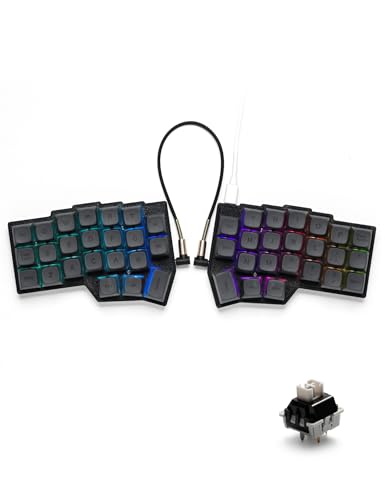
YIVU Corne Split 40% Mechanical Keyboard
Best for: Ergonomic typing and customization
- Switch Type
- Pre-lubricated linear
- Form Factor
- 40% split ortholinear
- Connectivity
- USB-C wired
- Backlighting
- RGB
- Hot-Swap Support
- Hot-Swappable
- Use
- Gaming
View on Amazon: YIVU Corne Split 40% Mechanical Keyboard Affiliate link
The YIVU CORNE V4 is a 40% split mechanical keyboard featuring an ortholinear layout. It uses pre-lubricated linear switches with a 40g trigger pressure for quiet, fast typing. The design allows adjustable spacing, tilt, and rotation to reduce wrist strain. You can program keys via QMK/Vial and customize RGB lighting. It connects via USB-C cable.
Pros
- Adjustable split layout with tilt and rotation
- Hot-swappable 3/5-pin switch sockets
- Fully programmable via QMK/Vial
- 16.8 million RGB backlight options
Cons
- Wired connection only
- TRS cable does not support hot-swapping
- Requires careful cable management to avoid errors
Good fit if
- You want to reduce wrist strain with an ergonomic split design
- You prefer customizable key mapping and layouts
- You like adjustable keyboard angles and spacing
Skip if
- You need wireless connectivity
- You prefer a standard non-split keyboard layout
- You want a plug-and-play setup without programming
Verdict: The YIVU CORNE V4 Split Keyboard fits users seeking an ergonomic, programmable split board for long typing sessions. Its adjustable design and hot-swap switches make it ideal for those prioritizing comfort and customization.
Specifications side by side
| Spec | YIVU Corne Split 40% Mechanical Keyboard |
|---|---|
| Switch Type | Pre-lubricated linear |
| Form Factor | 40% split ortholinear |
| Connectivity | USB-C wired |
| Backlighting | RGB |
| Hot-Swap Support | Hot-Swappable |
| Use | Gaming |
| Design | Ergonomic |
| Color | Black |
| Dimensions | 5.5 × 3.86 × 1.1 inches |
For monitoring your workspace setup, the wyze cam v4 review lists video resolution and hardware specifications.
Frequently asked questions
Does the YIVU Corne V4 support hot-swap switches?
Yes, this keyboard features hot-swappable sockets. This specification allows you to change mechanical switches without soldering. You can easily swap out the included linear switches for different tactile or clicky options. This feature simplifies customization and lets you tailor the typing feel to your specific preference.
What type of backlighting does this keyboard have?
The YIVU Corne V4 is equipped with RGB backlighting. This lighting system allows you to customize the color and brightness of each key. It enhances visibility in low-light environments and lets you personalize the aesthetic of your setup. The lighting is integrated into the standard ortholinear layout.
Is the YIVU Corne V4 suitable for gaming?
Yes, the product listing categorizes this keyboard for gaming use. The 40% split ortholinear layout provides a compact footprint that leaves more room for mouse movement. The wired connection ensures stable connectivity without latency. The linear switches offer a smooth actuation suitable for rapid key presses during gameplay.
How do the physical dimensions of the keyboard halves compare?
Each half of the YIVU Corne V4 measures approximately 5.5 inches in length, 3.86 inches in width, and 1.1 inches in height. These compact dimensions help reduce desk clutter. The small size is typical for 40% keyboards, making it ideal for users with limited workspace or those seeking portability.
What connectivity method does this split keyboard use?
This keyboard uses a wired connection. It connects to your computer via a USB-C cable. The listing specifies a 1.5-meter cable for the main connection. Wired connectivity provides a stable link without the need for battery charging or wireless pairing, ensuring consistent performance during extended use.
Can I adjust the angle of the keyboard halves?
Yes, the design allows for adjustable tilt and rotation. You can position each half independently to match your shoulder width and hand position. This ergonomic adjustability helps reduce wrist strain. The split construction is central to its ergonomic function, allowing you to find the most comfortable typing posture.