Compact or Mini Keyboard and Mouse Combos? Compared by Specs
As an Amazon Associate we earn from qualifying purchases. Links on this page are affiliate links.
When you compare a compact vs mini keyboard and mouse combo, you need to look at how each saves space while delivering functionality. Both Arteck and Macally offer wireless setups that use a single USB receiver for simplicity. The main difference lies in their physical design and switch technology. Arteck focuses on an ultra-slim stainless steel build with rechargeable batteries. Macally provides a silent, compact layout with scissor keys and adjustable mouse DPI. You should choose based on your preferred typing feel and device size.
Key differences
| Aspect | Arteck Ultra Compact Wireless Combo | Macally Compact Wireless Keyboard and Mouse |
|---|---|---|
| Form Factor | Ultra Compact Slim | Mini |
| Switch Type | Low-profile keys | Slim scissor flex |
| Mouse DPI | Not listed | 800 / 1200 / 1600 DPI |
| Noise Level | Not listed | Silent |
| Power Source | Rechargeable lithium battery | Not listed |
| Keyboard Dimensions | 11.1 x 5.28 x 0.55 inches | Not listed |
Which one should you choose?
Choose Arteck Ultra Compact Wireless Combo if
- You prefer a rechargeable battery system for the keyboard and mouse.
- You want a stainless steel keyboard with a low-profile design.
- You need a larger keyboard footprint that still saves desk space.
Choose Macally Compact Wireless Keyboard and Mouse if
- You require a silent typing experience with scissor switch keys.
- You want adjustable mouse DPI settings for precise cursor control.
- You prefer a smaller, more compact keyboard layout.
Verdict: Choose the Arteck if you prioritize rechargeable convenience and a sturdy stainless steel build. Pick the Macally if you need silent keys and customizable mouse DPI. Both options save space, but they cater to different typing and pointing preferences.
Compact vs Mini Keyboard Specs
Form Factor
Arteck offers an ultra-compact slim design measuring 11.1 inches long, 5.28 inches wide, and 0.55 inches high. Macally provides a compact keyboard paired with a mini mouse. The Macally keyboard shares the compact classification but includes a separate mini mouse with a slim body. Arteck’s mouse is described as ergonomic rather than mini. You should choose Arteck if you prefer a unified slim profile. Macally suits you if you want a distinct mini mouse for precise control.
Switch Type
Macally specifies its keyboard uses slim scissor flex keys, which typically offer a stable and quiet typing experience. Arteck does not list its switch technology in the provided data. However, Arteck notes low-profile keys for comfortable typing. The scissor mechanism in the Macally unit often provides better feedback than standard membrane switches. If you prefer a known switch mechanism, Macally has the advantage. Arteck remains a mystery regarding internal switch construction, so you cannot verify the tactile feel from the specs alone.
Mouse DPI
Macally includes a mouse with selectable DPI options of 800, 1200, and 1600. This allows you to adjust cursor speed for different tasks or surfaces. Arteck does not provide DPI specifications for its mouse in the data. The ability to change sensitivity is useful for precision work. Macally gives you control over pointer speed. Arteck’s mouse lacks listed adjustable sensitivity, which may limit performance on high-resolution displays or for specific workflows.
Connectivity
Both products use 2.4GHz wireless technology via a single nano USB receiver. Arteck stores the receiver inside the mouse for easy transport. Macally uses a standard USB dongle without mentioning internal storage. Macally specifies a 30-foot range for the connection. Arteck does not state a range limit. Both setups save a USB port by using one receiver for both devices. Macally offers a verified range claim, while Arteck prioritizes portability with its hidden receiver design.
Power Source
Arteck features a rechargeable lithium battery for both the keyboard and mouse. The keyboard lasts up to six months on a single charge, and the mouse lasts four months with two hours of daily use. Macally does not list battery type or capacity in the provided data. Rechargeable batteries reduce long-term waste and cost. Arteck clearly communicates its power efficiency. Without Macally’s battery specs, you cannot compare endurance, but Arteck’s rechargeable feature is a clear practical benefit.
Build Material
Arteck uses stainless steel material for the keyboard, providing a heavy-duty feel. The mouse is designed for ergonomic comfort. Macally does not specify the keyboard material in the data. The Macally mouse has a slim body with a three-button layout. Stainless steel offers durability and a premium look. Arteck’s material choice stands out in the specs. Macally’s build quality is not detailed, so you rely on the ergonomic design of the mouse rather than the keyboard’s construction.
Which combo fits your desk setup
Users needing long battery life without frequent charging
The Arteck combo features a rechargeable lithium battery with high capacity. This design supports up to six months of use for the keyboard and four months for the mouse on a single charge. You benefit from reduced maintenance and fewer interruptions to your workflow compared to models requiring constant power management.
Buyers prioritizing precise cursor control and quiet operation
The Macally mouse offers three DPI options: 800, 1200, and 1600. This allows you to adjust pointer speed for different tasks. The keyboard uses silent scissor flex switches, reducing noise during typing. These specs support focused work in shared spaces where quiet productivity and customizable mouse sensitivity matter.
Shoppers seeking durable materials and ergonomic comfort
Arteck constructs its keyboard with stainless steel, providing a heavy-duty feel. The ergonomic mouse design aims to reduce stress during extended use. Low-profile keys offer comfortable typing. This combination of robust materials and ergonomic shaping suits users who value tactile durability and physical comfort in their daily computing setup.
Users wanting versatile typing shortcuts and LED indicators
The Macally keyboard includes 12 shortcut keys for efficient navigation. LED indicators provide visual feedback on status. The slim scissor flex keys deliver a quality typing experience. These features support users who rely on quick access commands and visual cues to maintain productivity without looking down at their hands.
Quick picks
| # | Product | Best for | Price |
|---|---|---|---|
| 1 | Arteck Ultra Compact Wireless Combo | Windows users needing port-saving wireless combos | Check price of Arteck Ultra Compact Wireless Combo on Amazon |
| 2 | Macally Compact Wireless Keyboard and Mouse | Users needing a compact, quiet wireless setup | Check price of Macally Compact Wireless Keyboard and Mouse on Amazon |
The products compared

Arteck Ultra Compact Wireless Combo
Best for: Windows users needing port-saving wireless combos
- Form Factor
- Compact (what this guide is about)
- Connectivity
- 2.4 GHz USB receiver
- Keyboard Form Factor
- Ultra Compact Slim
- Ergonomic Features
- Ergonomic mouse
- Power Source
- Built-in rechargeable battery
- Color
- Black
View on Amazon: Arteck Ultra Compact Wireless Combo Affiliate link
This Arteck combo features an ultra-compact stainless steel keyboard and an ergonomic mouse. It uses a single 2.4G USB receiver for both devices, saving a port. The rechargeable lithium batteries last up to six months for the keyboard and four months for the mouse. It is designed for Windows and offers a slim profile to fit small desks.
Pros
- Stainless steel keyboard material provides a heavy-duty feel
- Single nano USB receiver connects both keyboard and mouse
- Rechargeable lithium batteries offer up to six months of keyboard life
- Ergonomic mouse design reduces stress during use
Cons
- Only supports Windows operating systems
- No Bluetooth connectivity; requires USB receiver
- 24-month warranty is shorter than typical industry standards
Good fit if
- You need a single receiver for both devices
- You want a stainless steel keyboard surface
- You use a Windows computer with limited USB ports
Skip if
- You require macOS compatibility
- You prefer Bluetooth wireless connectivity
- You want a longer warranty period
Verdict: Arteck Ultra Compact Wireless Combo is a practical option for Windows users who need to save USB ports. It suits those who prioritize battery life and a durable metal keyboard over cross-platform support.
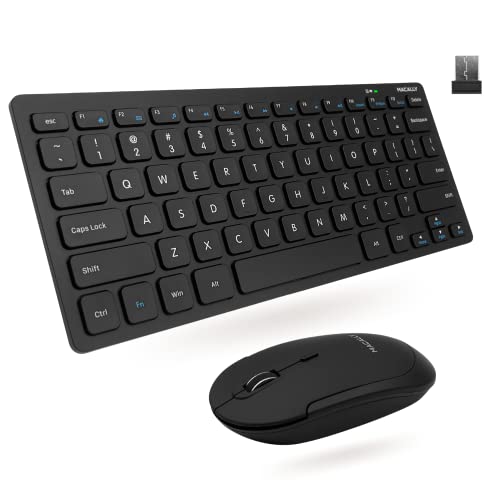
Macally Compact Wireless Keyboard and Mouse
Best for: Users needing a compact, quiet wireless setup
- Form Factor
- Mini (what this guide is about)
- Connectivity
- 2.4 GHz RF (USB dongle)
- Keyboard Form Factor
- Compact
- Switch Type
- Slim scissor flex
- Mouse DPI
- 800 / 1200 / 1600 DPI
- Color
- Black
View on Amazon: Macally Compact Wireless Keyboard and Mouse Affiliate link
This Macally combo pairs a compact keyboard with a mini mouse for space-saving setups. It uses 2.4 GHz RF connectivity via a single USB dongle with a 30-foot range. The keyboard features 78 slim scissor flex keys with LED indicators. The mouse offers three DPI options: 800, 1200, and 1600. It includes a lifetime support policy and up to a two-year warranty. This set suits users who need reliable, quiet productivity tools.
Pros
- Compact keyboard with 78 slim scissor flex keys
- 2.4 GHz RF wireless connection with 30-foot range
- Mouse with selectable DPI settings (800/1200/1600)
- Quiet click mouse design for silent operation
Cons
- Only includes a single USB dongle for both devices
- Mouse lacks Bluetooth or multi-device pairing options
- Keyboard does not include a numeric keypad
Good fit if
- You need a small footprint for a limited desk area
- You prefer quiet typing and clicking sounds
- You want a simple plug-and-play wireless setup
Skip if
- You require a full-size keyboard with a number pad
- You need Bluetooth connectivity for multiple devices
- You want a mechanical keyboard for tactile feedback
Verdict: Macally Compact Wireless Keyboard and Mouse Combo provides a quiet, space-efficient solution for basic computing tasks. It fits users who prioritize a compact layout and silent operation over advanced connectivity features.
Specifications side by side
| Spec | Arteck Ultra Compact Wireless Combo | Macally Compact Wireless Keyboard and Mouse |
|---|---|---|
| Connectivity | 2.4 GHz USB receiver | 2.4 GHz RF (USB dongle) |
| Keyboard Form Factor | Ultra Compact Slim | Compact |
| Ergonomic Features | Ergonomic mouse | not stated |
| Power Source | Built-in rechargeable battery | not stated |
| Switch Type | not stated | Slim scissor flex |
| Mouse DPI | not stated | 800 / 1200 / 1600 DPI |
| Form Factor | Compact | Mini |
| Design | Ergonomic | not stated |
| Color | Black | Black |
| Operating System | Windows | not stated |
| Noise Level | not stated | Silent |
| Dimensions | 11.1 × 5.28 × 0.55 inches | 0.79 × 1.18 × 0.5 inches |
| Weight | not stated | 12 ounces |
| Size | Ultra Compact Slim | Compact Combo |
| Model | HW086 | RFCOMPACTKEYCB |
Frequently asked questions
Is a compact keyboard better than a mini one?
It depends on your need for portability versus typing comfort. Compact keyboards like the Arteck offer a full-sized layout in a smaller footprint, which is better for regular typing. Mini setups, such as the Macally combo, use a separate tiny mouse that saves significant desk space but may feel cramped for long sessions.
Do these combos work with Mac?
The Arteck Ultra Compact Wireless Combo is designed specifically for Windows users. It does not list cross-platform support in its specifications. The Macally combo does not specify its operating system compatibility in the provided data. You should check the manufacturer details if you rely on macOS features or specific driver requirements.
Are the keys quiet on these keyboards?
The Macally Compact Wireless Keyboard and Mouse is explicitly described as having silent operation. This makes it suitable for shared offices or quiet environments. The Arteck model does not mention noise levels in its specifications. You should assume standard key click sounds for the Arteck unless the manufacturer states otherwise.
How long do the batteries last?
The Arteck combo uses a rechargeable lithium battery system. This design supports extended usage periods, with the keyboard lasting up to six months and the mouse up to four months on a single charge. The Macally combo does not provide specific battery life data in the available specifications.
Is the mouse included in the box?
Yes, both products are sold as keyboard and mouse combos. The Macally product is explicitly named as a compact wireless keyboard and mouse set. The Arteck Ultra Compact Wireless Combo also includes a mouse, as indicated by its name and description as a combo. You receive both peripherals together in each package.
What is the difference in size between the two?
The Arteck keyboard measures 11.1 inches long and 5.28 inches wide. It is an ultra-compact slim design that retains a near-standard key layout. The Macally setup includes a compact keyboard and a mini mouse measuring 0.79 inches long. The Macally mouse is significantly smaller, offering a different kind of space saving.