Best Compact Keyboard and Mouse Combos: 12 Spec-Based Picks
As an Amazon Associate we earn from qualifying purchases. Links on this page are affiliate links.
A compact keyboard and mouse combo saves desk space while preserving your typing and cursor accuracy. To narrow your search, this guide compares 12 options based strictly on the specifications published on their product listings.
The Logitech MK470 Slim Compact Wireless Combo takes the top spot because its 17.95-inch by 6-inch footprint includes a dedicated number pad while weighing only 1.455 pounds. This comparison helps you decide on the right balance of dimensions, key layout, and wireless connectivity for your setup.
Quick picks
The best fit for you
- You need quiet typing paired with a number pad. Logitech MK470 Slim Compact Wireless Combo This compact combo measures 17.95 inches long and includes a dedicated number pad.
- You want ergonomic wrist support in a compact footprint. Perixx Compact Ergonomic Wireless Keyboard and Mouse It features an ergonomic design, an integrated wrist rest, and a vertical mouse.
- You want a wireless connection without USB receivers. Logitech MK250 Bluetooth Compact Combo The combo connects directly using Bluetooth for dongle-free wireless operation.
- You want a wired gaming setup with RGB backlighting. Guiheng 60% Wired RGB Keyboard and Mouse Combo It provides corded wired connectivity with integrated RGB backlighting for Mac and Windows.
Our 12 picks

Logitech MK470 Slim Compact Wireless Combo
Best for: quiet desk productivity with a number pad
- Form Factor
- Compact (what this guide is about)
- Connectivity
- 2.4 GHz wireless (USB nano receiver)
- Keyboard Form Factor
- Compact
- Switch Type
- Low-profile scissor
- Mouse DPI
- 1000 DPI
- Dimensions
- 18 × 6 × 1.4 inches
The Logitech MK470 Slim Wireless Combo pairs a compact low-profile scissor-switch keyboard with a 1000 DPI ambidextrous mouse. Both devices link through a single 2.4 GHz USB nano receiver with up to 33 feet of range. You get an integrated number pad alongside quiet keys and battery ratings up to 36 months for the keyboard and 18 months for the mouse. This set suits you if you need full numeric entry in a space-saving footprint.
Pros
- Up to 36 months of keyboard battery life and 18 months for the mouse
- Dedicated number pad included within a compact layout
- Low-profile scissor keys and noise-reduced 3-button mouse
- 12 customizable FN shortcut keys supported through Logi Options
Cons
- Mouse sensor resolution is fixed at 1000 DPI
- Requires a 2.4 GHz USB receiver with no Bluetooth support listed
Good fit if
- You want a compact desk setup that still retains a dedicated numeric keypad.
- You prefer low-profile scissor switches and quiet mouse clicks.
- You need long battery ratings reaching up to 36 months.
Skip if
- You require Bluetooth connectivity without occupying a USB port.
- You need adjustable mouse DPI settings higher than 1000 DPI.
Verdict: Logitech MK470 Slim Wireless Combo delivers a quiet, compact typing experience complete with a number pad and long battery life. It is an efficient productivity setup if you rely on a 2.4 GHz USB receiver.

Perixx Compact Ergonomic Wireless Keyboard and Mouse
Best for: Windows users wanting compact ergonomic desk setups
- Form Factor
- Compact (what this guide is about)
- Connectivity
- 2.4 GHz USB receiver
- Keyboard Form Factor
- Compact
- Ergonomic Features
- Vertical mouse, adjustable palm rest
- Power Source
- 4 x AAA alkaline batteries
- Switch Type
- Membrane low profile
View on Amazon: Perixx Compact Ergonomic Wireless Keyboard and Mouse
This 3-in-1 wireless set gives you a compact ergonomic keyboard, a separate numeric keypad, and a vertical mouse running off a single 2.4 GHz USB receiver. The keyboard features a built-in wrist rest and a detachable magnetic tilt base for angle adjustment. With 800 and 1600 DPI optical tracking on the mouse, this setup suits you if you need dedicated number keys and ergonomic positioning in a compact desk footprint.
Pros
- Single 2.4 GHz USB receiver connects keyboard, mouse, and keypad
- Detachable magnetic tilt base provides adjustable typing angles
- Vertical mouse offers 800 or 1600 DPI tracking and silent primary clicks
- Independent numeric pad includes Calculator, Tab, and 00 keys
Cons
- Requires four AAA batteries not included in the package
- Officially listed for Windows compatibility only
- Scroll wheel and side buttons lack silent clicks
Good fit if
- You want an ergonomic vertical mouse and wrist rest to support neutral hand alignment
- You need a modular numeric keypad you can reposition or set aside
- You run a Windows PC with an available USB-A port
Skip if
- You require official support for macOS or other non-Windows operating systems
- You want devices with internal rechargeable batteries rather than replaceable AAA cells
Verdict: Perixx Compact Wireless Ergonomic Combo provides three modular input devices that share a single receiver to support neutral wrist posture. It offers an adjustable typing layout and vertical tracking for Windows workstations.

Macally Compact Wireless Keyboard and Mouse
Best for: basic PC productivity on small desks
- Form Factor
- Compact (what this guide is about)
- Connectivity
- 2.4 GHz USB receiver
- Keyboard Form Factor
- Compact
- Switch Type
- Scissor switch
- Mouse DPI
- 800 / 1200 / 1600 DPI
- Color
- White
This Macally set delivers a compact 78-key scissor-switch keyboard paired with a 3-button silent mouse for PC setups. Both peripherals connect through a single 2.4 GHz USB dongle with a 30-foot operating range. The mouse provides switchable DPI settings at 800, 1200, and 1600. It suits you if you need a space-saving wireless desktop pair with dedicated shortcut keys and quiet clicks without extra desk clutter.
Pros
- Single 2.4 GHz USB dongle connects both devices up to 30 feet
- Compact 78-key layout with slim scissor switches and 12 shortcuts
- Mouse features three selectable DPI settings (800, 1200, 1600)
- Quiet-click mouse buttons reduce clicking noise
Cons
- No Bluetooth support listed; requires an open USB port
- Lacks a dedicated number pad
- Mouse is limited to a 3-button layout without side buttons
Good fit if
- You want a slim 78-key keyboard with scissor switches for a PC desk.
- You prefer a mouse with adjustable DPI presets between 800 and 1600.
- You want both peripherals linked via a single 2.4 GHz wireless receiver.
Skip if
- You need a dedicated number pad for frequent data entry.
- You require Bluetooth connectivity for devices lacking standard USB ports.
- You want additional programmable buttons on your mouse.
Verdict: Macally Compact Wireless Keyboard and Mouse pairs a 78-key scissor-switch layout with a 3-stage DPI mouse over a single 2.4 GHz connection. It gives you an uncluttered, quiet workspace setup for standard PC tasks.

Logitech Pebble 2 Compact Silent Combo
Best for: silent multi-device switching on compact desks
- Form Factor
- Compact (what this guide is about)
- Connectivity
- Bluetooth, Logi Bolt USB receiver
- Keyboard Form Factor
- Compact
- Multi-Device Pairing
- 3 devices
- Color
- Black
- Noise Level
- Silent
The Logitech Pebble 2 Compact Wireless Combo pairs a low-profile keyboard with a silent mouse for multi-device workflows. You can pair up to three devices across different operating systems via Bluetooth or the included Logi Bolt USB receiver. The setup offers quiet keys, Silent Touch mouse clicks, and battery ratings of three years for the keyboard and two years for the mouse. It suits your need for quiet multi-screen work.
Pros
- Connects up to three devices with one-click switching via Bluetooth or Logi Bolt USB receiver
- Long battery life rated at three years for the keyboard and two years for the mouse
- Silent Touch mouse clicks and low-noise keyboard operation
- Ten customizable Fn keys and customizable middle mouse button via companion app
Cons
- Relies on replaceable batteries rather than integrated USB recharging
- No integrated key backlighting listed
Good fit if
- You switch regularly between up to three computers, tablets, or phones.
- You need silent mouse clicks and quiet typing for shared spaces.
- You prefer long multi-year battery life over frequent USB recharging.
Skip if
- You prefer built-in rechargeable batteries over replaceable cells.
- You need backlit keys for working in low-light settings.
Verdict: Logitech Pebble 2 Compact Wireless Combo provides quiet typing and seamless switching between up to three paired devices. It is an efficient choice if you prioritize low noise and multi-year battery operation.

Logitech Pebble 2 Compact Mac Keyboard and Mouse Combo
Best for: multi-device Apple workflows on the go
- Form Factor
- Compact (what this guide is about)
- Connectivity
- Bluetooth
- Keyboard Form Factor
- Compact
- Multi-Device Pairing
- 3 devices
- Operating System
- Mac
- Dimensions
- 11 × 5 × 0.5 inches
View on Amazon: Logitech Pebble 2 Compact Mac Keyboard and Mouse Combo
This compact wireless set includes the Pebble Keys 2 K380s and Pebble Mouse 2 M350s designed for macOS, iPadOS, and iOS. At 11 inches long and 0.5 inches tall with a total weight of 0.915 pounds, it takes minimal space in a bag. It connects via Bluetooth across three paired Apple devices, offering quiet typing, silent clicking, and multi-year battery life for portable multi-device setups.
Pros
- Connects up to three Apple devices via Bluetooth switching
- Keyboard battery lasts up to 3 years and mouse lasts up to 2 years
- Slim 0.5-inch profile and light 0.915-pound total weight
- Customizable middle button and 10 Fn keys via Logi Options+ app
Cons
- Configured specifically for Apple operating systems (macOS, iPadOS, iOS)
- Lacks a dedicated numeric keypad
- No wired connectivity mode specified
Good fit if
- You switch regularly between a Mac, iPad, or iPhone
- You need an ultra-slim setup that packs easily into a bag
Skip if
- You work primarily on Windows machines
- You require a built-in number pad for numeric data entry
Verdict: Logitech Pebble 2 Mac Wireless Combo delivers a lightweight, ultra-slim typing and mousing setup tailored for multi-device Apple users on the move.

SABLUTE Compact Backlit Wireless Combo
Best for: Low-light typing with dedicated number pad input
- Form Factor
- Compact (what this guide is about)
- Connectivity
- Shared USB receiver
- Keyboard Form Factor
- Compact
- Power Source
- Rechargeable battery
- Switch Type
- Scissor
- Backlighting
- 7-color switchable backlight
The SABLUTE Compact Backlit Wireless Combo pairs a 102-key scissor-switch keyboard with a 6-button mouse using a single shared USB receiver. At 14.8 by 5.4 by 0.78 inches, the keyboard retains a dedicated number pad while minimizing desk footprint. You get seven-color keyboard backlighting with four brightness steps, Type-C rechargeability for both units, and dedicated hotkeys to switch between Windows and Mac layouts. It fits you if you want illuminated keys and compact data entry.
Pros
- Rechargeable batteries via USB Type-C for both keyboard and mouse
- Seven-color keyboard backlighting with four selectable brightness levels
- Compact 102-key footprint includes a full number pad and 12 shortcuts
- Dedicated hotkey switching between Windows and Mac layouts
Cons
- Operates strictly via USB receiver with no Bluetooth connectivity listed
- Mouse RGB colors cycle automatically without static color selection
Good fit if
- You need a space-saving keyboard that preserves a physical number pad.
- You frequently work in dark environments and require backlit keys.
- You alternate between Windows and Mac operating systems.
Skip if
- You need direct Bluetooth pairing without occupying a USB port.
- You prefer an ultra-narrow layout without an integrated number pad.
Verdict: SABLUTE Compact Backlit Wireless Combo delivers full number-pad functionality and illuminated scissor keys in a slim footprint. It connects via a single USB receiver to serve dual Windows and Mac setups.

Logitech MK270 Wireless Keyboard and Mouse
Best for: long battery life on Windows desks
- Form Factor
- Compact (what this guide is about)
- Connectivity
- 2.4 GHz USB
- Color
- Black
- Operating System
- Windows
- Dimensions
- 20.1 × 6.22 × 1.81 inches
- Weight
- 4.2 pounds
The Logitech MK270 is a 2.4 GHz wireless keyboard and compact mouse combo built for Windows. It provides a standard key layout with a number pad, full-size arrow keys, and eight dedicated multimedia hotkeys. With battery life rated up to 36 months for the keyboard and 12 months for the mouse, it gives you long operating endurance. It suits you if you need a spill-resistant desktop set with plug-and-play USB connectivity.
Pros
- Up to 36-month keyboard and 12-month mouse battery life
- 2.4 GHz wireless USB receiver with range up to 33 feet
- Eight dedicated multimedia hotkeys
- Spill-resistant keyboard build with adjustable tilt legs
Cons
- Requires a USB receiver with no Bluetooth connectivity listed
- Operating system compatibility specified only for Windows
Good fit if
- You use Windows and want plug-and-play 2.4 GHz USB wireless connectivity.
- You need a dedicated number pad, full-size arrow keys, and multimedia hotkeys.
- You prefer extended battery endurance rated up to 36 months on the keyboard.
Skip if
- You need direct Bluetooth pairing without using a USB receiver.
- You work on non-Windows operating systems.
Verdict: Logitech MK270 Wireless Keyboard and Mouse delivers dependable 2.4 GHz wireless operation, multi-year battery life, and dedicated media controls for Windows workstations.
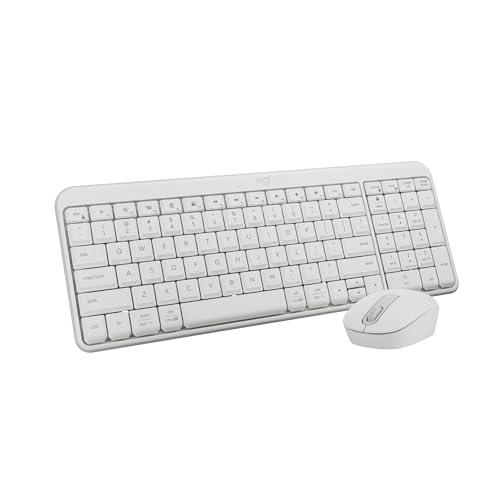
Logitech MK250 Bluetooth Compact Combo
Best for: dongle-free Bluetooth productivity on compact desks
- Form Factor
- Compact (what this guide is about)
- Connectivity
- Bluetooth
- Keyboard Form Factor
- Compact
- Color
- White
- Dimensions
- 18 × 5.98 × 1.73 inches
- Weight
- 1.5 pounds
The Logitech MK250 Bluetooth Compact Combo gives you a wireless keyboard and mouse pairing via direct Bluetooth without consuming USB ports. It features a compact footprint that retains a number pad, full arrow keys, and adjustable tilt legs. With spill-resistant keyboard construction and a 12-month battery life for both peripherals, it suits you if you need a clean, dongle-free desktop setup for portable laptops and compact work areas.
Pros
- Direct Bluetooth connectivity requires no USB receiver or open port
- 12-month battery life across both keyboard and mouse
- Spill-resistant keyboard design with adjustable tilt legs
- Compact footprint includes an integrated number pad and arrow keys
Cons
- Relies strictly on Bluetooth with no 2.4 GHz USB dongle option
- Uses disposable batteries rather than rechargeable USB-C power
Good fit if
- You use a device without standard USB-A ports and want direct Bluetooth pairing.
- You need a dedicated number pad while keeping a compact desk footprint.
- You want spill resistance and up to 12 months between battery changes.
Skip if
- You require a 2.4 GHz wireless USB receiver for devices lacking Bluetooth.
- You prefer rechargeable internal batteries over replaceable cells.
Verdict: Logitech MK250 Bluetooth Compact Combo provides reliable dongle-free wireless operation with a full number pad in a space-saving layout. It is a solid match for portable setups needing spill resistance and year-long battery life.
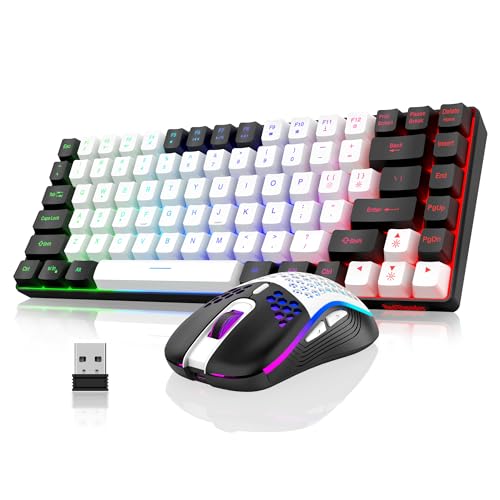
RedThunder 75% Wireless Keyboard and Honeycomb Mouse
Best for: compact setups needing an ultralight honeycomb mouse
- Form Factor
- Compact (what this guide is about)
- Connectivity
- 2.4 GHz USB
- Keyboard Form Factor
- 75%
- Power Source
- Rechargeable (1850 mAh / 500 mAh)
- Mouse DPI
- 3200 DPI
- Backlighting
- RGB rainbow LED
View on Amazon: RedThunder 75% Wireless Keyboard and Honeycomb Mouse
This wireless setup combines an 84-key, 75-percent compact keyboard with a lightweight 65-gram honeycomb mouse using a single shared 2.4 GHz USB receiver. You get dedicated arrow and media keys alongside rainbow backlighting, an 1850 mAh keyboard battery, and a 500 mAh mouse battery rated for eight hours of continuous lit use. It suits you if you want a space-saving desk footprint with full arrow keys and a ventilated mouse.
Pros
- Lightweight 65-gram mouse with perforated honeycomb shell
- 75-percent compact layout retains dedicated arrow and media keys
- Rechargeable batteries with a shared 2.4 GHz USB receiver
- Double-shot ABS keycaps rated for 10 million keystrokes
Cons
- Continuous battery life is limited to 8 hours with lights active
- Mouse RGB cycles automatically and cannot be customized manually
- Initial full recharge via computer USB port takes 8 hours
Good fit if
- You want an ultralight 65-gram mouse with a ventilated honeycomb shell.
- You prefer an 84-key compact layout that keeps dedicated arrow keys.
- You need built-in rechargeable batteries operating over a single USB dongle.
Skip if
- You need multi-day battery endurance without turning off backlighting.
- You require static or customizable mouse lighting effects.
- You need Bluetooth pairing for devices lacking a standard USB port.
Verdict: RedThunder 75% Wireless Honeycomb Combo delivers an ultralight 65-gram mouse alongside an 84-key layout with dedicated arrows. It provides a compact, illuminated desktop setup if you do not mind an eight-hour lit battery life.

TECKNET Compact Multi-Device Wireless Combo
Best for: multi-device mobile and desktop workflows
- Form Factor
- Compact (what this guide is about)
- Connectivity
- Bluetooth, 2.4G wireless, USB-C wired
- Keyboard Form Factor
- Compact
- Multi-Device Pairing
- 5 devices
- Power Source
- Built-in rechargeable battery
- Switch Type
- Scissor switch
This TECKNET keyboard and mouse combo features a 0.6-inch profile and weighs 1.1 pounds. It connects to five devices across three Bluetooth channels, a 2.4 GHz wireless receiver, and a wired USB-C mode that charges while you work. Built-in rechargeable batteries provide power with up to 90 days of standby time. It suits you if you need a portable setup for multi-device workflows across Windows and macOS.
Pros
- Connects to up to five devices via Bluetooth, 2.4 GHz wireless, and USB-C
- Internal rechargeable batteries support typing while charging over USB-C
- Low 0.6-inch profile and light 1.1-pound combined carry weight
- Mouse features three selectable sensitivity levels at 800, 1200, and 1600 DPI
Cons
- Mouse tracking resolution stops at 1600 DPI
- Requires waiting 30 minutes of inactivity before automatic sleep engages
Good fit if
- You switch inputs frequently among up to five separate hardware devices.
- You prefer built-in rechargeable batteries over disposable AA or AAA cells.
- You need a thin 0.6-inch travel setup to fit inside a laptop bag.
Skip if
- You need mouse sensitivity options beyond 1600 DPI.
- You run operating systems older than Windows 7.
Verdict: TECKNET Rechargeable Compact Wireless Combo delivers multi-device flexibility across Bluetooth, 2.4 GHz, and wired USB-C in a slim 1.1-pound package. It gives you quiet scissor switches and rechargeable power for switching between several workstations.

Guiheng 60% Wired RGB Keyboard and Mouse Combo
Best for: compact wired gaming and typing setups
- Form Factor
- Compact (what this guide is about)
- Connectivity
- USB wired
- Keyboard Form Factor
- 60%
- Ergonomic Features
- Palm rest
- Mouse DPI
- 3200 DPI
- Backlighting
- RGB
View on Amazon: Guiheng 60% Wired RGB Keyboard and Mouse Combo
The Guiheng 60% Wired combo pairs a compact 61-key layout with a corded 3200 DPI optical mouse. You get RGB backlighting, adjustable tilt legs, a palm rest, and an ambidextrous mouse body. The direct USB wired connection eliminates charging and driver setup on Windows and Mac. This hardware suits you if you need a space-saving desktop footprint and prefer plug-and-play wired peripherals over battery-powered wireless sets.
Pros
- Ultra-compact 61-key layout saves desk surface area
- Lightweight mouse equipped with a 3200 DPI optical sensor
- RGB backlighting on keys for enhanced visibility
- Plug-and-play wired USB interface needs no batteries or software
Cons
- Lacks dedicated arrow keys and a numeric keypad
- Wired configuration requires tethered USB cable connections
Good fit if
- You want an ultra-compact 61-key keyboard with integrated RGB lighting.
- You prefer wired USB peripherals to avoid charging batteries.
- You need an ambidextrous mouse with a 3200 DPI sensor.
Skip if
- You need a dedicated number pad or navigation cluster for daily work.
- You want a cordless workspace powered by wireless connections.
Verdict: Guiheng 60% Wired RGB Keyboard and Mouse Combo delivers an ultra-compact 61-key typing deck paired with a 3200 DPI corded optical mouse. It provides core functionality without requiring battery recharges or configuration software.

RedThunder 60% Wired Gaming Combo
Best for: compact gaming setups needing extra mouse space
- Form Factor
- Compact (what this guide is about)
- Connectivity
- USB wired
- Keyboard Form Factor
- 60%
- Ergonomic Features
- Symmetrical ergonomics
- Mouse DPI
- 7200 DPI
- Backlighting
- RGB
This RedThunder bundle gives you a wired 60-percent setup built for desk space and gaming. The keyboard features a 61-key layout with customizable RGB backlighting and a water-resistant design. Alongside it, you get a 65-gram honeycomb mouse equipped with a 7200 DPI optical sensor and 1000 Hz polling rate. It suits you if you want ultra-compact wired peripherals that maximize your mouse-swiping area.
Pros
- Ultra-compact 60% layout with 61 keys
- Lightweight 65g honeycomb mouse with 1000 Hz polling rate
- Optical sensor with sensitivity up to 7200 DPI and 400 IPS tracking
- Water-resistant keyboard with braided USB cable and gold-plated interface
- Adjustable RGB backlighting brightness and breathing speed
Cons
- Lacks wireless connectivity options
- No dedicated number pad or navigation cluster
Good fit if
- You need a 61-key footprint to preserve maximum desk room for mouse travel.
- You prefer a tethered wired setup with high mouse sensitivity up to 7200 DPI.
- You want built-in water resistance to protect against accidental spills.
Skip if
- You need a wireless connection to keep cables completely off your desk.
- You rely on a dedicated numeric keypad or dedicated arrow keys for work.
Verdict: RedThunder 60% Wired Keyboard and Mouse Combo delivers an ultra-compact 61-key footprint paired with a high-polling lightweight mouse. It gives you responsive wired performance if you do not mind giving up dedicated navigation keys.
Specifications side by side
| Spec | Logitech MK470 Slim Compact Wireless Combo | Perixx Compact Ergonomic Wireless Keyboard and Mouse | Macally Compact Wireless Keyboard and Mouse | Logitech Pebble 2 Compact Silent Combo | Logitech Pebble 2 Compact Mac Keyboard and Mouse Combo | SABLUTE Compact Backlit Wireless Combo | Logitech MK270 Wireless Keyboard and Mouse | Logitech MK250 Bluetooth Compact Combo | RedThunder 75% Wireless Keyboard and Honeycomb Mouse | TECKNET Compact Multi-Device Wireless Combo | Guiheng 60% Wired RGB Keyboard and Mouse Combo | RedThunder 60% Wired Gaming Combo |
|---|---|---|---|---|---|---|---|---|---|---|---|---|
| Connectivity | 2.4 GHz wireless (USB nano receiver) | 2.4 GHz USB receiver | 2.4 GHz USB receiver | Bluetooth, Logi Bolt USB receiver | Bluetooth | Shared USB receiver | 2.4 GHz USB | Bluetooth | 2.4 GHz USB | Bluetooth, 2.4G wireless, USB-C wired | USB wired | USB wired |
| Keyboard Form Factor | Compact | Compact | Compact | Compact | Compact | Compact | not specified | Compact | 75% | Compact | 60% | 60% |
| Ergonomic Features | not specified | Vertical mouse, adjustable palm rest | not specified | not specified | not specified | not specified | not specified | not specified | not specified | not specified | Palm rest | Symmetrical ergonomics |
| Multi-Device Pairing | not specified | not specified | not specified | 3 devices | 3 devices | not specified | not specified | not specified | not specified | 5 devices | not specified | not specified |
| Power Source | not specified | 4 x AAA alkaline batteries | not specified | not specified | not specified | Rechargeable battery | not specified | not specified | Rechargeable (1850 mAh / 500 mAh) | Built-in rechargeable battery | not specified | not specified |
| Switch Type | Low-profile scissor | Membrane low profile | Scissor switch | not specified | not specified | Scissor | not specified | not specified | not specified | Scissor switch | not specified | not specified |
| Mouse DPI | 1000 DPI | 800 / 1600 DPI | 800 / 1200 / 1600 DPI | not specified | not specified | not specified | not specified | not specified | 3200 DPI | 1600 DPI | 3200 DPI | 7200 DPI |
| Backlighting | not specified | not specified | not specified | not specified | not specified | 7-color switchable backlight | not specified | not specified | RGB rainbow LED | not specified | RGB | RGB |
| Form Factor | Compact | Compact | Compact | Compact | Compact | Compact | Compact | Compact | Compact | Compact | Compact | Compact |
| Use | not specified | not specified | not specified | not specified | not specified | not specified | not specified | not specified | Gaming | not specified | Gaming | Gaming |
| Design | not specified | Ergonomic | not specified | not specified | not specified | not specified | not specified | not specified | not specified | not specified | not specified | not specified |
| Color | Graphite | Black | White | Black | Tonal Graphite | Space Gray | Black | White | White Black | Black | Grey and black combo | Black contour line |
| Shape | not specified | Vertical | not specified | not specified | not specified | not specified | not specified | not specified | not specified | not specified | not specified | not specified |
| Shell Design | not specified | not specified | not specified | not specified | not specified | not specified | not specified | not specified | Honeycomb | not specified | not specified | not specified |
| Operating System | not specified | not specified | not specified | not specified | Mac | not specified | Windows | not specified | not specified | not specified | Mac, Windows | Mac |
| Noise Level | not specified | not specified | Silent | Silent | not specified | not specified | not specified | not specified | not specified | not specified | not specified | not specified |
| Dimensions | 18 × 6 × 1.4 inches | 13.8 × 8.94 × 2.56 inches | not specified | 14.2 × 5.3 × 1.41 inches | 11 × 5 × 0.5 inches | 14.8 × 5.4 × 0.78 inches | 20.1 × 6.22 × 1.81 inches | 18 × 5.98 × 1.73 inches | not specified | not specified | not specified | not specified |
| Weight | 1.46 pounds | 2.58 pounds | 14.6 ounces | 1.08 pounds | 14.6 ounces | 1.52 pounds | 4.2 pounds | 1.5 pounds | 1.43 pounds | not specified | not specified | not specified |
| Size | 21.3 | Pack of 1 | not specified | One Size | 2 Piece Set | 14.8x5.4x0.78 inches | 4 Pack | 1.90 | not specified | 0.6 in | not specified | not specified |
| Model | 920-009437 | PD-606AUS-11967 | not specified | 920-012415 | 920-012200 | KM61PRO | 920-008813 | 920-013511 | K84 | TK-KM061 | not specified | K62 |
If you are outfitting a small kitchen space as well, you can review specifications for the best compact toasters.
How to Choose a Compact Desktop Combo
-
Check Layout and Key Count
Keyboard layouts in compact combos range from 60 percent up to condensed full-size arrangements. If you write code or input data, a condensed layout with dedicated arrow keys or an integrated number pad prevents repetitive key combinations. If your desk space is severely restricted or you want maximum mouse clearance, a 61-key deck like the Guiheng 60% Wired RGB Keyboard eliminates the navigation cluster and numeric pad entirely. Compare the listed key count and deck width to verify you retain the keys essential for your daily workflow.
-
Evaluate Mouse Grip and Shape
Compact combos package diverse mouse styles, ranging from flat travel designs to sculpted shapes. Flat and low-profile mice pack easily into bags and maintain a low desktop profile, but they require a fingertip grip that may strain hands during long working hours. If you need forearm comfort, vertical mice keep your wrist in a neutral handshake posture. The Perixx Compact Ergonomic Wireless Keyboard and Mouse includes a dedicated vertical mouse alongside a split wrist rest. Check mouse height and contour specifications to ensure the shape matches your grip style.
-
Review Backlighting and Illumination
Backlighting lets you locate legends accurately when working in dim environments or during late hours. Combos with RGB or white key illumination improve visibility, but running LEDs on wireless models consumes power rapidly and shortens operating runtimes between charges. If you work in standard ambient office light, a non-backlit board avoids frequent charging cycles. If your workspace lacks consistent lighting, choose an illuminated model like the SABLUTE Compact Backlit Wireless Combo. Review the product specifications for lighting type and brightness options before deciding whether you require key illumination.
-
Select Your Power Source
Wireless compact combos rely on either built-in rechargeable lithium cells or swappable alkaline batteries. Rechargeable models eliminate ongoing battery replacement and allow you to power the hardware through a standard USB-C cable while working. The TECKNET Compact Multi-Device Wireless Combo uses rechargeable internal power for both keyboard and mouse. Swappable alkaline cells, by contrast, can provide multi-year runtimes and require zero cable clutter on your desk, but you must keep spare batteries on hand. Check the stated power source specification to match your maintenance preference.
-
Consider Key Switch Mechanism
The switch mechanism under each keycap dictates key travel depth, tactile stability, and noise level. Scissor switches provide short, crisp key travel similar to laptop keyboards, reducing finger fatigue and producing minimal clicking noise. The Macally Compact Wireless Keyboard and Mouse relies on a scissor-switch design to deliver silent typing suitable for quiet shared offices and libraries. Standard membrane mechanisms offer slightly deeper travel but may feel spongy over extended sessions. Examine the switch type and sound profile specifications to ensure the acoustic output suits your workspace.
-
Verify Operating System Compatibility
Keyboards often feature modifier keys printed for specific operating systems, such as Command and Option for macOS or Windows and Alt for PC hardware. While many keyboards connect across platforms, mismatched keycaps cause confusion when executing system shortcuts. The Logitech Pebble 2 Compact Mac Keyboard and Mouse Combo provides dedicated macOS key legends and matching system functions out of the box. Other models provide dual-printed legends or OS toggles. Check the compatibility and operating system specifications to ensure modifier legends match your primary computer setup.
Frequently asked questions
What is the difference between a 60 percent and a 75 percent keyboard combo?
A 60 percent keyboard removes dedicated arrow keys and navigation clusters to reduce width, while a 75 percent model keeps them in a condensed footprint. For instance, the Guiheng 60% uses a 61-key deck without dedicated arrows. In contrast, the RedThunder 75% combo provides an 84-key layout with dedicated direction keys. Your choice depends on whether you need immediate access to arrows or maximum desk clearance for mouse swipes.
Can you find a compact keyboard and mouse combo with a number pad?
Yes, several compact combos retain a numeric keypad by narrowing spacing or condensing the layout. The Logitech MK470 includes a dedicated number pad while keeping total length to 17.95 inches. Similarly, the SABLUTE Backlit Wireless Combo measures 14.8 inches long and includes full number-pad functionality with illuminated scissor keys. These options let you enter numeric data efficiently without taking up the desk space of a standard traditional desktop keyboard.
Do compact wireless keyboard and mouse combos use one USB receiver or two?
Most compact wireless combos share a single 2.4 GHz USB receiver for both the keyboard and mouse. Models like the Macally Compact Wireless Combo and the Perixx Compact Ergonomic set run both peripherals through one shared dongle to save open ports. Other compact models skip USB receivers entirely. For example, the Logitech MK250 relies on Bluetooth connectivity, freeing your ports completely for flash drives or external monitors.
Are compact keyboard and mouse combos suitable for gaming?
Yes, specialized compact combos include gaming features such as RGB illumination, high-polling sensors, and ultralight mice. The RedThunder 75% wireless combo includes a 65-gram honeycomb mouse designed for fast sweeps. If you prefer corded stability with zero battery maintenance, the Guiheng 60% wired set delivers a 3200 DPI optical mouse with RGB backlighting. Compact footprints benefit gamers by freeing up physical surface area for wider mouse movements.
Can compact combos switch between multiple computers or operating systems?
Yes, multi-device compact combos allow you to toggle between distinct machines and operating platforms. The TECKNET Compact Wireless Combo connects across Bluetooth, 2.4 GHz, and wired USB-C to support quick transitions between workstations. Similarly, the Logitech Pebble 2 combo pairs with up to three devices at once. Checking compatibility is critical, as sets like the Logitech Pebble 2 Mac are tailored specifically for Apple hardware, while others support Windows.
What ergonomic features are available on compact keyboard and mouse combos?
Ergonomic compact combos offer neutral wrist angles and vertical grips while preserving desk space. The Perixx Compact Wireless Combo features a vertical mouse shape and an integrated wrist rest to promote neutral forearm positioning. Its modular components allow you to position each input device exactly where your arms naturally rest. Compact dimensions also bring your mouse closer to your body, reducing shoulder reach compared to wide standard keyboards.
How do scissor-switch keys benefit a compact desktop keyboard?
Scissor-switch keys reduce the physical height of a compact keyboard while providing stable, quiet typing action. The Macally Compact Wireless Combo uses a 78-key scissor-switch layout, while the TECKNET combo pairs scissor keys with a slim profile. Because the scissor mechanism stabilizes the keycap under each keystroke, keys register smoothly without the wobbling or tall travel distance found on traditional desktop membrane switches.