Corsair vs SOLAKAKA: Gaming Mice Compared by Specs
As an Amazon Associate we earn from qualifying purchases. Links on this page are affiliate links.
This corsair vs SOLAKAKA gaming mouse comparison highlights two distinct designs for different playstyles. Both options target gamers with RGB lighting and programmable buttons. The main difference lies in their structure and connection. The Corsair model is a wired MMO mouse with a unique side button rail. The SOLAKAKA model is a wireless honeycomb mouse designed for lightweight speed. You need to decide between specialized macro control and wireless mobility.
Key differences
| Aspect | Corsair Scimitar RGB Elite Wired MMO Mouse | SOLAKAKA Wireless Honeycomb Gaming Mouse |
|---|---|---|
| Connectivity | Wired | 2.4G wireless, BT5.1, Type-C wired |
| Maximum DPI | 18,000 DPI | 13,200 DPI |
| Programmable Buttons | 17 | 7 |
| Weight | 4.3 ounces | 3.17 ounces |
| Polling Rate | not listed | 1000Hz |
Which one should you choose?
Choose Corsair Scimitar RGB Elite Wired MMO Mouse if
- You play MMOs or MOBAs and need many side buttons for macros.
- You prefer a wired connection for consistent tracking without latency.
- You want a higher maximum DPI for precise sensor adjustments.
Choose SOLAKAKA Wireless Honeycomb Gaming Mouse if
- You want a wireless setup with Bluetooth and 2.4G options.
- You prioritize a lightweight honeycomb shell for reduced hand fatigue.
- You need a 1000Hz polling rate for responsive input.
Verdict: Choose the Corsair Scimitar if your games require extensive macro buttons and you prefer a wired, stable connection. Pick the SOLAKAKA SM600 if you value wireless freedom and a lighter, honeycomb design for faster movements.
Corsair vs SOLAKAKA Mouse Specs
Connectivity options
The Corsair Scimitar RGB Elite is a wired-only device, connecting via a braided cable for consistent performance without latency concerns. In contrast, the SOLAKAKA SM600 offers tri-mode connectivity, supporting 2.4G wireless, Bluetooth 5.1, and Type-C wired connections. This allows you to switch between multiple devices, including PCs, laptops, and tablets, saving up to four device profiles. The SOLAKAKA provides flexibility for users who move between setups or prefer wireless freedom. The Corsair restricts you to a single wired connection, which may limit versatility but ensures stable tracking without battery management.
Sensor and DPI
Tracking accuracy is defined by the sensor and DPI range. The Corsair Scimitar uses the PixArt PMW3391 optical sensor with a maximum DPI of 18,000, adjustable in 1 DPI steps. This high resolution suits precise aiming in fast-paced games. The SOLAKAKA SM600 features a maximum DPI of 13,200 with six adjustable levels (800 to 13,200). While the SOLAKAKA reaches 1000Hz polling rate for responsive wireless input, the Corsair offers a higher peak DPI and finer granularity. If you need maximum sensor ceiling, the Corsair has the advantage. For standard gaming needs, both exceed typical requirements.
Button configuration
Button layout significantly impacts gameplay, especially for specific genres. The Corsair Scimitar includes 17 programmable buttons, with 12 side buttons on a patented Key Slider Control System. This allows you to reposition side buttons to fit your grip, ideal for MMOs and MOBAs requiring many macros. The SOLAKAKA SM600 offers 7 programmable buttons, including two side buttons, configurable via software. This count is sufficient for general gaming but lacks the extensive macro capabilities of the Corsair. If you play complex strategy games, the Corsair’s 17 buttons provide more control. Casual gamers may find the SOLAKAKA’s seven buttons adequate.
Weight and build
Physical feel affects comfort during long sessions. The Corsair Scimitar weighs 4.3 ounces with a contoured, solid plastic shell designed for palm grip support and a finger rest. It uses Omron switches rated for 50 million clicks. The SOLAKAKA SM600 weighs 3.17 ounces with a honeycomb shell design, reducing weight and enhancing heat dissipation. This lighter build may reduce hand fatigue for some users. The Corsair offers durability and ergonomic support, while the SOLAKAKA prioritizes lightweight agility. Your preference depends on whether you value the solid feel and switch rating of the Corsair or the featherweight design of the SOLAKAKA.
Dimensions and shape
Size determines how the mouse fits your hand. The Corsair Scimitar measures 6.89 inches in length, 4.49 inches in width, and 1 inch in height. Its contoured shape supports various grip styles with a dedicated finger rest. The SOLAKAKA SM600 measures 4.88 inches in length, 2.76 inches in width, and 1.61 inches in height. The SOLAKAKA is significantly shorter and narrower, which may suit smaller hands or claw grips. The Corsair is larger and wider, better for palm grips. If you have large hands, the Corsair’s dimensions offer better support. Smaller hands might prefer the SOLAKAKA’s compact profile.
Choose your mouse by playstyle
MMO players needing many buttons
The Corsair Scimitar RGB Elite features 17 programmable buttons, including 12 side buttons on a patented slider system. This layout allows you to reposition keys for your grip. With 18,000 DPI and a PixArt PMW3391 sensor, it offers precise tracking. The contoured shape and finger rest provide support during long gaming sessions, making it ideal for complex macros in MMOs.
Users wanting wireless flexibility
The SOLAKAKA SM600 supports tri-mode connectivity: 2.4G wireless, Bluetooth 5.1, and Type-C wired. You can save four devices and switch quickly. Its lightweight honeycomb shell reduces fatigue. With 7 programmable buttons and adjustable DPI up to 13,200, it suits general gaming. The 1000Hz polling rate ensures responsive performance across PC, laptop, or tablet.
Gamers prioritizing lightweight design
Weighing only 3.17 ounces, the SOLAKAKA SM600 uses a hollow honeycomb shell to minimize weight. This ergonomic design enhances flexibility and reduces hand strain during extended use. The ABS material aids heat dissipation. While it has fewer buttons than the Corsair, its wireless freedom and low weight make it a comfortable choice for fast-paced gaming.
The products compared
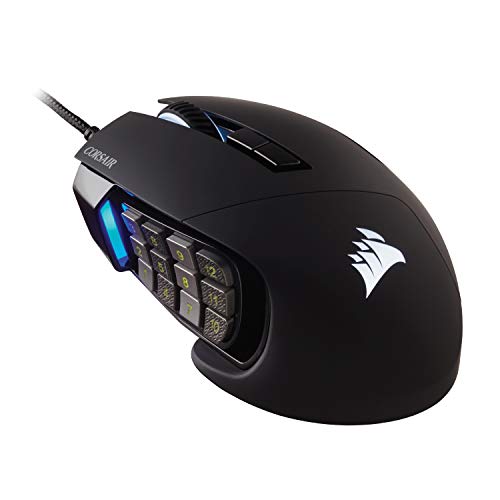
Corsair Scimitar RGB Elite Wired MMO Mouse
Best for: MMO and MOBA gamers needing many macros
- Connectivity
- Wired
- Maximum DPI
- 18,000 DPI
- Programmable Buttons
- 17
- Sensor
- PixArt PMW3391
- Backlighting
- RGB
- Use
- Gaming
View on Amazon: Corsair Scimitar RGB Elite Wired MMO Mouse Affiliate link
The Corsair Scimitar RGB Elite is a wired gaming mouse built for MMO and MOBA players. It features a PixArt PMW3391 optical sensor with 18,000 DPI and 17 programmable buttons. The patented Key Slider system lets you reposition 12 side buttons to match your grip. Its contoured shape includes a finger rest for palm comfort. This mouse suits gamers who need extensive macro support and precise tracking.
Pros
- 17 fully programmable buttons for complex macros
- Repositionable 12 side buttons via Key Slider system
- 18,000 DPI PixArt PMW3391 optical sensor
- 50 million click-rated Omron switches
- Contoured shape with right-side finger rest
Cons
- Wired connectivity limits cable-free movement
- Heavier at 4.3 ounces compared to lighter alternatives
- No wireless or tri-mode connectivity options
Good fit if
- You play MMOs or MOBAs requiring many macros
- You prefer a contoured mouse with a finger rest
- You want to customize side button positions
Skip if
- You need wireless freedom for your setup
- You prefer lightweight mice under 3 ounces
- You play fast-paced FPS games needing low latency
Verdict: Corsair Scimitar RGB Elite MMO Mouse is ideal for MMO players who need extensive programmable buttons and a comfortable, contoured grip. Its wired design and heavier build suit stationary desk setups rather than mobile gaming.

SOLAKAKA Wireless Honeycomb Gaming Mouse
Best for: gamers needing multi-device connectivity
- Connectivity
- 2.4G wireless, BT5.1, Type-C wired
- Maximum DPI
- 13200 DPI
- Weight
- 3.17 ounces
- Programmable Buttons
- 7
- Polling Rate
- 1000Hz
- Backlighting
- RGB
View on Amazon: SOLAKAKA Wireless Honeycomb Gaming Mouse Affiliate link
The SOLAKAKA SM600 is a tri-mode wireless gaming mouse supporting 2.4G, Bluetooth 5.1, and Type-C wired connections. It features 13,200 DPI, a 1000Hz polling rate, and seven programmable buttons. The lightweight honeycomb shell weighs 3.17 ounces and includes a 600 mAh battery with RGB lighting. It suits gamers who value connectivity options and customizable settings.
Pros
- Tri-mode connectivity with 2.4G, Bluetooth 5.1, and Type-C wired options
- High 13,200 DPI and 1000Hz polling rate for responsive control
- Seven programmable buttons for macro customization
- Lightweight 3.17-ounce honeycomb shell design
Cons
- Smaller 600 mAh battery compared to competitors
- Honeycomb shell may collect dust and debris
- Limited to 14 RGB lighting modes
Good fit if
- You need multiple connection modes for various devices
- You prefer a lightweight mouse for extended gaming sessions
- You want customizable buttons and DPI settings
Skip if
- You require a larger battery capacity for longer use
- You prefer a solid shell for easier cleaning
- You need more advanced RGB lighting customization
Verdict: SOLAKAKA SM600 Wireless Gaming Mouse offers versatile connectivity and a lightweight design for gamers who prioritize flexibility and customization. It is ideal for users who switch between devices frequently.
Specifications side by side
| Spec | Corsair Scimitar RGB Elite Wired MMO Mouse | SOLAKAKA Wireless Honeycomb Gaming Mouse |
|---|---|---|
| Connectivity | Wired | 2.4G wireless, BT5.1, Type-C wired |
| Maximum DPI | 18,000 DPI | 13200 DPI |
| Weight | not stated | 3.17 ounces |
| Programmable Buttons | 17 | 7 |
| Sensor | PixArt PMW3391 | not stated |
| Polling Rate | not stated | 1000Hz |
| Backlighting | RGB | RGB |
| Use | Gaming | Gaming |
| Color | Black | Black |
| Game Genre | MMO | not stated |
| Shell Design | not stated | Honeycomb |
| Operating System | Mac | Mac |
| Dimensions | 6.89 × 4.49 × 0.1 inches | not stated |
| Length | not stated | 4.88 inches |
| Width | not stated | 2.76 inches |
| Size | 1 Count (Pack of 1) | SM600 |
| Model | CH-9304211-AS | SM600 |
Frequently asked questions
Which mouse is better for MMO gaming?
The Corsair Scimitar RGB Elite is the superior choice for MMO and MOBA gamers. It features a unique side button slider system with 12 programmable keys. This layout allows you to reposition keys to fit your grip perfectly. The wired design ensures no latency during intense sessions. Its contoured shape supports extended play.
Is the SOLAKAKA mouse lightweight?
Yes, the SOLAKAKA SM600 is a lightweight option. It weighs just 3.17 ounces. This honeycomb design reduces overall mass for faster movements. The smaller dimensions, measuring 4.88 inches in length, suit smaller hands. This build prioritizes speed and agility over heavy-duty durability.
Can I connect the SOLAKAKA mouse to multiple devices?
The SOLAKAKA SM600 supports multi-device connectivity. It offers tri-mode connection options including Bluetooth 5.1 and 2.4G wireless. You can also use the Type-C port for wired use. This flexibility lets you switch between your PC, Mac, or other devices easily without needing extra adapters.
What is the DPI on the Corsair mouse?
The Corsair Scimitar RGB Elite features a sensor with up to 18,000 DPI. This high resolution provides precise tracking for competitive gaming. The PixArt sensor ensures consistent performance across various surfaces. The wired connection maintains this precision without any wireless interference or polling rate drops.
Does the Corsair mouse have RGB lighting?
Yes, the Corsair Scimitar RGB Elite includes RGB backlighting. You can customize the lighting effects to match your setup. The black color scheme provides a sleek look. The lighting enhances visibility in low-light environments while adding aesthetic value to your gaming station.
Which mouse is better for Mac users?
The SOLAKAKA SM600 is explicitly listed as compatible with Mac operating systems. Its Bluetooth 5.1 support allows seamless pairing with Apple devices. The Corsair model is described primarily for Windows-based gaming setups. If you use a Mac, the SOLAKAKA offers more straightforward compatibility without additional driver concerns.
How many buttons does the Corsair mouse have?
The Corsair Scimitar RGB Elite has 17 programmable buttons in total. This includes the standard left and right clicks plus 12 side buttons. The side buttons are arranged on a sliding mechanism. This allows you to adjust the button layout to suit your hand size and grip style.