DIERYA Wireless RGB Gaming Mouse Review: Specs, Pros and Cons
As an Amazon Associate we earn from qualifying purchases. Links on this page are affiliate links.
This dierya m1 wireless gaming mouse review covers a versatile peripheral designed for multi-device users. It features a 24,000 DPI sensor and a 1000mAh battery that delivers up to 180 hours of playtime. The mouse supports tri-mode connectivity, allowing you to switch between 2.4GHz wireless, Bluetooth 5.2, and USB-C wired connections. With six programmable buttons and customizable RGB lighting, it offers extensive control. We break down how these specifications translate to daily use, helping you decide if this lightweight, symmetrical design fits your workflow.
What stands out
- 24,000 DPI sensor with six preset levels and color-coded feedback
- 180-hour battery life in ECO mode with one-hour fast charging
- Tri-mode connectivity: 2.4GHz, Bluetooth 5.2, and USB-C wired
- 90-gram symmetrical shell with honeycomb texture for improved grip
- Huano micro switches rated for 20 million clicks
Who it fits
Good fit for
This mouse suits gamers and professionals who juggle multiple computers. The Bluetooth 5.2 dual-device pairing lets you switch between a work laptop and a gaming PC effortlessly. The lightweight 90-gram design benefits users who prefer claw or fingertip grips. If you need long battery life without constant recharging, the 180-hour ECO mode is ideal. The tri-mode setup also appeals to those who want a wired connection for competitive play without sacrificing wireless convenience.
Who should skip it
You might want to look elsewhere if you prioritize raw speed above all else. While the polling rate reaches 1000Hz, the Bluetooth mode is capped at 125Hz, which may feel sluggish for high-refresh-rate competitive gaming. The honeycomb shell, while reducing weight, can collect dust and debris over time. Additionally, the mouse requires driver software for full customization, which may not suit users who prefer plug-and-play simplicity without installing additional programs on their system.
Verdict: The DIERYA M1 offers a solid blend of connectivity options and battery efficiency for users managing multiple devices. Its lightweight build and high DPI range make it a capable choice for both casual and serious gamers.
Key specs explained for this mouse
Maximum DPI: 24,000 DPI
This value indicates the sensor's sensitivity range. You can adjust it from 200 to 24,000 DPI. High DPI helps track fast movements in shooters. Lower settings suit precise aiming. The mouse includes preset levels for quick changes. You get color-coded feedback to verify your current setting. This flexibility supports various gaming styles without needing software tweaks.
Battery Life: 180 hours
The 1000mAh battery offers up to 180 hours in ECO mode. This reduces charging frequency for casual users. With full RGB lighting, life drops to 48 hours. Fast charging fills the battery in one hour via USB-C. Intelligent sleep modes save power after inactivity. You can customize these timers. This ensures the mouse lasts through long sessions without frequent interruptions.
Connectivity: 2.4GHz, Bluetooth 5.2, USB-C
Tri-mode connectivity lets you switch between three methods. Use 2.4GHz wireless for low-latency gaming at 1000Hz. Bluetooth 5.2 supports dual-device pairing for office work. USB-C wired mode ensures stable performance. LED indicators show the active connection. You can save four device profiles. This makes switching between computers seamless for multi-device users.
Weight: 90g
At 90 grams, this mouse is lightweight. It reduces hand fatigue during extended gaming sessions. The symmetrical shell fits claw, palm, and fingertip grips. The honeycomb texture improves grip and reduces sweat. PTFE feet ensure smooth movement across pads. This weight balances control and speed. You can maneuver quickly without strain. It suits players who prefer agile movements over heavy precision.
Polling Rate: 125-1000Hz
The polling rate determines how often the mouse reports position. 1000Hz provides instant response for competitive gaming. Lower rates like 125Hz save battery life. You can adjust this via software. Higher rates reduce input lag. This ensures accurate tracking during fast movements. You can choose the best setting for your needs. It balances performance with power efficiency effectively.
Design and build details
According to the listing, the DIERYA M1 features a symmetrical mid-size shell measuring 125 by 63 by 41 millimeters. This specific footprint makes it suitable for claw, palm, and fingertip grip styles. The mouse weighs 90 grams, which the brand classifies as lightweight. A lower weight generally helps you reduce fatigue during long sessions and allows for quicker directional changes in fast-paced games.
The exterior uses a sweat-resistant honeycomb texture. This finish is designed to improve grip stability, especially if your hands get warm during intense play. The listing notes that the mouse is available in black or white. The symmetrical shape ensures that left- and right-handed users can both use the device without discomfort, as the button layout mirrors on both sides.
You get six programmable buttons for customization. The listing specifies that Huano micro switches are rated for 20 million clicks. This durability claim suggests the buttons will maintain their tactile feel over extended use. Smooth PTFE feet are included to ensure effortless movement across your mousepad. The lightweight construction combined with the durable switches means you get a responsive tool that can handle rigorous daily gaming without adding unnecessary bulk to your setup.
Setup and daily use
Setting up the DIERYA M1 depends on your preferred connection mode. For the fastest response, use the 2.4GHz wireless receiver or a USB-C cable. Both modes support a 1000Hz polling rate. This ensures tracking updates quickly, which matters for fast-paced games. You can also connect via Bluetooth 5.2. This mode allows dual-device pairing, so you can switch between a computer and a tablet. The mouse saves up to four device profiles. A dedicated button lets you toggle between them instantly. LED indicators show which connection is active, so you know your status at a glance.
Daily use focuses on comfort and battery management. The mouse weighs 90 grams. Its symmetrical shape fits claw, palm, or fingertip grips. The honeycomb texture helps with grip stability. Six buttons are fully programmable. You can use the driver software to remap keys or create macros. You can also adjust DPI levels and sleep timers. The Huano switches are rated for 20 million clicks. Smooth PTFE feet help the mouse glide easily.
Battery life varies by lighting settings. You get up to 180 hours in ECO mode. Full RGB lighting reduces this to 48 hours. Fast charging fills the battery in one hour via USB-C. Intelligent sleep modes activate after one or five minutes of inactivity. You can customize these timers in the software. This helps conserve power when you step away from your desk.
Before You Buy This Mouse
You should verify that your operating system supports the dedicated driver software for full customization. The listing notes Mac compatibility, but Windows users will need to download the correct application to remap buttons or adjust sleep timers. Keep the USB-C cable handy for fast charging, as the 1000mAh battery drains quickly with RGB lighting active. Regularly wipe the honeycomb texture to prevent dust buildup in the shell holes. This mouse fits well into a multi-device setup, allowing you to pair it with a laptop and desktop simultaneously. If you prefer wired consistency or need longer battery life without lights, compare it against other lightweight options in our 1 picks. Ensure your desk surface is smooth for the PTFE feet to glide properly. This peripheral suits users who value flexibility over minimalism.
Check before you buy
- Confirm driver software compatibility with your operating system.
- Check if you need dual-device Bluetooth pairing.
- Ensure you have a USB-C cable for charging.
- Verify your desk surface works with PTFE feet.
- Decide if RGB lighting is necessary for your setup.
The product at a glance
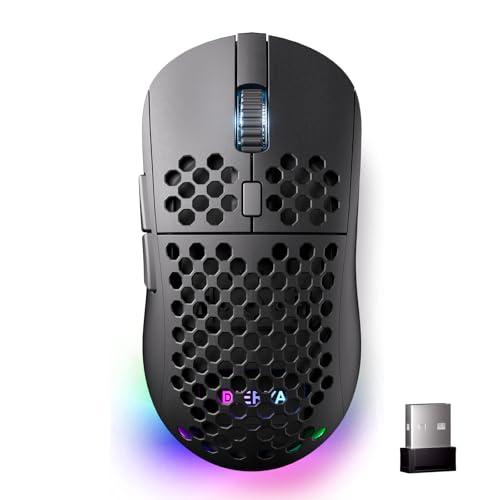
DIERYA Wireless RGB Gaming Mouse
Best for: Multi-device users seeking long battery life
- Connectivity
- 2.4GHz, Bluetooth 5.2, USB-C
- Maximum DPI
- 24,000 DPI
- Weight
- 90g
- Programmable Buttons
- 6
- Polling Rate
- 125-1000Hz
- Battery Life
- 180 hours
View on Amazon: DIERYA Wireless RGB Gaming Mouse Affiliate link
The DIERYA M1 is a tri-mode wireless gaming mouse with a 24,000 DPI sensor and 180-hour battery life. It connects via 2.4GHz, Bluetooth 5.2, or USB-C wired. The lightweight 90g design features six programmable buttons and 16.8 million color RGB lighting. It suits gamers who need multi-device switching and long battery endurance without frequent charging.
Pros
- 24,000 DPI sensor with six preset levels
- 180-hour battery life in ECO mode
- Tri-mode connectivity including Bluetooth 5.2
- Lightweight 90g symmetrical build
- 16.8 million color RGB lighting options
Cons
- Requires driver software for full customization
- Honeycomb texture may collect dust
- No mention of onboard memory for profiles
Good fit if
- You need seamless switching between multiple devices
- You prefer a lightweight mouse for fast movements
- You want long battery life with fast charging
Skip if
- You need a mouse without any software setup
- You prefer a solid shell over honeycomb design
- You require a mouse with onboard profile storage
Verdict: The DIERYA M1 Wireless Gaming Mouse fits players who value long battery life and multi-device connectivity. It offers high precision and a lightweight feel for competitive gaming.
Specifications side by side
| Spec | DIERYA Wireless RGB Gaming Mouse |
|---|---|
| Connectivity | 2.4GHz, Bluetooth 5.2, USB-C |
| Maximum DPI | 24,000 DPI |
| Weight | 90g |
| Programmable Buttons | 6 |
| Polling Rate | 125-1000Hz |
| Battery Life | 180 hours |
| Backlighting | RGB |
| Use | Gaming |
| Color | Black |
| Operating System | Mac |
| Length | 4.39 inches |
| Width | 2.48 inches |
| Model | M1 |
For your audio setup, the beyerdynamic mmx 100 wireless gaming review covers headset specifications to compare alongside this mouse.
Frequently asked questions
Does the DIERYA M1 mouse work with Mac computers?
Yes, the listing confirms Mac compatibility for this wireless gaming mouse. You can use it with macOS systems right out of the box. However, keep in mind that Windows users may need to download specific driver software to access full customization features. This ensures you can adjust settings like button remapping or sleep timers effectively on your preferred platform.
How heavy is the DIERYA M1 gaming mouse?
The DIERYA M1 weighs 5.61 ounces, which converts to approximately 90 grams. This weight classifies it as a lightweight option suitable for competitive gaming. The reduced mass helps reduce fatigue during long sessions. You can lift and move it quickly for precise aim adjustments without feeling weighed down by a heavy shell or excessive components.
What is the maximum DPI on this DIERYA mouse?
The maximum DPI is 24,000. This high sensitivity range allows you to track fast movements in shooters or adjust for high-resolution monitors. You can dial the sensitivity down to 200 DPI for precise aiming tasks. The wide range gives you flexibility to switch between rapid flicks and careful pixel-perfect clicks depending on the game you are playing.
What size grip is the DIERYA M1 designed for?
The mouse features a symmetrical mid-size shell measuring 4.39 inches in length and 2.48 inches in width. This footprint is versatile enough to support claw, palm, and fingertip grip styles. You do not need to worry about hand size limitations. The balanced shape allows you to maintain control regardless of whether you prefer a loose or tight hold on the device.
Does the DIERYA M1 have RGB lighting?
Yes, the DIERYA M1 Wireless Gaming Mouse includes RGB backlighting. You can customize the lighting effects to match your setup. This feature adds visual appeal to your desk space. The lighting is integrated into the black shell, providing a sleek look that complements most gaming environments without being overly distracting during intense gameplay sessions.
Is the DIERYA M1 mouse wireless?
Yes, this model is a wireless gaming mouse. It supports tri-mode connectivity, allowing you to switch between 2.4GHz wireless, Bluetooth, and USB-C wired connections. This flexibility lets you choose the best mode for your needs. You can enjoy a clutter-free desk with wireless use or plug in for zero-latency performance during competitive matches.