Keychron Q8 65% Alice Layout Barebone Mechanical Keyboard Review: Who It Fits and Who Should Skip It
As an Amazon Associate we earn from qualifying purchases. Links on this page are affiliate links.
This keychron q8 65 alice layout barebone mechanical keyboard review focuses on the Q8, a premium 65% keyboard built from CNC-machined aluminum. It features an ergonomic Alice layout and double-gasket construction for improved typing feel. As a barebone version, it does not include switches or keycaps, requiring you to purchase them separately. The board supports hot-swappable MX-style switches and QMK firmware for deep customization. It connects via wire and works with both macOS and Windows systems. This guide explains how these specifications shape your typing experience and who might benefit from this specific configuration.
What stands out
- CNC-machined aluminum full metal case for durability and weight
- Double-gasket design with sound-absorbing foam for reduced resonance
- Hot-swappable PCB supporting 3-pin and 5-pin MX-style switches
- QMK programmable firmware for key remapping and layout tweaks
- South-facing RGB LEDs for better illumination with non-shine-through keycaps
Who it fits
Good fit for
You should consider this keyboard if you enjoy building custom setups from scratch. The barebone format lets you choose your preferred switches and keycaps, offering full control over your typing feel and sound. The Alice layout suits users who want an ergonomic wrist position without a full-size board. Hot-swap support means you can experiment with different switch types without soldering. The double-gasket mount and foam layers appeal to those who prioritize a quieter, softer typing sound in a metal chassis.
Who should skip it
Skip this option if you want a keyboard that works immediately out of the box. Since this is a barebone version, you must buy switches and keycaps separately, which adds to the initial setup time and effort. If you prefer plug-and-play simplicity, a complete keyboard might be better. Additionally, the wired-only connection may not suit users who need wireless freedom. The QMK customization, while powerful, requires learning new software if you are new to programmable firmware. You also need to be comfortable with assembling and disassembling the case for maintenance.
Verdict: The Keychron Q8 Alice 65% Barebone is a solid choice for builders who value customization and a premium metal feel. It offers excellent sound dampening and flexibility for those willing to source their own switches and keycaps.
Keychron Q8 Key Specs Explained
Connectivity: Wired
You connect this keyboard via a cable rather than using wireless signals. This setup eliminates the need to charge batteries or worry about signal interference. You get consistent input latency and reliability, which is ideal for users who prefer a stable connection and want to avoid the maintenance of wireless charging routines.
Hot-Swap Support: Hot-Swappable
The printed circuit board allows you to insert and remove mechanical switches without soldering. You can change the typing feel by swapping switches easily. This feature lets you customize your experience or replace damaged switches quickly. It is useful for beginners who want to experiment with different switch types without technical skills.
Mounting Style: Gasket Mount
The internal components are suspended by flexible gaskets instead of being rigidly screwed to the case. This design absorbs shock and reduces harsh sounds during typing. You get a softer, more consistent keystroke feel. This construction is preferred by enthusiasts seeking a premium typing experience with better acoustics and reduced vibration.
Backlighting: RGB
The keyboard uses red, green, and blue LEDs to produce customizable lighting effects. You can adjust colors and patterns to suit your environment or preferences. South-facing LEDs direct light toward you, ensuring keycaps illuminate clearly even if they do not have transparent legends. This enhances visibility in low-light conditions.
Design And Build Quality
The listing describes the Keychron Q8 as a premium unit built from CNC-machined aluminum. This full metal construction gives the keyboard a solid, heavy feel. You get a rigid chassis that resists flex during typing. The Grey finish is listed as one of the available color options, alongside Black and Blue variants. This durable material choice suggests the keyboard is built to last, though it will add noticeable weight to your desk setup.
It features a 65% Alice layout, which combines a compact form factor with an ergonomic columnar arrangement. This design reduces wrist strain by aligning keys with your natural finger movement. The double-gasket mount style adds flexibility to the case. This construction isolates the PCB from the metal shell, which helps dampen resonance. You also get sound-absorbing foam and case foam to reduce unwanted noise between components.
Controls are handled via south-facing RGB LEDs. This placement directs light toward you, improving visibility when you use non-shine-through PBT keycaps. The listing notes that the keyboard is wired and compatible with both macOS and Windows. As a barebone model, it does not include switches or keycaps. You must purchase those separately to complete the build. The PCB-mounted screw-in stabilizers for larger keys aim to reduce wobble for a cleaner typing experience.
Setup And Daily Use Guide
Setting up the Keychron Q8 begins with assembly. This barebone version does not include switches or keycaps. You must purchase these separately to make the keyboard functional. The listing confirms support for most 3-pin and 5-pin MX-style mechanical switches. This includes popular brands like Cherry, Gateron, Kailh, and Panda. You can install your chosen switches without soldering. The PCB uses screw-in stabilizers for larger keys. This mounting style reduces wobble and improves stability for keys like the space bar, Shift, Enter, and Delete.
Connection is wired only. You plug the keyboard into your computer via cable. This method ensures consistent input latency without battery charging or signal interference. The device works with both macOS and Windows operating systems. You do not need to switch drivers for basic functionality.
For daily use, the double-gasket design and sound-absorbing foam manage typing noise. These features reduce resonance between metal components. The south-facing RGB LEDs illuminate keys from your angle. This design helps visibility, especially if you use non-shine-through PBT keycaps. The QMK firmware allows deep customization. You can remap keys and tweak layouts using Keychron Launcher. The aluminum case and gasket mount provide a rigid platform. You get a stable typing surface that does not flex during heavy use. The unit remains fixed in place on your desk due to its weight and construction.
Before You Buy The Q8
You need to buy switches and keycaps separately for this barebone model. The listing supports most 3-pin and 5-pin MX-style switches. You must ensure your chosen switches fit the hot-swap sockets. This allows you to tailor the typing feel to your preference. The keyboard works with both macOS and Windows systems. You may need to download the Keychron Launcher for full customization. The double-gasket design and foam layers reduce noise. You should keep the aluminum body clean with a dry cloth. Avoid harsh chemicals that might damage the finish. This option suits builders who want a premium, customizable rig. It differs from pre-built boards by requiring assembly. If you prefer plug-and-play simplicity, other models in this guide may fit better. Check your desk space for the 65% Alice layout. The ergonomic shape requires some adjustment time. Ensure your cable length reaches your computer. This setup demands patience but offers long-term satisfaction.
Check before you buy
- Purchase compatible 3-pin or 5-pin MX-style switches separately.
- Select keycaps that fit the Alice layout profile.
- Confirm your operating system supports QMK customization.
- Verify desk space for the ergonomic Alice shape.
The product at a glance
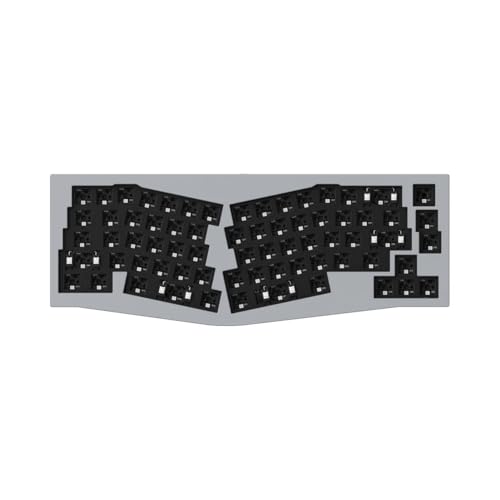
Keychron Q8 Alice 65% Barebone
Best for: Custom keyboard builders
- Form Factor
- 65% Alice Layout
- Connectivity
- USB wired
- Backlighting
- RGB
- Case Material
- CNC-machined aluminum
- Hot-Swap Support
- Hot-Swappable
- Mounting Style
- Gasket Mount
View on Amazon: Keychron Q8 Alice 65% Barebone Affiliate link
The Keychron Q8 is a barebone 65% Alice layout mechanical keyboard. It features a full CNC-machined aluminum body and a double-gasket mount for flexibility. The board supports QMK firmware for deep customization and hot-swappable sockets for easy switch changes. South-facing RGB LEDs improve lighting visibility. You get a wired connection and compatibility with both macOS and Windows. This kit requires you to buy switches and keycaps separately.
Pros
- CNC-machined aluminum full metal build
- Double-gasket design with sound-absorbing foam
- QMK programmable for custom layouts
- Hot-swappable for 3-pin and 5-pin MX-style switches
- South-facing RGB LEDs
Cons
- Wired only connection
- Barebone version excludes switches and keycaps
- No wireless capability
Good fit if
- You want a premium aluminum build quality
- You prefer the ergonomic Alice layout
- You enjoy customizing firmware and switches
Skip if
- You need a wireless keyboard
- You want a complete kit with switches included
- You prefer a standard rectangular layout
Verdict: Keychron Q8 65% Alice Barebone suits enthusiasts who value build quality and customization. It fits those who want to build a custom typing experience from scratch.
Specifications side by side
| Spec | Keychron Q8 Alice 65% Barebone |
|---|---|
| Form Factor | 65% Alice Layout |
| Connectivity | USB wired |
| Backlighting | RGB |
| Case Material | CNC-machined aluminum |
| Hot-Swap Support | Hot-Swappable |
| Mounting Style | Gasket Mount |
| Color | Grey |
| Operating System | Mac, Windows |
Frequently asked questions
Is the Keychron Q8 Alice barebone suitable for beginners?
This keyboard is best for enthusiasts who enjoy building their own devices. As a barebone model, it does not include switches or keycaps. You must purchase these components separately to complete the assembly. It fits those who want to customize their typing experience from scratch rather than using a pre-built unit.
Does the Keychron Q8 support both Mac and Windows?
Yes, the listing confirms compatibility with both Mac and Windows operating systems. This flexibility allows you to use the keyboard across different platforms without needing specific hardware drivers. You can switch between these systems easily, making it a versatile choice for users who work with multiple computers daily.
What mounting style does the Keychron Q8 use?
The Keychron Q8 features a gasket mount design. This construction method suspends the plate within the case using flexible gaskets. It isolates the switches from the rigid chassis to reduce vibration and noise. This setup typically provides a softer, more consistent typing feel compared to traditional tray-mounted keyboards.
Is the Keychron Q8 wireless or wired?
This model connects via a wired interface. You plug it into your computer using a cable rather than relying on wireless signals. This setup eliminates the need to charge batteries or worry about signal interference. You get consistent input latency and reliability, which is ideal for users who prioritize stability.
Can I change the switches on the Keychron Q8?
Yes, the keyboard offers hot-swappable support. This feature allows you to insert and remove mechanical switches without soldering. You can easily swap out switches to change the typing feel or sound profile. This flexibility lets you tailor the keyboard to your specific preferences without needing specialized tools or technical skills.
What backlighting does the Keychron Q8 provide?
The Keychron Q8 includes RGB backlighting. This feature allows you to customize the color and lighting effects of each key. You can adjust the brightness and patterns to suit your environment or aesthetic preferences. RGB lighting enhances visibility in low-light conditions while adding a personalized visual element to your workspace.
What layout does the Keychron Q8 Alice use?
The Keychron Q8 Alice uses a 65% Alice layout. This configuration combines the ergonomic benefits of the Alice split design with the compact size of a 65% keyboard. It reduces the distance your hands must travel while maintaining a streamlined footprint. This layout is ideal for users seeking ergonomics without sacrificing desk space.