Logitech K270 Full-Size Wireless Keyboard Review (2026): A Spec-Based Look
As an Amazon Associate we earn from qualifying purchases. Links on this page are affiliate links.
This logitech k270 full size wireless review covers a straightforward peripheral for daily tasks. The device is a full-size keyboard featuring a standard layout with a number pad and arrow keys. It connects via a USB receiver, offering wireless freedom without software installation. The listing highlights a 24-month battery life, reducing the need for frequent changes. You get a reliable connection with up to a 33 ft range. This model is designed for Windows users who need a familiar typing experience. The specs focus on durability and long-term usability for office or home desks.
What stands out
- Full-size layout includes F-keys, number pad, and arrow keys
- 24-month battery life with a single set of batteries
- Wireless range of up to 33 feet
- Spill-proof design with durable print characters
- 8 multimedia hotkeys for quick access to internet and volume
Who it fits
Good fit for
This keyboard suits users who need a complete layout for data entry or spreadsheet work. The full-size design with a number pad is ideal for those who type frequently. You will appreciate the plug-and-play setup if you want to avoid installing drivers. The long battery life makes it a low-maintenance choice for office desks or home workstations. Windows users who prefer a traditional typing experience will find this spec sheet reassuring.
Who should skip it
You should look elsewhere if you use a Mac, as this model is specified for Windows. The lack of Bluetooth means you cannot connect to devices without a USB port. If you need a compact or tenkeyless design for a small desk, this full-size unit will take up too much space. Users who want a silent typing experience might find the standard key profile too loud. You will also miss out on customizable software features since no app is mentioned.
Verdict: The Logitech K270 offers a durable, full-size typing experience with minimal setup for Windows users. Its long battery life and reliable wireless connection make it a practical choice for standard office tasks.
Key specs explained
Form Factor: full-size
This layout includes a standard number pad and dedicated arrow keys. You get the complete keyboard experience found on most office desks. If you rely on numeric data entry or need full navigation controls, this format suits you. Compact or tenkeyless models omit these keys to save space, but you lose that full utility.
Connectivity: Wireless, USB receiver
The keyboard uses a small USB dongle to communicate with your computer. You plug it into any available USB port to start using the device immediately. This setup avoids the pairing complexity of Bluetooth connections. It offers a stable link without requiring drivers or software installation on your Windows system.
Battery Life: 24-month
You can use this keyboard for two years before needing to replace the batteries. This long duration reduces maintenance hassle and ensures consistent performance. You do not need to charge it frequently like rechargeable devices. This makes it ideal for users who prefer predictable, low-maintenance peripherals for their home or office setup.
Wireless Range: up to 33 ft
The connection remains strong up to thirty-three feet from your computer. You can place the keyboard comfortably on your lap or across the room. This range reduces the risk of signal dropouts or input delays. It provides flexibility in desk arrangement, allowing you to position the device for maximum ergonomic comfort without cable constraints.
Design and build details
The listing describes the Logitech K270 as a full-size keyboard with a standard layout. This format includes a number pad and dedicated arrow keys. You get the complete keyboard experience found on most office desks. If you rely on numeric data entry or need full navigation controls, this format suits you. The design prioritizes familiarity over compactness, ensuring you have access to all function keys and multimedia shortcuts.
According to the listing, the device features a spill-proof design and durable print characters. These specifications suggest the keyboard can handle occasional on-the-job mishaps without immediate failure. The keys have a deep profile, which the listing claims creates a comfortable and familiar typing experience. The finish is black, a common choice for professional environments that prefer neutral aesthetics. The plastic parts include thirty-eight percent certified post-consumer recycled plastic, indicating a specific material composition for the casing.
The physical dimensions are listed as seventeen point three inches in width, five point seven five inches in depth, and zero point seven five inches in height. It weighs one point one pounds. These measurements confirm the unit is a substantial desktop peripheral. It requires a dedicated space on your desk rather than a lap or travel bag. The wireless connection uses a USB receiver with an up to thirty-three-foot range, allowing you to position the keyboard at a comfortable distance from your computer.
Setup and everyday use guide
Setting up the Logitech K270 requires minimal effort. You simply plug the included USB receiver into a port on your desktop, laptop, or netbook. The listing confirms that no software installation is necessary to begin typing. This plug-and-play approach means you can start using the device immediately after connecting the receiver. The keyboard is compatible with Windows 7, 8, 10, or later operating systems. Once connected, you benefit from a strong wireless link with a stated range of up to 33 feet. This distance allows you to place the keyboard comfortably on your desk without worrying about signal dropouts or input delays. The device features eight dedicated multimedia hotkeys for quick access to internet, email, and volume controls. These keys provide instant access to common tasks without navigating through menus. For maintenance, the keyboard uses a single battery that the manufacturer claims lasts for 24 months. This long battery life reduces the hassle of frequent replacements. The spill-proof design and durable print characters suggest the keyboard can withstand minor workplace mishaps over time. The unit measures 17.3 inches in length and weighs 1.1 pounds. Its full-size layout with deep-profile keys aims to provide a familiar typing experience. You do not need to adjust to a compact or unusual form factor. The device is available in black, rose, or off-white colors, and comes in single or four-pack options.
Before you buy this keyboard
You will need a free USB port for the receiver. This keyboard works with Windows 7, 8, 10, or later. Check your computer’s operating system before buying. The listing notes a 24-month battery life. You should keep spare AAA batteries on hand. The spill-proof design helps protect against minor accidents. Clean the keys regularly to maintain durability. This model fits well alongside other wireless options in our 1 recommendations. It lacks Bluetooth, so it only connects via the USB dongle. If you prefer multiple device switching, look at other picks. The full-size layout is ideal for desks with space. It is not suitable for laptops or tight spaces. The plastic construction includes post-consumer recycled materials. This makes it a practical choice for everyday office work. You get reliable typing without complex setup. The wireless range reaches up to 33 feet. This allows flexible placement away from your computer. Just ensure your USB port is accessible.
Check before you buy
- Verify your computer runs Windows 7 or later
- Ensure you have a free USB port available
- Check if you need Bluetooth connectivity for other devices
- Confirm your desk has space for a full-size layout
The product at a glance
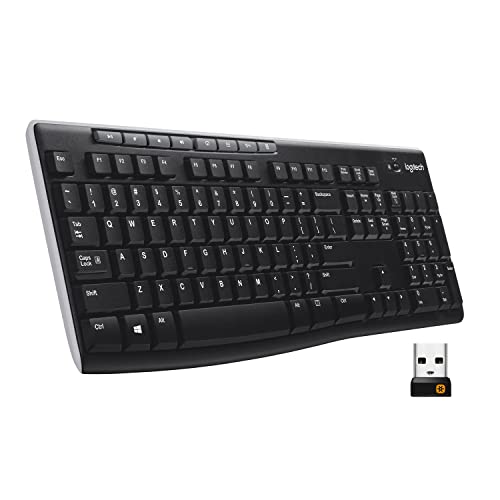
Logitech K270 Full-Size Wireless Keyboard
Best for: Windows users needing a durable, full-size wireless keyboard
- Form Factor
- Full-size
- Connectivity
- Wireless (USB receiver)
- Case Material
- Plastic
- Color
- Black
- Operating System
- Windows
- Dimensions
- 0.75 × 5.75 × 17.3 inches
View on Amazon: Logitech K270 Full-Size Wireless Keyboard Affiliate link
The Logitech K270 is a full-size wireless keyboard designed for Windows users who need a reliable, no-fuss typing experience. It features deep-profile keys and a standard layout with a number pad. The device connects via a USB receiver with a 33-foot range and offers 24-month battery life. Its spill-proof design and durable print characters make it a practical choice for daily office or home desk use.
Pros
- Full-size layout with number pad and F-keys
- 24-month battery life on standard batteries
- 33-foot wireless range via USB receiver
- Spill-proof design for durability
- Plug-and-play setup with no software required
Cons
- Limited to Windows operating systems only
- No Bluetooth or multi-device switching capability
- Uses proprietary USB receiver instead of standard dongle
Good fit if
- You need a full-size keyboard with a number pad
- You prefer a simple plug-and-play wireless setup
- You want long battery life without frequent changes
Skip if
- You use a Mac or Linux computer
- You need Bluetooth connectivity for multiple devices
- You prefer a compact or tenkeyless layout
Verdict: Logitech K270 Full-Size Wireless Keyboard is a straightforward, durable option for Windows users who prioritize battery life and a traditional layout. It suits those who want a reliable, no-frills keyboard for a fixed desk setup.
Specifications side by side
| Spec | Logitech K270 Full-Size Wireless Keyboard |
|---|---|
| Form Factor | Full-size |
| Connectivity | Wireless (USB receiver) |
| Case Material | Plastic |
| Color | Black |
| Operating System | Windows |
| Dimensions | 0.75 × 5.75 × 17.3 inches |
| Weight | 1.1 pounds |
| Size | 1 Pack |
| Model | 920-003051 |
If you are also outfitting a bedroom, the bedsure full size comforter review outlines fill weight and fabric measurements.
Frequently asked questions
Does the Logitech K270 work with Mac?
No, this keyboard is designed specifically for Windows. The listing confirms it is compatible with Windows 7, 8, 10, or later versions. It does not mention macOS support. If you use a Mac, you may find key layouts incompatible or lack of driver support. You should check your operating system requirements before purchasing to ensure it meets your needs.
What are the dimensions of this keyboard?
The Logitech K270 measures 17.3 inches in length, 5.75 inches in width, and 0.75 inches in height. These dimensions reflect its full-size form factor. The included number pad and dedicated arrow keys contribute to this larger footprint. You should ensure your desk has enough space to accommodate these measurements comfortably for daily typing tasks.
How heavy is the Logitech K270?
The keyboard weighs 1.1 pounds. This weight provides stability on your desk during use. It is not designed to be portable due to its full-size layout and weight. You will likely keep it in a fixed position. The substantial build helps prevent sliding while you type, offering a steady platform for your daily computing needs.
Is the Logitech K270 wireless?
Yes, it is a wireless keyboard. It connects via a USB receiver that you plug into your computer. This setup offers wireless freedom without requiring software installation. You do not need to charge the device, as it uses batteries. This makes it a convenient option for reducing cable clutter on your desk while maintaining reliable connectivity.
What color is the Logitech K270?
The Logitech K270 is black. This color matches most standard office and home computer setups. It features a full-size layout with a traditional design. The black finish is practical for hiding dust and wear over time. You get a classic look that blends seamlessly with other peripherals and desk accessories without drawing unnecessary attention.
Does it require software installation?
No, software installation is not necessary. You simply plug the USB receiver into a port to begin typing. This plug-and-play approach allows for immediate use on your Windows computer. You do not need to download drivers or configure settings. This simplicity makes it ideal for users who want a straightforward setup without technical hurdles.