Looking Beyond the Logitech K750 Solar Wireless Mac? 6 Alternatives Worth a Look
As an Amazon Associate we earn from qualifying purchases. Links on this page are affiliate links.
The Logitech K750 Solar Wireless Mac Keyboard offers reliable 2.4 GHz wireless connectivity and solar charging for Mac users. If you are exploring logitech k750 solar wireless mac alternatives, you likely want different features or form factors. This guide compares 6 options that share core wireless capabilities while offering distinct specifications.
The original model provides a grey, low-profile design with dedicated hotkeys and a 33-foot wireless range. However, some buyers prefer mechanical switches, compact layouts, or additional media controls. The selected alternatives include keyboards with RGB backlighting, volume knobs, and hot-swappable switches. These specs overlap with the K750’s wireless reliability but expand on customization and physical control. You can choose based on whether you need a numpad, a smaller footprint, or tactile feedback. Each option here meets the basic requirement of wireless Mac compatibility while differing in build and feature sets.
How alternatives compare to K750
Soueto Wireless Keyboard with Device Holder
The Soueto Wireless Keyboard includes a built-in device holder, which the Logitech K750 lacks. This adds desk organization for your phone. It uses RGB backlighting instead of the K750’s simple grey design. The Soueto model focuses on tactile typing and stability via a USB dongle. You give up solar charging and the dedicated Mac hotkeys found on the K750. This option suits users who prioritize a tidy workspace and visual customization over the K750’s maintenance-free power. It is a practical choice if you need a phone stand integrated into your typing setup.
Redragon Wireless Keyboard with Volume Knob
The Redragon RM104 offers tri-mode connectivity, whereas the K750 relies solely on 2.4 GHz wireless. This Redragon model features a volume knob for direct audio control, a feature absent on the K750. It includes RGB backlighting and is designed for gaming use. You gain versatile connection options and physical media controls but lose the solar charging capability. The K750 remains simpler for basic Mac tasks. Choose the Redragon if you need to switch between devices easily or want tactile volume adjustment. It is better for users who value hardware controls and multi-device flexibility over the K750’s minimalist approach.
Redragon Wireless Mac Mechanical Keyboard
The Redragon K671KS is a mechanical keyboard with hot-swappable switches, unlike the K750’s standard membrane keys. It features a durable metal build and RGB backlighting. This model supports tri-mode connectivity, offering more connection options than the K750’s single 2.4 GHz link. You get the ability to customize switches without soldering, which the K750 does not offer. However, you sacrifice the solar charging feature. This keyboard is ideal for users who want to tailor their typing feel and prefer a premium metal construction. It suits those who value customization and durability over the K750’s simple, maintenance-free design.
SOLAKAKA 96% Wireless Mechanical Keyboard
The SOLAKAKA A99 Pro features a 96% layout with a numpad, providing more keys than the K750. It includes hot-swappable switches and an LCD screen for direct control. This model offers tri-mode connectivity, unlike the K750’s single wireless mode. You gain a compact full-size layout and hardware controls but lose solar charging. The SOLAKAKA is suitable for users who need a numpad in a smaller footprint. It is ideal for those who want to customize their switches and view system info on the screen. Choose this if you prioritize layout flexibility and hardware controls over the K750’s simplicity and solar power.
EPOMAKER 75% Wireless Gasket Keyboard with Screen
The EPOMAKER F75 MAX uses a 75% form factor, which is more compact than the K750. It includes hot-swappable switches and a gasket mount for sound tuning. This model offers tri-mode connectivity and an LCD screen, features the K750 lacks. You gain a smaller footprint and customizable switches but lose solar charging. The EPOMAKER is best for users who want a compact setup with advanced hardware controls. It suits those who value sound customization and switch flexibility. Choose this if you prefer a smaller keyboard with modern mechanical features over the K750’s traditional layout and maintenance-free power solution.
ASUS ROG Strix Scope II 96 Wireless
The ASUS ROG Strix Scope II 96 offers a full-size layout with a numpad, larger than the K750. It features hot-swappable switches and tri-mode connectivity. This model includes PBT keycaps and RGB backlighting, unlike the K750’s standard keys and simple design. You gain a durable build and extensive customization options but lose solar charging. The ASUS is ideal for users who need a numpad and want to customize their typing experience. It suits gamers and professionals who value hardware controls and switch flexibility. Choose this if you prefer a robust mechanical keyboard with advanced features over the K750’s simple, solar-powered design.
Quick picks
Our 7 picks

Logitech K750 Solar Wireless Mac Keyboard
Best for: Mac users seeking solar-powered simplicity
- Connectivity
- 2.4 GHz
- Color
- Grey
- Operating System
- Mac
- Dimensions
- 19.1 × 1.4 × 7.9 inches
- Weight
- 1.68 pounds
View on Amazon: Logitech K750 Solar Wireless Mac Keyboard Affiliate link
The Logitech K750 Solar Wireless Keyboard for Mac uses solar power to stay charged, eliminating battery swaps. It connects via a 2.4 GHz wireless link with a range over 33 feet. The grey unit measures 19.1 by 7.9 inches and weighs 1.68 pounds. It includes dedicated Mac hotkeys for navigation. This keyboard suits users who want a low-maintenance, wired-free typing experience on macOS.
Pros
- Solar-powered rechargeable battery
- 2.4 GHz wireless connection
- Over 33 ft wireless range
- Dedicated Mac hotkeys
Cons
- No Bluetooth connectivity
- Non-mechanical membrane switches
- No backlighting
Good fit if
- You use a Mac desktop
- You want to avoid battery replacements
- You prefer a standard full-size layout
Skip if
- You need Bluetooth connectivity
- You want mechanical switches
- You require backlighting
Verdict: The Logitech K750 Solar Mac Keyboard is a solid choice for Mac users who value solar charging and reliable 2.4 GHz wireless performance over customizable features.
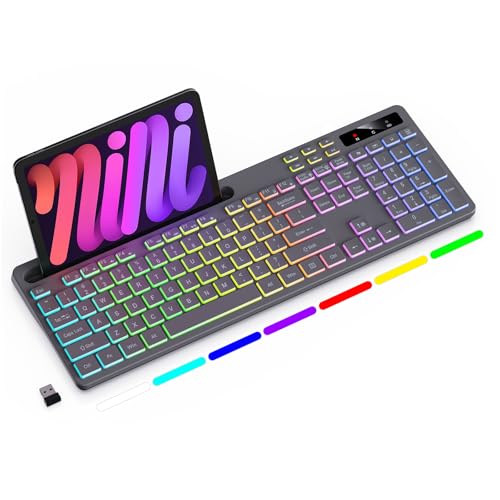
Soueto Wireless Keyboard with Device Holder
Best for: Desk organization with a phone stand
- Switch Type
- Tactile
- Form Factor
- Full-Size
- Connectivity
- 2.4GHz wireless
- Backlighting
- 7-color RGB
- Use
- Gaming
- Color
- Grey
View on Amazon: Soueto Wireless Keyboard with Device Holder Affiliate link
The Soueto WK713 is a grey wireless mechanical keyboard designed for Mac and PC users. It features tactile switches and RGB backlighting with seven colors and four modes. A built-in 8.7-inch phone holder keeps your desk tidy. The 2.4G wireless connection uses a USB dongle for stability. A 1500mAh battery reduces the need for replacements. This layout includes shortcut and multimedia keys for efficient work.
Pros
- Tactile switches for responsive keystrokes
- Integrated 8.7-inch device holder
- 1500mAh rechargeable battery
- 7-color RGB backlighting
- 2.4G wireless dongle connection
Cons
- Only 2.4G wireless connectivity
- No Bluetooth support listed
- Single USB dongle required
Good fit if
- You want a built-in phone stand
- You prefer tactile mechanical switches
- You use a 2.4G USB receiver
Skip if
- You need Bluetooth connectivity
- You require multi-device pairing
- You prefer membrane switches
Verdict: Soueto Wireless Keyboard with Phone Holder suits users who value a tidy desk with a built-in stand and tactile typing. It fits those who rely on a USB dongle for stable wireless performance.

Redragon Wireless Keyboard with Volume Knob
Best for: Gamers needing audio and lighting control
- Connectivity
- Bluetooth, 2.4GHz, USB-C wired
- Backlighting
- RGB
- Media Controls
- Volume Knob
- Use
- Gaming
- Operating System
- Mac
View on Amazon: Redragon Wireless Keyboard with Volume Knob Affiliate link
The Redragon RM104 is a wireless gaming keyboard featuring a multifunction control knob for volume and lighting. It offers tri-mode connectivity via Bluetooth, 2.4GHz, and USB-C. The 4000mAh battery supports extended use. You can customize keys and RGB effects through companion software. It works with Windows, macOS, and gaming consoles, providing flexible setup options for various devices.
Pros
- Multifunction smart control knob for audio and lighting
- Tri-mode connectivity with Bluetooth, 2.4GHz, and USB-C
- 4000mAh battery capacity for long-term use
- Customizable via companion software for macros and profiles
Cons
- Requires software for full customization capabilities
- Designed primarily for gaming rather than typing comfort
- No mention of solar charging or low battery alerts
Good fit if
- You want precise volume control without reaching for system settings
- You need flexible connectivity options for multiple devices
- You prefer customizable lighting and key mappings
Skip if
- You prioritize silent typing over gaming features
- You want a keyboard with built-in solar charging
- You need a compact layout with fewer keys
Verdict: The Redragon RM104 Tri-Mode Keyboard suits users who value tactile control and versatile connectivity. It is ideal for gamers seeking customizable lighting and audio management during sessions.
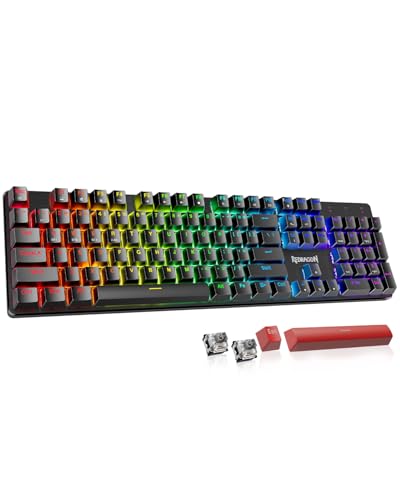
Redragon Wireless Mac Mechanical Keyboard
Best for: Multi-device users wanting hot-swap flexibility
- Switch Type
- Red
- Connectivity
- Bluetooth 3.0/5.0, 2.4 GHz, USB-C
- Backlighting
- RGB
- Keycap Material
- Double injection PBT
- Case Material
- Metal panel
- Hot-Swap Support
- Hot-Swappable
View on Amazon: Redragon Wireless Mac Mechanical Keyboard Affiliate link
The Redragon K671KS is a wireless mechanical keyboard featuring a metal panel and hot-swappable red switches. It supports tri-mode connectivity via Bluetooth 3.0/5.0, 2.4 GHz, and USB-C, allowing you to pair up to five devices. The double injection PBT keycaps provide durable RGB backlighting with adjustable brightness. This setup suits users who need flexible connection options and customizable switch feel for gaming or office work.
Pros
- Tri-mode connectivity with Bluetooth 3.0/5.0, 2.4 GHz, and USB-C
- Hot-swappable red switches include 8 spare switches for customization
- Metal panel construction with double injection PBT keycaps
- Supports macro editing and individual RGB key adjustment
Cons
- Bluetooth 3.0 support may offer less stability than newer versions
- No dedicated software mentioned for advanced macro configuration
- Switches are pre-installed red switches, not linear or tactile
Good fit if
- You want to swap switches without soldering
- You need to connect to multiple devices
- You prefer a metal build for durability
Skip if
- You require Bluetooth 5.0 only
- You need a compact 60% layout
- You prefer plastic case materials
Verdict: Redragon K671KS Tri-Mode Mechanical Keyboard offers a durable metal build and flexible connectivity for users who value customization and multi-device support. It is a solid option for gamers and professionals who want to tailor their typing experience without complex software.

SOLAKAKA 96% Wireless Mechanical Keyboard
Best for: Users wanting compact layout with numpad and hot-swap
- Form Factor
- 96%
- Connectivity
- 2.4GHz, BT 5.0, USB-C
- Backlighting
- RGB
- Keycap Material
- Double-shot PBT
- Hot-Swap Support
- Hot-Swappable
- Mounting Style
- Gasket Mount
View on Amazon: SOLAKAKA 96% Wireless Mechanical Keyboard Affiliate link
The SOLAKAKA A99 Pro is a 96% wireless mechanical keyboard featuring a gasket mount and hot-swappable switches. It supports tri-mode connectivity via Bluetooth 5.0, 2.4GHz, and USB-C. An LCD screen and metal knob provide direct control over volume, lighting, and system switching. The 8000mAh battery offers extended usage, while double-shot PBT keycaps ensure durability. This setup suits users who want extensive customization and a compact layout with a numpad.
Pros
- Tri-mode connectivity for multiple devices
- Hot-swappable switches for easy customization
- Gasket mount structure for typing feel
- LCD screen and metal volume knob
- 8000mAh battery with long life
Cons
- Requires web driver for full customization
- Large 96% layout takes desk space
- No dedicated Mac optimization features
Good fit if
- You want a compact layout with a numpad
- You prefer hot-swappable mechanical switches
- You value physical knobs and LCD displays
Skip if
- You need a standard full-size keyboard
- You dislike web-based configuration tools
- You require a smaller 75% or 60% form factor
Verdict: SOLAKAKA A99 Pro 96% Wireless fits users who want a compact layout with a numpad and hot-swappable switches. The LCD screen and metal knob offer direct control over volume and lighting.

EPOMAKER 75% Wireless Gasket Keyboard with Screen
Best for: Compact setups with media control needs
- Switch Type
- Linear Reaper switch
- Form Factor
- 75%
- Connectivity
- Bluetooth, 2.4GHz wireless, wired
- Backlighting
- RGB
- Hot-Swap Support
- Hot-Swappable
- Mounting Style
- Gasket Mount
View on Amazon: EPOMAKER 75% Wireless Gasket Keyboard with Screen Affiliate link
The EPOMAKER X Aula F75 MAX is a 75% wireless mechanical keyboard with a gasket mount and hot-swappable linear switches. It features a TFT screen, volume knob, and RGB backlighting. This tri-mode device supports Bluetooth, 2.4GHz, and wired connections. It suits users seeking customizable typing feedback and media controls on Mac or PC systems.
Pros
- 75% form factor with 80 keys
- Gasket mount for flexible typing feel
- Hot-swappable linear Reaper switches
- TFT smart display and volume knob
- Tri-mode connectivity including 2.4GHz
Cons
- No dedicated numeric keypad for data entry
- TFT screen adds bulk to the profile
- Linear switches lack tactile feedback
Good fit if
- You want a compact layout with a knob
- You prefer customizable hot-swappable switches
- You need tri-mode wireless flexibility
Skip if
- You require a full-size numpad
- You prefer tactile clicky switches
- You dislike software configuration
Verdict: The EPOMAKER X Aula F75 MAX 75% Keyboard fits gamers and typists who value sound tuning and media controls in a compact form. It is ideal for those who want to swap switches and use a knob.

ASUS ROG Strix Scope II 96 Wireless
Best for: compact full-size layouts with numpads
- Switch Type
- ROG NX Snow linear
- Form Factor
- 96%
- Connectivity
- Bluetooth, 2.4GHz wireless, USB wired
- Backlighting
- RGB
- Keycap Material
- PBT
- Hot-Swap Support
- Hot-Swappable
View on Amazon: ASUS ROG Strix Scope II 96 Wireless Affiliate link
The ASUS ROG Strix Scope II 96 is a 96% full-size mechanical keyboard that retains a numpad in a compact form. It offers tri-mode connectivity via Bluetooth, 2.4GHz wireless, or USB wired. The board features PBT keycaps and hot-swappable ROG NX Snow linear switches. Integrated sound-dampening foam and pre-lubricated switches improve acoustics. It includes a detachable wrist rest and three tilt positions for ergonomic comfort.
Pros
- 96% full-size layout with numpad
- Tri-mode connectivity including 2.4GHz
- Hot-swappable pre-lubed mechanical switches
- PBT keycap material
- Sound-dampening foam and pads
Cons
- Heavier at 2.78 pounds
- No solar charging capability
- Larger footprint than TKL models
Good fit if
- You need a numpad but want a compact desk
- You prefer hot-swappable switches for customization
- You want tri-mode wireless flexibility
Skip if
- You require a solar-powered keyboard
- You need a standard full-size 104-key layout
- You prefer a lighter portable keyboard
Verdict: ASUS ROG Strix Scope II 96 suits users who want a compact full-size layout with hot-swappable switches and tri-mode connectivity. It is ideal for those needing a numpad without the bulk of a traditional board.
Specifications side by side
| Spec | Logitech K750 Solar Wireless Mac Keyboard | Soueto Wireless Keyboard with Device Holder | Redragon Wireless Keyboard with Volume Knob | Redragon Wireless Mac Mechanical Keyboard | SOLAKAKA 96% Wireless Mechanical Keyboard | EPOMAKER 75% Wireless Gasket Keyboard with Screen | ASUS ROG Strix Scope II 96 Wireless |
|---|---|---|---|---|---|---|---|
| Switch Type | not stated | Tactile | not stated | Red | not stated | Linear Reaper switch | ROG NX Snow linear |
| Form Factor | not stated | Full-Size | not stated | not stated | 96% | 75% | 96% |
| Connectivity | 2.4 GHz | 2.4GHz wireless | Bluetooth, 2.4GHz, USB-C wired | Bluetooth 3.0/5.0, 2.4 GHz, USB-C | 2.4GHz, BT 5.0, USB-C | Bluetooth, 2.4GHz wireless, wired | Bluetooth, 2.4GHz wireless, USB wired |
| Backlighting | not stated | 7-color RGB | RGB | RGB | RGB | RGB | RGB |
| Keycap Material | not stated | not stated | not stated | Double injection PBT | Double-shot PBT | not stated | PBT |
| Case Material | not stated | not stated | not stated | Metal panel | not stated | not stated | not stated |
| Hot-Swap Support | not stated | not stated | not stated | Hot-Swappable | Hot-Swappable | Hot-Swappable | Hot-Swappable |
| Mounting Style | not stated | not stated | not stated | not stated | Gasket Mount | Gasket Mount | not stated |
| Media Controls | not stated | not stated | Volume Knob | not stated | Volume Knob | Volume Knob | not stated |
| Use | not stated | Gaming | Gaming | Gaming | Gaming | Gaming | Gaming |
| Color | Grey | Grey | Grayish Black | Deep Black | Milk Coffee Brown | Black Gradient | Black |
| Operating System | Mac | Mac | Mac | Mac | Mac, Windows | Mac | Mac |
| Noise Level | not stated | Silent | not stated | not stated | not stated | not stated | not stated |
| Power Source | not stated | Rechargeable | not stated | not stated | not stated | not stated | not stated |
| Dimensions | 19.1 × 1.4 × 7.9 inches | not stated | not stated | not stated | not stated | 5.62 × 1.69 × 12.9 inches | 14.8 × 5.16 × 1.57 inches |
| Weight | 1.68 pounds | not stated | not stated | not stated | not stated | not stated | 2.78 pounds |
| Model | 920-003472 | WK713 | RM104 | not stated | A99 Pro | F75 MAX | X901 STRIX SCOPE II 96 WL/NXSW/CA/PBT |
| Size | not stated | not stated | RM104 | 3 Mode | not stated | not stated | Snow Linear |
Frequently asked questions
Which alternative offers the best solar charging for Mac users?
The Logitech K750 Solar Wireless Mac Keyboard remains the top choice for solar-powered simplicity. It uses solar charging and 2.4 GHz wireless connectivity. Most other options rely on rechargeable batteries or USB-C. If you want to avoid charging cables, this model is the only one in the list with built-in solar panels.
Is there a wireless Mac keyboard with a phone stand?
Yes, the Soueto Wireless Keyboard with Device Holder includes a built-in phone stand. This feature helps keep your desk organized while you type. It connects via a USB dongle for stable performance. The keyboard also features RGB backlighting, offering a different aesthetic compared to the K750’s plain grey design.
What is the best keyboard for gamers who need volume control?
The Redragon RM104 Tri-Mode Keyboard is ideal for gamers needing direct audio control. It features a dedicated volume knob for quick adjustments during sessions. The keyboard supports tri-mode connectivity and includes RGB lighting. This setup allows you to manage sound and lighting without using software or system menus.
Which option allows you to swap switches easily?
Several models support hot-swappable switches for customization. The Redragon K671KS Tri-Mode Mechanical Keyboard and the SOLAKAKA A99 Pro both feature hot-swap sockets. The EPOMAKER X Aula F75 MAX also allows switch swapping. This flexibility lets you change the typing feel without soldering, which is a significant upgrade over standard fixed-switch keyboards.
Does any alternative include a small display screen?
The SOLAKAKA A99 Pro 96% Wireless includes a small LCD screen. It sits above the number pad and displays status information. The EPOMAKER X Aula F75 MAX also features a display for media control. These screens provide quick visual feedback for battery levels or lighting modes without needing to check your computer.
Which keyboard is best for users who want a compact layout with a numpad?
The ASUS ROG Strix Scope II 96 offers a compact full-size layout. It includes a numpad but takes up less space than a traditional board. The SOLAKAKA A99 Pro also provides a 96% layout with a numpad. Both models fit well on smaller desks while retaining essential number keys for data entry.
Are there Mac-compatible keyboards with PBT keycaps?
Yes, the Redragon K671KS and the ASUS ROG Strix Scope II 96 both use PBT keycaps. PBT plastic is known for durability and a textured feel that resists shine over time. These materials offer a more robust typing experience compared to the ABS keycaps often found on budget models. Both are fully compatible with Mac operating systems.