MEETION Wave Ergonomic Split Keyboard Review: Who It Fits and Who Should Skip It
As an Amazon Associate we earn from qualifying purchases. Links on this page are affiliate links.
This meetion wave ergonomic split keyboard review focuses on the K9330 model. It is a split keyboard featuring a separate numeric keypad. The design prioritizes ergonomic comfort through a wave key layout and a built-in wrist rest. You get two connectivity options: a 2.4GHz wireless receiver and Bluetooth. These specs define its flexibility for different desk setups. The split structure allows you to rearrange the main board and keypad. This accommodates both left and right-handed users. The device aims to reduce typing fatigue during long work sessions.
What stands out
- Split structure with a separate numeric keypad for flexible layout combinations
- Wave key layout that follows natural finger stretch and bend
- Built-in curved wrist rest to support wrists and reduce flexion fatigue
- Dual connection modes via 2.4GHz USB receiver and dedicated Bluetooth channels
- Adjustable tilt feet on the front and back for custom angles
Who it fits
Good fit for
This keyboard suits accountants or data entry workers who type for many hours. The wave layout and wrist rest help reduce arm movement and typing fatigue. Left-handed users will appreciate the ability to place the numeric keypad on their preferred side. You can also use the separate Bluetooth channels to switch between multiple devices. If you need a customizable workspace that adapts to your physical needs, this split design offers the necessary flexibility.
Who should skip it
You should look elsewhere if you prefer a compact, single-unit keyboard. This model requires space for both the main board and the separate numeric keypad. If you do not need the extra flexibility of a split layout, the size may be unnecessary. The design is specifically engineered for ergonomic comfort rather than minimalism. Users who want a traditional, solid block keyboard will find this layout disruptive. The separate components also mean more cables or dongles to manage on your desk.
Verdict: The MEETION Wave is a flexible ergonomic tool for those who need customizable layouts and wrist support. Its split design and dual connectivity make it suitable for varied workspaces.
Key specs for MEETION Wave
Form Factor: Split
The keyboard separates into two distinct halves. You can position each side to match your shoulder width. This reduces the strain on your wrists and forearms caused by reaching inward. It suits users who want to customize their layout. You can also move the numeric keypad to the left for left-handed use. This flexibility helps prevent repetitive strain injuries during long typing sessions.
Connectivity: 2.4GHz, Bluetooth
You have two wireless options. The 2.4GHz receiver offers stable, plug-and-play performance with low latency. Bluetooth lets you pair with multiple devices separately. You can switch between a desktop and a laptop without unplugging anything. This dual mode is useful if you work across different screens. It provides reliable connection stability for both office tasks and casual use.
Design: Ergonomic
This design focuses on physical comfort. The wave key layout follows your natural finger curve. Rounded edges and a built-in wrist rest support your hands. This reduces tension in your arms and wrists. It is ideal for accountants or writers who type for hours. The ergonomic shape helps minimize fatigue compared to flat, standard keyboards. You can adjust the tilt feet for a better angle.
Model: K9330
This specific model number identifies the MEETION Wave. It includes the split main board and the separate numeric keypad. Knowing the model helps you find exact replacement parts or drivers if needed. It distinguishes this ergonomic version from other MEETION keyboards. You can reference this model when comparing features like the wave layout or dual connectivity options.
Design and build details
The MEETION Wave K9330 features a split form factor with a separate numeric keypad. According to the listing, the layout follows a wave pattern that aligns with how fingers naturally stretch and bend. This design aims to reduce arm movement and typing fatigue. You can freely separate the main board from the number pad. This allows you to position each half to match your shoulder width. Left-handed users can place the keypad on the left side. If space is tight, you can tuck the numeric pad away and use only the main keyboard.
The listing describes the build as ergonomic, featuring smooth, rounded edges. A built-in curved wrist rest supports your wrists to cut down on flexion fatigue. This padding helps keep you comfortable during long typing sessions. The keyboard also includes adjustable tilt feet on the front and back. These let you set the perfect ergonomic angle for your desk setup. The color is listed as Wave BK2. This split design suits accountants or anyone who works long hours. It allows you to customize your workspace to reduce strain. The flexible layout means you can rearrange components to fit your specific needs. This adaptability is central to the product’s ergonomic promise.
Setup and daily workflow
Setting up the MEETION Wave K9330 involves connecting the main unit and the separate numeric keypad. You have two primary connection modes to choose from. The first is a shared 2.4GHz USB receiver. This allows for plug-and-play synchronous performance. You simply insert the orange receiver into your computer. Both halves communicate through this single channel. This setup is ideal if you prefer a unified wireless experience without managing multiple connections.
The second option is Bluetooth. Each half has a dedicated Bluetooth channel. You can pair them separately across multiple devices. This lets you switch between work setups effortlessly. You are not locked into one computer. This flexibility supports a multi-device workflow.
In daily use, the split design allows you to position the halves to match your shoulder width. The wave key layout follows how your fingers naturally stretch. This aims to reduce arm movement during long typing sessions. The built-in curved wrist rest supports your wrists. This helps cut down on flexion fatigue. Adjustable tilt feet let you set the perfect ergonomic angle.
You can also rearrange the numeric keypad. Place it on the right, center, or left. Left-handed users can position it on the left side. If space is limited, you can tuck the keypad away. This adaptability ensures the keyboard fits your specific workspace needs without requiring extensive desk modifications.
Before You Buy This Split Keyboard
You should verify your desk dimensions before purchasing the MEETION Wave K9330. The split design and separate numeric keypad require more surface area than a standard board. Ensure you have enough space to position the halves comfortably without crowding your mouse. Check your computer’s available ports for the shared 2.4GHz USB receiver. You must also confirm Bluetooth compatibility if you plan to pair with multiple devices. Upkeep involves keeping the wave keys and wrist rest clean to maintain hygiene. This keyboard fits best for users who prioritize ergonomic comfort over compactness. It suits those who type for long hours and need to reduce wrist strain. If you need a minimalist setup, this board may not fit your workflow. Consider how the flexible layout integrates with your existing peripherals. The separate keypad adds versatility but also complexity. You should decide if the extra configuration is worth the ergonomic benefits. This model stands out for its adjustable tilt and dedicated wrist support. It is a solid choice for accountants or data entry workers who value hand health.
Check before you buy
- Measure your desk space for the split layout and separate keypad.
- Verify Bluetooth support on your primary devices.
- Check available USB ports for the 2.4GHz receiver.
- Confirm compatibility with your operating system.
The product at a glance
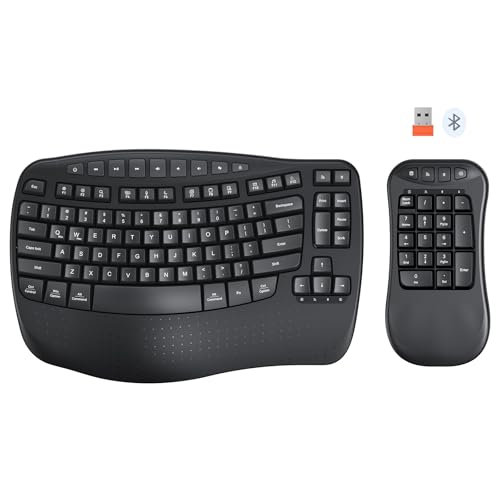
MEETION Wave Ergonomic Split Keyboard
Best for: Users needing a separate numeric keypad
- Connectivity
- 2.4 GHz, Bluetooth
- Design
- Ergonomic, Left-Handed
- Ergonomic Features
- Wrist Rest
View on Amazon: MEETION Wave Ergonomic Split Keyboard Affiliate link
The Meetion K9330 is a split ergonomic keyboard with a separate numeric keypad. It uses a wave key layout and includes a built-in wrist rest. You get both 2.4GHz and Bluetooth connectivity. The design reduces arm movement and typing fatigue. It suits users who want customizable layouts or work long hours on numbers.
Pros
- Split design with a separate numeric keypad
- Wave key layout follows natural finger stretch
- Built-in curved wrist rest reduces fatigue
- Dual 2.4GHz and Bluetooth connection modes
Cons
- No mention of mechanical switch options
- No wireless charging support listed
- Requires USB receiver for 2.4GHz mode
Good fit if
- You need a separate numeric keypad
- You want to reduce wrist strain
- You prefer flexible layout configurations
Skip if
- You require mechanical switches
- You want a single-unit keyboard
- You need wireless charging capability
Verdict: Meetion K9330 Ergonomic Split Keyboard fits users who need a separate numeric keypad and want to reduce wrist strain through its split design and built-in wrist rest.
Specifications side by side
| Spec | MEETION Wave Ergonomic Split Keyboard |
|---|---|
| Connectivity | 2.4 GHz, Bluetooth |
| Design | Ergonomic, Left-Handed |
| Ergonomic Features | Wrist Rest |
| Color | Wave BK2 |
| Model | K9330 |
If you prefer alternative hardware designs, you can compare this layout against the victrola wave review.
Frequently asked questions
Does the MEETION Wave split keyboard include a wrist rest?
Yes, the MEETION Wave K9330 comes with a built-in wrist rest. This feature supports your wrists during long typing sessions. It helps reduce strain by keeping your hands in a neutral position. The rest is integrated into the ergonomic design, offering comfort without needing an external accessory.
What is the model number for the MEETION Wave keyboard?
The model number for this device is K9330. It is part of the MEETION Wave series. You can identify it by this specific model identifier on the product listing. Knowing the model number helps you find the correct specifications and accessories for this split keyboard setup.
Is the MEETION Wave keyboard good for users who need a number pad?
Yes, it is ideal for users who need a separate numeric keypad. The K9330 includes a distinct numeric keypad unit. This allows you to keep the main typing area compact while maintaining full number entry capabilities. It suits workflows that require frequent data entry or spreadsheet use.
What color options are available for the MEETION Wave split keyboard?
The listing specifies the color as Wave BK2. This identifier denotes the specific finish of the device. You should check the product images or detailed listing for visual confirmation of the BK2 shade. It ensures you select the correct aesthetic that matches your desk setup.
How does the split design help with ergonomics?
The split design allows you to position each half independently. This lets you align the keyboard with your shoulder width. It reduces the inward reach that causes wrist and forearm strain. The separate halves promote a more natural hand position, which can improve comfort during extended typing periods.
Does the MEETION Wave keyboard use a wired or wireless connection?
The device supports wireless connectivity via a 2.4GHz USB receiver. This connection type offers plug-and-play performance without the need for Bluetooth pairing. It provides a stable link between the keyboard halves and your computer. You can place the receiver in a convenient port for reliable signal transmission.