SOLAKAKA SM809 Pro Modular Wireless MMO Mouse Review: Specs, Pros and Cons
As an Amazon Associate we earn from qualifying purchases. Links on this page are affiliate links.
The SOLAKAKA SM809 Pro is a wireless MMO mouse with four magnetic side plates that change the grip and the side-button layout; the title mentions nine side buttons. All 16 buttons are programmable, with macros and remaps saved to onboard memory. It connects over 2.4GHz, BT 5.0 or USB-C, uses a PAW3311 sensor up to 24,000 DPI, and is configured in a browser at SOLAKAKA's driver site, with no install. These notes come from SOLAKAKA's listing; we have not handled the mouse.
What stands out
- Four magnetic side plates
- 16 programmable buttons with onboard memory
- 2.4GHz, BT 5.0 and USB-C wired
- PAW3311 sensor up to 24,000 DPI
- Browser-based driver, nothing to install
Who it fits
Good fit for
MMO and MOBA players on a budget who want a wireless mouse whose side layout can change between games, and who move between computers.
Who should skip it
Buyers who want listed battery life and weight, competitive shooter players, and anyone who wants a big-brand ecosystem.
Verdict: A low-cost modular wireless MMO mouse; the listing leaves out battery and weight.
SM809 Pro specs explained
Four magnetic side plates
Swap the thumb panel to change grip and button layout, from a full MMO grid to fewer buttons.
16 programmable buttons
Every button takes a macro or remap.
Onboard memory
Profiles live on the mouse, so no software has to run in the background.
Tri-mode
2.4GHz for games, BT 5.0 for laptops and tablets, USB-C cable for wired play.
PAW3311, 24,000 DPI
A budget PixArt sensor with adjustable levels on the fly.
Web driver
Set DPI, buttons and macros in any browser at SOLAKAKA's driver site.
Design
The SM809 Pro is a right-hand MMO body whose thumb side takes one of four magnetic plates, each lit with RGB. Color modes are adjustable. The listing gives no weight, size or battery capacity.
Daily use
Pick a side plate for the game, set buttons and macros in the browser driver, and the profile saves to the mouse, so it works the same on another PC. Use the receiver for games and Bluetooth for a laptop or tablet.
Before ordering
Check these before buying the SM809 Pro.
Check before you buy
- You are right-handed
- You want swappable side layouts
- You can live without a listed battery figure
- You are fine setting it up in a browser
- You play MMOs or MOBAs more than shooters
The product at a glance
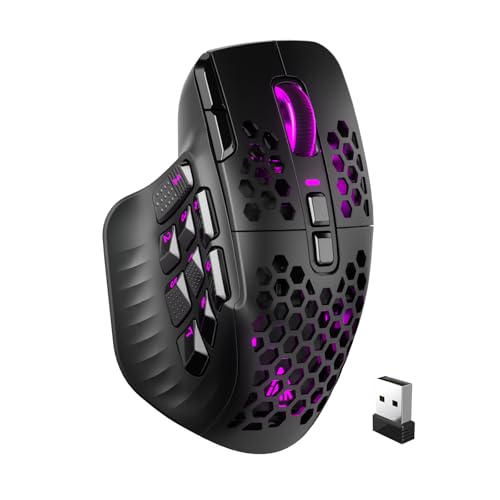
SOLAKAKA Modular Wireless MMO Mouse
Best for: Budget modular MMO
- Connectivity
- 2.4GHz wireless, BT 5.0, USB-C wired
- Maximum DPI
- 24000 DPI
- Programmable Buttons
- 16
- Sensor
- PAW3311
- Backlighting
- RGB
- Use
- Gaming
View on Amazon: SOLAKAKA Modular Wireless MMO Mouse Affiliate link
The SOLAKAKA SM809 Pro is a tri-mode (2.4GHz, BT 5.0, USB-C) MMO mouse with four magnetic RGB side plates, 16 programmable buttons with onboard memory, a PAW3311 sensor up to 24,000 DPI and a browser-based driver.
Pros
- Four swappable side plates
- Tri-mode wireless
- No software install
Cons
- Battery and weight not listed
- Budget sensor
Good fit if
- You want a modular wireless MMO mouse on a budget
- You switch between PCs
Skip if
- You need full specs
- You play competitive shooters
Verdict: A flexible budget MMO mouse with swappable plates.
Specifications side by side
| Spec | SOLAKAKA Modular Wireless MMO Mouse |
|---|---|
| Connectivity | 2.4GHz wireless, BT 5.0, USB-C wired |
| Maximum DPI | 24000 DPI |
| Programmable Buttons | 16 |
| Sensor | PAW3311 |
| Backlighting | RGB |
| Use | Gaming |
| Color | Black |
| Game Genre | MMO |
| Size | SM809PRO |
| Model | SM809PRO |
Frequently asked questions
How many buttons does the SOLAKAKA SM809 Pro have?
16 programmable buttons; the title mentions nine side buttons.
How many side plates come with the SM809 Pro?
Four magnetic side plates.
Does the SM809 Pro need software?
No install: it uses a browser-based driver and saves settings to the mouse.
How does the SM809 Pro connect?
By 2.4GHz receiver, BT 5.0 or USB-C cable.
Featured in
See also
- solakaka sm822 wireless gaming mouse review
- logitech mk270 full size wireless review
- logitech mk470 slim wireless combo review
- solakaka sm900 gaming mouse wired review
- solakaka sm600 wireless honeycomb gaming mouse review
- SOLAKAKA SM809 Pro White Review: Tri-Mode MMO Mouse With 4 Side Plates
- gaming mouse buying guide
- disney baby mickey mouse simple review