SOLAKAKA SM822 Wireless Gaming Mouse Review: Who It Fits and Who Should Skip It
As an Amazon Associate we earn from qualifying purchases. Links on this page are affiliate links.
The SOLAKAKA SM822 (White) is a 62 g wireless gaming mouse with a magnetic RGB charging dock. The receiver plugs into the dock, which connects to the PC, so the mouse charges and connects in the same spot. It also pairs over BT5.0 or works on a USB-C cable. A PixArt PAW3311 (300 IPS, 35G, 1000 Hz) offers six DPI steps from 800 to 12,000, or up to 24,000 in software. Our notes are drawn from SOLAKAKA's listing; we have not tried it.
What stands out
- Magnetic charging dock with RGB that holds the receiver
- 62 g
- 2.4GHz, BT5.0 and USB-C wired
- PAW3311 sensor: 300 IPS, 35G, up to 24,000 DPI
- Five programmable buttons
Who it fits
Good fit for
Budget buyers who want a light wireless mouse that charges on a stand, for gaming and for a laptop, tablet or phone.
Who should skip it
Mac users who want to set macros (the driver is Windows-only), MMO players, and anyone after a high-end sensor.
Verdict: A cheap light wireless mouse whose dock makes charging easy; the driver and sensor are basic.
SM822 specs explained
Magnetic dock
Set the mouse on the base to charge; the receiver sits in the dock near the mouse for a steady signal.
62 g
Light for a solid-shell mouse; the spec sheet's 7.84 oz looks like a boxed weight with the dock.
PAW3311
A budget PixArt sensor: 300 IPS and 35G suit casual and mid-level play.
DPI 800 to 12,000 onboard
Six steps; software adjusts in 100-DPI steps up to 24,000.
Tri-mode
2.4GHz for games, BT5.0 for tablets and phones, USB-C cable as backup.
Five buttons
Including forward and back side buttons; remaps and macros need the Windows driver.
Design
The SM822 has a tapered waist for a steady palm hold and a contoured top. The dock is magnetic and lit with RGB. The listing names Windows, Mac, iOS and Android support for basic use.
Daily use
Plug the dock into the PC, put the receiver in it and drop the mouse on the dock between sessions. For macros and polling changes, install SOLAKAKA's driver on Windows and run it with the mouse in wired mode, as the listing advises. Bluetooth covers a tablet or phone.
Before ordering
Check these before buying the SM822.
Check before you buy
- You want a dock instead of a charging cable
- You set it up on Windows
- Five buttons are enough
- You are fine with a budget sensor
- You have desk space for the dock
The product at a glance
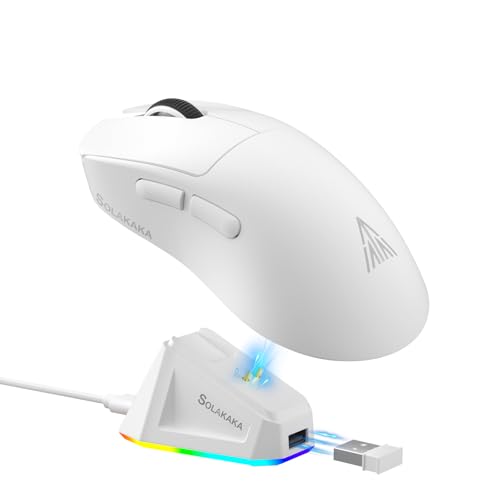
SOLAKAKA Lightweight Wireless Gaming Mouse with Dock
Best for: Easy-charge wireless
- Connectivity
- 2.4GHz wireless, BT5.0, USB-C wired
- Maximum DPI
- 24,000 DPI
- Weight
- 62g
- Programmable Buttons
- 5
- Sensor
- PAW3311
- Polling Rate
- 1000Hz
View on Amazon: SOLAKAKA Lightweight Wireless Gaming Mouse with Dock Affiliate link
The SOLAKAKA SM822 is a 62 g tri-mode (2.4GHz, BT5.0, USB-C) gaming mouse with a magnetic RGB charging dock that holds the receiver, a PAW3311 sensor (up to 24,000 DPI) and five programmable buttons.
Pros
- Magnetic charging dock
- 62 g
- Tri-mode at a low price
Cons
- Driver is Windows only
- Budget sensor
Good fit if
- You want easy charging
- You use a PC and a tablet
Skip if
- You set macros on a Mac
- You need many buttons
Verdict: A cheap light wireless mouse with a handy dock.
Specifications side by side
| Spec | SOLAKAKA Lightweight Wireless Gaming Mouse with Dock |
|---|---|
| Connectivity | 2.4GHz wireless, BT5.0, USB-C wired |
| Maximum DPI | 24,000 DPI |
| Weight | 62g |
| Programmable Buttons | 5 |
| Sensor | PAW3311 |
| Polling Rate | 1000Hz |
| Use | Gaming |
| Color | White |
| Size | SM822 |
| Model | SM822 |
Frequently asked questions
How does the SOLAKAKA SM822 charge?
On its magnetic charging dock, which also holds the USB receiver.
How much does the SM822 weigh?
62 g according to the features; the spec sheet's 7.84 oz looks like a boxed weight.
Does the SM822 driver work on Mac?
No, the listing says the software supports Windows only.
What sensor does the SM822 use?
A PixArt PAW3311 with up to 24,000 DPI in software.
Featured in
See also
- logitech mk270 full size wireless review
- logitech mk470 slim wireless combo review
- logitech mk295 full size silent review
- solakaka sm900 gaming mouse wired review
- solakaka sm600 wireless honeycomb gaming mouse review
- SOLAKAKA SM809 Pro Modular Wireless MMO Mouse Review: Specs, Pros and Cons
- SOLAKAKA SM809 Pro White Review: Tri-Mode MMO Mouse With 4 Side Plates
- boytond gaming wireless earbuds review
- hyperx cloud alpha wireless gaming review