Wired or Bluetooth Keyboard and Mouse Combos? Compared by Specs
As an Amazon Associate we earn from qualifying purchases. Links on this page are affiliate links.
You are deciding between a wired vs bluetooth keyboard and mouse combo. Both sets offer full-size layouts for standard typing. The EDJO model uses a direct cable connection for immediate power and stable signal input. The Seenda model connects via Bluetooth or a 2.4 GHz USB receiver, allowing wireless freedom. You must choose based on your need for cable stability versus portable, clutter-free desk setups.
Key differences
| Aspect | EDJO Full-Size Wired Ergonomic Keyboard and Mouse | Seenda Full-Size Multi-Device Wireless Combo |
|---|---|---|
| Connectivity | Wired | Bluetooth and 2.4 GHz USB |
| Switch Type | Not listed | Scissor switch |
| Mouse Technology | Optical | Adjustable DPI (1000/1600/2400) |
| Power Source | Wired | Built-in rechargeable battery |
| Ergonomic Features | Palm rest | Ergonomic stand |
| Multi-Device Pairing | Not listed | 3 devices |
Which one should you choose?
Choose EDJO Full-Size Wired Ergonomic Keyboard and Mouse if
- You prefer a stable, plug-and-play connection without managing batteries.
- You want a built-in palm rest for wrist support.
- You type on a smooth surface without needing a mouse pad.
Choose Seenda Full-Size Multi-Device Wireless Combo if
- You need to switch between three different devices easily.
- You want a rechargeable battery for wireless convenience.
- You require adjustable mouse DPI for precise control.
Verdict: The EDJO combo suits users who prioritize a direct wired connection and a physical palm rest. The Seenda combo is better for those who need wireless flexibility, multi-device switching, and adjustable mouse sensitivity. Your choice depends on whether you value cable stability or wireless portability.
Wired Stability Versus Wireless Flexibility
Connectivity Type
The EDJO model relies on a direct wired connection. This setup provides a stable signal input without the need for batteries or pairing procedures. You simply plug it in, and it works immediately. In contrast, the Seenda combo offers dual wireless options. It supports Bluetooth for connecting to multiple devices and a 2.4 GHz USB receiver. This flexibility allows you to connect to Windows, Mac, iOS, and Android systems. You can switch between three devices seamlessly. The wired option prioritizes consistency, while the wireless option prioritizes adaptability across different environments.
Power Source
Power management differs significantly between these two combos. The EDJO keyboard and mouse draw power directly from your computer via the USB cable. You do not need to worry about charging or battery life. The Seenda model uses a built-in rechargeable battery. It offers up to 200 hours of use on a full charge and recharges via Type-C in three hours. It also features an auto-sleep mode and an on/off switch to conserve energy. If you prefer never to plug in a charger, the wired EDJO is more convenient. If you value cable-free operation, the Seenda battery life is sufficient for most users.
Switch Type
The typing experience is shaped by the internal switches. The Seenda keyboard uses scissor-switch keys. This design typically reduces typing noise and enhances comfort, making it suitable for shared spaces like offices or libraries. The EDJO keyboard does not specify its switch type in the provided data. It does highlight 12 multimedia shortcuts to improve work efficiency. Without specific data on the EDJO switches, you cannot compare the tactile feel or noise level directly. The Seenda offers a known quiet typing experience, while the EDJO offers standard full-size keycaps with ergonomic spacing.
Mouse Precision
Mouse control varies between optical sensors and adjustable DPI settings. The EDJO mouse is an optical wired model. It works well on smooth surfaces without a mouse pad. The design is symmetrical, fitting all users comfortably. The Seenda mouse features adjustable DPI levels: 1000, 1600, and 2400. This allows you to change cursor speed for different tasks. It also has noiseless clicks to prevent distractions. The adjustable DPI on the Seenda provides more control options. The EDJO mouse is simple and reliable but lacks speed customization. If you need precise control adjustments, the Seenda has the advantage.
Ergonomic Features
Both combos include ergonomic elements to reduce strain. The EDJO keyboard features a built-in palm rest and a foldable stand. It also has an anti-slip design on the bottom for stability. The Seenda keyboard includes an ergonomic stand but does not list a separate palm rest in its specs. It focuses on a slim, metal build to save space. The EDJO palm rest offers direct wrist support. The Seenda stand elevates the keyboard for better posture. If you need explicit wrist cushioning, the EDJO is better. If you prefer a compact, space-saving design, the Seenda fits smaller desks.
Choose based on your connection needs
Users wanting zero setup and stable signal
The EDJO combo uses a direct wired connection that provides stable signal input without any pairing steps. You simply plug it in for immediate power. This design eliminates battery anxiety and ensures responsive typing. It is ideal if you prefer a straightforward plug-and-play experience with a reliable, uninterrupted connection to your desktop or laptop.
Multitaskers switching between Windows and Mac devices
The Seenda combo supports triple device connectivity via Bluetooth and 2.4 GHz USB. You can switch seamlessly between three devices, including Windows, macOS, and Android. It features a dual OS layout, so you do not need to relearn key positions. This flexibility makes it perfect for hybrid workers who use multiple computers or tablets throughout the day.
Buyers prioritizing quiet operation and portability
The Seenda model features a scissor-switch keyboard and a noiseless mouse, reducing typing distractions in shared spaces. Its slim metal build and rechargeable battery offer 200 hours of use. The adjustable DPI settings on the mouse ensure smooth control. This lightweight and durable design fits easily into bags, making it suitable for travel or cafe sessions.
Users needing ergonomic support with a wrist rest
The EDJO keyboard includes a dedicated palm rest and an ergonomic design to keep your hands relaxed during long work sessions. The anti-slip bottom adds stability while typing. This full-size layout with a physical wrist support is beneficial if you spend many hours typing and want a setup that physically cushions your wrists without needing complex adjustments.
Quick picks
| # | Product | Best for | Price |
|---|---|---|---|
| 1 | EDJO Full-Size Wired Ergonomic Keyboard and Mouse | Desktop users needing stable wired connectivity | Check price of EDJO Full-Size Wired Ergonomic Keyboard and Mouse on Amazon |
| 2 | Seenda Full-Size Multi-Device Wireless Combo | multi-OS users needing full-size quiet input | Check price of Seenda Full-Size Multi-Device Wireless Combo on Amazon |
The products compared

EDJO Full-Size Wired Ergonomic Keyboard and Mouse
Best for: Desktop users needing stable wired connectivity
- Connectivity
- Wired (what this guide is about)
- Keyboard Form Factor
- Full-size
- Ergonomic Features
- Palm rest
- Design
- Ergonomic
- Color
- Black
- Operating System
- Mac, Windows
View on Amazon: EDJO Full-Size Wired Ergonomic Keyboard and Mouse Affiliate link
This EDJO combo offers a full-size 104-key layout with a dedicated wrist rest for ergonomic support. It connects via a stable wired USB interface, requiring no drivers for plug-and-play use. The set includes an optical wired mouse and 12 multimedia shortcuts. It weighs 1.85 pounds and measures 17.5 inches in length. This setup suits users who prioritize connection reliability and physical comfort over wireless freedom.
Pros
- Full-size 104-key layout with integrated palm rest
- Wired connection for stable, responsive signal input
- Includes 12 multimedia shortcuts for quick access
- Symmetrical optical wired mouse fits all hand sizes
Cons
- No Bluetooth or wireless connectivity options available
- Full-size footprint requires significant desk space
- Multimedia functions may not work on Mac OS
Good fit if
- You need a stable, lag-free wired connection
- You prefer a full-size keyboard with a wrist rest
- You want a simple plug-and-play setup without drivers
Skip if
- You require Bluetooth or wireless freedom
- You have limited desk space for a full-size board
- You primarily use Mac OS and need full shortcut support
Verdict: EDJO Full-Size Wired Keyboard and Mouse Combo provides a stable, ergonomic typing experience for desktop users who value wired reliability. It is ideal for those who need a full keyboard layout with a wrist rest and do not require wireless mobility.
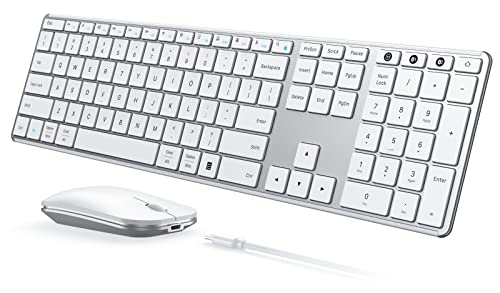
Seenda Full-Size Multi-Device Wireless Combo
Best for: multi-OS users needing full-size quiet input
- Connectivity
- Bluetooth (what this guide is about)
- Keyboard Form Factor
- Full-size
- Ergonomic Features
- Ergonomic stand
- Multi-Device Pairing
- 3 devices
- Power Source
- Built-in battery
- Switch Type
- Scissor switch
View on Amazon: Seenda Full-Size Multi-Device Wireless Combo Affiliate link
The Seenda SKM64-3 is a full-size keyboard and mouse combo with dual connectivity options. It supports both 2.4 GHz USB and Bluetooth connections, allowing you to pair with three devices simultaneously. The keyboard uses scissor switches for a quiet typing experience, while the mouse offers adjustable DPI settings. Its metal build and rechargeable battery make it suitable for users who switch between Windows and Mac systems frequently.
Pros
- Supports 2.4 GHz USB and Bluetooth connectivity
- Pairs with up to three devices simultaneously
- Features scissor-switch keys for quiet operation
- Mouse includes adjustable DPI levels up to 2400
- Built-in rechargeable battery with 200-hour life
Cons
- 2.4 GHz USB mode is restricted to Windows only
- Full-size footprint takes up more desk space
- Bluetooth requires version 4.0 or higher
Good fit if
- You need a single combo for multiple operating systems
- You prefer a full-size keyboard layout for typing
- You want a quiet setup for shared spaces
Skip if
- You require universal 2.4 GHz compatibility across all OS
- You need a compact or 60% form factor
- You are using older hardware without Bluetooth 4.0
Verdict: Seenda SKM64-3 Full-Size Wireless Combo is a practical choice for users who need a full-size keyboard and mouse that works across Windows and Mac. It suits those who value quiet typing and multi-device switching over portability.
Specifications side by side
| Spec | EDJO Full-Size Wired Ergonomic Keyboard and Mouse | Seenda Full-Size Multi-Device Wireless Combo |
|---|---|---|
| Connectivity | USB wired | 2.4G USB, Bluetooth |
| Keyboard Form Factor | Full-size | Full-size |
| Ergonomic Features | Palm rest | Ergonomic stand |
| Multi-Device Pairing | not stated | 3 devices |
| Power Source | not stated | Built-in battery |
| Switch Type | not stated | Scissor switch |
| Mouse DPI | not stated | 2400 DPI |
| Form Factor | Full-Size | Full-Size |
| Design | Ergonomic | not stated |
| Color | Black | White Silver |
| Operating System | Mac, Windows | Mac, Windows |
| Noise Level | not stated | Silent |
| Dimensions | 17.5 × 7.35 × 0.79 inches | 16.9 × 4.33 × 0.79 inches |
| Weight | 1.85 pounds | 1.43 pounds |
| Model | Keyboard | JP-064-3 |
| Size | not stated | Full Size |
Frequently asked questions
Do I need batteries for a Bluetooth keyboard and mouse combo?
Yes, wireless models like the Seenda combo require power sources. The Seenda JP-064-3 uses batteries to maintain its Bluetooth connection. You must replace or recharge them periodically. Wired options like the EDJO model draw power directly from your computer. This eliminates the need for separate batteries entirely.
Which combo is better for a Mac and Windows user?
The Seenda Full-Size Multi-Device Wireless Combo supports both Mac and Windows operating systems. It allows you to switch between different devices easily. The EDJO model is a standard wired keyboard. It does not specify multi-OS compatibility in its published attributes. Check the manual for specific key mapping if you use Mac.
Does a wired combo take up more desk space?
Wired combos often have larger footprints due to cable management. The EDJO model measures 17.5 inches in length and includes a wrist rest. This design prioritizes ergonomic typing over compactness. Wireless models like the Seenda are 16.9 inches long. You can place them anywhere without worrying about cable length limits.
Is a wrist rest important for daily typing?
A wrist rest supports your hands during long sessions. The EDJO Full-Size Wired Ergonomic Keyboard includes a dedicated wrist rest. This feature helps reduce strain for desktop users. The Seenda combo does not list a wrist rest in its attributes. You may need to purchase one separately if you prefer extra support.
How heavy are these keyboard and mouse sets?
Weight affects stability and portability. The EDJO combo weighs 1.85 pounds. Its full-size design provides a solid feel on the desk. The Seenda combo is lighter at 1.43 pounds. This makes it easier to move if you change your workspace layout frequently. Both are designed for stationary use.
Can I use a Bluetooth combo with multiple computers?
Yes, if the device supports multi-device switching. The Seenda combo is designed for multi-OS users and allows switching between systems. You can connect it to different machines. The EDJO model uses a wired connection. It typically connects to one computer at a time via a USB port. You cannot switch devices without unplugging.