Wired vs Wireless Keyboard and Mouse Combos: Which Should You Buy?
As an Amazon Associate we earn from qualifying purchases. Links on this page are affiliate links.
When choosing a wired vs wireless keyboard and mouse combo, you must weigh stability against flexibility. These two options share the goal of connecting input devices to your computer, but they differ in how they transmit data and what features they include. One relies on a direct cable for consistent performance, while the other offers multiple connection modes and advanced lighting. Understanding these spec differences helps you pick the right tool for your desk.
Key differences
| Aspect | EDJO Full-Size Wired Ergonomic Keyboard and Mouse | Redragon 75% Wireless Keyboard and Mouse Combo |
|---|---|---|
| Connectivity | Wired | Bluetooth 5.0, 2.4GHz, USB-C wired |
| Form Factor | Full-Size | 75% |
| Backlighting | Not listed | 16.8M RGB |
| Mouse DPI | Not listed | 12800 DPI |
| Power Source | Not listed | Built-in rechargeable battery |
Which one should you choose?
Choose EDJO Full-Size Wired Ergonomic Keyboard and Mouse if
- You need a plug-and-play setup without managing battery charges
- You prefer a full-sized keyboard with a numpad and wrist rest
- You want a stable, low-latency connection for basic office tasks
Choose Redragon 75% Wireless Keyboard and Mouse Combo if
- You want to switch between multiple devices using Bluetooth or 2.4GHz
- You prefer a compact 75% layout to save desk space
- You need customizable RGB lighting and high-precision mouse DPI settings
Verdict: Choose the EDJO if you prioritize simple, cable-connected reliability and a full-size ergonomic layout for standard work. Select the Redragon if you need multi-device connectivity, a compact form factor, and gaming-oriented features like RGB lighting and adjustable DPI.
Wired Stability vs Wireless Flexibility
Connectivity
The EDJO keyboard and mouse combo uses a wired connection, providing a stable signal input that is more responsive for typing. It offers plug-and-play functionality without the need for driver installation. The Redragon combo supports tri-mode connectivity, including Bluetooth 5.0, 2.4GHz wireless, and USB-C wired modes. This allows you to switch between multiple devices instantly. The Redragon 2.4GHz receiver controls both the keyboard and mouse simultaneously, keeping your desktop tidier. While the EDJO connection is consistently stable, the Redragon offers greater flexibility for multi-device users.
Form Factor
The EDJO keyboard features a full-size layout with 104 keys, including a dedicated numpad. It measures 17.5 inches in length and includes an ergonomic design with a palm rest and foldable stand. The Redragon keyboard has a 75% portable form factor, which removes the numpad to save desk space and allow for more flexible mouse movement. It is classified as TKL (tenkeyless) in its specifications. The EDJO design is better for users who need a numpad, while the Redragon is ideal for those prioritizing a compact setup.
Backlighting
The EDJO keyboard does not feature backlighting. It only includes caps lock and number lock indicators in the upper right corner. The Redragon keyboard boasts 16.8 million RGB colors with 8 dynamic lighting effects and 6 custom DIY modes. You can adjust brightness and lighting speed in five levels. The Redragon mouse also supports high-precision adjustable DPI levels, ranging from 400 to 12800 DPI, with indicator lights showing the current setting. The EDJO mouse is an optical wired mouse without mentioned lighting features. The Redragon offers significant advantages for users who want customizable lighting.
Power Source
The EDJO keyboard and mouse combo is powered directly through the USB connection, requiring no batteries or charging. The Redragon combo uses built-in rechargeable batteries, with a 4000mAh keyboard battery and a 700mAh mouse battery. The Redragon keyboard can last up to 50 hours with RGB lighting on and 300 hours with lights off. It includes an auto-sleep function after two minutes of inactivity to save power. The EDJO design eliminates the need for charging, while the Redragon provides long battery life but requires periodic recharging via USB-C.
Media Controls
The EDJO keyboard includes 12 multimedia shortcut combinations for instant access to music, volume, computer functions, and mail. These shortcuts improve work efficiency, though some may not be available on Mac OS. The Redragon keyboard features dedicated shortcut buttons for brightness, lighting modes, and game mode. It also allows full programmability via software, enabling key remapping and mouse button reassignment. The Redragon mouse supports a polling rate adjustment from 125Hz to 1000Hz. The EDJO offers simple hardware shortcuts, while the Redragon provides deeper customization through software.
Choose Your Best Keyboard Combo
Users wanting simple plug-and-play stability
This EDJO combo uses a wired connection for stable signal input and responsive typing. You get plug-and-play functionality with no driver installation required. The full-size ergonomic design includes a palm rest and anti-slip base for comfort. It is a straightforward choice for reliable, lag-free daily use on Windows or Mac systems without battery worries.
Gamers needing high precision and RGB
The Redragon combo features a mouse with adjustable DPI up to 12,800 for precise aiming. It supports 26-key anti-ghosting and customizable polling rates up to 1000Hz. You also get 16.8 million RGB lighting options and full programmability via software. This setup delivers the performance and visual customization essential for immersive gaming sessions.
Buyers preferring wireless flexibility and portability
This Redragon combo offers tri-mode connectivity via Bluetooth 5.0, 2.4GHz, or USB-C wired. The 75% form factor saves desk space and allows more mouse movement. You benefit from long battery life, with up to 300 hours of use when lights are off. The compact design and multi-device switching provide maximum flexibility for your workspace.
Quick picks
| # | Product | Best for | Price |
|---|---|---|---|
| 1 | EDJO Full-Size Wired Ergonomic Keyboard and Mouse | Office users needing stable wired input | Check price of EDJO Full-Size Wired Ergonomic Keyboard and Mouse on Amazon |
| 2 | Redragon 75% Wireless Keyboard and Mouse Combo | Multi-device users seeking compact wireless setups | Check price of Redragon 75% Wireless Keyboard and Mouse Combo on Amazon |
The products compared

EDJO Full-Size Wired Ergonomic Keyboard and Mouse
Best for: Office users needing stable wired input
- Connectivity
- Wired (what this guide is about)
- Keyboard Form Factor
- Full-size
- Ergonomic Features
- Palm rest
- Design
- Ergonomic
- Color
- Black
- Operating System
- Mac, Windows
View on Amazon: EDJO Full-Size Wired Ergonomic Keyboard and Mouse Affiliate link
This EDJO combo features a full-size wired keyboard with an integrated palm rest and a symmetrical optical mouse. The wired connection offers stable signal input without driver installation. It includes 12 multimedia shortcuts and is compatible with Windows and Mac systems. The set is designed for comfortable, long-term typing sessions on smooth surfaces.
Pros
- Full-size 104-key layout with ergonomic palm rest
- Wired connection for stable, responsive signal input
- 12 multimedia shortcut keys for quick access
- Symmetrical optical mouse suitable for all users
Cons
- Full-size footprint requires more desk space
- Wired design limits cable management flexibility
- Some multimedia functions unavailable on Mac OS
Good fit if
- You need a stable wired connection without latency
- You prefer a full-size keyboard with a wrist rest
- You work on Windows PCs or laptops
Skip if
- You require a portable or compact 75% layout
- You need wireless freedom for a clean desk
- You primarily use Mac OS for multimedia control
Verdict: EDJO Full-Size Wired Keyboard and Mouse Combo is a practical choice for users who prioritize typing comfort and connection stability over portability. It suits office workers and desktop users who need a reliable, full-sized input set.
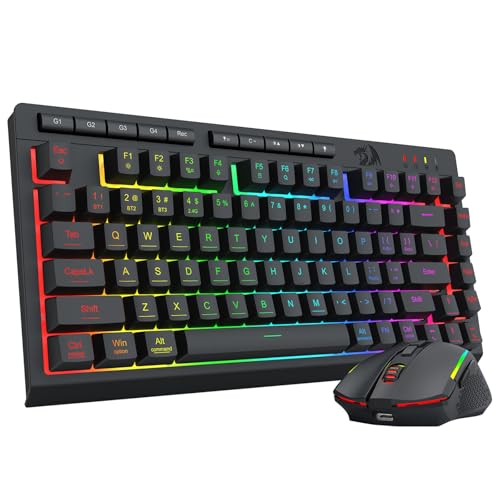
Redragon 75% Wireless Keyboard and Mouse Combo
Best for: Multi-device users seeking compact wireless setups
- Connectivity
- Bluetooth 5.0, 2.4G, USB-C wired
- Keyboard Form Factor
- 75%
- Power Source
- Rechargeable (4000mAh, 700mAh)
- Switch Type
- Membrane
- Mouse DPI
- 12800 DPI
- Backlighting
- 16.8M RGB
View on Amazon: Redragon 75% Wireless Keyboard and Mouse Combo Affiliate link
This Redragon combo offers tri-mode connectivity via Bluetooth 5.0, 2.4GHz, and USB-C wired. The 75% keyboard saves desk space while the mouse supports up to 12800 DPI. You get long battery life with a 4000mAh keyboard and 700mAh mouse. The package includes full programmability and 16.8 million RGB lighting options. It suits gamers and office users who need flexible connection modes and compact design.
Pros
- Tri-mode connectivity with Bluetooth 5.0, 2.4GHz, and USB-C wired options
- 75% keyboard form factor saves desk space
- Mouse supports adjustable DPI up to 12800
- Long battery life with 4000mAh keyboard and 700mAh mouse
- 16.8 million RGB lighting with 8 dynamic effects
Cons
- Requires driver software for full customization and DPI adjustment
- No mention of native macro programming without software
- Heavier build at 1.13 pounds compared to lighter alternatives
Good fit if
- You need flexible connectivity for multiple devices
- You want a compact 75% keyboard layout
- You prefer customizable RGB lighting and DPI settings
Skip if
- You prefer a wired-only connection for zero latency
- You want a full-size keyboard with numpad
- You need a lightweight portable setup
Verdict: Redragon 75% Wireless Keyboard and Mouse Combo fits users who value flexible connectivity and a compact design for gaming or office work. It delivers solid performance with long battery life and customizable features.
Specifications side by side
| Spec | EDJO Full-Size Wired Ergonomic Keyboard and Mouse | Redragon 75% Wireless Keyboard and Mouse Combo |
|---|---|---|
| Connectivity | USB wired | Bluetooth 5.0, 2.4G, USB-C wired |
| Keyboard Form Factor | Full-size | 75% |
| Ergonomic Features | Palm rest | not stated |
| Power Source | not stated | Rechargeable (4000mAh, 700mAh) |
| Switch Type | not stated | Membrane |
| Mouse DPI | not stated | 12800 DPI |
| Backlighting | not stated | 16.8M RGB |
| Form Factor | Full-Size | 75% |
| Use | not stated | Gaming |
| Design | Ergonomic | not stated |
| Color | Black | Gaming Combo |
| Operating System | Mac, Windows | Mac, Windows |
| Noise Level | not stated | Silent |
| Dimensions | 17.5 × 7.35 × 0.79 inches | not stated |
| Weight | 1.85 pounds | 1.13 pounds |
| Model | Keyboard | S155-PRO |
| Size | not stated | TKL |
Frequently asked questions
Do wireless keyboard and mouse combos lag during gaming?
Modern wireless combos minimize lag through advanced connection protocols. The Redragon 75% Wireless Keyboard and Mouse Combo supports tri-mode connectivity, including Bluetooth. This flexibility allows you to choose the best connection for your needs. It is designed for gaming, ensuring responsive performance. You get solid performance with customizable features. This setup suits users who value flexible connectivity and compact design.
Is a wired keyboard better for office work?
Wired keyboards offer stable connections ideal for office environments. The EDJO Full-Size Wired Ergonomic Keyboard and Mouse provides stable signal input. This ensures responsive typing without connection drops. It offers plug-and-play functionality without driver installation. The full-size ergonomic design includes a palm rest. This makes it a practical choice for users prioritizing typing comfort and connection stability.
What is the difference between wired and wireless keyboard size?
Wired combos often feature full-size layouts for maximum key availability. The EDJO model is a full-size ergonomic keyboard. It measures 17.5 inches in length. Wireless combos frequently adopt compact forms to save desk space. The Redragon model uses a 75% form factor. It is described as TKL size. This compact design fits users seeking flexible connectivity and a smaller footprint.
Do I need batteries for a wireless keyboard combo?
Yes, wireless keyboards require power sources for operation. The Redragon 75% Wireless Keyboard and Mouse Combo relies on battery power. It features long battery life for sustained use. You must ensure the batteries are charged or replaced. This maintenance is the trade-off for the flexibility of wireless connectivity. Wired models like the EDJO do not require batteries.
Which keyboard combo is more portable?
Wireless combos are generally more portable due to the lack of cables. The Redragon 75% Wireless Keyboard and Mouse Combo weighs 1.13 pounds. Its compact 75% form factor enhances portability. Wired combos are heavier and less mobile. The EDJO Full-Size Wired Keyboard and Mouse weighs 1.85 pounds. It measures 17.5 inches long. This makes it better suited for desktop use rather than travel.
Can I use a wireless keyboard with multiple devices?
Many wireless keyboards support multi-device switching for convenience. The Redragon combo supports tri-mode connectivity, including Bluetooth. This allows connection to various devices. You can switch between computers, tablets, or phones. This feature suits multi-device users seeking compact setups. Wired keyboards typically connect to one device at a time via USB.
Are ergonomic keyboards available in wireless combos?
Ergonomic designs are common in both wired and wireless options. The EDJO Full-Size Wired Ergonomic Keyboard and Mouse features an ergonomic design. It includes a wrist rest for comfort. The Redragon combo focuses on compact gaming utility. It is designed for gaming and office work. While it may not have a built-in wrist rest, its compact size aids comfort. Choose based on your primary need for ergonomics or compactness.