YIVU Corne Split 40% Mechanical Keyboard or YIVU Corne Low Profile Split? Which YIVU Model to Buy
As an Amazon Associate we earn from qualifying purchases. Links on this page are affiliate links.
This guide compares the yivu corne v4 wired split mechanical keyboard vs corne lp low profile. Both models share a 40% ortholinear layout, RGB backlighting, and full programmability via QMK/VIAL. They also feature hot-swappable sockets and adjustable ergonomic spacing. The main difference lies in the switch type. One uses standard mechanical switches, while the other uses low-profile variants. This change affects height and typing feel significantly.
Key differences
| Aspect | YIVU Corne Split 40% Mechanical Keyboard | YIVU Corne Low Profile Split Keyboard |
|---|---|---|
| Form Factor | 40% split ortholinear | 40% split ortholinear |
| Switch Type | Pre-lubricated linear (standard) | Pre-lubed low profile linear |
| Height | 1.1 inches | 1.33 inches |
| Color | Black | White |
| Programmability | QMK/VIAL | VIAL |
Which one should you choose?
Choose YIVU Corne Split 40% Mechanical Keyboard if
- You prefer the tactile feel of standard height mechanical switches
- You want a black chassis to match your desk setup
- You value QMK support alongside VIAL for advanced customization
Choose YIVU Corne Low Profile Split Keyboard if
- You want a lower profile for reduced finger travel distance
- You prefer a white chassis for a lighter aesthetic
- You prioritize a slim design for your workspace
Verdict: Choose the standard switch model if you like traditional mechanical keyboard height and deeper actuation. Pick the low-profile version if you want a slimmer profile and faster finger movement. Both offer similar ergonomic benefits and connectivity options.
YIVU Corne V4 vs Low Profile Specs
Switch type
You choose between standard mechanical switches and low-profile alternatives. The YIVU Corne Split 40% Mechanical Keyboard uses pre-lubricated linear switches compatible with 3/5-pin Cherry MX style stems. This offers a traditional travel distance. The YIVU Corne Low Profile Split Keyboard uses low-profile linear switches. These have a shorter travel distance and 40g actuation force. Low-profile switches often reduce finger fatigue for some users. The standard switches provide a different tactile feel. You should pick the switch type that matches your preferred typing height and travel distance.
Form factor
Both keyboards share a 40% ortholinear layout with a 3x6 column staggered split design. This layout reduces wrist strain by aligning keys in vertical columns. The YIVU Corne Split 40% Mechanical Keyboard emphasizes ergonomic support through adjustable spacing, tilt, and rotation. The YIVU Corne Low Profile Split Keyboard also features this adjustable ergonomic design. It explicitly notes a 46-key count for a compact footprint. Both models allow independent use of left and right halves. The layout remains consistent across both models, ensuring similar muscle memory development for typing and gaming workflows.
Programmability
You get full control over key functions on both devices. The YIVU Corne Split 40% Mechanical Keyboard supports QMK and VIAL firmware. This allows you to remap any key and create custom layers. The YIVU Corne Low Profile Split Keyboard also supports VIAL for full programmability. You can adjust light colors, brightness, and speed through the software. Both keyboards allow you to create quick access layers to speed up your workflow. This means you can map complex commands to simple key combinations. The software support ensures both models meet the needs of power users who require customized layouts.
Backlighting
Both keyboards feature RGB backlighting with approximately 16.8 million colors. You can adjust brightness, speed, and color through VIAL software. Each model includes 45 preset light modes, such as rainbow, breathing, and rhythmic effects. This lighting helps you identify keys in low-light environments. The YIVU Corne Split 40% Mechanical Keyboard and the YIVU Corne Low Profile Split Keyboard offer identical lighting capabilities. You can create the perfect atmosphere for your typing experience. The visual customization options are the same, so your choice will not be influenced by lighting features.
Dimensions
The physical size differs slightly between the two models. The YIVU Corne Split 40% Mechanical Keyboard measures 5.5 inches in length, 3.86 inches in width, and 1.1 inches in height. The YIVU Corne Low Profile Split Keyboard measures 5.51 inches in length, 3.87 inches in width, and 1.33 inches in height. The low-profile model is slightly taller due to its switch design. The width and length are nearly identical. This height difference may affect your wrist angle when using palm rests or wrist supports. You should consider your desk setup and ergonomic accessories when choosing between the 1.1-inch and 1.33-inch profiles.
Which YIVU Corne model fits you
Standard switch enthusiasts
Choose the YIVU Corne Split 40% Mechanical Keyboard if you prefer traditional switch travel. It supports 3/5-pin Cherry MX style switches, offering a standard actuation distance. The pre-lubricated linear switches provide a smooth feel. This model is ideal for users who want the classic mechanical keyboard experience with full QMK/VIAL programmability and RGB customization.
Low profile preference
Select the YIVU Corne Low Profile Split if you want reduced finger fatigue. It uses low-profile linear switches with a shorter travel distance. The 40g actuation force remains consistent. This design suits slim keyboard enthusiasts and gamers who prefer a lower profile. It includes hot-swappable sockets and VIAL support for easy customization and remapping.
Compact desktop space
The YIVU Corne Low Profile Split offers a 46-key layout in an ultra-compact form. Its dimensions are slightly wider but very similar in length to the standard model. If you want a 40% layout that saves desktop space while using low-profile switches, this is your choice. It includes all necessary cables for split or combined use.
The products compared
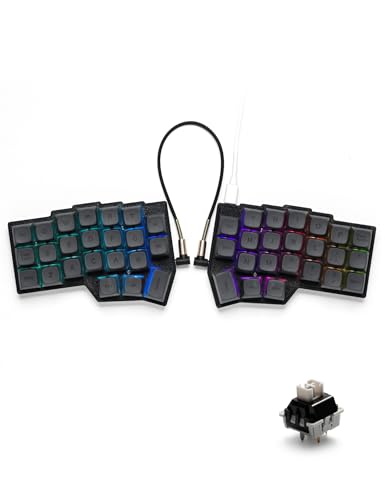
YIVU Corne Split 40% Mechanical Keyboard
Best for: Ergonomic typists wanting full software control
- Switch Type
- Pre-lubricated linear
- Form Factor
- 40% split ortholinear
- Connectivity
- USB-C wired
- Backlighting
- RGB
- Hot-Swap Support
- Hot-Swappable
- Use
- Gaming
View on Amazon: YIVU Corne Split 40% Mechanical Keyboard Affiliate link
The YIVU Corne V4 is a 40% split mechanical keyboard featuring a 3x6 ortholinear layout. It uses pre-lubricated linear switches with a 40g trigger pressure for quiet, fast typing. The design allows adjustable spacing, tilt, and rotation to reduce wrist fatigue. You can program every key via QMK/Vial and customize 16.8 million RGB colors. It connects via USB-C wired cable.
Pros
- Adjustable split design with tilt and rotation options
- Fully programmable keys using QMK and Vial software
- Hot-swappable 3/5-pin switch sockets
- 16.8 million RGB backlight options
- Pre-lubricated linear switches with 40g actuation
Cons
- Wired-only connectivity limits desk freedom
- TRS cable does not support hot-swapping
- Small 40% form factor reduces key count
Good fit if
- You want to reduce wrist strain through ergonomic adjustment
- You prefer fully customizable key mappings and macros
- You want a compact 40% layout for limited desk space
Skip if
- You need wireless Bluetooth connectivity
- You require a full-size keyboard with number pad
- You prefer tactile or clicky switch feedback
Verdict: The YIVU Corne V4 Wired Split Keyboard fits users who prioritize ergonomic customization and programmable features in a compact 40% form factor. It is ideal for those willing to sacrifice wireless convenience for adjustable split design and full software control.

YIVU Corne Low Profile Split Keyboard
Best for: Low-profile ergonomic typing setups
- Switch Type
- Low-profile linear
- Form Factor
- 40%
- Connectivity
- USB-C wired
- Backlighting
- RGB
- Hot-Swap Support
- Hot-Swappable
- Design
- Ergonomic
View on Amazon: YIVU Corne Low Profile Split Keyboard Affiliate link
The YIVU Corne LP is a 40% ortholinear split keyboard with a low-profile linear switch design. It features hot-swappable sockets and fully programmable keys via VIAL. The unit includes RGB backlighting and a 1.5m USB-C cable. Its adjustable split layout allows for custom spacing and tilt. This model suits users who prefer a compact, wired ergonomic setup with low actuation force.
Pros
- Low-profile linear switches with 40g actuation force
- Fully programmable keys via VIAL software
- Adjustable split design with 3x6 column staggered layout
- Hot-swappable PCB for easy switch replacement
Cons
- Wired-only USB-C connection limits mobility
- 40% layout has limited key count for complex workflows
- Requires VIAL software for full customization
Good fit if
- You want a low-profile typing experience
- You need an adjustable ergonomic split layout
- You prefer wired connectivity for stability
Skip if
- You require wireless Bluetooth connectivity
- You need a full-size keyboard layout
- You prefer tactile or clicky switches
Verdict: The YIVU Corne LP Low Profile Split Keyboard fits users seeking a compact, wired ergonomic setup with low-profile switches and full programmability. It is ideal for those who value adjustability and hot-swappable features in a 40% form factor.
Specifications side by side
| Spec | YIVU Corne Split 40% Mechanical Keyboard | YIVU Corne Low Profile Split Keyboard |
|---|---|---|
| Switch Type | Pre-lubricated linear | Low-profile linear |
| Form Factor | 40% split ortholinear | 40% |
| Connectivity | USB-C wired | USB-C wired |
| Backlighting | RGB | RGB |
| Hot-Swap Support | Hot-Swappable | Hot-Swappable |
| Use | Gaming | not stated |
| Design | Ergonomic | Ergonomic |
| Color | Black | White |
| Dimensions | 5.5 × 3.86 × 1.1 inches | 5.51 × 3.87 × 1.33 inches |
| Model | not stated | YIVU CorneLP46 |
Frequently asked questions
Does the YIVU Corne V4 support wireless connections?
No, the YIVU Corne Split 40% Mechanical Keyboard uses a wired connectivity method. You must connect it via cable for operation. This design choice allows for full software control and programmability without battery management. It is ideal if you prioritize stable connections over wireless convenience.
What color options are available for the low profile model?
The YIVU Corne Low Profile Split Keyboard is available in white. This color scheme offers a clean aesthetic for your desk setup. The standard V4 model comes in black. You can choose based on your preferred visual style for your ergonomic workspace.
Can I change the switches on both keyboards?
Yes, both models feature hot-swappable sockets. You can install and remove switches without soldering. This allows you to customize the typing feel by swapping in different linear or tactile switches. The V4 supports 3/5-pin Cherry MX style stems specifically.
How large is the YIVU Corne V4 keyboard?
The YIVU Corne Split 40% Mechanical Keyboard measures 5.5 inches in length, 3.86 inches in width, and 1.1 inches in height. These compact dimensions make it suitable for smaller desks. The low profile version is slightly larger at 1.33 inches in height.
Do both keyboards have RGB backlighting?
Yes, both the YIVU Corne Split 40% and the Low Profile Split models include RGB backlighting. You can customize the lighting effects to suit your environment. This feature enhances visibility in low-light conditions while adding a visual element to your typing setup.
Is the YIVU Corne LP suitable for gaming?
The V4 model is explicitly listed for gaming use. The low profile model is best for ergonomic typing setups. Both offer responsive inputs due to their mechanical nature. If gaming is your primary goal, the V4 is the recommended choice based on its specified use case.
What is the main difference in switch travel?
The V4 uses standard mechanical switches with traditional travel distance. The Low Profile model uses low-profile switches for shorter travel. This affects the tactile feel and actuation point. You should choose based on whether you prefer the standard or compact switch experience.