Best Keyboard and Mouse Combos for Windows in 2026: 11 Picks Ranked by Specs
As an Amazon Associate we earn from qualifying purchases. Links on this page are affiliate links.
Choosing the right keyboard and mouse combo for windows simplifies your workstation by eliminating cable clutter and mismatched accessories. We compared 11 models based strictly on the specifications published on their product listings.
The Logitech Wireless Solar Keyboard and Mouse earns the top position because its rechargeable light-powered design and wireless connectivity deliver reliable operation for low-maintenance desktop workstations. This guide helps you decide which hardware profile, form factor, and connection standard best suit your typing habits and desk space.
Quick picks
The best fit for you
- You want a low-maintenance wireless desktop workstation setup Logitech Wireless Solar Keyboard and Mouse This black wireless combo provides rechargeable power built specifically for the Windows operating system.
- You want an ergonomic combo built for left-handed users Logitech Wave Keys & Lift Left-Handed Wireless Combo The setup features an ergonomic left-handed vertical mouse paired with an integrated wrist rest.
- You need a compact and quiet wireless setup TECKNET Mini Silent Wireless Combo This mini combo features silent operation and an 11.22-inch length for small desk spaces.
- You prefer a wired gaming setup with backlighting Guiheng 60% Wired RGB Keyboard and Mouse Combo This set offers a compact layout with wired connectivity and RGB backlighting.
Our 11 picks
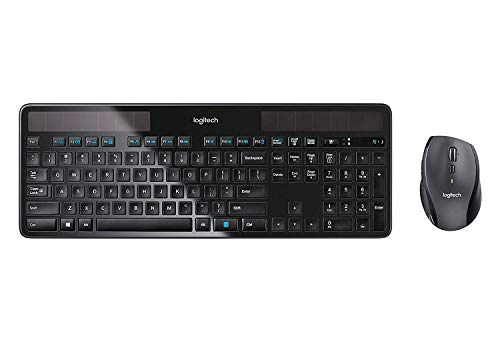
Logitech Wireless Solar Keyboard and Mouse
Best for: low-maintenance Windows desktop workstations
- Operating System
- Windows (what this guide is about)
- Connectivity
- Wireless Unifying
- Power Source
- Solar-powered (keyboard)
- Color
- Black
- Dimensions
- 18 × 8 × 2 inches
- Weight
- 3 pounds
The Logitech Solar Wireless Keyboard and Mouse combo gives you a desktop typing setup built specifically for Windows. The keyboard features built-in solar cells that draw power from ambient indoor or outdoor light, removing the need for battery changes. Logitech pairs it with a marathon wireless mouse that provides up to three years of battery life. Both peripherals share a single Logitech Unifying wireless connection, making it ideal if you want low-maintenance desktop gear.
Pros
- Keyboard recharges using indoor and outdoor ambient light
- Marathon wireless mouse provides up to three years of battery life
- Logitech Unifying wireless technology connects both devices to one receiver
- Key layout optimized specifically for Windows operating systems
Cons
- Keyboard measures 18 inches long and requires substantial desk space
- Mouse relies on standard battery power rather than solar recharging
Good fit if
- You want a Windows desktop keyboard that recharges continuously from ambient light.
- You prefer a wireless mouse engineered for multi-year battery longevity.
- You need a single wireless receiver for both your keyboard and mouse.
Skip if
- You have a small workstation that cannot fit an 18-inch keyboard.
- You require a mouse that also features solar recharging capability.
Verdict: Logitech Solar Wireless Keyboard and Mouse pairs a light-powered keyboard with a marathon wireless mouse for Windows workstations.
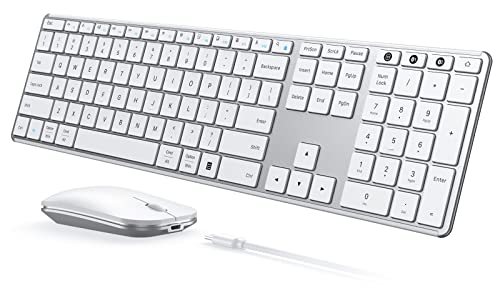
Seenda Full-Size Multi-Device Wireless Combo
Best for: switching between Windows and secondary Bluetooth devices
- Operating System
- Mac, Windows (what this guide is about)
- Connectivity
- 2.4 GHz USB, Bluetooth
- Keyboard Form Factor
- Full-size
- Ergonomic Features
- Ergonomic stand
- Multi-Device Pairing
- 3 devices
- Power Source
- Built-in rechargeable battery
View on Amazon: Seenda Full-Size Multi-Device Wireless Combo
This full-size wireless keyboard and mouse set connects to your Windows PC via a 2.4 GHz USB-A receiver or two Bluetooth channels. You can pair and switch between up to three devices at once. It features built-in Type-C rechargeable batteries delivering 200 hours of runtime, scissor-switch keys, and mouse tracking up to 2400 DPI. It suits you if you juggle multiple platforms from one desk.
Pros
- Pairs with up to three devices via 2.4 GHz USB and two Bluetooth channels
- Built-in battery recharges via Type-C in three hours with up to 200 hours of use
- Mouse features three adjustable DPI settings at 1000, 1600, and 2400
- Full-size keyboard layout uses scissor-switch keys and dual OS markings
Cons
- 2.4 GHz USB mode functions only on Windows operating systems
- Bluetooth channels require host devices with Bluetooth 4.0 or higher
Good fit if
- You switch frequently between a Windows PC and up to two Bluetooth devices
- You prefer built-in Type-C recharging over disposable batteries
- You need selectable mouse tracking resolutions up to 2400 DPI
Skip if
- You need 2.4 GHz USB receiver support on macOS or Android hardware
- You use older hardware that lacks Bluetooth 4.0 support
Verdict: Seenda Full Size Multi-Device Wireless Combo delivers three-channel pairing and rechargeable Type-C power in a slim footprint. It gives you flexible multi-device switching across Windows and Bluetooth setups without swapping peripherals.
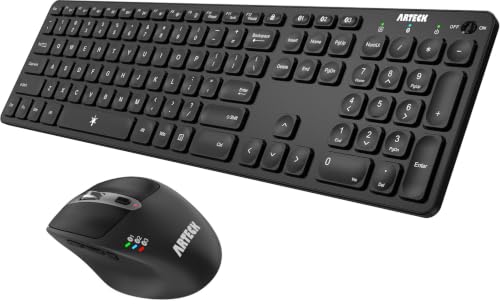
Arteck Full-Size Multi-Device Bluetooth Combo
Best for: multi-device Bluetooth setups needing rechargeable peripherals
- Operating System
- Windows (what this guide is about)
- Connectivity
- Bluetooth
- Keyboard Form Factor
- Full-size
- Ergonomic Features
- Ergonomic mouse
- Multi-Device Pairing
- 3 devices
- Power Source
- Rechargeable lithium battery
View on Amazon: Arteck Full-Size Multi-Device Bluetooth Combo
This Arteck set pairs a full-size wireless keyboard with a seven-button ergonomic mouse using Bluetooth. You can pair up to three devices simultaneously and cycle between them with a dedicated key. The mouse features five adjustable DPI levels from 800 to 2400 alongside dedicated window-switching and navigation buttons. It suits you if you need a multi-device desktop setup with built-in rechargeable batteries charged via USB-C.
Pros
- Pairs with up to 3 Bluetooth devices with single-click switching
- Mouse features 7 buttons with dedicated window switch and side navigation controls
- 5 selectable mouse DPI settings from 800 to 2400
- Rechargeable internal batteries charged via included USB-C cable
Cons
- Relies strictly on Bluetooth with no 2.4 GHz USB wireless receiver included
- Battery longevity ratings are calculated on 2 hours of daily use
Good fit if
- You work across up to three Bluetooth-enabled devices and need rapid switching
- You want an ergonomic mouse with side buttons and adjustable DPI presets
- You prefer rechargeable hardware powered by standard USB-C cables
Skip if
- You require a 2.4 GHz USB dongle for PCs lacking Bluetooth hardware
- You need a compact tenkeyless keyboard layout rather than a full-size frame
Verdict: Arteck Full-Size Multi-Device Bluetooth Combo delivers multi-system Bluetooth switching alongside an ergonomic seven-button mouse with adjustable DPI. It gives your Windows workstation flexible device control without disposable batteries.
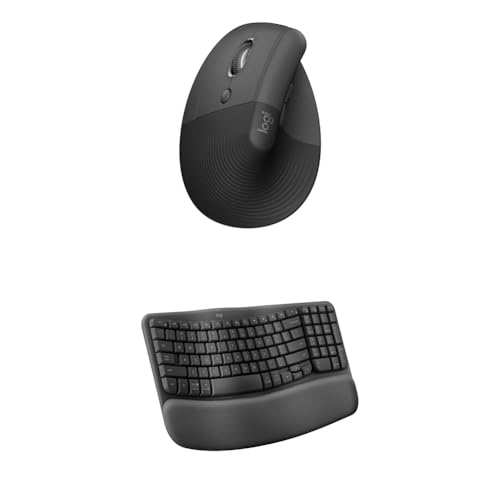
Logitech Wave Keys & Lift Left-Handed Wireless Combo
Best for: left-handed users wanting comprehensive ergonomic support
- Operating System
- Mac, Windows (what this guide is about)
- Connectivity
- Wireless
- Keyboard Form Factor
- Compact
- Ergonomic Features
- Wave layout, palm rest, vertical mouse
- Design
- Ergonomic, Left-Handed
View on Amazon: Logitech Wave Keys & Lift Left-Handed Wireless Combo
This wireless ergonomic desktop set pairs Logitech's Wave Keys compact keyboard with the Lift Vertical mouse. You get a contoured key frame with an integrated memory foam wrist rest alongside a 57-degree vertical mouse tailored for left-handed ergonomics. It connects without cables to Windows or Mac devices. If you want a matched setup targeting forearm posture and palm support during desk work, this bundle covers both input devices.
Pros
- 57-degree vertical mouse angle designed for forearm posture
- Cushioned memory foam palm rest integrated with the keyboard
- Dual wireless compatibility across Windows and Mac platforms
- Textured mouse grip with dedicated thumb rest
Cons
- Mouse included in this bundle is configured strictly for left hands
- Mouse dimensions are sized specifically for small to medium hand sizes
Good fit if
- You use your left hand for mouse navigation.
- You want built-in memory foam wrist support on your keyboard.
- You switch work tasks between Windows and Mac systems.
Skip if
- You operate your mouse with your right hand.
- You have large hands that exceed small-to-medium sizing.
- You prefer a flat, standard non-contoured typing surface.
Verdict: Logitech Wave Keys and Lift Vertical Wireless Combo delivers targeted ergonomic support via its curved keyframe, cushioned palm rest, and 57-degree left-handed vertical mouse.

TECKNET Mini Silent Wireless Combo
Best for: compact desks and portable Windows workstations
- Operating System
- Mac, Windows (what this guide is about)
- Connectivity
- 2.4GHz USB receiver
- Keyboard Form Factor
- Compact
- Power Source
- AAA batteries
- Switch Type
- Scissor switch
- Mouse DPI
- 1600 DPI
This TECKNET set pairs an 11.2-inch mini scissor-switch keyboard with a silent mouse via a single 2.4 GHz USB receiver. You get a lightweight 0.79-pound setup with 12 multimedia shortcut keys tailored for Windows desktop and laptop systems. It runs on four AAA batteries and drops the numeric keypad, making it an efficient choice if you need a quiet, space-saving typing workstation for compact desks or travel.
Pros
- Shares a single 2.4 GHz USB-A nano receiver with up to 49-foot range
- Compact footprint measuring 11.2 inches long and weighing under 0.8 pounds
- Scissor-switch keys paired with quiet keyboard typing and silent mouse clicks
- Includes 12 dedicated multimedia shortcut keys for Windows operations
Cons
- Does not support Bluetooth connectivity
- Requires four AAA batteries that are not included in the box
- Lacks an integrated numeric keypad
Good fit if
- You need a lightweight, travel-friendly keyboard and mouse for tight workspaces.
- You prefer scissor-switch keys and silent clicks for quiet typing around others.
- You use Windows devices equipped with a standard USB-A port.
Skip if
- You need Bluetooth connectivity for devices without a USB-A port.
- You require a full-size layout with a dedicated number pad.
- You prefer built-in rechargeable batteries over replaceable AAA cells.
Verdict: TECKNET Mini Wireless Keyboard and Mouse delivers a quiet, ultra-compact typing and tracking solution for Windows setups using a single 2.4 GHz USB receiver. It omits a numeric keypad and Bluetooth to keep desk clutter and carry weight minimal.

Logitech Signature Slim Wireless Keyboard and Mouse
Best for: switching between multiple Windows and work computers
- Operating System
- Mac, Windows (what this guide is about)
- Connectivity
- Bluetooth
- Keyboard Form Factor
- Full-size
- Multi-Device Pairing
- 3 devices
- Noise Level
- Silent
View on Amazon: Logitech Signature Slim Wireless Keyboard and Mouse
This full-size wireless keyboard and mouse set pairs over Bluetooth to control up to three computers. You get a full keyboard layout with low-profile, laptop-style keys and a silent contoured mouse. The Logi Options+ desktop app lets you map custom key shortcuts and mouse buttons on Windows. It suits multi-computer setups where you switch between work and home systems.
Pros
- Switches across three connected devices
- Full-size keyboard layout with laptop-style keys
- Silent typing and mouse clicks
- Key and button customization via Logi Options+ on Windows
Cons
- Relies on Bluetooth with no dedicated 2.4 GHz USB receiver listed
- No integrated palm rest included on the keyboard
Good fit if
- You switch between multiple computers at one desk
- You prefer silent typing and quiet mouse clicks
- You want to customize shortcut keys and mouse buttons using Windows software
Skip if
- You require a 2.4 GHz USB wireless dongle
- You prefer deep mechanical key switches over laptop-style keys
Verdict: Logitech Signature Slim Full-Size Wireless Combo provides multi-device Bluetooth switching, quiet operation, and customizable shortcuts for your Windows desktop. It delivers clean everyday productivity across personal and work systems.

Logitech MK270 Wireless Keyboard and Mouse
Best for: low-maintenance everyday Windows office setups
- Operating System
- Windows (what this guide is about)
- Connectivity
- 2.4 GHz USB
- Form Factor
- Compact
- Color
- Black
- Dimensions
- 20.1 × 6.22 × 1.81 inches
- Weight
- 4.2 pounds
This full-size wireless desk set pairs a standard-layout keyboard with a compact mouse using a single 2.4 GHz USB receiver. You get an operating range up to 33 feet, full compatibility with Windows 11, and integrated on-off switches. The hardware delivers up to 36 months of keyboard power and 12 months for the mouse. It suits you if you need a spill-resistant daily typing setup with eight dedicated multimedia hotkeys.
Pros
- Up to 36-month keyboard and 12-month mouse battery life
- 2.4 GHz wireless range up to 33 feet via USB receiver
- Spill-resistant frame with adjustable tilt legs
- Eight dedicated multimedia hotkeys
Cons
- Relies on a USB receiver with no Bluetooth support listed
- Mouse uses a compact form factor rather than a full-size profile
Good fit if
- You want long battery life reaching up to 36 months on the keyboard.
- You need a spill-resistant full layout with number pad and media keys for Windows.
Skip if
- You require Bluetooth connectivity instead of a USB receiver.
- You prefer a full-sized or contoured ergonomic mouse.
Verdict: Logitech MK270 Wireless Keyboard and Mouse Combo provides a dependable 2.4 GHz connection, spill resistance, and dedicated media keys for everyday Windows workstations. Its battery ratings reach up to 36 months on the keyboard and 12 months on the mouse.

RECCAZR Full-Size Ergonomic Wave Keyboard and Mouse
Best for: quiet ergonomic Windows typing with number pad
- Operating System
- Mac, Windows (what this guide is about)
- Connectivity
- 2.4 GHz USB
- Keyboard Form Factor
- Full-size
- Ergonomic Features
- Wave layout, wrist rest
- Design
- Ergonomic
- Color
- Black
View on Amazon: RECCAZR Full-Size Ergonomic Wave Keyboard and Mouse
The RECCAZR Full-Size Wave Ergonomic Wireless Combo pairs a 104-key curved keyboard with a quiet-click wireless mouse using a shared 2.4 GHz USB receiver. You get an integrated wrist rest, bottom drainage holes for spill resistance, and adjustable mouse tracking across 800, 1200, and 1600 DPI settings. It suits you if you type full days on Windows and require a dedicated number pad with built-in wrist support.
Pros
- Integrated wrist rest with curved wave-style 104-key layout
- Shared 2.4 GHz USB nano receiver with 33-foot wireless range
- Mouse features 800, 1200, and 1600 DPI settings with quiet clicks
- Spill-resistant keyboard design with built-in bottom drain holes
Cons
- Requires a USB-A port with no Bluetooth connectivity listed
- No rechargeable battery specifications provided
Good fit if
- You need a full-size 104-key layout with an integrated wrist rest for Windows.
- You prefer a quiet mouse with adjustable DPI and side navigation buttons.
Skip if
- You require Bluetooth support for devices lacking a USB-A port.
- You prefer a compact tenkeyless layout without a number pad.
Verdict: RECCAZR Full-Size Wave Ergonomic Wireless Combo provides full-size typing with a built-in wrist rest and a three-speed silent mouse over a single USB connection. It delivers practical ergonomics and spill protection for Windows desktop setups.

Guiheng 60% Wired RGB Keyboard and Mouse Combo
Best for: compact wired Windows gaming and desk setups
- Operating System
- Mac, Windows (what this guide is about)
- Connectivity
- USB wired
- Keyboard Form Factor
- 60%
- Ergonomic Features
- Palm rest
- Mouse DPI
- 3200 DPI
- Backlighting
- RGB
View on Amazon: Guiheng 60% Wired RGB Keyboard and Mouse Combo
This Guiheng combo provides a wired USB setup featuring a compact 60% keyboard and an ambidextrous optical mouse. The keyboard carries 61 keys with RGB backlighting and integrated tilt legs, while the mouse delivers up to 3200 DPI sensitivity. Because it runs purely on wired USB power across Windows XP through Windows 10, you bypass battery maintenance and pairing steps, making it practical if you prioritize a small desk footprint.
Pros
- Direct USB wired connection requires no charging or batteries
- Space-saving 61-key layout with RGB backlighting
- Optical mouse includes a 3200 DPI sensor
- Keyboard features foldable legs for angle adjustment
Cons
- Lacks a dedicated number pad and arrow key cluster
- Tethered USB cables occupy physical ports without wireless options
Good fit if
- You prefer a plug-and-play wired setup without recharging.
- You want an ultra-compact 61-key layout to save desk space.
- You need an ambidextrous mouse with up to 3200 DPI.
Skip if
- You need a full-size layout with dedicated numeric keys.
- You want a cordless desk setup free of cables.
Verdict: Guiheng 60% Wired Keyboard and Mouse Combo delivers an ultra-compact 61-key footprint paired with a 3200 DPI mouse for simple plug-and-play Windows use. It is a focused choice if you prioritize zero battery maintenance over full-size key layouts.

SABLUTE Full-Size Ergonomic Split Keyboard and Mouse
Best for: full-size ergonomic typing on spacious desks
- Operating System
- Mac, Windows (what this guide is about)
- Connectivity
- 2.4GHz wireless
- Keyboard Form Factor
- Full-Size
- Ergonomic Features
- Split layout, wrist rest, thumb rest
- Power Source
- USB-C rechargeable
- Mouse DPI
- 2400 DPI
View on Amazon: SABLUTE Full-Size Ergonomic Split Keyboard and Mouse
This is a full-size ergonomic wireless desktop combo featuring a split curved key layout and an integrated memory-foam wrist rest. You get 2.4GHz wireless connectivity via an included USB-A receiver or USB-C adapter, plus internal rechargeable batteries. The bundled contoured mouse provides four DPI settings up to 2400. It suits you if you need dedicated wrist support and a number pad for long Windows typing sessions.
Pros
- Split ergonomic key layout with built-in memory foam wrist rest
- Internal USB-C rechargeable batteries eliminate disposable cells
- Includes both 2.4GHz USB-A receiver and USB-C adapter
- Four adjustable mouse DPI presets from 800 to 2400
Cons
- Large 19-inch by 10.45-inch keyboard footprint requires substantial desk space
- No Bluetooth support listed; relies strictly on a 2.4GHz wireless receiver
Good fit if
- You want a split keyboard layout with an integrated cushioned palm rest.
- You prefer USB-C rechargeable peripherals over swapping alkaline batteries.
- You need a full-size layout that includes a dedicated numeric keypad.
Skip if
- You have limited desk depth or width to fit a 19-inch wide board.
- You require direct Bluetooth connectivity without occupying a USB port.
Verdict: SABLUTE Full-Size Ergonomic Split Keyboard and Mouse delivers dedicated forearm support and rechargeable power for desktop workstations. Its large footprint makes it best suited for spacious desks where typing posture takes priority over compactness.

Logitech Signature MK650 Business Combo
Best for: secure office deployments requiring long battery life
- Operating System
- Mac, Windows (what this guide is about)
- Connectivity
- Logi Bolt USB receiver, Bluetooth LE
- Ergonomic Features
- Integrated palm rest
- Power Source
- 2 AA (keyboard), 1 AA (mouse)
The Logitech Signature MK650 Business Combo equips your Windows setup with a wireless keyboard and contoured mouse. You get dual-mode wireless via Bluetooth Low Energy or the Logi Bolt USB receiver. The keyboard includes an integrated palm rest and lasts up to 36 months on two AA batteries, while the mouse reaches 24 months on a single AA. It suits offices needing long battery life.
Pros
- Logi Bolt wireless receiver with Bluetooth Low Energy Security Mode 1 Level 4 protection
- Dual connectivity via Logi Bolt USB receiver and Bluetooth Low Energy
- Up to 36 months of keyboard battery life and 24 months of mouse battery life
- Integrated keyboard palm rest and contoured mouse shape
Cons
- Operates on replaceable AA batteries instead of internal rechargeable cells
- Packaged as a 4-pack case rather than a single combo set
Good fit if
- You need Logi Bolt enterprise security protocols alongside Bluetooth flexibility.
- You want multi-year battery life using standard AA batteries.
- You are equipping multiple workstations with a multi-pack bundle.
Skip if
- You want built-in rechargeable batteries with USB charging.
- You only need a single standalone keyboard and mouse combo.
Verdict: Logitech Signature MK650 Business Combo provides secure dual-mode wireless connectivity and multi-year battery life for Windows workstations. Its integrated palm rest and contoured mouse design offer dependable comfort throughout daily desktop use.
Specifications side by side
| Spec | Logitech Wireless Solar Keyboard and Mouse | Seenda Full-Size Multi-Device Wireless Combo | Arteck Full-Size Multi-Device Bluetooth Combo | Logitech Wave Keys & Lift Left-Handed Wireless Combo | TECKNET Mini Silent Wireless Combo | Logitech Signature Slim Wireless Keyboard and Mouse | Logitech MK270 Wireless Keyboard and Mouse | RECCAZR Full-Size Ergonomic Wave Keyboard and Mouse | Guiheng 60% Wired RGB Keyboard and Mouse Combo | SABLUTE Full-Size Ergonomic Split Keyboard and Mouse | Logitech Signature MK650 Business Combo |
|---|---|---|---|---|---|---|---|---|---|---|---|
| Connectivity | Wireless Unifying | 2.4 GHz USB, Bluetooth | Bluetooth | Wireless | 2.4GHz USB receiver | Bluetooth | 2.4 GHz USB | 2.4 GHz USB | USB wired | 2.4GHz wireless | Logi Bolt USB receiver, Bluetooth LE |
| Keyboard Form Factor | not specified | Full-size | Full-size | Compact | Compact | Full-size | not specified | Full-size | 60% | Full-Size | not specified |
| Ergonomic Features | not specified | Ergonomic stand | Ergonomic mouse | Wave layout, palm rest, vertical mouse | not specified | not specified | not specified | Wave layout, wrist rest | Palm rest | Split layout, wrist rest, thumb rest | Integrated palm rest |
| Multi-Device Pairing | not specified | 3 devices | 3 devices | not specified | not specified | 3 devices | not specified | not specified | not specified | not specified | not specified |
| Power Source | Solar-powered (keyboard) | Built-in rechargeable battery | Rechargeable lithium battery | not specified | AAA batteries | not specified | not specified | not specified | not specified | USB-C rechargeable | 2 AA (keyboard), 1 AA (mouse) |
| Switch Type | not specified | Scissor switch | not specified | not specified | Scissor switch | not specified | not specified | not specified | not specified | not specified | not specified |
| Mouse DPI | not specified | 1000 / 1600 / 2400 DPI | 2400 DPI | not specified | 1600 DPI | not specified | not specified | not specified | 3200 DPI | 2400 DPI | not specified |
| Backlighting | not specified | not specified | not specified | not specified | not specified | not specified | not specified | not specified | RGB | not specified | not specified |
| Form Factor | not specified | not specified | Full-Size | not specified | Mini | not specified | Compact | Full-Size | Compact | not specified | not specified |
| Use | not specified | not specified | not specified | not specified | not specified | not specified | not specified | not specified | Gaming | not specified | not specified |
| Design | not specified | not specified | Ergonomic | Ergonomic, Left-Handed | not specified | not specified | not specified | Ergonomic | not specified | Ergonomic | not specified |
| Color | Black | White Silver | Black | Graphite | Black | Graphite | Black | Black | Grey and black combo | Black & Gray | Graphite |
| Shape | not specified | not specified | not specified | Vertical | not specified | not specified | not specified | not specified | not specified | not specified | not specified |
| Operating System | Windows | Mac, Windows | Windows | Mac, Windows | Mac, Windows | Mac, Windows | Windows | Mac, Windows | Mac, Windows | Mac, Windows | Mac, Windows |
| Noise Level | not specified | not specified | not specified | not specified | Silent | Silent | not specified | Silent | not specified | not specified | not specified |
| Dimensions | 18 × 8 × 2 inches | 16.9 × 4.33 × 0.79 inches | not specified | not specified | 11.2 × 4.72 × 0.79 inches | not specified | 20.1 × 6.22 × 1.81 inches | not specified | not specified | 19 × 10.5 × 1.88 inches | not specified |
| Weight | 3 pounds | 1.43 pounds | not specified | not specified | 12.7 ounces | not specified | 4.2 pounds | not specified | not specified | 3.39 pounds | not specified |
| Size | not specified | Full Size | not specified | Combo | Small | not specified | 4 Pack | not specified | not specified | Full-Size | One Size (Pack of 4) |
| Model | not specified | JP-064-3 | HB305-3MB167 | not specified | X315 | not specified | 920-008813 | not specified | not specified | MA51 | 920-010909 |
If you need airflow for your workspace, compare the best window fans by published dimensions and intake specs.
How to Select a Windows Peripheral Combo
-
Compare Peripheral Power Sources
Examine how each set receives power. Standard wireless units rely on replaceable batteries that can run for months. Rechargeable options eliminate disposable cells completely. Some models use cables to top up internal batteries, while others rely on ambient lighting to maintain charge levels during regular desk work. The Logitech Wireless Solar Keyboard and Mouse uses built-in light panels to stay operational without traditional charging cables. If you want zero maintenance and dislike changing alkaline cells, check the power source listing before buying.
-
Check Multi-Device Bluetooth Support
Determine whether you work across several machines. Basic wireless bundles feature a single USB receiver linked exclusively to one Windows computer. In contrast, multi-device models feature Bluetooth channels that let you pair with multiple systems simultaneously. The Seenda Full-Size Multi-Device Wireless Combo provides three-channel pairing, allowing you to toggle between a primary Windows PC and secondary equipment. If you alternate between a personal computer and an office laptop at the same desk, choose a bundle specifying multi-device Bluetooth switching rather than a standalone wireless receiver.
-
Evaluate Mouse DPI and Buttons
Review the mouse specifications included with each package. Standard mice offer basic three-button navigation suited for simple browsing. If your work involves wide displays, precision tracking, or repetitive data navigation, look for hardware with customizable sensitivity and additional inputs. The Arteck Full-Size Multi-Device Bluetooth Combo includes an ergonomic mouse with seven buttons and adjustable DPI levels. Having selectable DPI allows you to alter cursor speed instantly directly on the hardware. Extra programmable side buttons help you execute frequent commands without reaching for keyboard shortcuts.
-
Look for Dedicated Media Keys
Check whether the keyboard layout includes dedicated quick-access controls. Many compact layouts require you to press an extra function key modifier to adjust audio or skip tracks. Bundles with dedicated hardware controls let you manage playback, mute calls, or pause media with a single direct press. The Logitech MK270 Wireless Keyboard and Mouse includes dedicated media keys along with spill-resistant construction. If your desk setup routinely involves drinks or frequent audio adjustments during work hours, choosing a keyboard with native media buttons and spill resistance simplifies daily desktop operation.
-
Consider Wired RGB Connections
Weigh continuous wired operation against wireless flexibility. Wireless peripherals keep your desk free of cords, but they require periodic battery swaps or recharging. A wired connection guarantees constant power with zero latency or battery tracking. It also provides enough electrical throughput for features like backlighting without draining a cell. The Guiheng 60% Wired RGB Keyboard and Mouse Combo uses a direct wired cable alongside full RGB backlighting. If you use your Windows setup in dim environments and do not want to monitor battery levels, look for a wired model with illuminated keys.
-
Check Acoustic Noise Ratings
Look at key and button noise specifications before selecting a combo. Standard membrane and mechanical keyboards can produce audible clicks that travel across shared rooms. If you share a home office or work in an open corporate layout, prioritize peripherals marked with a silent acoustic rating. The Logitech Signature Slim Wireless Keyboard and Mouse specifies quiet keystrokes alongside discreet mouse tracking. Opting for hardware designed for quiet operation helps you type notes and click through documents during voice calls without capturing distracting ambient background sounds on your microphone.
Frequently asked questions
Which keyboard and mouse combo works best for switching between multiple Windows computers?
You should look for Bluetooth multi-device switching specs if you manage several machines. The Seenda Full-Size Wireless Combo provides three-channel pairing across Windows and secondary devices. The Arteck Full-Size Bluetooth Combo also supports multi-system switching and pairs with an ergonomic seven-button mouse featuring adjustable DPI. Both options let you jump across separate operating environments without unplugging receivers or rearranging your desk hardware.
Can a combo listed with Mac compatibility work properly on Windows?
Yes, dual-platform peripherals work seamlessly on Windows PCs. Models such as the Logitech Signature Slim, Seenda Full-Size, and TECKNET Mini explicitly list both Mac and Windows in their operating system specifications. When connected to a Windows machine, the hardware maps standard Windows navigation and modifier inputs automatically. You gain full functionality without needing specialized drivers or compromising shortcut access.
Do wireless keyboard and mouse combos use a single USB receiver for both devices?
Many 2.4 GHz wireless combos connect both peripherals using one shared USB receiver. The TECKNET Mini Silent Wireless Combo operates both the compact keyboard and mouse through a single 2.4 GHz USB dongle. Similarly, the RECCAZR Full-Size Ergonomic Wave set runs over a single USB connection. This configuration frees up computer ports on your Windows PC and avoids occupying multiple USB slots.
Why choose a wired keyboard and mouse combo for a Windows PC?
Wired combos eliminate battery management and connection latency entirely. The Guiheng 60% Wired RGB Combo connects directly to your Windows computer, delivering continuous power alongside a 3200 DPI gaming mouse and a 61-key layout. Wired peripherals provide consistent plug-and-play operation for gaming and intensive typing because you never need to recharge internal cells, monitor battery levels, or troubleshoot wireless interference.
How do compact and full-size Windows keyboards compare in size?
Compact layouts save significant desk space by removing the dedicated numeric keypad. For example, the TECKNET Mini measures 11.22 inches long and 4.72 inches wide, making it highly portable. In contrast, full-size models like the SABLUTE Split Combo measure 19 inches long and 10.45 inches wide to accommodate wrist rests and number pads. Choose compact footprints for limited spaces and full-size layouts for data entry.
Which mouse features are available in ergonomic Windows combos?
Ergonomic combos offer specialized mouse designs that target hand comfort and tracking control. The Arteck Full-Size Combo includes an ergonomic seven-button mouse with adjustable DPI sensitivity settings. For vertical grip styles, the Logitech Wave Keys combo pairs with a 57-degree left-handed Lift vertical mouse. Other models, like the RECCAZR Wave combo, provide a three-speed mouse built specifically for silent clicking during daily productivity tasks.
What options exist for quiet typing on Windows?
You can select combos specifically engineered with silent switches to minimize workspace noise. The TECKNET Mini Silent Wireless Combo and the Logitech Signature Slim both feature silent noise level ratings for quiet operation. Additionally, the RECCAZR Full-Size Wave set includes a silent mouse to prevent distracting click sounds. These dampening specifications keep office environments quiet without sacrificing keypress feedback or tracking accuracy.