Best Ergonomic Keyboard and Mouse Combos: 10 Spec-Based Picks
As an Amazon Associate we earn from qualifying purchases. Links on this page are affiliate links.
Finding the right ergonomic keyboard and mouse combo helps you maintain neutral wrist posture during long workdays. We evaluated 10 options using the specifications published on their listings to identify the best designs for different desks.
The Perixx Compact Ergonomic Wireless Keyboard and Mouse takes the top spot because its compact layout pairs with a separate numeric pad, an integrated wrist rest, and a vertical mouse for flexible desktop placement. This guide helps you choose the right form factor, hand orientation, and wireless connectivity to match your workspace requirements.
Quick picks
The best fit for you
- You need a compact setup with vertical mouse Perixx Compact Ergonomic Wireless Keyboard and Mouse It pairs a compact form factor keyboard with a vertical mouse and built-in wrist rest.
- You require a left-handed vertical mouse ergonomic combo Logitech Wave Keys & Lift Left-Handed Wireless Combo It includes a dedicated left-handed vertical mouse with a 57-degree angle for neutral hand positioning.
- You want a silent full-size ergonomic typing combo RECCAZR Full-Size Ergonomic Wave Keyboard and Mouse It features a silent noise level rating alongside a full-size wave layout and integrated wrist rest.
- You prefer a rechargeable split layout keyboard combo SABLUTE Full-Size Ergonomic Split Keyboard and Mouse It delivers an ergonomic split keyboard powered by a rechargeable battery source.
Our 10 picks

Perixx Compact Ergonomic Wireless Keyboard and Mouse
Best for: modular ergonomic setups on Windows PCs
- Design
- Ergonomic (what this guide is about)
- Connectivity
- 2.4 GHz USB receiver
- Keyboard Form Factor
- Compact
- Ergonomic Features
- Vertical mouse, adjustable palm rest
- Power Source
- 4 x AAA alkaline batteries
- Switch Type
- Membrane low profile
View on Amazon: Perixx Compact Ergonomic Wireless Keyboard and Mouse
This 3-in-1 wireless set gives you a compact ergonomic keyboard, a separate numeric keypad, and an upright vertical mouse. All three devices connect through a single 2.4 GHz USB nano receiver with up to a 30-foot range. You get an adjustable magnetic tilt base to alter typing angles, plus switchable 800 and 1600 DPI mouse tracking. It suits you if you want neutral wrist alignment across typing and navigation tasks on Windows.
Pros
- One 2.4 GHz USB receiver connects the keyboard, keypad, and mouse
- Vertical mouse design with 800 and 1600 DPI settings
- Detachable magnetic base allows customized tilt angles
- Separate compact numeric keypad includes Calculator and Tab keys
Cons
- Requires four AAA batteries that are not included
- Mouse scroll wheel and secondary buttons are not silent
- Officially lists compatibility only for Windows operating systems
Good fit if
- You use Windows and want a vertical mouse to keep your wrist upright
- You want a separate number pad that you can position independently
- You prefer a single USB nano receiver to run multiple wireless peripherals
Skip if
- You need built-in rechargeable batteries rather than replaceable AAA cells
- You run non-Windows operating systems
- You want silent operation on all mouse buttons and the scroll wheel
Verdict: Perixx Compact Ergonomic Keyboard and Vertical Mouse delivers a complete workspace setup with its separate numeric pad and upright mouse design. It is a solid match if you need customizable typing angles and quiet primary clicks on Windows.

Logitech Wave Keys Wireless Ergonomic Combo
Best for: medium to large hands needing wrist support
- Design
- Ergonomic (what this guide is about)
- Connectivity
- Bluetooth, Logi Bolt
- Keyboard Form Factor
- Compact
- Ergonomic Features
- Wave layout, cushioned palm rest
- Dimensions
- 18 × 9.32 × 2.16 inches
This wireless combo pairs a wave-shaped compact keyboard with the Signature M550 L mouse. The keyboard features a built-in memory foam palm rest and dual wireless connectivity via Bluetooth or Logi Bolt. Its compact footprint lets you keep the mouse closer to reduce shoulder reach. You get multi-device Easy-Switch pairing on the keyboard, making this setup suitable for everyday office typing across multiple operating systems.
Pros
- Integrated cushioned palm rest with memory foam
- Dual wireless connectivity through Bluetooth and Logi Bolt receiver
- Keyboard supports multi-device Easy-Switch across Windows, macOS, iPadOS, and ChromeOS
- Signature M550 L mouse includes SmartWheel and SilentTouch quiet switches
Cons
- Easy-Switch feature does not apply to the included Signature M550 L mouse
- Mouse size is targeted specifically for medium to large hands
Good fit if
- You want an ergonomic wave layout with an integrated memory foam wrist rest.
- You switch typing between multiple operating systems like Windows, macOS, and ChromeOS.
- You have medium to large hands and prefer quiet mouse clicks.
Skip if
- You have smaller hands that might find the Signature M550 L mouse too large.
- You need one-touch multi-device switching synced across both the keyboard and the mouse.
Verdict: Logitech Wave Keys Ergonomic Combo delivers a compact wave typing layout with integrated memory foam support and a quiet, sculpted mouse. It gives you flexible Bluetooth and Logi Bolt connectivity for cross-platform desktop use.
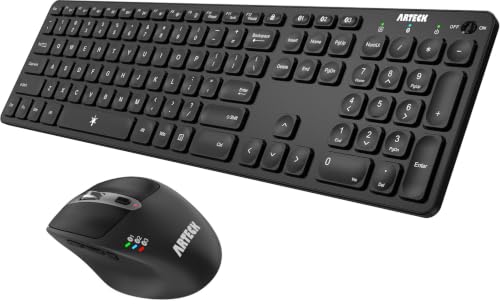
Arteck Full-Size Multi-Device Bluetooth Combo
Best for: Multi-device desks needing rechargeable Bluetooth peripherals
- Design
- Ergonomic (what this guide is about)
- Connectivity
- Bluetooth
- Keyboard Form Factor
- Full-size
- Ergonomic Features
- Ergonomic mouse
- Multi-Device Pairing
- 3 devices
- Power Source
- Rechargeable lithium battery
View on Amazon: Arteck Full-Size Multi-Device Bluetooth Combo
This full-size combo pairs an ergonomic keyboard with a 7-button mouse over Bluetooth. You get three-device switching, USB-C recharging, and five adjustable DPI levels from 800 to 2400. The internal batteries last up to six months on the keyboard and four months on the mouse. It suits you if you need a multi-device setup across Windows, Mac, or mobile operating systems without buying disposable batteries.
Pros
- Pairs with and switches between 3 Bluetooth devices
- 7-button mouse with 5 DPI settings up to 2400 DPI
- USB-C rechargeable internal batteries
- Compatible with Windows, macOS, iOS, iPadOS, and Android
Cons
- Bluetooth only with no 2.4GHz USB receiver included
- No integrated palm rest listed
Good fit if
- You need to toggle between up to three Bluetooth devices.
- You want rechargeable peripherals with USB-C charging.
- You prefer a full-size layout with a dedicated number pad.
Skip if
- You require a 2.4GHz wireless USB dongle connection.
- You want a combo with a built-in cushioned palm rest.
Verdict: Arteck Full-Size Multi-Device Bluetooth Combo delivers multi-host pairing and rechargeable power across standard operating systems. It provides adjustable mouse sensitivity and a full-size layout for multi-screen workflows.
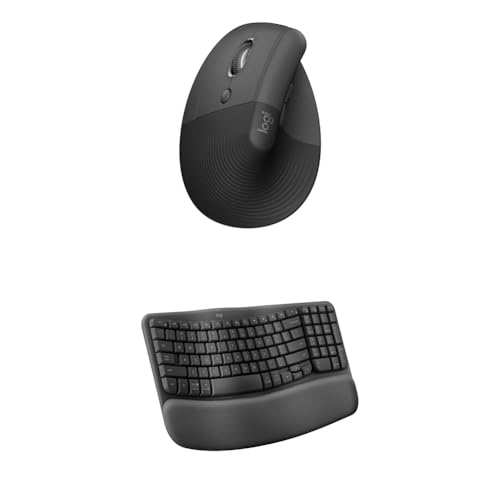
Logitech Wave Keys & Lift Left-Handed Wireless Combo
Best for: left-handed users wanting vertical ergonomic support
- Design
- Ergonomic, Left-Handed (what this guide is about)
- Connectivity
- Wireless
- Keyboard Form Factor
- Compact
- Ergonomic Features
- Wave layout, palm rest, vertical mouse
- Operating System
- Mac, Windows
View on Amazon: Logitech Wave Keys & Lift Left-Handed Wireless Combo
This wireless setup pairs a compact wave-layout keyboard with a 57-degree vertical ergonomic mouse. The keyboard features a cushioned memory foam palm rest to keep your wrists supported during typing. Built for Windows and Mac systems, the included mouse is sculpted specifically for small to medium left hands with a dedicated thumb rest. It suits you if you want neutral wrist angles and tailored left-hand ergonomics across desktop workspaces.
Pros
- 57-degree vertical mouse angle promotes neutral forearm posture
- Integrated memory foam cushioned palm rest provides wrist support
- Sculpted mouse with thumb rest designed for small to medium left hands
- Compatible with both Windows and Mac operating systems
Cons
- Mouse shape in this bundle is restricted to left-handed use
- Mouse dimensions are limited to small and medium hand sizes
Good fit if
- You are a left-handed user with small to medium hands.
- You switch between Windows and Mac platforms.
- You want an integrated memory foam wrist rest on your keyboard.
Skip if
- You need a right-handed mouse grip.
- You have large hands.
Verdict: Logitech Wave Keys and Lift Vertical Combo pairs a cushioned wave keyboard with a dedicated left-handed 57-degree vertical mouse for neutral wrist alignment.
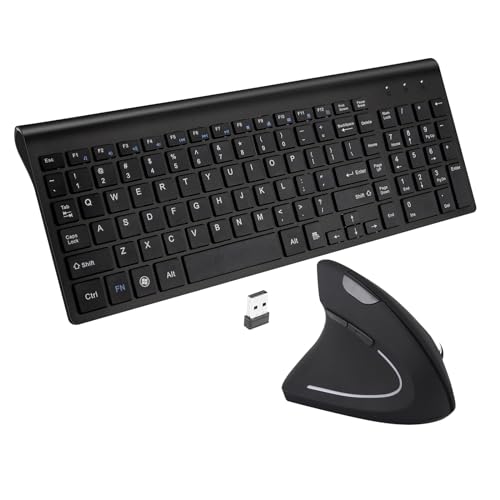
Fonicer Left-Handed Wireless Keyboard and Vertical Mouse
Best for: left-handed users wanting an ergonomic vertical combo
- Design
- Ergonomic, Left-Handed (what this guide is about)
- Connectivity
- 2.4 GHz wireless, Nano USB receiver
- Keyboard Form Factor
- Full size
- Ergonomic Features
- Vertical mouse
- Switch Type
- Scissor-key-switch
- Mouse DPI
- 1600 DPI
View on Amazon: Fonicer Left-Handed Wireless Keyboard and Vertical Mouse
This set pairs a dedicated left-handed vertical mouse with an ultra-thin 101-key keyboard. The vertical mouse holds your hand in a neutral handshake posture and offers 800, 1200, and 1600 DPI optical tracking. Both peripherals link through a single 2.4 GHz USB nano receiver with up to 33 feet of range. It fits you if you want a left-handed ergonomic setup with low-profile scissor switches.
Pros
- Dedicated left-handed vertical mouse design
- Adjustable optical tracking with 800, 1200, and 1600 DPI settings
- Single 2.4 GHz USB nano receiver connects both devices up to 33 feet
- Quiet scissor-switch keys on a 101-key layout
Cons
- The 12 keyboard hotkeys only function on Windows
- Not compatible with iOS devices
- Lacks Bluetooth connectivity
Good fit if
- You are left-handed and want a vertical mouse tailored to your left hand.
- You prefer quiet, low-profile scissor keys on a full-size board.
- You want a single 2.4 GHz USB receiver to operate both peripherals.
Skip if
- You work on an iOS operating system.
- You need Bluetooth pairing rather than a USB-A receiver.
- You rely on keyboard hotkeys on macOS or Linux.
Verdict: Fonicer Left-Handed Wireless Keyboard and Mouse delivers a rare left-handed vertical mouse paired with a quiet scissor-switch keyboard over a single wireless connection. It gives left-handed desk workers an ergonomic layout without requiring separate peripherals.

RECCAZR Full-Size Ergonomic Wave Keyboard and Mouse
Best for: quiet office typing and shared work spaces
- Design
- Ergonomic (what this guide is about)
- Connectivity
- 2.4 GHz USB
- Keyboard Form Factor
- Full-size
- Ergonomic Features
- Wave layout, wrist rest
- Color
- Black
- Operating System
- Mac, Windows
View on Amazon: RECCAZR Full-Size Ergonomic Wave Keyboard and Mouse
The RECCAZR Full-Size Wave Wireless Ergonomic Combo includes a 104-key curved keyboard and a quiet-click mouse. You get an integrated wrist rest, fold-out stands, and spill-resistant drain holes for everyday desktop use. The mouse features three adjustable sensitivity settings at 800, 1200, and 1600 DPI. Both peripherals share a single 2.4GHz USB receiver with a 33-foot range, making it a practical option if you need silent navigation and full layout utility.
Pros
- Mouse buttons reduce click noise by 90 percent
- Full 104-key layout with dedicated number pad and integrated wrist rest
- Single shared 2.4GHz nano USB receiver connects both devices up to 33 feet
- Mouse includes side navigation buttons and adjustable 800, 1200, and 1600 DPI
Cons
- No Bluetooth connectivity included
- Requires an open USB port for the 2.4GHz nano receiver
Good fit if
- You want a mouse with dampened click noise for shared workspaces.
- You need a standard 104-key keyboard layout with an integrated palm rest.
- You prefer running both peripherals from a single 2.4GHz USB receiver.
Skip if
- You need Bluetooth connectivity for devices without standard USB ports.
- You prefer a fully split keyboard over a single-piece curved wave layout.
Verdict: RECCAZR Full-Size Wave Wireless Ergonomic Combo pairs a quiet three-speed mouse with a 104-key wave keyboard for low-noise desk setups. It delivers essential ergonomic support and basic spill protection through a shared 2.4GHz wireless connection.

Seenda Full-Size Bluetooth Ergonomic Combo
Best for: pink desktop setups needing multi-device switching
- Design
- Ergonomic (what this guide is about)
- Connectivity
- 2.4GHz USB receiver, Bluetooth 5.0
- Keyboard Form Factor
- Full-size
- Ergonomic Features
- Built-in wrist rest
- Multi-Device Pairing
- 2 devices
- Power Source
- 1 AAA (keyboard), 1 AA (mouse)
This full-size Seenda set includes an ergonomic keyboard with an integrated wrist rest and a symmetrical mouse. You get dual connectivity through Bluetooth 5.0 and a 2.4GHz USB receiver, letting you switch between two devices. The mouse features three adjustable DPI levels (1000, 1600, 2400), and the keyboard has a dedicated number pad. It suits you if you need a colorful desktop layout with multi-device support across Windows and macOS.
Pros
- Dual wireless connectivity via Bluetooth 5.0 and 2.4GHz USB
- Keyboard includes a built-in wrist rest and dedicated number pad
- Mouse features adjustable 1000, 1600, and 2400 DPI settings
- Supports pairing and toggling between two devices
Cons
- 2.4GHz USB receiver mode supports Windows only
- Requires separate purchase of one AA and one AAA battery
Good fit if
- You switch frequently between a Windows PC and a Bluetooth device
- You want an integrated wrist rest with a full numeric keypad
- You prefer low-noise typing and clicking in a pink finish
Skip if
- You require 2.4GHz USB wireless support on macOS
- You prefer hardware with built-in rechargeable batteries
Verdict: Seenda Full-Size Ergonomic Wireless Combo delivers multi-device switching and an integrated wrist rest in a colorful design. It provides standard ergonomic features and dual-mode wireless without needing software drivers.

Faadar Full-Size Ergonomic Wave Keyboard and Mouse
Best for: desktop typing with an integrated device cradle
- Design
- Ergonomic (what this guide is about)
- Connectivity
- 2.4GHz USB receiver
- Keyboard Form Factor
- Full-size
- Ergonomic Features
- Wave layout, 2.8-inch palm rest
- Power Source
- 1 AA (keyboard), 1 AA (mouse)
- Switch Type
- Membrane
View on Amazon: Faadar Full-Size Ergonomic Wave Keyboard and Mouse
The Faadar Full-Size Wireless Ergonomic Wave Combo pairs a 104-key wave keyboard with a contoured optical mouse over a 2.4GHz wireless USB connection. You get an integrated 2.8-inch palm rest, soft membrane switches, and a built-in device slot for your phone or tablet. The mouse provides three adjustable DPI presets up to 1600 DPI. This combo suits you if you want a complete number pad and wrist support for office tasks.
Pros
- Built-in 2.8-inch palm rest and integrated phone/tablet cradle
- Full 104-key layout with dedicated number pad and function keys
- Mouse includes 800, 1200, and 1600 DPI optical presets
- Single 2.4GHz USB receiver provides wireless range up to 33 feet
Cons
- Requires two AA batteries that are not included
- No rechargeable battery or wired connection mode
- Uses membrane key switches instead of mechanical switches
Good fit if
- You want a built-in slot to hold your phone or tablet while typing.
- You need a dedicated numeric keypad alongside an integrated palm rest.
- You prefer quick mouse sensitivity adjustments between 800, 1200, and 1600 DPI.
Skip if
- You prefer rechargeable peripherals instead of replaceable AA batteries.
- You need a compact tenkeyless footprint to save desk space.
- You want mechanical switches rather than soft membrane keys.
Verdict: Faadar Full-Size Wireless Ergonomic Wave Combo delivers full-size data-entry capability with built-in wrist support and a dedicated mobile device cradle. Its 2.4GHz wireless link and adjustable mouse tracking make it a straightforward desktop workstation setup.

SABLUTE Full-Size Ergonomic Split Keyboard and Mouse
Best for: rechargeable split keyboard and mouse setups
- Design
- Ergonomic (what this guide is about)
- Connectivity
- 2.4GHz wireless
- Keyboard Form Factor
- Full-Size
- Ergonomic Features
- Split layout, wrist rest, thumb rest
- Power Source
- USB-C rechargeable
- Mouse DPI
- 2400 DPI
View on Amazon: SABLUTE Full-Size Ergonomic Split Keyboard and Mouse
This full-size wireless setup combines a curved split keyboard and a contoured mouse, both powered by internal USB-C rechargeable batteries. You get four adjustable mouse DPI settings up to 2400, a memory-foam wrist rest with four tilt legs, and an included USB-C adapter for the 2.4GHz receiver. It suits you if you want integrated wrist support and rechargeable power on a spacious desk.
Pros
- USB-C rechargeable batteries eliminate disposable battery swaps
- Memory foam wrist rest with four adjustable tilt legs
- Contoured mouse with four DPI levels from 800 to 2400
- Includes 2.4GHz USB-A receiver plus separate USB-C adapter
Cons
- Large 19-inch width requires substantial desk space
- Lacks Bluetooth connectivity for adapter-free pairing
- Sleep mode triggers quickly after five seconds of inactivity
Good fit if
- You prefer USB-C rechargeable hardware over disposable batteries.
- You need a full-size split layout with an integrated number pad.
- You switch between Windows and Mac systems using a dedicated layout key.
Skip if
- You have a compact desk surface measuring under 19 inches wide.
- You need native Bluetooth connectivity without using a USB receiver.
Verdict: SABLUTE Full-Size Split Rechargeable Combo delivers an adjustable split typing layout and contoured mouse powered entirely by internal rechargeable cells. It supports neutral hand positioning without requiring ongoing battery replacements.

MEETION Ergonomic Split Keyboard and Mouse
Best for: multi-device setups needing split ergonomic typing
- Design
- Ergonomic (what this guide is about)
- Connectivity
- 2.4 GHz wireless, Bluetooth
- Keyboard Form Factor
- Full-size
- Ergonomic Features
- Split curved, cushioned palm rest
- Color
- Black
This full-size wireless keyboard and mouse set pairs a split, curved layout with dual-mode connectivity. You get Bluetooth and a 2.4GHz USB receiver to switch between up to three devices across Windows and Mac systems. The keyboard includes low-profile squared keys, a cushioned non-slip palm rest, and four tilt brackets. Paired with a four-level DPI mouse featuring a thumb rest, it suits desk workers seeking neutral wrist alignment across multiple screens.
Pros
- Connects to up to three devices via Bluetooth or 2.4GHz wireless
- Cushioned non-slip palm rest with four adjustable tilt brackets
- Ergonomic mouse features a thumb rest and four selectable DPI levels
- Full-size split curved layout with low-profile squared keycaps
Cons
- Split key layout requires an adjustment period compared to standard keyboards
- Exact numerical DPI values and battery specifications are unlisted
Good fit if
- You switch frequently between up to three computers across Windows and Mac platforms.
- You want a split curved keyframe with an integrated cushioned palm rest.
- You prefer a mouse with a dedicated thumb rest and adjustable cursor sensitivity.
Skip if
- You want a traditional straight keyboard without a learning curve.
- You require verified, exact numerical DPI sensitivity settings for precise tasks.
Verdict: MEETION Split Ergonomic Wireless Keyboard and Mouse delivers multi-device pairing and neutral wrist positioning through its split curved keybed and contoured mouse. It is a solid setup for multi-screen desktop work requiring reduced wrist strain.
Specifications side by side
| Spec | Perixx Compact Ergonomic Wireless Keyboard and Mouse | Logitech Wave Keys Wireless Ergonomic Combo | Arteck Full-Size Multi-Device Bluetooth Combo | Logitech Wave Keys & Lift Left-Handed Wireless Combo | Fonicer Left-Handed Wireless Keyboard and Vertical Mouse | RECCAZR Full-Size Ergonomic Wave Keyboard and Mouse | Seenda Full-Size Bluetooth Ergonomic Combo | Faadar Full-Size Ergonomic Wave Keyboard and Mouse | SABLUTE Full-Size Ergonomic Split Keyboard and Mouse | MEETION Ergonomic Split Keyboard and Mouse |
|---|---|---|---|---|---|---|---|---|---|---|
| Connectivity | 2.4 GHz USB receiver | Bluetooth, Logi Bolt | Bluetooth | Wireless | 2.4 GHz wireless, Nano USB receiver | 2.4 GHz USB | 2.4GHz USB receiver, Bluetooth 5.0 | 2.4GHz USB receiver | 2.4GHz wireless | 2.4 GHz wireless, Bluetooth |
| Keyboard Form Factor | Compact | Compact | Full-size | Compact | Full size | Full-size | Full-size | Full-size | Full-Size | Full-size |
| Ergonomic Features | Vertical mouse, adjustable palm rest | Wave layout, cushioned palm rest | Ergonomic mouse | Wave layout, palm rest, vertical mouse | Vertical mouse | Wave layout, wrist rest | Built-in wrist rest | Wave layout, 2.8-inch palm rest | Split layout, wrist rest, thumb rest | Split curved, cushioned palm rest |
| Multi-Device Pairing | not specified | not specified | 3 devices | not specified | not specified | not specified | 2 devices | not specified | not specified | not specified |
| Power Source | 4 x AAA alkaline batteries | not specified | Rechargeable lithium battery | not specified | not specified | not specified | 1 AAA (keyboard), 1 AA (mouse) | 1 AA (keyboard), 1 AA (mouse) | USB-C rechargeable | not specified |
| Switch Type | Membrane low profile | not specified | not specified | not specified | Scissor-key-switch | not specified | not specified | Membrane | not specified | not specified |
| Mouse DPI | 800 / 1600 DPI | not specified | 2400 DPI | not specified | 1600 DPI | not specified | 2400 DPI | 1600 DPI | 2400 DPI | not specified |
| Form Factor | Compact | not specified | Full-Size | not specified | not specified | Full-Size | Full-Size | Full-Size | not specified | not specified |
| Design | Ergonomic | Ergonomic | Ergonomic | Ergonomic, Left-Handed | Ergonomic, Left-Handed | Ergonomic | Ergonomic | Ergonomic | Ergonomic | Ergonomic |
| Color | Black | Graphite | Black | Graphite | Black | Black | Pink | Black | Black & Gray | Black |
| Shape | Vertical | not specified | not specified | Vertical | Vertical | not specified | not specified | not specified | not specified | not specified |
| Operating System | not specified | not specified | Windows | Mac, Windows | Mac | Mac, Windows | not specified | not specified | Mac, Windows | not specified |
| Noise Level | not specified | not specified | not specified | not specified | not specified | Silent | not specified | not specified | not specified | not specified |
| Dimensions | 13.8 × 8.94 × 2.56 inches | 18 × 9.32 × 2.16 inches | not specified | not specified | 14.8 × 5.4 × 1 inches | not specified | not specified | 17.5 × 8.7 × 2.1 inches | 19 × 10.5 × 1.88 inches | not specified |
| Weight | 2.58 pounds | not specified | not specified | not specified | 1.7 pounds | not specified | not specified | 2.4 pounds | 3.39 pounds | not specified |
| Size | Pack of 1 | not specified | not specified | Combo | 17.72x5.91x1.57in | not specified | Full Size | Large | Full-Size | Standard Size |
| Model | PD-606AUS-11967 | 920-012060 | HB305-3MB167 | not specified | Left | not specified | COE200 | EK39 | MA51 | Director-E |
If you want grip comfort while cooking, compare the best kitchen knives with ergonomic handle by their specifications.
How to Choose an Ergonomic Combo
-
Check the Wireless Connection Type
Check the connectivity specification to see if a combo uses direct Bluetooth or a dedicated wireless USB receiver. Bluetooth connects without taking up a USB port on your computer, making it suitable for modern laptops with limited ports. Standard 2.4GHz wireless uses a USB dongle, which provides plug-and-play pairing without needing software setup. If your workstation includes multiple screens or computers, choose a Bluetooth set like the Arteck Full-Size Multi-Device Bluetooth Combo to switch between paired hosts without moving physical dongles around your desk.
-
Confirm Operating System Compatibility
Verify the operating system listed on the product specifications before choosing a combo. Some models are configured strictly for Windows, meaning default function keys and layout shortcuts might not map properly on macOS. Other units specify compatibility with both Mac and Windows or focus exclusively on one platform. For example, the Fonicer Left-Handed Wireless Keyboard and Vertical Mouse specifies Mac support. Matching your hardware directly to your operating system prevents input mapping issues, unmapped modifier keys, or the need to download extra third-party key-remapping software on your work machine.
-
Compare Power Source Options
Examine whether the keyboard and mouse rely on rechargeable internal batteries or replaceable alkaline cells. Combos with integrated rechargeable batteries eliminate the ongoing chore of swapping disposable cells and recharge via USB cables during your downtime. If you prefer avoiding disposable batteries entirely, models like the SABLUTE Full-Size Ergonomic Split Keyboard and Mouse specify a rechargeable power source for both items. Conversely, if you work away from power outlets and do not want to wait for cables to recharge your peripherals, alkaline-powered sets let you resume work instantly by inserting fresh batteries.
-
Look for Integrated Wrist Rests
Check whether the keyboard specifications list an integrated wrist rest under ergonomic features. A built-in wrist rest bridges the height gap between your desk surface and the keycaps, helping you maintain a straight wrist posture while typing. Combos such as the RECCAZR Full-Size Ergonomic Wave Keyboard and Mouse include an integrated wrist rest directly on the frame. If you already own a standalone palm pad, selecting a model without a fixed rest gives you the freedom to position your own support at whatever angle and distance you prefer.
-
Check Multi-Device Switching Specs
If you manage multiple computers on the same desk, check the specs for multi-device support. Combos that specify multi-device pairing allow you to toggle connections between a work laptop, desktop, or tablet using dedicated channel keys or pairing buttons. The MEETION Ergonomic Split Keyboard and Mouse provides multi-device Bluetooth capability, letting you control different machines without plugging and unplugging wireless dongles. Buyers operating a single desktop do not need this feature, but anyone managing separate work and personal devices on one desk can keep their surface clear by using one unified combo across every screen.
Frequently asked questions
What is the main benefit of a split keyboard design?
A split keyboard separates or angles the key groupings to match the natural angle of your arms. This orientation prevents your wrists from bending outward toward your pinky fingers while typing. Combos like the SABLUTE Full-Size Ergonomic Split Keyboard and MEETION Split Ergonomic Keyboard place keys in angled clusters, helping you keep your forearms and wrists in a more neutral resting position throughout long workdays.
Do ergonomic keyboard and mouse combos work across both Windows and Mac systems?
Many ergonomic combos support both operating systems, but you should verify compatibility specs before selecting one. Models such as the RECCAZR Full-Size Wave Keyboard and Mouse, SABLUTE Full-Size Split Combo, and Logitech Wave Keys support both Mac and Windows environments. Conversely, some models list support for a single platform, such as the Arteck Full-Size Combo on Windows or the Fonicer Left-Handed Combo on Mac.
How do rechargeable ergonomic combos differ from standard battery-powered sets?
Rechargeable ergonomic combos use built-in internal cells rather than disposable alkaline batteries. You replenish them via charging cables, eliminating the need to store or replace spare cells. The SABLUTE Full-Size Split Keyboard and Mouse and the Arteck Full-Size Multi-Device Combo feature internal rechargeable power. Other wireless sets run on standard replaceable batteries, which allow you to swap in fresh cells immediately when power runs out.
Which features should you look for if you need a quiet ergonomic keyboard and mouse?
Look for specific hardware designations such as silent micro-switches, scissor-switch key mechanisms, and dampened mouse buttons. The RECCAZR Full-Size Ergonomic Wave Keyboard and Mouse features a silent specification alongside a quiet three-speed mouse to minimize desktop noise in shared spaces. Similarly, the Fonicer Left-Handed combo uses scissor-switch keys, while the Perixx Compact combo includes quiet primary mouse clicks to keep operational sounds low during office work.
Can left-handed users find dedicated ergonomic combos with a vertical mouse?
Yes, select combos specifically cater to left-handed users with mirrored upright mice. The Logitech Wave Keys & Lift Left-Handed Wireless Combo features an upright mouse contoured specifically for left-handed grip at a 57-degree angle. Similarly, the Fonicer Left-Handed Wireless Keyboard and Vertical Mouse package provides a dedicated left-handed vertical pointing device, allowing left-handed typists to use an upright posture without buying separate peripherals.
What is the benefit of a keyboard with an integrated device cradle?
An integrated device cradle holds your smartphone or tablet upright directly above your function row keys. This setup keeps secondary screens within your primary field of view without taking up additional desk surface. The Faadar Full-Size Ergonomic Wave Keyboard and Mouse includes a dedicated mobile device slot, allowing you to monitor incoming messages, reference notes, or track notifications while typing continuously on the main keyboard.