8 Best Silent Keyboard and Mouse Combos, Compared
As an Amazon Associate we earn from qualifying purchases. Links on this page are affiliate links.
Finding the right silent keyboard and mouse combo keeps your workspace quiet without sacrificing typing comfort. We compared 8 models based strictly on the specifications published on their product listings.
The Macally Compact Wireless Keyboard and Mouse leads our ranking because its mini form factor and silent scissor switches deliver reliable input in compact spaces. This guide helps you compare form factors, wireless connections, and operating system compatibility so you can decide which quiet desktop set fits your daily routine.
Quick picks
The best fit for you
- You need a silent wireless setup for tight desk spaces Macally Compact Wireless Keyboard and Mouse Its mini form factor and 0.75-pound weight fit cramped desks while delivering silent scissor switches.
- You need a full-size layout for numeric data entry Logitech MK295 Full-Size Silent Wireless Combo Its full-size form factor provides a dedicated number pad with a 10-meter wireless operating range.
- You want wrist support and an ergonomic typing layout RECCAZR Full-Size Ergonomic Wave Keyboard and Mouse It features an ergonomic wave layout and an integrated wrist rest alongside quiet mouse operation.
- You switch between multiple Bluetooth devices during your workday Lenovo Multi-Device Silent Keyboard and Mouse Combo It provides Bluetooth pairing across three devices alongside a 36-month battery life rating.
Our 8 picks
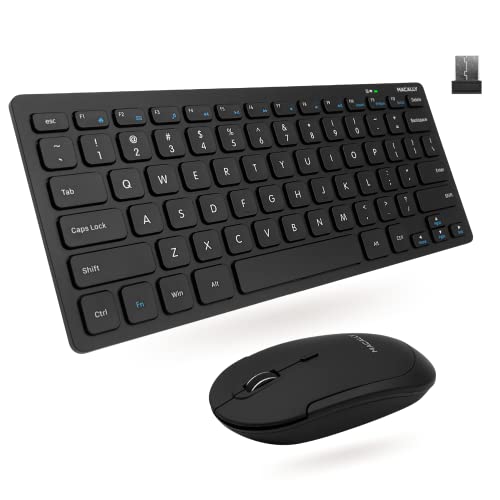
Macally Compact Wireless Keyboard and Mouse
Best for: compact workspaces requiring silent PC input
- Noise Level
- Silent (what this guide is about)
- Connectivity
- 2.4 GHz RF (USB dongle)
- Keyboard Form Factor
- Compact
- Switch Type
- Slim scissor flex
- Mouse DPI
- 800 / 1200 / 1600 DPI
- Color
- Black
This Macally set pairs a compact mini keyboard with a quiet-click mouse via a single 2.4 GHz USB receiver. You get 78 scissor-flex keys with 12 shortcuts, paired with a three-button mouse offering 800, 1200, and 1600 DPI sensitivity options. With a 30-foot wireless range and silent operation, it fits your desk if you need low-noise typing and pointer control without taking up excess workspace.
Pros
- Quiet click mouse with 800, 1200, and 1600 DPI settings
- Compact 78-key scissor-flex switch layout with 12 shortcut keys
- Single 2.4 GHz USB dongle with a 30-foot wireless range
- Lightweight build at 0.75 pounds total
Cons
- Compact 78-key layout lacks a dedicated numeric keypad
- Mouse controls limited to 3 standard buttons
- No Bluetooth support listed
Good fit if
- You need a quiet mouse paired with a compact 78-key scissor keyboard.
- You prefer using a single 2.4 GHz USB dongle for both devices.
- You want adjustable mouse tracking speeds up to 1600 DPI.
Skip if
- You require a dedicated numeric keypad for data entry.
- You want Bluetooth pairing instead of a 2.4 GHz USB dongle.
- You need extra mouse buttons beyond the standard 3-button layout.
Verdict: Macally Compact Silent Wireless Keyboard and Mouse provides silent scissor switches and quiet mouse clicks in a space-saving wireless format. It gives you dependable 2.4 GHz connectivity for uncluttered PC desks.

Logitech MK295 Full-Size Silent Wireless Combo
Best for: full-size silent data entry and office tasks
- Noise Level
- Silent (what this guide is about)
- Connectivity
- 2.4 GHz USB receiver
- Keyboard Form Factor
- Full-size
- Ergonomic Features
- Adjustable tilt legs
- Dimensions
- 0.7 × 17.4 × 5.86 inches
View on Amazon: Logitech MK295 Full-Size Silent Wireless Combo
The Logitech MK295 is a full-size wireless keyboard and mouse set designed for quiet workspaces. It features SilentTouch technology to dampen typing and click sounds, a dedicated 10-key number pad, and eight media shortcut keys. With a 2.4 GHz USB receiver delivering up to a 10-meter range, it suits you if you need a standard desktop layout without click noise on Windows or Chrome OS.
Pros
- SilentTouch technology reduces typing and clicking noise by 90 percent
- Full-size layout includes a numpad and 8 dedicated shortcut keys
- Long battery life rated at 36 months for the keyboard and 18 months for the mouse
- Spill-resistant keyboard build with adjustable tilt legs
Cons
- Official compatibility limited to Windows and Chrome OS
- Uses a 2.4 GHz USB receiver with no Bluetooth connectivity listed
Good fit if
- You need a dedicated number pad and quick-access media shortcut keys.
- You work in quiet environments where reduced click and typing volume matters.
- You want long battery longevity with hardware on/off switches.
Skip if
- You use macOS or other non-listed operating systems.
- You need Bluetooth connectivity instead of a USB-A receiver.
Verdict: Logitech MK295 Full-Size Silent Wireless Combo delivers quiet typing and clicking across a complete desktop layout with a 10-meter wireless range. It provides a straightforward plug-and-play solution for Windows and Chrome OS users who require numeric input.

Logitech Pebble 2 Compact Silent Combo
Best for: multi-device quiet typing in compact workspaces
- Noise Level
- Silent (what this guide is about)
- Connectivity
- Bluetooth, Logi Bolt USB receiver
- Keyboard Form Factor
- Compact
- Multi-Device Pairing
- 3 devices
- Color
- Black
- Dimensions
- 14.2 × 5.3 × 1.41 inches
The Logitech Pebble 2 Compact Silent Combo pairs a slim wireless keyboard with a quiet mouse. It features Silent Touch technology on the mouse and keys engineered for quiet, laptop-like typing. You can connect up to three devices across operating systems using Bluetooth or the included Logi Bolt receiver. It suits you if you prioritize quiet operation, multi-year battery life, and multi-device portability.
Pros
- Connects up to 3 devices via Bluetooth or the included Logi Bolt USB receiver
- Silent Touch mouse clicks and quiet laptop-like keyboard typing
- Long battery life with 3 years for the keyboard and 2 years for the mouse
- Personalize 10 Fn keys and the mouse middle button using the Logi Options+ App
Cons
- Mouse customization is limited strictly to the middle button
- Button personalization requires installing the Logi Options+ App
Good fit if
- You switch between up to three devices across different operating systems.
- You need a compact, lightweight setup for quiet travel or desk work.
Skip if
- You prefer a full-size keyboard layout instead of a compact form factor.
- You need multiple programmable buttons on your mouse.
Verdict: Logitech Pebble 2 Compact Silent Combo provides quiet, laptop-style typing and silent mouse clicks in a portable footprint. Its three-device Easy-Switch pairing and multi-year battery ratings deliver reliable, clutter-free productivity across multiple systems.

TECKNET Mini Silent Wireless Combo
Best for: quiet typing in compact and travel workspaces
- Noise Level
- Silent (what this guide is about)
- Connectivity
- 2.4GHz USB receiver
- Keyboard Form Factor
- Compact
- Power Source
- AAA batteries
- Switch Type
- Scissor switch
- Mouse DPI
- 1600 DPI
This mini wireless setup pairs a compact scissor-switch keyboard with a silent-click mouse using a single 2.4GHz USB receiver with a 49-foot range. Measuring 11.22 inches long and weighing under 0.8 pounds, it fits easily into a travel bag. The ultra-quiet keys and silent mouse switches keep your workspace distraction-free. It suits you if you need a quiet, portable typing setup for tight desks or travel.
Pros
- Scissor-switch keys paired with silent mouse clicks
- Single 2.4GHz nano USB receiver with up to 49 ft range
- Compact 11.22-inch length and 0.79 lb total weight
- 36-month manufacturer warranty
Cons
- Requires 4 AAA batteries that are not included
- Lacks Bluetooth connectivity and requires a USB-A port
- Multimedia hotkeys are not fully compatible with Mac OS
Good fit if
- You want a compact, lightweight combo for travel or small desks.
- You need quiet scissor keys and silent mouse clicks over a 2.4GHz connection.
- You have an available USB-A port on your device.
Skip if
- You prefer a full-size layout with an integrated number pad.
- You require Bluetooth pairing for tablets or port-limited laptops.
- You rely on full multimedia hotkey support within Mac OS.
Verdict: TECKNET Mini Silent Wireless Keyboard and Mouse Combo delivers ultra-quiet scissor typing and silent tracking in a lightweight, travel-friendly package. It gives you reliable 2.4GHz wireless operation for compact workstations without taking up valuable desk space.

Logitech Signature Slim Wireless Keyboard and Mouse
Best for: multi-device switching across Windows and Mac
- Noise Level
- Silent (what this guide is about)
- Connectivity
- Bluetooth
- Keyboard Form Factor
- Full-size
- Multi-Device Pairing
- 3 devices
- Operating System
- Mac, Windows
View on Amazon: Logitech Signature Slim Wireless Keyboard and Mouse
This setup pairs a full-size silent keyboard with a contoured wireless mouse. Both connect via Bluetooth and let you switch between three devices across Windows and macOS. You get laptop-style typing, quiet switches, and customizable shortcut keys through the Logi Options+ app. It suits you if you manage multiple computers and need a distraction-free workspace with a number pad.
Pros
- Connects and switches across three devices via Bluetooth
- Silent-rated typing and mouse clicking
- Full-size keyboard with laptop-style keycaps
- Customizable keys and mouse buttons via Logi Options+ app
Cons
- Lists only Bluetooth without a dedicated USB wireless dongle
- Logi Options+ software customization limited to Windows and macOS
Good fit if
- You switch workflow between up to three computers.
- You want a full-size keyboard with low-profile, quiet keys.
- You use Windows or macOS and need custom shortcuts.
Skip if
- You work on operating systems other than Windows or macOS.
- You prefer a compact layout without a numeric keypad.
Verdict: Logitech Signature Slim Full-Size Silent Combo delivers quiet input and seamless multi-device switching across three computers. It is a solid productivity match for mixed Windows and Mac desks.

RECCAZR Full-Size Ergonomic Wave Keyboard and Mouse
Best for: ergonomic typing with quiet mouse operation
- Noise Level
- Silent (what this guide is about)
- Connectivity
- 2.4 GHz USB
- Keyboard Form Factor
- Full-size
- Ergonomic Features
- Wave layout, wrist rest
- Design
- Ergonomic
- Color
- Black
View on Amazon: RECCAZR Full-Size Ergonomic Wave Keyboard and Mouse
The RECCAZR Ergonomic Wireless Combo pairs a full-size 104-key keyboard with a quiet-click mouse using a single 2.4GHz USB receiver. You get a curved wave layout with a built-in wrist rest, tilt legs, and spill-drainage holes. The mouse offers 800, 1200, and 1600 DPI settings alongside reduced click noise. This setup fits you if you want wrist support and a dedicated number pad for standard desk typing.
Pros
- Wave layout with integrated wrist rest and foldable stand
- Quiet-click mouse with adjustable 800, 1200, and 1600 DPI
- Single 2.4GHz nano USB receiver connects both devices
- Full-size 104-key layout with dedicated number pad
- Spill-resistant frame with bottom drainage holes
Cons
- No Bluetooth support listed; requires an available USB port
- Full-size footprint takes up significant desk space
Good fit if
- You need wrist support and a curved key arrangement for daily typing.
- You frequently input numeric data and need a full 104-key layout.
- You prefer a mouse with adjustable DPI and silent click switches.
Skip if
- You need Bluetooth connectivity for hardware without a USB-A port.
- You have limited workspace and need a compact, portable combo.
Verdict: RECCAZR Full-Size Ergonomic Wireless Keyboard and Mouse provides ergonomic wave typing and quiet mouse navigation via a shared 2.4GHz connection. It delivers full-layout productivity with integrated wrist support for desktop workstations.
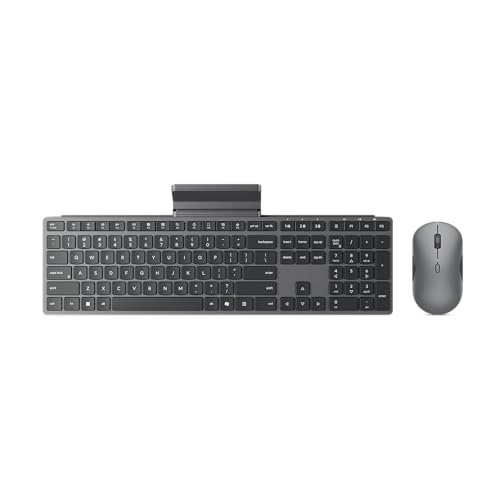
Lenovo Multi-Device Silent Keyboard and Mouse Combo
Best for: multi-device workflows needing silent typing
- Noise Level
- Silent (what this guide is about)
- Connectivity
- 2.4GHz USB receiver, dual Bluetooth
- Multi-Device Pairing
- 3 devices
- Power Source
- 2 AAA (keyboard), 1 AA (mouse)
- Dimensions
- 5.52 × 2.15 × 22.1 inches
- Weight
- 1.05 pounds
View on Amazon: Lenovo Multi-Device Silent Keyboard and Mouse Combo
This Lenovo wireless keyboard and mouse set delivers quiet operation with silent keys and mouse clicks. You can pair it with up to three devices at once using the 2.4 GHz USB-A receiver and dual Bluetooth channels. Both peripherals run on standard disposable batteries, providing up to 36 months of battery life. It suits you if you need a quiet workspace and switch between multiple computers throughout the day.
Pros
- Silent keys and mouse clicks
- Pairs with up to three devices via 2.4 GHz and dual Bluetooth
- Up to 36 months of battery life
- AES 128-bit wireless encryption
Cons
- Uses disposable AA and AAA batteries rather than built-in rechargeable cells
- Requires a USB-A port to use the 2.4 GHz dongle connection
Good fit if
- You need silent keystrokes and clicks for a shared workspace
- You toggle between up to three computers using Bluetooth and 2.4 GHz wireless
- You want long battery life lasting up to 36 months on standard batteries
Skip if
- You prefer built-in rechargeable batteries over disposable cells
- You only have USB-C ports and do not want to connect via Bluetooth
Verdict: Lenovo Silent Multi-Device Combo gives you silent keys and clicks alongside flexible pairing for up to three systems. Its 36-month battery life and AES 128-bit encryption make it a practical, low-maintenance setup for busy desks.
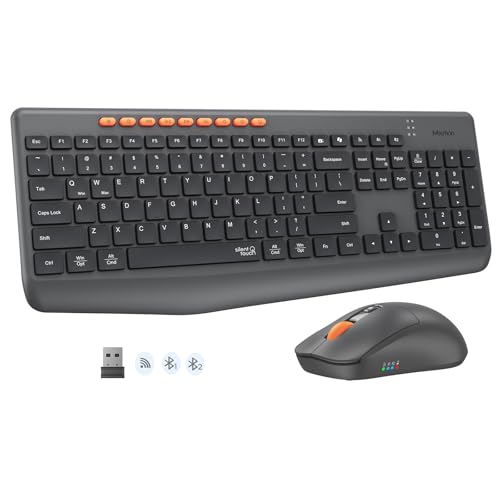
MEETION Full-Size Silent Wireless Combo
Best for: multi-device office workers needing a full number pad
- Noise Level
- Silent (what this guide is about)
- Connectivity
- Bluetooth, 2.4G wireless
- Keyboard Form Factor
- Full-size
- Power Source
- Dry battery
- Mouse DPI
- 3200 DPI
- Color
- Black
This full-size set pairs a 115-key silent keyboard with an adjustable-DPI mouse. You get dual-mode wireless connectivity via Bluetooth and 2.4 GHz, letting you swap between up to three paired devices. The mouse offers four sensitivity steps from 1200 to 3200 DPI. Operating on replaceable dry batteries with an auto-sleep mode, this desktop set suits you if you handle extensive numeric data entry across multiple screens without typing noise.
Pros
- Dual-mode Bluetooth and 2.4 GHz pairing for up to three devices
- Full-size 115-key layout with dedicated numeric keypad
- Mouse features four DPI presets from 1200 to 3200
- Nine dedicated multimedia hotkeys with dual OS legends
Cons
- Uses replaceable dry batteries rather than USB recharging
- Full 115-key footprint requires substantial desk space
Good fit if
- You need to toggle between up to three computers or mobile devices.
- You require a full layout with a numeric keypad for spreadsheet work.
- You want variable mouse tracking speeds up to 3200 DPI.
Skip if
- You prefer built-in rechargeable batteries over replaceable cells.
- You want a compact tenkeyless footprint for limited desk space.
Verdict: MEETION Full-Size Silent Wireless Keyboard and Mouse delivers multi-device switching, four mouse DPI levels, and a full number pad for quiet office workstations.
Specifications side by side
| Spec | Macally Compact Wireless Keyboard and Mouse | Logitech MK295 Full-Size Silent Wireless Combo | Logitech Pebble 2 Compact Silent Combo | TECKNET Mini Silent Wireless Combo | Logitech Signature Slim Wireless Keyboard and Mouse | RECCAZR Full-Size Ergonomic Wave Keyboard and Mouse | Lenovo Multi-Device Silent Keyboard and Mouse Combo | MEETION Full-Size Silent Wireless Combo |
|---|---|---|---|---|---|---|---|---|
| Connectivity | 2.4 GHz RF (USB dongle) | 2.4 GHz USB receiver | Bluetooth, Logi Bolt USB receiver | 2.4GHz USB receiver | Bluetooth | 2.4 GHz USB | 2.4GHz USB receiver, dual Bluetooth | Bluetooth, 2.4G wireless |
| Keyboard Form Factor | Compact | Full-size | Compact | Compact | Full-size | Full-size | not specified | Full-size |
| Ergonomic Features | not specified | Adjustable tilt legs | not specified | not specified | not specified | Wave layout, wrist rest | not specified | not specified |
| Multi-Device Pairing | not specified | not specified | 3 devices | not specified | 3 devices | not specified | 3 devices | not specified |
| Power Source | not specified | not specified | not specified | AAA batteries | not specified | not specified | 2 AAA (keyboard), 1 AA (mouse) | Dry battery |
| Switch Type | Slim scissor flex | not specified | not specified | Scissor switch | not specified | not specified | not specified | not specified |
| Mouse DPI | 800 / 1200 / 1600 DPI | not specified | not specified | 1600 DPI | not specified | not specified | not specified | 3200 DPI |
| Form Factor | Mini | Full-Size | Compact | Mini | not specified | Full-Size | not specified | Full-Size |
| Design | not specified | not specified | not specified | not specified | not specified | Ergonomic | not specified | not specified |
| Color | Black | Off-White | Black | Black | Graphite | Black | Luna Grey | Black |
| Operating System | not specified | not specified | not specified | Mac, Windows | Mac, Windows | Mac, Windows | not specified | not specified |
| Noise Level | Silent | Silent | Silent | Silent | Silent | Silent | Silent | Silent |
| Dimensions | 0.79 × 1.18 × 0.5 inches | 0.7 × 17.4 × 5.86 inches | 14.2 × 5.3 × 1.41 inches | 11.2 × 4.72 × 0.79 inches | not specified | not specified | 5.52 × 2.15 × 22.1 inches | not specified |
| Weight | 12 ounces | not specified | 1.08 pounds | 12.7 ounces | not specified | not specified | 1.05 pounds | not specified |
| Size | Compact Combo | (Pack of 1) | One Size | Small | not specified | not specified | Combo | standard |
| Model | RFCOMPACTKEYCB | 920-009783 | 920-012415 | X315 | not specified | not specified | 700 | C4133 |
If you need musical instruments instead of typing inputs, you can compare specifications for the best KORG electronic keyboards.
How to Choose the Right Silent Combo
-
Choose Between Bluetooth and Wireless
Check the connectivity specification before you buy. Combos with 2.4 GHz wireless use a dedicated USB receiver to provide an instant, stable connection. This works well for desktop towers with open ports. If you work on laptops, tablets, or setups without spare USB ports, select a Bluetooth model instead. The Lenovo Multi-Device Silent Keyboard and Mouse Combo uses Bluetooth to connect directly to your hardware. Match your computer ports to the required connection method to avoid needing extra adapters.
-
Check Multi-Device Switching Support
Review the pairing specifications if you manage more than one computer. Standard combos pair strictly to a single machine. Multi-device combos feature hardware buttons to switch your typing and clicking between separate computers on demand. This eliminates the need to unplug receivers or manage multiple peripherals on one desk. For instance, the Logitech Pebble 2 Compact Silent Combo includes three-device Easy-Switch pairing. If you alternate between a personal computer and a work machine during the day, look for explicit multi-device pairing support.
-
Evaluate Ergonomic Wrist Support
Look closely at the keyboard chassis design and wrist support specs if you type for extended daily shifts. Flat standard keyboards keep hands in a fixed alignment. In contrast, ergonomic wave layouts angle the key clusters and include integrated palm rests to support your hands. For example, the RECCAZR Full-Size Ergonomic Wave Keyboard and Mouse features an integrated wrist rest and a wave shape design. Choose an ergonomic build if you want physical forearm support, but keep in mind that these specialized layouts require more total desk area.
-
Verify Operating System Compatibility
Check the listed operating system support before deciding on a silent combo. Some models are built specifically for Windows and Chrome OS, leaving modifier keys misplaced on Apple computers. If you operate an Apple environment or switch between platforms, confirm dual OS support in the specifications. The TECKNET Mini Silent Wireless Combo lists explicit compatibility for both Mac and Windows. Choosing hardware with confirmed compatibility for your system ensures function shortcuts, Command keys, and Option keys match your expected physical key layout without remapping software.
-
Check Mouse Sensor DPI
Check the mouse specifications for adjustable DPI levels. DPI measures mouse sensitivity, dictating how far the cursor travels across your screen relative to hand movement. Fixed-DPI mice offer one standard tracking speed, which may feel sluggish on high-resolution monitors or overly twitchy on small displays. The MEETION Full-Size Silent Wireless Combo includes four selectable DPI levels on its mouse. If you do detailed design work or navigate across expansive widescreen displays, selecting a mouse with multiple DPI presets lets you tune tracking speed to your preference.
Frequently asked questions
Are silent keyboard and mouse combos completely soundless?
Silent combos significantly reduce operating noise rather than eliminating sound entirely. These peripherals use cushioned switches, scissor mechanisms, or dampened membranes alongside quiet mouse switches to soften the impact of keystrokes and clicks. You still hear a subtle, muted tap during fast typing or pressing down on buttons, but the sound remains faint enough to avoid disturbing colleagues, roommates, or family in quiet environments.
How do silent scissor switches work on compact keyboards?
Silent scissor switches use an interlocking plastic mechanism beneath each keycap to stabilize movement and reduce travel distance. This low-profile structure minimizes key wobble and dampens bottom-out noise compared to traditional tall keys. Models such as the Macally Compact and TECKNET Mini feature these silent scissor switches, giving you short, responsive keystrokes that stay quiet during rapid typing in close workspaces.
Can you use a silent keyboard and mouse combo with macOS?
Yes, multiple silent combos explicitly support macOS alongside Windows. The TECKNET Mini Silent Wireless Combo, Logitech Signature Slim, and RECCAZR Full-Size Ergonomic Wave list both Mac and Windows compatibility in their specifications. When connecting to macOS, these models recognize Mac-specific layout commands, ensuring functional modifier keys and accurate tracking without requiring proprietary drivers for baseline navigation.
What ergonomic support options exist in silent keyboard combos?
Certain silent combos incorporate specialized ergonomic contours and wrist rests to support neutral hand alignment. For example, the RECCAZR Full-Size Ergonomic Wireless Keyboard and Mouse features an ergonomic wave layout paired with an integrated wrist rest. This design positions your hands more naturally across the full-size frame, combining physical wrist support with quiet typing mechanisms for desktop workspaces.
How does multi-device pairing operate on silent Bluetooth combos?
Multi-device silent combos let you pair a single keyboard and mouse set to several systems and switch between them on demand. The Logitech Pebble 2, Logitech Signature Slim, and Lenovo Silent Combo each support connections across up to three devices. You press a dedicated toggle button to alternate control between computers, tablets, or laptops without unpairing and reconnecting the Bluetooth link.
What is the benefit of AES encryption in a silent wireless keyboard?
AES 128-bit encryption protects your keystrokes by encoding wireless signals transmitted between the keyboard and the receiver. This security feature prevents nearby parties from intercepting sensitive text, such as passwords or personal data, over radio frequencies. The Lenovo Multi-Device Silent Keyboard and Mouse Combo includes this hardware encryption specification, making it well suited for offices handling confidential digital information.
Can you adjust mouse pointer speed on silent combo mice?
Some silent combo mice include selectable DPI settings to adjust tracking sensitivity directly on the hardware. For instance, the MEETION Full-Size Silent Wireless Combo features four distinct mouse DPI levels. Switching between these preset sensitivity modes changes how far your cursor travels relative to hand movement, helping you balance fast navigation across monitors with precise cursor control in spreadsheets.