Corsair vs Strikonx: Gaming Mice Compared by Specs
As an Amazon Associate we earn from qualifying purchases. Links on this page are affiliate links.
When comparing a corsair vs strikonx gaming mouse, you are looking at two very different tools. Both offer RGB lighting and high-DPI sensors for gaming. The main difference lies in their design philosophy. One is a wired MMO mouse with many side buttons. The other is a lightweight wireless mouse with triple-mode connectivity. Your choice depends on whether you need macro-heavy side controls or wireless freedom.
Key differences
| Aspect | Corsair Scimitar RGB Elite Wired MMO Mouse | Aula Lightweight Tri-Mode Wireless Gaming Mouse |
|---|---|---|
| Connectivity | Wired | 2.4GHz wireless, BT5.3, wired USB |
| Maximum DPI | 18,000 DPI | 12,000 DPI |
| Programmable Buttons | 17 | 7 |
| Weight | 4.3 ounces | 67g |
| Polling Rate | not listed | 1000Hz |
Which one should you choose?
Choose Corsair Scimitar RGB Elite Wired MMO Mouse if
- You play MMOs or MOBAs and need many side buttons for macros.
- You prefer a wired connection for consistent tracking without latency.
- You want the highest maximum DPI available in this comparison.
Choose Aula Lightweight Tri-Mode Wireless Gaming Mouse if
- You want wireless freedom with Bluetooth and 2.4GHz options.
- You prefer a lighter mouse for faster movements and less fatigue.
- You need a dedicated polling rate of 1000Hz for responsive input.
Verdict: Choose the Corsair Scimitar if you need dedicated side buttons for complex MMO macros and wired reliability. Pick the Strikonx Aula if you prioritize wireless versatility, a lighter weight, and a 1000Hz polling rate. Both deliver solid RGB lighting and high DPI for general gaming.
Corsair vs Strikonx Mouse Specs
connectivity options
The Corsair Scimitar RGB Elite is a wired-only device. It connects via a braided USB cable, which ensures zero latency and constant power without needing to charge batteries. This setup is ideal for players who want a fixed, reliable connection. In contrast, the Strikonx mouse offers tri-mode connectivity. It supports 2.4GHz wireless, Bluetooth 5.3, and wired USB modes. This flexibility allows you to switch between gaming and office setups easily. It can store up to four devices for quick switching. While the Corsair provides a dedicated gaming cable, the Strikonx offers broader compatibility with laptops and multiple computers.
programmable buttons
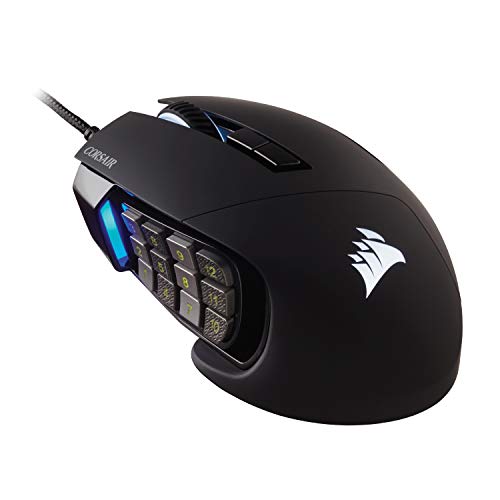
Button count and layout differ significantly between these two mice. The Corsair Scimitar features 17 fully programmable buttons. It includes 12 side buttons on the left that use a patented Key Slider Control System, allowing you to reposition them to fit your grip. This design is specifically built for MMOs and MOBAs where frequent actions and complex macros are common. The Strikonx mouse has 7 programmable buttons. It includes a dedicated fire button for one-click commands. While the Corsair offers more physical buttons for complex game controls, the Strikonx focuses on essential programmability for general gaming and office shortcuts.
sensor and dpi
Both mice offer high-performance optical sensors suitable for gaming. The Corsair Scimitar uses the custom PixArt PMW3391 sensor with a maximum DPI of 18,000. It allows adjustments in 1 DPI resolution steps, providing highly accurate and customizable tracking. The Strikonx mouse features a sensor with a maximum DPI of 12,000. It offers six adjustable DPI levels: 800, 1600, 3200, 4800, 8000, and 12,000. It also includes a 1000Hz polling rate for low latency. While the Corsair offers higher peak DPI and finer adjustment steps, the Strikonx provides sufficient precision for most tasks with its fixed steps and high polling rate.
weight and ergonomics
Weight and shape affect comfort during long sessions. The Corsair Scimitar weighs 4.3 ounces and features a contoured shape with a right-side finger rest. It is designed to fit palm contours regardless of hand size, providing support for extended gaming. The Strikonx mouse is notably lighter at 67 grams, which is approximately 2.4 ounces. It has a streamlined shape that conforms to the palm, reducing wrist strain. The Strikonx is suitable for claw, palm, or fingertip grips. Its lightweight design may reduce fatigue more effectively than the heavier Corsair model, which prioritizes side-button placement over minimal weight.
build quality
Durability features vary between the two products. The Corsair Scimitar is built with 50 million click-rated Omron switches, a sturdy scroll wheel, and a braided cable. These components are chosen to withstand the wear and tear of extended gaming sessions. The Strikonx mouse data does not specify switch ratings or cable type, though it mentions an energy-efficient design for its wireless battery life. Both mice feature RGB backlighting, with the Corsair offering static RGB and the Strikonx providing dynamic customizable lighting modes. The Corsair provides more specific data on internal component durability, while the Strikonx emphasizes battery efficiency.
Choose your mouse by specs
MMO players needing many buttons
The Corsair Scimitar RGB Elite features 17 programmable buttons, including 12 on a side slider. This layout allows you to map complex macros and frequent actions without reaching for the keyboard. The contoured shape and finger rest provide support during long sessions, making it ideal for MMOs and MOBAs where button access is critical.
Users wanting wireless flexibility
The Strikonx Aula SC620 supports tri-mode connectivity, switching between 2.4GHz wireless, Bluetooth 5.3, and wired USB. It stores settings for four devices, allowing quick changes between gaming and office work. This versatility suits users who move between desktops, laptops, or different operating systems without being tethered to a single cable connection.
Gamers preferring lightweight mice
Weighing just 67 grams, the Strikonx mouse reduces fatigue during extended play. Its lightweight design complements the 1000Hz polling rate for responsive tracking. The ergonomic shape fits claw, palm, or fingertip grips comfortably. This low mass helps you maintain precision and control during fast-paced movements without the weight of heavier wired alternatives.
The products compared
Corsair Scimitar RGB Elite Wired MMO Mouse
Best for: MMO and MOBA gamers needing many buttons
- Connectivity
- Wired
- Maximum DPI
- 18,000 DPI
- Programmable Buttons
- 17
- Sensor
- PixArt PMW3391
- Backlighting
- RGB
- Use
- Gaming
View on Amazon: Corsair Scimitar RGB Elite Wired MMO Mouse Affiliate link
This wired gaming mouse is built for MMO and MOBA players who need many buttons. It features a PixArt PMW3391 sensor with 18,000 DPI and 17 programmable buttons. The side buttons use a patented slider system for repositioning. Its contoured shape includes a finger rest. You get Omron switches rated for 50 million clicks. The braided cable ensures durability during long sessions.
Pros
- 17 programmable buttons for complex macros
- Patented slider system for side button repositioning
- PixArt PMW3391 sensor with 18,000 DPI
- Omron switches rated for 50 million clicks
Cons
- Wired connectivity limits freedom of movement
- Heavy at 4.3 ounces compared to lighter options
- No Bluetooth or wireless capability
Good fit if
- You play MMOs or MOBAs frequently
- You need many programmable side buttons
- You prefer a contoured shape with a finger rest
Skip if
- You want wireless freedom
- You prefer a lightweight mouse under 3 ounces
- You play primarily FPS games
Verdict: Corsair Scimitar RGB Elite MMO Mouse is ideal for MMO players needing 17 buttons and a repositionable side panel. It suits those who prioritize sensor accuracy and button count over weight or wireless convenience.
Aula Lightweight Tri-Mode Wireless Gaming Mouse
Best for: multi-device users needing lightweight precision
- Connectivity
- 2.4GHz wireless, BT5.3, wired USB
- Maximum DPI
- 12000 DPI
- Weight
- 67g
- Programmable Buttons
- 7
- Polling Rate
- 1000Hz
- Backlighting
- RGB
View on Amazon: Aula Lightweight Tri-Mode Wireless Gaming Mouse Affiliate link
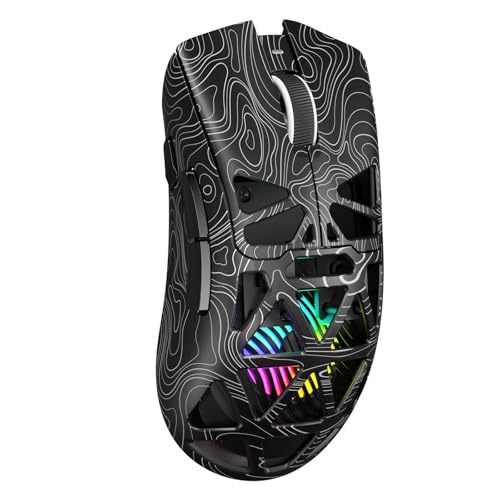
The Strikonx Aula SC620 is a lightweight wireless gaming mouse weighing 67g. It offers tri-mode connectivity via 2.4GHz, Bluetooth 5.3, and wired USB. The sensor supports up to 12,000 DPI with a 1000Hz polling rate. It features seven programmable buttons and dynamic RGB lighting. This mouse suits users who need multi-device switching and precise control for gaming or office work.
Pros
- Tri-mode connectivity stores up to four devices
- Lightweight 67g design reduces wrist strain
- 12,000 DPI sensor with 1000Hz polling rate
- Seven programmable buttons with macro support
Cons
- Bluetooth mode unavailable on Windows systems
- Requires AULA driver software for full customization
- RGB lighting may reduce battery life
Good fit if
- You switch between multiple computers frequently
- You prefer a lightweight mouse for long sessions
- You need programmable buttons for macros
Skip if
- You use Windows and require Bluetooth connectivity
- You prefer a mouse without driver software
- You need a mouse heavier than 67g
Verdict: Strikonx Aula SC620 Wireless Gaming Mouse fits users who need multi-device switching and precise control without a heavy build.
Specifications side by side
| Spec | Corsair Scimitar RGB Elite Wired MMO Mouse | Aula Lightweight Tri-Mode Wireless Gaming Mouse |
|---|---|---|
| Connectivity | Wired | 2.4GHz wireless, BT5.3, wired USB |
| Maximum DPI | 18,000 DPI | 12000 DPI |
| Weight | not stated | 67g |
| Programmable Buttons | 17 | 7 |
| Sensor | PixArt PMW3391 | not stated |
| Polling Rate | not stated | 1000Hz |
| Backlighting | RGB | RGB |
| Use | Gaming | Gaming |
| Color | Black | Line Black |
| Game Genre | MMO | not stated |
| Operating System | Mac | Mac |
| Dimensions | 6.89 × 4.49 × 0.1 inches | not stated |
| Size | 1 Count (Pack of 1) | not stated |
| Model | CH-9304211-AS | SC620 |
Frequently asked questions
Is the Corsair Scimitar RGB Elite wireless?
No, the Corsair Scimitar RGB Elite is a wired mouse. It connects via a USB cable, ensuring consistent power and zero latency. You do not need to charge batteries, which makes it reliable for long gaming sessions without interruption.
Does the Strikonx Aula support Mac?
Yes, the Strikonx Aula Lightweight Tri-Mode Wireless Gaming Mouse is compatible with Mac operating systems. It offers tri-mode connectivity, allowing you to switch between devices easily. This makes it suitable for users who work across different platforms.
What is the weight of the Corsair Scimitar?
The Corsair Scimitar RGB Elite weighs 4.3 ounces. This weight reflects its build as a wired MMO mouse with many buttons. You should consider this heft if you prefer a lighter mouse for fast-paced movement.
Does the Strikonx mouse have RGB lighting?
Yes, the Strikonx Aula Lightweight Tri-Mode Wireless Gaming Mouse features RGB backlighting. You can customize the lighting effects to match your setup. This adds visual appeal while maintaining a lightweight design for precision control.
Which mouse is better for MMO games?
The Corsair Scimitar RGB Elite is better for MMO games. It includes 17 programmable buttons, including a repositionable side panel. This layout allows you to map complex macros without reaching for the keyboard, which is essential for MMO gameplay.
Can I use the Strikonx mouse with multiple devices?
Yes, the Strikonx Aula supports multi-device switching. Its tri-mode connectivity lets you connect to various devices seamlessly. You can switch between them quickly, making it ideal for users who need precision control across different systems.
What color is the Corsair Scimitar mouse?
The Corsair Scimitar RGB Elite is black. It features a contoured shape designed for comfort during long sessions. The black color provides a classic look that fits most gaming setups without drawing too much attention.
Is the Strikonx mouse suitable for Mac users?
Yes, the Strikonx Aula is suitable for Mac users. It is listed as compatible with the Mac operating system. You can use it for gaming or general tasks on your Mac without needing additional drivers or compatibility issues.