Corsair or TMKB Technology Mechanical KeyBoard? Gaming Mice Compared in 2026
As an Amazon Associate we earn from qualifying purchases. Links on this page are affiliate links.
In this corsair vs TMKB Technology Mechanical KeyBoard gaming mouse comparison, we look at two wired options for different play styles. Both devices connect via USB and feature programmable buttons for gaming customization. The main difference lies in their design philosophy. One offers a heavy, contoured build with many side buttons, while the other provides a lightweight honeycomb shell. You need to decide which form factor matches your hand size and grip preference.
Key differences
| Aspect | Corsair Scimitar RGB Elite Wired MMO Mouse | TMKB Falcon Honeycomb Wired Gaming Mouse |
|---|---|---|
| Maximum DPI | 18,000 DPI | 12,800 DPI |
| Programmable Buttons | 17 (12 side) | 6 |
| Weight | 4.3 ounces | 75g |
| Shell Design | Contoured solid | Honeycomb |
| Polling Rate | not listed | 125-1000Hz |
Which one should you choose?
Choose Corsair Scimitar RGB Elite Wired MMO Mouse if
- You play MMOs or MOBAs and need many side buttons for complex macros.
- You prefer a heavier, palm-resting mouse with a solid shell.
- You want the highest available DPI setting of 18,000.
Choose TMKB Falcon Honeycomb Wired Gaming Mouse if
- You prefer a lightweight mouse under 80 grams for fast movements.
- You want a honeycomb design to reduce weight and improve airflow.
- You need a high polling rate up to 1000Hz for precise tracking.
Verdict: The Corsair Scimitar is the better choice for MMO players who rely on side buttons and prefer a heavier, contoured grip. The TMKB Falcon suits those who prioritize low weight and a honeycomb shell for rapid flicks. Your decision depends on whether you value button count or mouse weight more.
Corsair vs TMKB Mouse Specs
Sensor and DPI
The Corsair Scimitar RGB Elite uses a PixArt PMW3391 sensor with a maximum DPI of 18,000. You can adjust the resolution in single DPI steps for precise control. The TMKB Falcon M1SE features a high-precision optical sensor with a maximum DPI of 12,800. Its range is adjustable from 200 to 12,800 DPI. The Corsair offers a higher peak sensitivity and finer granularity in adjustments. This gives you more flexibility for low-sensitivity tracking or high-speed flicks. The TMKB sensor is capable for most gaming needs, but the Corsair provides superior top-end specs.
Programmable Buttons
The Corsair Scimitar RGB Elite includes 17 fully programmable buttons. It features a patented Key Slider Control System that lets you reposition 12 side buttons to fit your grip comfortably. This is ideal for MMOs and MOBAs where frequent actions are required. The TMKB Falcon M1SE has 6 height-customizable programmable buttons. It supports four configuration editing layers, macro recording, and rapid fire. While the TMKB offers decent customization for its button count, the Corsair provides significantly more inputs for complex macros without needing software layers.
Weight and Build
The TMKB Falcon M1SE is an ultralight mouse weighing only 75 grams. It features a honeycomb shell design that reduces weight and may offer better ventilation. The Corsair Scimitar RGB Elite weighs 4.3 ounces, which converts to approximately 122 grams. It has an ultra-durable construction with a braided cable and 50 million click-rated Omron switches. The Corsair feels heavier and more substantial, while the TMKB is designed for speed and reduced fatigue. Your preference depends on whether you value lightweight agility or robust, heavy-duty build quality.
Polling Rate
The TMKB Falcon M1SE specifies a polling rate adjustable between 125Hz and 1000Hz. This allows you to choose between lower latency for competitive gaming or lower CPU usage for general use. The Corsair Scimitar RGB Elite data does not list a specific polling rate. Both mice use wired connectivity, which generally ensures stable connections. However, the explicit 1000Hz option on the TMKB gives you a measurable advantage in response time settings. Without data on the Corsair, the TMKB has the edge in stated performance metrics.
RGB Lighting
The Corsair Scimitar RGB Elite features RGB backlighting as part of its standard design. The TMKB Falcon M1SE includes a rainbow strip with 16.8 million adjustable colors. Its RGB ribbon can change according to game sound and music rhythms. Both mice offer vibrant lighting effects for gaming atmospheres. The TMKB adds audio-reactive features, which is a unique functional aspect not mentioned for the Corsair. The Corsair likely has standard per-key or zone lighting, but the TMKB explicitly highlights dynamic, music-synced effects. If you want lighting that reacts to audio, the TMKB is the better choice.
Choose the Right Mouse for You
MMO players needing many side buttons
The Corsair Scimitar RGB Elite offers 17 programmable buttons, including a patented slider system that lets you reposition 12 side keys. This setup handles complex macros and frequent actions in MMOs and MOBAs effectively, while the contoured shape supports your palm during long sessions.
Gamers wanting ultra-lightweight performance
The TMKB Falcon M1SE weighs only 75 grams with a honeycomb shell design. This lightweight build reduces fatigue and allows for quick movements. The 12800 DPI sensor and up to 1000Hz polling rate ensure precise tracking, while the paracord cable minimizes drag for a smoother experience.
Users seeking high sensor precision
Corsair uses the PixArt PMW3391 sensor with a maximum DPI of 18,000. You can adjust resolution in 1 DPI steps for exact control. This high-end optical sensor provides highly accurate tracking, which is beneficial for games requiring fine cursor adjustments and consistent performance across different surfaces.
The products compared
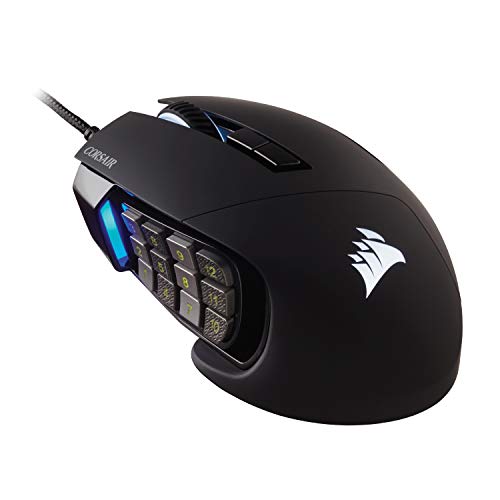
Corsair Scimitar RGB Elite Wired MMO Mouse
Best for: MMO players needing adjustable side buttons
- Connectivity
- Wired
- Maximum DPI
- 18,000 DPI
- Programmable Buttons
- 17
- Sensor
- PixArt PMW3391
- Backlighting
- RGB
- Use
- Gaming
View on Amazon: Corsair Scimitar RGB Elite Wired MMO Mouse Affiliate link
This wired mouse targets MMO and MOBA players with 17 programmable buttons. The patented Key Slider system lets you reposition the 12 side buttons to fit your grip. It uses a PixArt PMW3391 sensor with 18,000 DPI for precise tracking. The contoured shape includes a finger rest for palm support. Omron switches are rated for 50 million clicks.
Pros
- 17 programmable buttons for complex macros
- Repositionable side buttons via Key Slider system
- 18,000 DPI PixArt PMW3391 sensor
- 50 million click-rated Omron switches
- Contoured shape with finger rest
Cons
- Wired connectivity limits cable management flexibility
- 4.3-ounce weight is heavier than lightweight alternatives
- 4.49-inch width may not fit small hands
Good fit if
- You play MMOs or MOBAs requiring many side buttons
- You prefer a contoured shape with a finger rest
- You want adjustable button positioning for comfort
Skip if
- You need a wireless mouse for freedom of movement
- You prefer a lightweight mouse under 3 ounces
- You have small hands that need a compact size
Verdict: Corsair Scimitar RGB Elite MMO Mouse is built for MMO players who need many side buttons. Its adjustable slider system and high-DPI sensor suit those who prioritize button layout and precision over weight.

TMKB Falcon Honeycomb Wired Gaming Mouse
Best for: players seeking a lightweight wired gaming mouse
- Connectivity
- Wired
- Maximum DPI
- 12800 DPI
- Weight
- 75g
- Programmable Buttons
- 6
- Polling Rate
- 125-1000Hz
- Backlighting
- RGB
View on Amazon: TMKB Falcon Honeycomb Wired Gaming Mouse Affiliate link
The TMKB Falcon M1SE is a wired gaming mouse featuring a 75g ultralight honeycomb shell and a white finish. It uses a high-precision optical sensor with adjustable DPI from 200 to 12800 and a polling rate up to 1000Hz. Six programmable buttons allow for macro recording and function remapping. The RGB ribbon reacts to game audio. This mouse suits players who prefer lightweight designs and customizable lighting effects.
Pros
- Ultralight 75g honeycomb shell design
- Adjustable DPI up to 12800
- Polling rate reaches 1000Hz
- Six programmable buttons with macro support
- RGB ribbon syncs to game audio
Cons
- Wired connection limits mobility
- Honeycomb shell collects dust
- No wireless capability
Good fit if
- You want an ultralight mouse for fast movements
- You prefer a wired connection for zero latency
- You enjoy customizable RGB lighting effects
Skip if
- You need a wireless mouse
- You dislike open-shell designs
- You require more than six programmable buttons
Verdict: TMKB Falcon M1SE Lightweight Honeycomb Mouse offers a lightweight build and high DPI for precise gaming. It fits players who prioritize speed and wired reliability over wireless freedom.
Specifications side by side
| Spec | Corsair Scimitar RGB Elite Wired MMO Mouse | TMKB Falcon Honeycomb Wired Gaming Mouse |
|---|---|---|
| Connectivity | Wired | Wired |
| Maximum DPI | 18,000 DPI | 12800 DPI |
| Weight | not stated | 75g |
| Programmable Buttons | 17 | 6 |
| Sensor | PixArt PMW3391 | not stated |
| Polling Rate | not stated | 125-1000Hz |
| Backlighting | RGB | RGB |
| Use | Gaming | Gaming |
| Design | not stated | Ergonomic |
| Color | Black | White |
| Game Genre | MMO | not stated |
| Shell Design | not stated | Honeycomb |
| Operating System | Mac | not stated |
| Dimensions | 6.89 × 4.49 × 0.1 inches | 4.91 × 2.48 × 0.1 inches |
| Size | 1 Count (Pack of 1) | Wired |
| Model | CH-9304211-AS | M1SE |
Frequently asked questions
Is the Corsair Scimitar RGB Elite wired or wireless?
The Corsair Scimitar RGB Elite is a wired gaming mouse. It connects directly to your PC via USB cable. This design ensures stable connectivity without latency. You do not need to worry about battery life. The wired connection is ideal for competitive gaming where consistency matters.
Does the TMKB Falcon M1SE have a honeycomb shell?
Yes, the TMKB Falcon M1SE features a honeycomb shell design. This structure reduces the overall weight of the mouse. The lightweight build helps you move the cursor faster with less effort. It is a key feature for players who prioritize speed and quick reflexes in games.
What is the DPI of the Corsair Scimitar RGB Elite?
The Corsair Scimitar RGB Elite has a maximum DPI of 18,000. It uses a PixArt PMW3391 sensor for high precision. You can adjust the DPI in single steps. This allows for fine-tuned control over cursor movement. It suits players who need exact aiming capabilities.
How many side buttons does the Corsair Scimitar have?
The Corsair Scimitar RGB Elite includes 17 programmable buttons. Twelve of these are side keys arranged on a slider. You can adjust the position of these side buttons. This layout is specifically designed for MMO players who need quick access to many abilities.
What color is the TMKB Falcon M1SE mouse?
The TMKB Falcon M1SE is available in white. The color applies to the shell design of the mouse. This aesthetic choice fits well with light-colored desk setups. The white finish is part of its visual identity alongside its lightweight honeycomb structure.
Is the Corsair Scimitar RGB Elite suitable for MMO games?
Yes, the Corsair Scimitar RGB Elite is built for MMO players. It features an adjustable slider system for side buttons. This handles complex macros and frequent actions efficiently. The high-DPI sensor also supports precision aiming. It is a top choice for those prioritizing button layout in MMOs.
Does the TMKB Falcon M1SE support wireless connectivity?
No, the TMKB Falcon M1SE is a wired gaming mouse. It requires a USB connection to function. This design focuses on reliability and speed without wireless interference. You get consistent performance without needing to charge batteries. It fits players who prefer wired stability.