Full-Size vs 75% Keyboard and Mouse Combos in 2026: Key Differences
As an Amazon Associate we earn from qualifying purchases. Links on this page are affiliate links.
When you compare a full size vs 75 keyboard and mouse combo, the main difference is layout and connectivity. Both options provide wireless input for Windows, Mac, and other systems. The Logitech MK345 uses a single 2.4 GHz dongle and standard AA batteries. The Redragon S155-PRO offers tri-mode connections and rechargeable cells. You also get different features like backlighting and mouse precision. This guide breaks down the specs to help you decide.
Key differences
| Aspect | Logitech MK345 Full-Size Wireless Combo | Redragon 75% Wireless Keyboard and Mouse Combo |
|---|---|---|
| Form Factor | Full-Size | 75% |
| Connectivity | 2.4 GHz wireless | Bluetooth 5.0, 2.4 GHz, USB-C |
| Power Source | Replaceable batteries | Built-in rechargeable |
| Backlighting | Not listed | 16.8M RGB |
| Mouse DPI | Not listed | Up to 12800 DPI |
Which one should you choose?
Choose Logitech MK345 Full-Size Wireless Combo if
- You prefer a traditional layout with a number pad.
- You want simple plug-and-play setup with a single dongle.
- You prefer replaceable batteries over charging.
Choose Redragon 75% Wireless Keyboard and Mouse Combo if
- You need multiple connection modes like Bluetooth and wired.
- You want customizable RGB lighting for your desk.
- You require high-precision mouse settings for gaming.
Verdict: The Logitech MK345 suits users who want a standard layout and straightforward reliability. The Redragon S155-PRO fits those who need versatile connectivity and gaming features. Your choice depends on whether you prioritize layout familiarity or advanced tech specs.
Full-Size vs 75% Combo Specs
Form Factor
The Logitech MK345 is a traditional full-size layout, measuring 20 inches in length. This design includes a dedicated numeric keypad, which is essential for data entry and accounting tasks. The Redragon S155-PRO uses a 75% layout. It removes the numpad to save desk space and allows for more flexible mouse movement. This compact design is popular among gamers and users with limited workspace. If you need a number pad, the Logitech is the only choice here. If you prioritize a smaller footprint, the Redragon is the better fit.
Connectivity
The Logitech MK345 relies on a single 2.4 GHz wireless connection via a USB dongle. It offers a reliable range of up to 10 meters. The Redragon S155-PRO offers more versatility with tri-mode connectivity. It supports Bluetooth 5.0, 2.4 GHz wireless, and USB-C wired connections. The upgraded 2.4 GHz receiver controls both devices simultaneously. The Redragon allows instant switching between multiple devices like PCs, Macs, and consoles. The Logitech is limited to a single wireless mode. The Redragon provides more connection options for different environments.
Battery Life
The Logitech MK345 uses standard AA batteries. The keyboard lasts up to 3 years, and the mouse lasts up to 18 months. Batteries are included. The Redragon S155-PRO features built-in rechargeable batteries. The keyboard has a 4000mAh cell, and the mouse has a 700mAh cell. With RGB lights off, the keyboard lasts up to 300 hours. With lights on, it lasts 50 hours. The Redragon requires charging, while the Logitech uses replaceable batteries. Long-term users may prefer the Logitech for lower maintenance, while the Redragon offers modern rechargeable convenience.
Backlighting
The Logitech MK345 does not include backlighting in its specifications. It is designed for general office use with standard key visibility. The Redragon S155-PRO features extensive 16.8 million RGB lighting. It offers 8 dynamic effects, 6 custom DIY modes, and 7 solid color options. You can adjust brightness and speed in five levels. This lighting enhances gaming immersion and visibility in low light. The Logitech lacks any illumination features. The Redragon provides a wide range of customization for aesthetic and functional lighting needs.
Mouse Precision
The Logitech MK345 mouse features a contoured shape for comfort and smooth tracking. Specific DPI levels are not listed in the provided data. The Redragon S155-PRO mouse offers high-precision adjustable DPI. It has five default levels ranging from 400 to 3200 DPI. You can customize settings from 100 to 12800 DPI using driver software. The indicator light shows the current DPI gear. The Redragon allows for precise adjustments suitable for gaming and work. The Logitech mouse is designed for general comfort without specified precision metrics.
Which combo fits your workflow best
Data entry users needing numeric keypad
The Logitech MK345 offers a full-size layout with a dedicated numeric keypad. This layout is essential for spreadsheet work and accounting tasks. The included palm rest supports long typing sessions. You get reliable 2.4 GHz connectivity with a range of 10 meters. The keyboard lasts up to three years on batteries, reducing maintenance.
Gamers wanting RGB and low latency
The Redragon S155-PRO supports up to 12800 DPI and adjustable polling rates up to 1000Hz for precise gaming control. It features 26-key anti-ghosting and 16.8 million RGB colors. The 75% layout saves desk space for wider mouse movements. You can customize keys and lighting via driver software for a tailored experience.
Users managing multiple devices via Bluetooth
This combo supports Bluetooth 5.0, 2.4GHz, and USB-C wired modes. You can switch between PC, Mac, tablet, and console using hotkeys. The single 2.4G receiver controls both devices. The rechargeable batteries offer 50 hours with RGB on. This flexibility suits users who move between different screens and operating systems frequently.
Office workers prioritizing battery longevity
The Logitech MK345 keyboard battery lasts up to three years, and the mouse lasts 18 months. You do not need to recharge devices daily. The plug-and-play setup works seamlessly with Windows and macOS. The spill-resistant design adds durability for daily office use. The contoured mouse ensures comfort during extended navigation sessions.
Quick picks
| # | Product | Best for | Price |
|---|---|---|---|
| 1 | Logitech MK345 Full-Size Wireless Combo | users needing full-size layout and long battery life | Check price of Logitech MK345 Full-Size Wireless Combo on Amazon |
| 2 | Redragon 75% Wireless Keyboard and Mouse Combo | Users needing compact layout and multi-device wireless connectivity | Check price of Redragon 75% Wireless Keyboard and Mouse Combo on Amazon |
The products compared

Logitech MK345 Full-Size Wireless Combo
Best for: users needing full-size layout and long battery life
- Form Factor
- Full-Size (what this guide is about)
- Connectivity
- 2.4 GHz, USB-A Nano Receiver
- Keyboard Form Factor
- Full-size
- Ergonomic Features
- Integrated palm rest
- Color
- Black
- Dimensions
- 20 × 7.52 × 1.73 inches
View on Amazon: Logitech MK345 Full-Size Wireless Combo Affiliate link
This is a full-size wireless keyboard and mouse combo from Logitech. It uses a 2.4 GHz connection with a range up to 10 meters. The keyboard includes a palm rest and spill-resistant design. Battery life lasts up to 3 years for the keyboard and 18 months for the mouse. It works with Windows, macOS, and ChromeOS. This setup suits users who need a standard layout and long battery life.
Pros
- Full-size layout with integrated palm rest
- Up to 3 years keyboard battery life
- 2.4 GHz wireless connection up to 10 meters
- Spill-resistant keyboard design
Cons
- No Bluetooth connectivity
- Single right-handed mouse only
- No dedicated software for customization
Good fit if
- You prefer a traditional full-size keyboard layout
- You want long battery life without frequent changes
- You use Windows, macOS, or ChromeOS
Skip if
- You need a compact 75% form factor
- You require Bluetooth connectivity
- You need a left-handed mouse option
Verdict: Logitech MK345 Full-Size Wireless Combo delivers reliable performance for users who value a standard keyboard layout and extended battery life over compact size or wireless versatility.
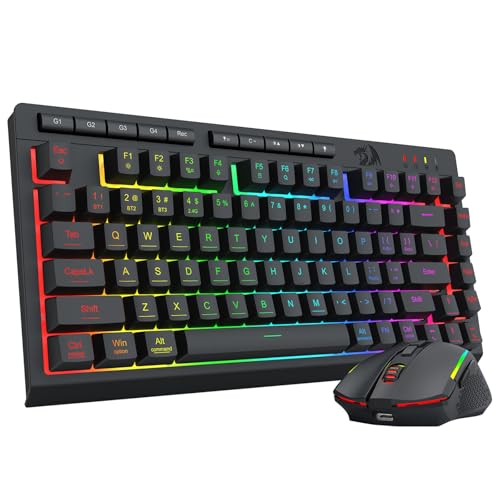
Redragon 75% Wireless Keyboard and Mouse Combo
Best for: Users needing compact layout and multi-device wireless connectivity
- Form Factor
- 75% (what this guide is about)
- Connectivity
- Bluetooth 5.0, 2.4G, USB-C wired
- Keyboard Form Factor
- 75%
- Power Source
- Rechargeable (4000mAh, 700mAh)
- Switch Type
- Membrane
- Mouse DPI
- 12800 DPI
View on Amazon: Redragon 75% Wireless Keyboard and Mouse Combo Affiliate link
This Redragon combo uses a 75% keyboard layout to save desk space while keeping arrow keys and essential function rows. It connects via Bluetooth 5.0, 2.4GHz wireless, or USB-C wired. The keyboard features a 4000mAh battery, and the mouse supports up to 12800 DPI. RGB lighting and programmable keys suit gamers and office workers who need multi-device switching and a compact footprint.
Pros
- Tri-mode connectivity with Bluetooth 5.0, 2.4GHz, and USB-C wired options
- 75% form factor removes the numpad to increase mouse movement space
- 4000mAh keyboard battery offers up to 300 hours of use with lights off
- Mouse DPI adjustable from 100 to 12800 via driver software
- 2.4GHz receiver controls both keyboard and mouse simultaneously
Cons
- 75% layout lacks a dedicated numpad for numeric data entry
- Requires driver software for full customization of mouse polling rate and key remapping
- No mention of a dedicated numpad or full-size number row
Good fit if
- You need a compact keyboard that retains arrow keys and essential functions
- You want to connect to multiple devices like PC, Mac, or consoles
- You prefer a wireless setup with a single 2.4GHz receiver for both devices
Skip if
- You require a full-size keyboard with a dedicated numpad for heavy number entry
- You want a keyboard that works without installing any driver software
- You need a mouse with a higher DPI than 12800
Verdict: Redragon 75% Wireless Keyboard and Mouse Combo is a practical choice for users who need a compact layout with multi-device support and high DPI mouse precision. It fits gamers and office workers who value desk space and wireless flexibility.
Specifications side by side
| Spec | Logitech MK345 Full-Size Wireless Combo | Redragon 75% Wireless Keyboard and Mouse Combo |
|---|---|---|
| Connectivity | 2.4 GHz, USB-A Nano Receiver | Bluetooth 5.0, 2.4G, USB-C wired |
| Keyboard Form Factor | Full-size | 75% |
| Ergonomic Features | Integrated palm rest | not stated |
| Power Source | not stated | Rechargeable (4000mAh, 700mAh) |
| Switch Type | not stated | Membrane |
| Mouse DPI | not stated | 12800 DPI |
| Backlighting | not stated | 16.8M RGB |
| Form Factor | Full-Size | 75% |
| Use | not stated | Gaming |
| Color | Black | Gaming Combo |
| Operating System | not stated | Mac, Windows |
| Noise Level | not stated | Silent |
| Dimensions | 20 × 7.52 × 1.73 inches | not stated |
| Weight | 1.1 pounds | 1.13 pounds |
| Size | 1 Pack | TKL |
| Model | 920-006481 | S155-PRO |
Frequently asked questions
Does a full-size keyboard include a number pad?
Yes, full-size layouts include a dedicated numeric keypad on the right side. This feature is essential for data entry, accounting, and spreadsheet work. The Logitech MK345 follows this traditional design, measuring 20 inches in length to accommodate all standard keys and the number block.
What is the main advantage of a 75% keyboard layout?
A 75% layout saves significant desk space while retaining most essential function keys. It removes the number pad and arrow keys, compacting the design. The Redragon S155-PRO uses this form factor, making it ideal for gamers and office workers who value wireless flexibility and a smaller footprint.
Are wireless combos compatible with Mac and Windows?
Yes, both listed combos provide wireless input for Windows, Mac, and other systems. The Logitech MK345 connects via a single 2.4 GHz dongle. The Redragon S155-PRO supports multi-device wireless connectivity. You can switch between operating systems without needing additional drivers or complex setup procedures for basic functionality.
Which combo is better for users needing long battery life?
The Logitech MK345 is designed for users who value extended battery life. It uses standard AA batteries, which are easy to replace. This makes it a reliable choice for general use where you need consistent performance without frequent charging or battery changes compared to other wireless options.
How much desk space does a 75% combo save?
A 75% combo reduces width significantly by removing the number pad. The Redragon S155-PRO weighs 1.13 pounds and features a compact TKL-style design. This layout frees up space for mouse movement or other peripherals, making it a practical choice for smaller desks or gaming setups.
Does the full-size combo include a palm rest?
Yes, the Logitech MK345 includes an included palm rest. This support is designed to reduce wrist strain during long typing sessions. The full-size layout measures 7.52 inches in width, providing ample space for comfortable hand placement alongside the numeric keypad and standard function row.
What connectivity type do these wireless combos use?
Both products use wireless connectivity for freedom from cable clutter. The Logitech MK345 utilizes a 2.4 GHz wireless dongle for stable connection. The Redragon S155-PRO also offers wireless flexibility with multi-device support. This allows you to move freely while maintaining responsive input for typing and gaming tasks.