Best Full-Size Keyboard and Mouse Combos in 2026: 9 Picks Ranked by Specs
As an Amazon Associate we earn from qualifying purchases. Links on this page are affiliate links.
A full size keyboard and mouse combo provides standard desktop coverage for everyday office typing and data entry. For this guide, we compared 9 products based on the specifications published on the listings. The Logitech MK270 Full-Size Wireless Combo takes the top position because it combines wireless connectivity with spill protection, media shortcuts, and a 1.05-pound build for everyday office tasks.
This guide helps you decide which wireless connectivity, desktop dimensions, and ergonomic features fit your daily workstation in 2026.
Quick picks
The best fit for you
- You need standard wireless data entry for daily office work Logitech MK270 Full-Size Wireless Combo This wireless setup provides a full-size layout with media shortcuts and spill protection for desk typing.
- You work in a shared space needing quiet typing Logitech MK295 Full-Size Silent Wireless Combo It features a silent noise level rating and 2.4 GHz wireless connectivity for quiet desks.
- You travel frequently and want a folding full-size layout ProtoArc Full-Size Foldable Wireless Keyboard and Mouse The folding design packs down to 12 by 5.55 by 1.6 inches while retaining a 105-key format.
- You manage multiple Apple Mac workstations simultaneously Logitech MX Keys S Mac Full-Size Combo It features dedicated Mac layout integration, three-device Bluetooth switching, and an 8K DPI mouse.
- You require extra wrist support during long typing sessions RECCAZR Full-Size Ergonomic Wave Keyboard and Mouse The ergonomic wave layout includes an integrated wrist rest and silent switches.
Our 9 picks

Logitech MK270 Full-Size Wireless Combo
Best for: Everyday office typing and data entry
- Form Factor
- Full-Size (what this guide is about)
- Connectivity
- Wireless USB receiver
- Keyboard Form Factor
- Full-size
- Color
- Black
- Dimensions
- 20.1 × 6.22 × 1.81 inches
- Weight
- 1.05 pounds
The Logitech MK270 Full-Size Wireless Combo pairs a standard keyboard layout with a compact ambidextrous mouse. You connect both peripherals via a single USB receiver with an operating range up to 33 feet. The keyboard features a dedicated number pad, eight multimedia hotkeys, and spill resistance. Rated battery longevity reaches 36 months for the keyboard and 12 months for the mouse, providing dependable input for everyday computing tasks.
Pros
- Battery life rated up to 36 months for keyboard and 12 months for mouse
- Full-size keyboard layout includes dedicated number pad and 8 multimedia hotkeys
- Spill-resistant keyboard housing with adjustable tilt legs
- Wireless USB receiver operation up to a 33-foot range
Cons
- Mouse features a compact frame rather than a full-size profile
- Keyboard lacks an integrated palm rest
Good fit if
- You want a full desktop layout with dedicated media controls and a number pad.
- You prioritize multi-year battery life with manual on/off power switches.
- You need an ambidextrous mouse usable with either hand.
Skip if
- You require an integrated wrist rest or sculpted palm support.
- You prefer a full-sized mouse with contoured soft grips.
Verdict: Logitech MK270 Full-Size Wireless Combo provides standard desktop coverage with reliable long-term battery performance and spill protection. It covers full-size data entry and media shortcuts without unnecessary setup complexity.

Logitech MK295 Full-Size Silent Wireless Combo
Best for: quiet shared office and home workspaces
- Form Factor
- Full-Size (what this guide is about)
- Connectivity
- 2.4 GHz USB receiver
- Keyboard Form Factor
- Full-size
- Ergonomic Features
- Adjustable tilt legs
- Noise Level
- Silent
- Dimensions
- 0.7 × 17.4 × 5.86 inches
View on Amazon: Logitech MK295 Full-Size Silent Wireless Combo
This full-size wireless combo includes a quiet keyboard with a dedicated number pad and eight shortcut keys, paired with a compact contoured mouse. It uses a single 2.4 GHz USB receiver with a 10-meter operating range. SilentTouch technology cuts click and typing noise by 90 percent. With up to 36 months of keyboard battery life and spill-resistant construction, it fits your everyday typing needs in shared or quiet work spaces.
Pros
- SilentTouch design reduces typing and clicking noise by 90 percent
- Battery life lasts up to 36 months for keyboard and 18 months for mouse
- Full-size layout includes eight media shortcuts and a full number pad
- Spill-resistant keyboard build with adjustable tilt legs
Cons
- Compatibility is limited to Windows and Chrome OS
- Connects only via 2.4 GHz USB receiver without Bluetooth support
Good fit if
- You work in shared spaces requiring minimal clicking and typing noise.
- You want extended battery life with simple plug-and-play USB setup.
- You need dedicated media shortcuts and a full numeric keypad.
Skip if
- You use macOS or need multi-OS connectivity.
- You require Bluetooth pairing for devices without standard USB ports.
Verdict: Logitech Full-Size Silent Wireless Combo provides dependable 2.4 GHz connectivity and quiet operation for Windows and Chrome OS desks. Its long battery life and spill-resistant design offer practical everyday utility.

ProtoArc Full-Size Foldable Wireless Keyboard and Mouse
Best for: travelers wanting a full-size folding setup
- Form Factor
- Full-Size (what this guide is about)
- Connectivity
- 2.4G USB-A, Bluetooth
- Keyboard Form Factor
- Full-size
- Multi-Device Pairing
- 3 devices
- Power Source
- Rechargeable (Type-C)
- Mouse DPI
- 2400 DPI
View on Amazon: ProtoArc Full-Size Foldable Wireless Keyboard and Mouse
This combo pairs a tri-fold, 105-key keyboard with an ultra-slim mouse. It gives you a full-size layout with a dedicated number pad that folds into an included hard travel case alongside a tablet stand. You can connect up to three devices across Bluetooth and 2.4G wireless. It suits you if you need a full-size portable workspace for travel without giving up number-pad input.
Pros
- Tri-fold 105-key layout includes a dedicated number pad
- Connects and switches between three devices via 2.4G USB-A and Bluetooth
- Includes hard storage case and foldable stand for 4–11-inch tablets
- Mouse features three adjustable DPI levels (1000/1600/2400) and 25dB quiet switches
- Type-C rechargeable with up to 150-day keyboard and 200-day mouse standby
Cons
- Non-backlit key switches
- Requires a flat desk surface rather than lap or sofa use
- Total package weighs 1.5 pounds
Good fit if
- You need a 105-key layout with a number pad that folds for travel.
- You work across multiple devices using 2.4G and Bluetooth switching.
- You want an included hard case and mobile stand in your setup.
Skip if
- You need backlit keys for working in dim lighting.
- You frequently type on your lap or soft surfaces.
- You prefer a contoured ergonomic mouse over an ultra-slim profile.
Verdict: ProtoArc Full-Size Foldable Wireless Combo delivers full 105-key typing and three-device connectivity in a compact, travel-ready folding format.
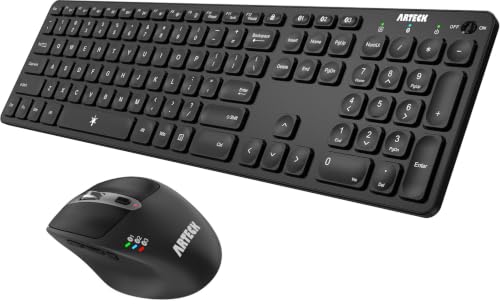
Arteck Full-Size Multi-Device Bluetooth Combo
Best for: multi-device Bluetooth desktop and tablet setups
- Form Factor
- Full-Size (what this guide is about)
- Connectivity
- Bluetooth
- Keyboard Form Factor
- Full-size
- Ergonomic Features
- Ergonomic mouse
- Multi-Device Pairing
- 3 devices
- Power Source
- Rechargeable lithium battery
View on Amazon: Arteck Full-Size Multi-Device Bluetooth Combo
This full-size combo from Arteck pairs a full-size keyboard with an ergonomic seven-button mouse using Bluetooth connectivity. You can pair both peripherals to three devices simultaneously and switch between them with a single click. The built-in rechargeable batteries charge via USB-C, providing months of operation per charge. The mouse includes five adjustable DPI levels from 800 to 2400, making it a practical fit if you toggle across different screens.
Pros
- Connects and switches across 3 Bluetooth devices
- Rechargeable batteries with included USB-C charging cable
- 7-button mouse with 5 DPI settings up to 2400 DPI
- Compatible with Windows, Mac OS, iOS, iPadOS, and Android
Cons
- Relies solely on Bluetooth with no USB wireless receiver included
- Internal batteries cannot be swapped with standard alkaline cells
Good fit if
- You need to toggle between up to three Bluetooth devices with one click.
- You prefer USB-C rechargeable batteries over disposable cells.
- You want a mouse with dedicated DPI adjustment and navigation buttons.
Skip if
- You require a dedicated 2.4GHz USB wireless dongle.
- You prefer swapping replaceable AA or AAA batteries.
Verdict: Arteck Full-Size Multi-Device Bluetooth Combo provides multi-device Bluetooth switching, USB-C recharging, and a 7-button mouse in a full-size setup. It handles multi-screen office workflows across different operating systems without requiring disposable batteries.

Logitech MX Keys S Mac Full-Size Combo
Best for: multi-device Apple Mac desktop workstations
- Form Factor
- Full-Size (what this guide is about)
- Connectivity
- Bluetooth Low Energy
- Keyboard Form Factor
- Full Size
- Multi-Device Pairing
- Up to 3 devices
- Mouse DPI
- 8K DPI
- Backlighting
- Backlit
The Logitech MX Keys S Mac Full-Size Wireless Combo combines a low-profile keyboard with the MX Master 3S mouse. You get a dedicated Mac key layout, smart proximity backlighting, and an 8,000 DPI sensor capable of tracking on glass. Bluetooth Low Energy lets you pair up to three Apple devices and toggle between them quickly. Both peripherals recharge over USB-C. This setup suits you if you work across multiple Mac systems and need precise tracking.
Pros
- MX Master 3S mouse features an 8,000 DPI sensor that tracks on glass
- Hand-proximity backlighting with custom settings via Logi Options+
- Bluetooth Low Energy pairs and switches between up to 3 Apple devices
- USB-C rechargeable internal batteries on both keyboard and mouse
Cons
- Mac-specific key layout lacks standard Windows legend markings
- No 2.4 GHz USB receiver included in the published package specs
- Combined package weight is relatively heavy at 3.4 pounds
Good fit if
- You work primarily on macOS or iPadOS setups and need native Apple key layouts.
- You require high-precision mouse tracking across varied surfaces, including glass.
- You switch workflows between up to three Mac computers or iPads.
Skip if
- You use Windows as your primary operating system.
- You prefer a lightweight travel bundle rather than a substantial 3.4-pound desktop set.
Verdict: Logitech MX Keys S Mac Full-Size Wireless Combo pairs a fluid, backlit typing experience with an 8K DPI mouse designed specifically for macOS users. It provides seamless three-device Bluetooth switching across Apple workstations.

RECCAZR Full-Size Ergonomic Wave Keyboard and Mouse
Best for: long typing sessions needing wrist support
- Form Factor
- Full-Size (what this guide is about)
- Connectivity
- 2.4 GHz USB
- Keyboard Form Factor
- Full-size
- Ergonomic Features
- Wave layout, wrist rest
- Design
- Ergonomic
- Color
- Black
View on Amazon: RECCAZR Full-Size Ergonomic Wave Keyboard and Mouse
This full-size combo pairs a 104-key wave keyboard with an ergonomic silent mouse over a single 2.4GHz USB receiver. You get an integrated wrist rest, tilt legs, and spill-drain holes on the keyboard deck. The accompanying mouse features three DPI presets at 800, 1200, and 1600 along with forward and back side navigation buttons. It suits you if you need a standard numeric layout paired with typing support.
Pros
- Integrated wrist rest with wave key surface layout
- Full-size 104-key layout with dedicated number pad
- Three mouse DPI settings at 800, 1200, and 1600
- Spill-resistant keyboard construction with bottom drain holes
- Single shared 2.4GHz nano USB receiver with 33-foot range
Cons
- No Bluetooth connectivity listed for port-free pairing
- Curved wave key profile requires adjustment from flat layouts
Good fit if
- You want a full-size keyboard with an integrated wrist rest.
- You need a mouse with adjustable DPI and side navigation buttons.
- You prefer plug-and-play wireless via a single USB receiver.
Skip if
- You need Bluetooth connectivity for hardware without USB-A ports.
- You prefer flat, straight key rows over curved wave key layouts.
Verdict: RECCAZR Full-Size Ergonomic Wave Keyboard and Mouse provides an integrated wrist rest and curved wave layout alongside a quiet, multi-DPI mouse. It offers straightforward 2.4GHz operation for desktop setups needing extra hand support.

Seenda Full-Size Bluetooth Ergonomic Combo
Best for: ergonomic multi-device typing in pink
- Form Factor
- Full-Size (what this guide is about)
- Connectivity
- 2.4GHz USB receiver, Bluetooth 5.0
- Keyboard Form Factor
- Full-size
- Ergonomic Features
- Built-in wrist rest
- Multi-Device Pairing
- 2 devices
- Power Source
- 1 AAA (keyboard), 1 AA (mouse)
This full-size combo pairs an ergonomic keyboard with an integrated wrist rest and a symmetrical mouse. You connect across two devices using Bluetooth 5.0 and a 2.4 GHz USB receiver, toggling between Windows, macOS, or mobile setups. The mouse supports 1000, 1600, and 2400 DPI settings for tracking adjustments. It suits you if you need a quiet full-layout desktop set with dedicated number keys and a pastel pink finish.
Pros
- Dual connectivity via Bluetooth 5.0 and 2.4 GHz USB receiver
- Integrated wrist rest on keyboard for typing support
- Adjustable mouse sensor with 1000, 1600, and 2400 DPI presets
- Full-size layout includes dedicated numeric keypad
Cons
- 2.4 GHz USB wireless mode functions only on Windows
- Requires one AAA and one AA battery not included in box
Good fit if
- You need a full-size layout with a built-in wrist rest and numpad.
- You switch between two devices using Bluetooth and a USB receiver.
- You prefer quiet switches and adjustable mouse sensitivity up to 2400 DPI.
Skip if
- You need 2.4 GHz wireless USB connectivity on macOS.
- You want built-in rechargeable batteries instead of replaceable alkaline cells.
Verdict: Seenda Full-Size Ergonomic Wireless Combo delivers dual-mode wireless pairing and built-in wrist support in a full layout. It handles multi-device typing smoothly if you supply your own AA and AAA batteries.

Faadar Full-Size Ergonomic Wave Keyboard and Mouse
Best for: ergonomic wave typing with integrated device docking
- Form Factor
- Full-Size (what this guide is about)
- Connectivity
- 2.4GHz USB receiver
- Keyboard Form Factor
- Full-size
- Ergonomic Features
- Wave layout, 2.8-inch palm rest
- Power Source
- 1 AA (keyboard), 1 AA (mouse)
- Switch Type
- Membrane
View on Amazon: Faadar Full-Size Ergonomic Wave Keyboard and Mouse
The Faadar Full-Size Ergonomic Wave Keyboard and Mouse gives you a standard 104-key layout paired with a curved wave profile and an integrated 2.8-inch palm rest. It runs on a 2.4GHz USB wireless connection operating up to 33 feet. A built-in top slot holds phones or tablets. The included optical mouse offers three DPI presets. It suits you if you want a complete desktop setup with dedicated wrist support.
Pros
- Integrated 2.8-inch palm rest and wave layout
- Built-in phone and tablet holding cradle
- Mouse features three DPI settings (800, 1200, 1600)
- Single 2.4GHz USB receiver provides up to 33 feet of range
Cons
- Requires two AA batteries that are not included
- No Bluetooth connectivity option
- Large footprint measuring 17.5 by 8.7 inches
Good fit if
- You need an integrated palm rest and angled wave keys for daily typing.
- You want an integrated cradle on your keyboard to prop up a phone or tablet.
- You prefer a mouse with adjustable tracking sensitivity presets.
Skip if
- You prefer rechargeable peripherals with internal batteries.
- You need native Bluetooth pairing without using a USB-A port.
- You have limited desk depth for an 8.7-inch wide keyboard frame.
Verdict: Faadar Full-Size Ergonomic Wave Keyboard and Mouse delivers a full 104-key layout with integrated wrist support and an on-board mobile device cradle. It provides a straightforward 2.4GHz wireless setup with adjustable mouse sensitivity.
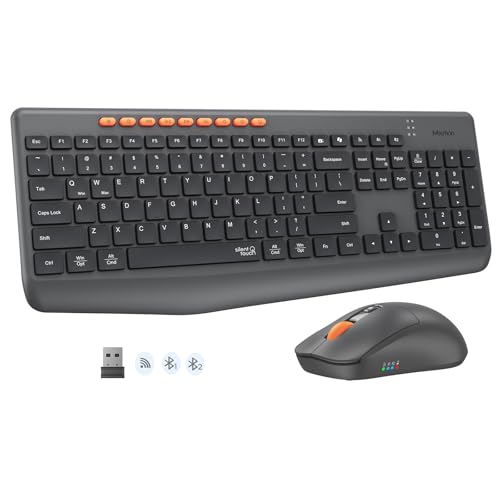
MEETION Full-Size Silent Wireless Combo
Best for: multi-device quiet typing with high DPI control
- Form Factor
- Full-Size (what this guide is about)
- Connectivity
- Bluetooth, 2.4G wireless
- Keyboard Form Factor
- Full-size
- Power Source
- Dry battery
- Mouse DPI
- 3200 DPI
- Color
- Black
The MEETION Full-Size Silent Wireless Keyboard and Mouse provides a standard 115-key layout with a dedicated number pad and nine multimedia hotkeys. You get dual-mode connectivity across Bluetooth and 2.4G wireless, letting you switch between three paired devices. The included mouse features four adjustable DPI settings up to 3200 DPI. This combo suits you if you need a quiet, multi-device desktop workstation powered by replaceable dry batteries.
Pros
- Dual-mode Bluetooth and 2.4G wireless pairing for up to three devices
- Mouse sensor offers four DPI levels: 1200, 1600, 2400, and 3200
- Full-size 115-key layout includes dedicated numeric keypad and 9 multimedia hotkeys
- Silent switches reduce operating noise by over 90 percent
Cons
- Runs on dry batteries rather than built-in rechargeable power
- No key backlighting listed in specifications
Good fit if
- You switch frequently between up to three computers, tablets, or phones
- You need a quiet full-size keyboard with a number pad for low-noise environments
- You want adjustable mouse tracking sensitivity up to 3200 DPI
Skip if
- You prefer a combo with internal USB rechargeable batteries
- You need backlit keys for working in dim environments
Verdict: MEETION Full-Size Silent Wireless Keyboard and Mouse delivers flexible multi-device pairing and high-DPI mouse control for shared workspaces. Its dry-battery design and quiet switches make it a practical office tool without charging downtime.
Specifications side by side
| Spec | Logitech MK270 Full-Size Wireless Combo | Logitech MK295 Full-Size Silent Wireless Combo | ProtoArc Full-Size Foldable Wireless Keyboard and Mouse | Arteck Full-Size Multi-Device Bluetooth Combo | Logitech MX Keys S Mac Full-Size Combo | RECCAZR Full-Size Ergonomic Wave Keyboard and Mouse | Seenda Full-Size Bluetooth Ergonomic Combo | Faadar Full-Size Ergonomic Wave Keyboard and Mouse | MEETION Full-Size Silent Wireless Combo |
|---|---|---|---|---|---|---|---|---|---|
| Connectivity | Wireless USB receiver | 2.4 GHz USB receiver | 2.4G USB-A, Bluetooth | Bluetooth | Bluetooth Low Energy | 2.4 GHz USB | 2.4GHz USB receiver, Bluetooth 5.0 | 2.4GHz USB receiver | Bluetooth, 2.4G wireless |
| Keyboard Form Factor | Full-size | Full-size | Full-size | Full-size | Full Size | Full-size | Full-size | Full-size | Full-size |
| Ergonomic Features | not specified | Adjustable tilt legs | not specified | Ergonomic mouse | not specified | Wave layout, wrist rest | Built-in wrist rest | Wave layout, 2.8-inch palm rest | not specified |
| Multi-Device Pairing | not specified | not specified | 3 devices | 3 devices | Up to 3 devices | not specified | 2 devices | not specified | not specified |
| Power Source | not specified | not specified | Rechargeable (Type-C) | Rechargeable lithium battery | not specified | not specified | 1 AAA (keyboard), 1 AA (mouse) | 1 AA (keyboard), 1 AA (mouse) | Dry battery |
| Switch Type | not specified | not specified | not specified | not specified | not specified | not specified | not specified | Membrane | not specified |
| Mouse DPI | not specified | not specified | 2400 DPI | 2400 DPI | 8K DPI | not specified | 2400 DPI | 1600 DPI | 3200 DPI |
| Backlighting | not specified | not specified | Non-backlit | not specified | Backlit | not specified | not specified | not specified | not specified |
| Form Factor | Full-Size | Full-Size | Full-Size | Full-Size | Full-Size | Full-Size | Full-Size | Full-Size | Full-Size |
| Design | not specified | not specified | not specified | Ergonomic | not specified | Ergonomic | Ergonomic | Ergonomic | not specified |
| Color | Black | Off-White | Black Gray | Black | Space Grey | Black | Pink | Black | Black |
| Operating System | not specified | not specified | not specified | Windows | Mac | Mac, Windows | not specified | not specified | not specified |
| Noise Level | not specified | Silent | not specified | not specified | not specified | Silent | not specified | not specified | Silent |
| Dimensions | 20.1 × 6.22 × 1.81 inches | 0.7 × 17.4 × 5.86 inches | not specified | not specified | 17.7 × 5.7 × 3 inches | not specified | not specified | 17.5 × 8.7 × 2.1 inches | not specified |
| Weight | 1.05 pounds | not specified | 1.5 pounds | not specified | 3.4 pounds | not specified | not specified | 2.4 pounds | not specified |
| Size | 1 Pack | (Pack of 1) | 12 x 5.55 x 1.6 inches | not specified | Full Size | not specified | Full Size | Large | standard |
| Model | 920-008813 | 920-009783 | XKM01 | HB305-3MB167 | 920-012592 | not specified | COE200 | EK39 | C4133 |
Choosing Your Full-Size Keyboard and Mouse
-
Evaluate Ergonomic Wave Frames
Check whether the keyboard layout is flat or contoured. Full-size ergonomic models feature curved wave designs and integrated wrist rests to keep your hands at a neutral angle during extended data entry. Standard flat decks occupy less vertical desk space and suit traditional straight-wrist typing. If you experience forearm strain during long work shifts, choose a model with dedicated wrist support. The RECCAZR Full-Size Ergonomic Wave Keyboard and Mouse includes an integrated wrist rest to support your palms directly below the keybed.
-
Compare Battery and Power Options
Review how both peripherals receive power before selecting a desktop set. Some combos use built-in rechargeable batteries powered over USB-C cables. This eliminates the recurring need for disposable cells and lets you top off power directly from your computer. Other models operate on standard replaceable AA or AAA dry batteries, which avoid cable clutter and prevent charging interruptions during critical tasks. The Arteck Full-Size Multi-Device Bluetooth Combo provides USB-C recharging, allowing you to replenish both the keyboard and mouse without buying replacement alkaline cells.
-
Check Operating System Compatibility
Verify the exact operating system compatibility listed in the keyboard specifications. Full-size keyboards feature platform-specific function rows and bottom modifier rows, including Command, Option, or Windows start keys. Using a Windows-configured board on an Apple computer can displace critical shortcut mappings. While some hardware works across multiple platforms, dedicated systems offer exact printed legends for your setup. The Logitech MX Keys S Mac Full-Size Combo is built specifically for macOS workstations, ensuring all system keys align directly with native Mac controls.
-
Examine Mouse Sensitivity Controls
Mouse specifications vary widely across full-size desktop bundles. Look at tracking resolution and button configurations based on your navigation needs. Basic desktop mice supply standard two-button layouts with a click wheel for ordinary navigation. For precise cursor control across high-resolution displays, check for adjustable sensitivity ratings that let you calibrate cursor speed on demand. The Faadar Full-Size Ergonomic Wave Keyboard and Mouse features adjustable mouse sensitivity, allowing you to match pointer movement to your desk space and screen dimensions.
-
Consider Travel and Folding Needs
Standard full-size desktop keyboards measure between 17 and 20 inches in length, making them difficult to fit inside briefcases or travel backpacks. If you work in multiple locations but still require a dedicated numeric keypad for data entry, inspect the frame design. Folding models hinge at the center to compress physical dimensions down to compact footprints for transport without omitting keys. The ProtoArc Full-Size Foldable Wireless Keyboard and Mouse delivers a full 105-key layout while packing down to a 12-inch folding size.
Frequently asked questions
What is the standard key count for a full-size keyboard combo?
Full-size keyboards typically include between 104 and 108 keys to provide complete alphanumeric, navigation, and numeric sections. For example, the Faadar combo uses a 104-key layout, while the ProtoArc folding model incorporates 105 keys. This footprint gives you a dedicated number pad for efficient calculation, arrow clusters, and function keys without relying on secondary function layers.
Can you use a full-size keyboard and mouse combo with macOS?
Yes, specific full-size combos are built to support macOS configurations directly out of the box. The Logitech MX Keys S Mac combo is tailored for Mac workstations, offering Apple-specific key legends and three-device Bluetooth pairing. Additionally, cross-platform models like the RECCAZR Wave combo list compatibility with both Mac and Windows operating systems for flexible office setups.
How do full-size combos handle power without disposable batteries?
Combos without disposable dry batteries use internal rechargeable cells that charge via standard cables. For instance, the Arteck Full-Size Multi-Device Bluetooth Combo integrates USB-C recharging, eliminating the need to buy extra AA or AAA alkaline cells. In contrast, models like the Seenda combo require external AA and AAA batteries, while the MEETION combo uses a dry-battery design.
Are there portable full-size keyboard and mouse options for travel?
Yes, folding full-size designs allow you to pack a complete desktop layout into a portable footprint. The ProtoArc Full-Size Foldable Wireless combo folds down to dimensions of 12 by 5.55 by 1.6 inches and weighs 1.5 pounds. This gives you a full 105-key typing experience and three-device switching on the road without carrying a rigid, full-length deck.
What mouse specifications should you look for in a full-size desktop combo?
Look at mouse sensor sensitivity and physical button count based on your daily workflow. Precision setups benefit from high sensitivity, such as the Logitech MX Keys S combo, which includes an 8K DPI mouse. If you need extra productivity shortcuts, the Arteck combo features a 7-button mouse, while the Faadar and RECCAZR mice offer adjustable DPI tracking speeds.
How do built-in mobile device cradles work on full-size keyboards?
Built-in device cradles are integrated slots across the top deck of the keyboard designed to hold your smartphone or tablet upright. The Faadar Full-Size Ergonomic Wave Keyboard includes an on-board mobile device cradle right into its frame. This slot holds your mobile screen at an accessible viewing angle while you type across the standard 104-key desktop deck.
Which full-size combos offer silent typing for shared workspaces?
Several full-size setups specifically feature silent switches to prevent noise disruption in shared environments. The Logitech MK295, MEETION, and RECCAZR combos all carry published silent noise ratings. These keyboards and companion mice minimize audible click sounds, making them practical options when you need full data entry capabilities without creating typing noise around coworkers or family.