Full-Size vs Mini Keyboard and Mouse Combos: Which Should You Buy?
As an Amazon Associate we earn from qualifying purchases. Links on this page are affiliate links.
Choosing between a full size vs mini keyboard and mouse combo depends on your desk space and typing habits. Both Logitech MK345 and Macally Compact offer reliable 2.4 GHz wireless connectivity via a single USB dongle. They share a black color scheme and plug-and-play setup for Windows, macOS, and ChromeOS. The main difference lies in their physical footprint and key design. One prioritizes a traditional layout with a palm rest, while the other focuses on a slim, space-saving profile with quiet keys.
Key differences
| Aspect | Logitech MK345 Full-Size Wireless Combo | Macally Compact Wireless Keyboard and Mouse |
|---|---|---|
| Form Factor | Full-Size | Compact |
| Switch Type | Standard | Slim scissor flex |
| Keyboard Dimensions | 20 x 7.52 x 1.73 inches | Not listed |
| Mouse DPI | Not listed | 800 / 1200 / 1600 DPI |
| Battery Life | 3 years (keyboard), 18 months (mouse) | Not listed |
| Noise Level | Quiet typing | Silent |
Which one should you choose?
Choose Logitech MK345 Full-Size Wireless Combo if
- You need a full numeric keypad and standard arrow keys for data entry.
- You prefer a larger palm rest for wrist support during long sessions.
- You want the longest possible battery life without frequent replacements.
Choose Macally Compact Wireless Keyboard and Mouse if
- You have limited desk space and need a compact footprint.
- You want adjustable mouse sensitivity for different tasks.
- You prioritize silent operation and a slim profile.
Verdict: The Logitech MK345 suits users who need a traditional full-size layout and extensive battery life. The Macally Compact is better for those with small desks who value quiet typing and adjustable mouse DPI. Your choice should hinge on whether you prioritize layout completeness or space efficiency.
Full-Size vs Mini Keyboard Comparison
Form Factor
The Logitech MK345 is a full-size keyboard with a standard layout, including a number pad and dedicated media keys. It measures 20 inches in length and includes a palm rest for comfort. The Macally Compact is a mini keyboard with only 78 keys, measuring just 7.9 inches long. It saves significant desk space but removes the number pad and dedicated media controls. If you need a numeric keypad for data entry, the Logitech is the practical choice. If you prioritize a smaller footprint on your desk, the Macally design fits better.
Switch Type
The Macally Compact uses slim scissor flex switches, which are typically found in laptops. These keys are designed for quiet operation and a low profile. The product data describes the mouse as having a quiet click, and the keyboard is marketed for quiet productivity. The Logitech MK345 does not specify its switch technology in the provided data. However, it is described as having comfortable, quiet typing. Without explicit details on the Logitech switch mechanism, we cannot determine which offers a superior tactile feel or noise reduction level based strictly on the specifications.
Mouse DPI
The Macally Compact mouse offers three distinct DPI settings: 800, 1200, and 1600. This allows you to adjust the cursor speed depending on your task or monitor resolution. The Logitech MK345 mouse is described as having smooth, precise tracking and scrolling, but the specific DPI values are not listed in the data. If you require the ability to customize pointer speed for different workflows, the Macally provides clear options. For general use, both mice aim for comfort and precision, but the Macally gives you more control over sensitivity.
Battery Life
The Logitech MK345 offers significantly longer battery life according to the data. The keyboard batteries last up to three years, and the mouse batteries last up to eighteen months. Batteries are included in the box. The Macally Compact does not list specific battery duration in the provided specifications. While both use 2.4 GHz wireless technology, the Logitech combo is designed for long-term use without frequent battery changes. If you prefer to change batteries rarely, the Logitech MK345 is the more reliable option for endurance.
Dimensions
Size differences are stark between these two combos. The Logitech MK345 weighs 1.1 pounds and takes up a full desktop area. The Macally Compact is much lighter at 12 ounces and has a compact footprint. The Macally keyboard height is listed as 0.5 inches, while the Logitech keyboard height is 1.73 inches. The Macally mouse is also described as having a slim body. If you have a small desk or travel often, the Macally is easier to store. If you prefer a substantial, stable typing surface, the Logitech provides more mass and space.
Choose Your Perfect Keyboard Combo
Typists needing full layout and palm support
The Logitech MK345 offers a full-size layout with a dedicated number pad and media keys. It includes a palm rest for comfort during long sessions. Its 20-inch length provides ample space for standard typing. You get reliable 2.4 GHz connectivity up to 10 meters. Battery life lasts up to three years for the keyboard.
Users wanting compact design and adjustable mouse
The Macally Compact saves desk space with a 78-key layout. It features a slim scissor flex switch design for quiet typing. The mouse allows you to adjust DPI between 800, 1200, and 1600 for precise control. Its 30-foot wireless range ensures stable connection. The slim body fits comfortably in your hand for extended use.
Buyers seeking long battery life and comfort
This combo delivers exceptional endurance with up to three years of battery life for the keyboard. The mouse lasts 18 months. The contoured mouse shape supports all-day comfort. You benefit from a spill-resistant design and quiet typing experience. The full-size layout ensures you have all necessary keys without searching for functions.
Quick picks
| # | Product | Best for | Price |
|---|---|---|---|
| 1 | Logitech MK345 Full-Size Wireless Combo | Full-size setups needing long battery life | Check price of Logitech MK345 Full-Size Wireless Combo on Amazon |
| 2 | Macally Compact Wireless Keyboard and Mouse | small desks and quiet environments | Check price of Macally Compact Wireless Keyboard and Mouse on Amazon |
The products compared

Logitech MK345 Full-Size Wireless Combo
Best for: Full-size setups needing long battery life
- Form Factor
- Full-Size (what this guide is about)
- Connectivity
- 2.4 GHz, USB-A Nano Receiver
- Keyboard Form Factor
- Full-size
- Ergonomic Features
- Integrated palm rest
- Color
- Black
- Dimensions
- 20 × 7.52 × 1.73 inches
View on Amazon: Logitech MK345 Full-Size Wireless Combo Affiliate link
The Logitech MK345 is a full-size wireless keyboard and mouse combo designed for standard desk setups. It uses a 2.4 GHz connection with a range of 10 meters. The keyboard features a palm rest, spill resistance, and media keys. Battery life lasts up to 3 years for the keyboard and 18 months for the mouse. It works with Windows, macOS, and ChromeOS.
Pros
- Full-size layout with integrated palm rest
- 2.4 GHz wireless connection up to 10 meters
- Keyboard battery life up to 3 years
- Spill-resistant design and media keys
Cons
- No Bluetooth or multi-device switching capability
- Right-handed mouse only
- No backlighting or illumination
Good fit if
- You need a full-size keyboard with a palm rest
- You want long battery life for both devices
- You use Windows, macOS, or ChromeOS
Skip if
- You require Bluetooth connectivity
- You need a compact or mini form factor
- You are left-handed
Verdict: Logitech MK345 Full-Size Wireless Combo is a reliable choice for users who prioritize a full-size layout and long battery life over compactness or wireless versatility.
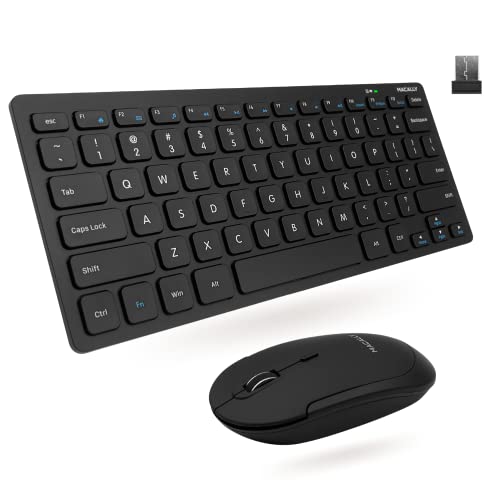
Macally Compact Wireless Keyboard and Mouse
Best for: small desks and quiet environments
- Form Factor
- Mini (what this guide is about)
- Connectivity
- 2.4 GHz RF (USB dongle)
- Keyboard Form Factor
- Compact
- Switch Type
- Slim scissor flex
- Mouse DPI
- 800 / 1200 / 1600 DPI
- Color
- Black
View on Amazon: Macally Compact Wireless Keyboard and Mouse Affiliate link
This Macally combo offers a compact keyboard and quiet mouse for space-saving setups. It uses 2.4 GHz wireless connectivity with a 30-foot range via a single USB dongle. The keyboard features 78 slim scissor flex keys and 12 shortcuts. The mouse provides three DPI settings: 800, 1200, and 1600. It is designed for PC users who need a reliable, silent, and small footprint for their desk.
Pros
- Compact form factor saves desk space
- Silent click mouse reduces noise
- Three adjustable DPI levels (800/1200/1600)
- Slim scissor flex keys for comfortable typing
- 30-foot wireless range with one USB dongle
Cons
- No Bluetooth connectivity; requires USB dongle
- Compact keyboard lacks a numpad
- Limited to 2-year warranty
Good fit if
- You need a small keyboard and mouse for a limited desk area
- You prefer silent input devices for quiet environments
- You want a reliable 2.4 GHz connection without Bluetooth
Skip if
- You require a full-size keyboard with a numpad
- You need Bluetooth wireless connectivity
- You want a longer warranty than 2 years
Verdict: Macally Compact Wireless Keyboard and Mouse Combo is a practical choice for users with limited desk space who value silent operation. It fits those who need a compact setup with reliable 2.4 GHz wireless performance.
Specifications side by side
| Spec | Logitech MK345 Full-Size Wireless Combo | Macally Compact Wireless Keyboard and Mouse |
|---|---|---|
| Connectivity | 2.4 GHz, USB-A Nano Receiver | 2.4 GHz RF (USB dongle) |
| Keyboard Form Factor | Full-size | Compact |
| Ergonomic Features | Integrated palm rest | not stated |
| Switch Type | not stated | Slim scissor flex |
| Mouse DPI | not stated | 800 / 1200 / 1600 DPI |
| Form Factor | Full-Size | Mini |
| Color | Black | Black |
| Noise Level | not stated | Silent |
| Dimensions | 20 × 7.52 × 1.73 inches | 0.79 × 1.18 × 0.5 inches |
| Weight | 1.1 pounds | 12 ounces |
| Size | 1 Pack | Compact Combo |
| Model | 920-006481 | RFCOMPACTKEYCB |
Frequently asked questions
Do full-size keyboard and mouse combos take up too much desk space?
Yes, they require significantly more room than compact options. The Logitech MK345 measures 20 inches in length, which dominates larger desks. This layout includes a number pad and dedicated media keys. You need ample surface area to accommodate this footprint comfortably without crowding your mouse.
Is a mini keyboard and mouse combo quieter for office use?
Many mini combos prioritize silent operation for shared environments. The Macally Compact features silent keys, making it suitable for quiet offices or home offices. Its compact design also reduces the overall visual clutter on your workspace. This makes it a practical choice for noise-sensitive settings.
Which combo is better for users who need a number pad?
Full-size combos are the better choice if you frequently enter numerical data. The Logitech MK345 includes a dedicated number pad on the right side. This layout supports spreadsheet work and data entry tasks more efficiently than mini keyboards, which typically omit the numeric section entirely.
Do these wireless combos require software installation?
No, both listed models offer plug-and-play setup via a single USB dongle. You simply insert the receiver into your computer to establish a 2.4 GHz wireless connection. Neither product requires additional software drivers or complex configuration steps, allowing you to start using them immediately after unpacking.
How much weight does a full-size combo add to my desk?
Full-size combos are heavier due to their larger build and included accessories. The Logitech MK345 weighs 1.1 pounds, including its palm rest. This extra mass can provide stability during typing. In contrast, mini combos like the Macally Compact are lighter, making them easier to move or store.
Can I use a mini keyboard combo with a small laptop?
Yes, mini combos are ideal for pairing with laptops on small desks. The Macally Compact is designed for limited desk space and offers a compact footprint. Its smaller dimensions allow it to sit neatly beside a laptop without overwhelming the workspace. This makes it perfect for mobile or minimal setups.
What connectivity options do these keyboard and mouse combos use?
Both models rely on 2.4 GHz wireless technology for stable connections. They connect to your computer using a single USB dongle. This method avoids the latency issues sometimes associated with Bluetooth. You get reliable performance for typing and mouse movement without the need for wired cables.