Logitech MX Mechanical Full-Size Keyboard Review: Specs, Pros and Cons
As an Amazon Associate we earn from qualifying purchases. Links on this page are affiliate links.
The Logitech MX Mechanical is a full-size, low-profile mechanical keyboard built for productivity: it brings real mechanical switches to Logitech's MX office line, with a number pad, multi-device pairing and a smart backlight. This listing is the Clicky version, so every press has a tactile bump and an audible click; it will be heard across a shared office. It pairs with up to 3 devices over Bluetooth Low Energy or the included Logi Bolt receiver, works on nearly any OS, and charges by USB-C, rated at up to 15 days with backlighting or up to 10 months without. Logi Options+ handles Fn keys, lighting effects and Logitech Flow. The switches are not listed as hot-swappable. We compared the listing and Logitech's specs; we have not typed on it.
What stands out
- Low-profile clicky mechanical switches
- Full-size layout with number pad
- Bluetooth or Logi Bolt receiver, 3 devices
- Backlight that wakes on approach and adapts to light
- USB-C battery rated up to 15 days lit, 10 months unlit
Who it fits
Good fit for
Office and multi-device users who want mechanical switches in a low, laptop-like profile and like an audible click.
Who should skip it
Shared offices and call-heavy setups where clicks carry, gamers chasing fast polling or RGB, and anyone wanting hot-swap sockets.
Verdict: A strong productivity mechanical board; choose the Clicky version only if the noise suits your room.
MX Mechanical specs explained
Clicky switches
Tactile bump plus an audible click on every key; the loudest of Logitech's switch choices.
Low profile
Shorter keys and switches than a standard mechanical board, closer to laptop height.
Logi Bolt or Bluetooth
Bolt receiver included for PCs; Bluetooth Low Energy for laptops and tablets; up to 3 devices.
Smart illumination
Backlight wakes as hands approach and adjusts to ambient light; effects set in Logi Options+.
Battery
USB-C quick charging, up to 15 days lit or 10 months with backlight off.
Full size
About 17.8 inches long and 2.49 lb, with number pad.
Design
The Graphite body is flat and low, with Logitech's office styling rather than gaming looks. Plastic parts include 45% certified recycled plastic. The backlight is single-color office lighting, not per-key RGB, and the listing gives no hot-swap or keycap material details.
Daily use
Typing feels mechanical without the tall keycaps of a gaming board, so many users can skip a wrist rest. The three device keys move between a work laptop, a desktop and a tablet. Battery life with lights on is around two weeks, so most owners will charge it twice a month or turn the backlight off. The click is the main thing to weigh before buying.
Before you buy the MX Mechanical
Check these points.
Check before you buy
- The click will not bother people around you
- You want a number pad
- Low-profile keycaps suit you
- You do not need hot-swappable switches
- Single-color backlight is enough
The product at a glance
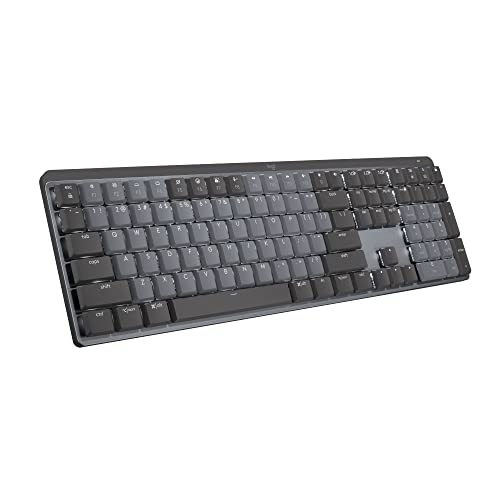
Logitech MX Mechanical Full Size Clicky Keyboard
Best for: Mechanical office typing
- Switch Type
- Clicky low-profile mechanical
- Form Factor
- Full size
- Connectivity
- Bluetooth Low Energy, Logi Bolt
- Backlighting
- Smart backlighting
- Power Source
- Rechargeable
- Dimensions
- 17.8 × 5.9 × 2 inches
View on Amazon: Logitech MX Mechanical Full Size Clicky Keyboard Affiliate link
The Logitech MX Mechanical is a full-size low-profile mechanical keyboard with clicky switches, smart backlight, Bluetooth or Logi Bolt and a long battery rating.
Pros
- Real mechanical switches, low height
- 3 devices with Bolt or Bluetooth
- Long unlit battery
Cons
- Clicky version is loud
- No hot-swap listed
Good fit if
- You want mechanical keys for office work
- You switch devices
Skip if
- You share a quiet office
- You want RGB gaming features
Verdict: A top productivity mechanical keyboard if clicks are welcome.
Specifications side by side
| Spec | Logitech MX Mechanical Full Size Clicky Keyboard |
|---|---|
| Switch Type | Clicky low-profile mechanical |
| Form Factor | Full size |
| Connectivity | Bluetooth Low Energy, Logi Bolt |
| Backlighting | Smart backlighting |
| Power Source | Rechargeable |
| Dimensions | 17.8 × 5.9 × 2 inches |
| Weight | 2.49 pounds |
| Size | Full Size |
| Color | Graphite |
| Model | 920-010549 |
Frequently asked questions
What switches does the Logitech MX Mechanical use?
This listing is the Clicky version: low-profile mechanical switches with a tactile bump and audible click.
Does the MX Mechanical come with a receiver?
Yes, the Logi Bolt receiver is included, and it also supports Bluetooth Low Energy.
How long does the MX Mechanical battery last?
Up to 15 days with backlighting and up to 10 months with it off, per Logitech.
Is the Logitech MX Mechanical hot-swappable?
Hot-swap is not listed.
Is the MX Mechanical good for gaming?
It is built for productivity; the listing makes no gaming claims such as high polling rates.
Featured in
See also
- logitech signature k650 comfort full review
- logitech k585 slim wireless keyboard review
- logitech pebble keys 2 k380s review
- logitech alto keys k98m wireless review
- logitech k750 wireless solar keyboard review
- Logitech K270 Review: Full-Size Wireless Keyboard for Windows
- Logitech K480 Multi-Device Bluetooth Keyboard Review: Specs, Pros and Cons
- Logitech Wireless Solar Keyboard for Mac Review: Who It Fits and Who Should Skip It
- logitech zone wireless 2 business review
- logitech g pro x superlight wireless review