12 Best Keyboard and Mouse Combos for Mac, Compared
As an Amazon Associate we earn from qualifying purchases. Links on this page are affiliate links.
Finding the right keyboard and mouse combo for mac depends on your desk setup, connectivity needs, and typing preferences. We compared 12 models based on the specifications published on the listings.
The Seenda Full-Size Multi-Device Wireless Combo leads the rankings because it pairs multi-device Bluetooth connectivity and Type-C recharging with a full-size scissor-switch layout for Mac and Windows. This guide helps you compare form factors, ergonomic designs, and connection methods to pick the right desktop setup.
Quick picks
The best fit for you
- You switch between Mac and Windows computers regularly Seenda Full-Size Multi-Device Wireless Combo Full-size scissor-switch keys and multi-device Bluetooth support allow seamless switching between Mac and Windows.
- You need a compact setup for Mac and iPad Logitech Pebble 2 Compact Mac Keyboard and Mouse Combo An 11-inch compact footprint and multi-device Bluetooth switching fit tight desks alongside Mac and iPad hardware.
- You are a left-handed Mac user needing ergonomic alignment Logitech Wave Keys & Lift Left-Handed Wireless Combo A 57-degree vertical left-handed mouse and cushioned memory foam palm rest reduce strain during Mac workdays.
- You need precise tracking on glass and illuminated typing Logitech MX Keys S Mac Full-Size Combo Its 8K DPI sensor tracks directly on glass while smart illumination lights the full-size macOS layout.
Our 12 picks
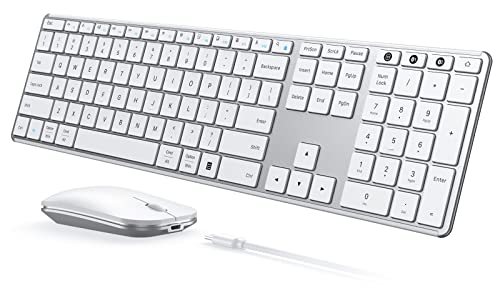
Seenda Full-Size Multi-Device Wireless Combo
Best for: multi-device Mac and Windows desk setups
- Operating System
- Mac, Windows (what this guide is about)
- Connectivity
- 2.4 GHz USB, Bluetooth
- Keyboard Form Factor
- Full-size
- Ergonomic Features
- Ergonomic stand
- Multi-Device Pairing
- 3 devices
- Power Source
- Built-in rechargeable battery
View on Amazon: Seenda Full-Size Multi-Device Wireless Combo
The Seenda Full-Size Bluetooth Keyboard and Mouse Combo provides a dual-layout design tailored for macOS 10.12 and newer. It features scissor switches, a stainless steel base, and a silent mouse with three DPI settings up to 2400. You can pair it across three devices using Bluetooth and USB. It suits you if you need a full-size workspace setup with Type-C recharging and 200 hours of operating battery life.
Pros
- Dual OS layout with dedicated Apple keys
- Connects with up to three devices across two Bluetooth channels and one USB channel
- Internal battery recharges via Type-C with up to 200 hours of runtime
- Mouse offers adjustable tracking at 1000, 1600, and 2400 DPI
Cons
- The 2.4G USB receiver mode works only on Windows, leaving Mac reliant on Bluetooth
- Requires devices with Bluetooth 4.0 or above
Good fit if
- You want a full-size keyboard with an Apple layout and numeric keypad
- You switch between a Mac and other devices using Bluetooth
- You prefer scissor switches and a silent mouse with adjustable DPI
Skip if
- You need 2.4G USB wireless receiver support on macOS
- You use a Mac running an operating system older than macOS 10.12
Verdict: Seenda Full-Size Bluetooth Keyboard and Mouse Combo delivers an Apple-ready layout, multi-device Bluetooth pairing, and Type-C recharging in a slim metal build. It provides quiet scissor-switch typing and adjustable mouse tracking for your Mac desk setup.

Logitech Pebble 2 Compact Mac Keyboard and Mouse Combo
Best for: multi-device Mac and iPad portable setups
- Operating System
- Mac (what this guide is about)
- Connectivity
- Bluetooth
- Keyboard Form Factor
- Compact
- Multi-Device Pairing
- 3 devices
- Dimensions
- 11 × 5 × 0.5 inches
- Weight
- 14.6 ounces
View on Amazon: Logitech Pebble 2 Compact Mac Keyboard and Mouse Combo
You get a lightweight Mac-compatible setup with the Logitech Pebble 2. This wireless combo weighs 0.915 pounds and measures 11 inches long by 0.5 inches high. Bluetooth lets you switch between three Apple devices running macOS, iPadOS, or iOS. The keyboard runs up to three years on included batteries, while the mouse reaches two years. It suits users who need a portable, quiet typing and pointing kit for travel or multi-device desks.
Pros
- Pairs and switches across up to three Apple devices via Bluetooth
- Long battery runtimes with three years for keyboard and two years for mouse
- Compact footprint measuring 11 inches long and weighing under one pound
- Logi Options+ app allows customizing 10 Fn keys and mouse middle button
Cons
- Compact form factor omits a dedicated numeric keypad
- Requires replaceable batteries instead of built-in rechargeable power
Good fit if
- You switch regularly between macOS, iPadOS, and iOS hardware
- You want a compact, 0.915-pound kit for portable travel setups
- You prefer quiet keystrokes and Silent Touch mouse clicks
Skip if
- You require a full-size layout with a dedicated number pad
- You prefer built-in rechargeable batteries over replaceable cells
Verdict: Logitech Pebble 2 Compact Wireless Combo delivers multi-device Bluetooth switching and multi-year battery life in an ultra-slim footprint. It offers a practical, space-saving desktop setup across macOS and iPadOS.
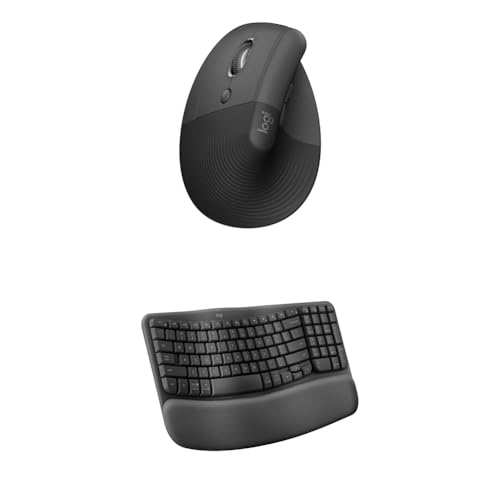
Logitech Wave Keys & Lift Left-Handed Wireless Combo
Best for: left-handed Mac users seeking ergonomic support
- Operating System
- Mac, Windows (what this guide is about)
- Connectivity
- Wireless
- Keyboard Form Factor
- Compact
- Ergonomic Features
- Wave layout, palm rest, vertical mouse
- Design
- Ergonomic, Left-Handed
View on Amazon: Logitech Wave Keys & Lift Left-Handed Wireless Combo
This wireless ergonomic setup pairs the Logitech Wave Keys compact keyboard with the Lift Vertical mouse. Designed for Mac and Windows, it features a wave-shaped key layout and an integrated cushioned palm rest with memory foam to support your wrists. The included mouse offers a 57-degree vertical tilt sculpted specifically for small to medium left hands seeking forearm comfort.
Pros
- Integrated cushioned palm rest with memory foam for wrist support
- Lift vertical mouse features a 57-degree angle for neutral forearm posture
- Compact wave-shaped key layout aligns hands and forearms naturally
- Sculpted mouse body with thumb rest tailored for left-handed users
Cons
- Mouse is sculpted exclusively for left-handed operation
- Vertical mouse form factor is sized only for small to medium hands
Good fit if
- You are a left-handed Mac user with small to medium hands.
- You want an integrated memory foam palm rest to relieve wrist pressure.
- You need a 57-degree upright mouse angle for neutral forearm alignment.
Skip if
- You navigate with your right hand.
- You have large hands that exceed small-to-medium mouse dimensions.
Verdict: Logitech Wave Keys and Lift Vertical Ergonomic Combo delivers tailored ergonomic alignment for left-handed Mac users needing a 57-degree vertical grip. Its cushioned memory foam palm rest provides steady wrist support throughout your workday.

TECKNET Mini Silent Wireless Combo
Best for: compact Mac desks with USB-A ports
- Operating System
- Mac, Windows (what this guide is about)
- Connectivity
- 2.4GHz USB receiver
- Keyboard Form Factor
- Compact
- Power Source
- AAA batteries
- Switch Type
- Scissor switch
- Mouse DPI
- 1600 DPI
The TECKNET Mini Wireless Keyboard and Mouse provides a compact 2.4GHz setup using a single shared USB-A nano receiver. You get scissor-switch keys, silent typing, and quiet mouse clicks in a footprint under twelve inches long. It connects up to 49 feet away without Bluetooth. Note that the twelve multimedia hotkeys are not fully compatible with macOS, and your Mac setup requires a USB-A port.
Pros
- Shared 2.4GHz USB nano receiver connects both peripherals
- Scissor-switch keys paired with quiet mouse clicks
- Lightweight 0.79-pound build under 12 inches long
- Operating wireless range up to 49 feet
Cons
- Twelve multimedia hotkeys lack full compatibility with Mac OS
- No Bluetooth support, requiring a physical USB-A port
- Requires four AAA batteries not included in the box
Good fit if
- You need an ultra-compact desk setup under 12 inches wide.
- You have an available USB-A port or hub on your Mac.
- You want quiet scissor-switch typing and silent clicks.
Skip if
- You rely on native macOS multimedia hotkey functionality.
- You need direct Bluetooth connectivity without USB dongles.
- You prefer a full-size layout with built-in rechargeable batteries.
Verdict: TECKNET Mini Wireless Keyboard and Mouse delivers a lightweight, compact typing pair for basic Mac tasks over a single 2.4GHz receiver. Lack of Bluetooth and limited Mac hotkey compatibility remain its primary trade-offs.

Logitech MX Keys S Mac Full-Size Combo
Best for: multi-device Mac workstations needing glass tracking
- Operating System
- Mac (what this guide is about)
- Connectivity
- Bluetooth Low Energy
- Keyboard Form Factor
- Full Size
- Multi-Device Pairing
- Up to 3 devices
- Mouse DPI
- 8K DPI
- Backlighting
- Backlit
This full-size wireless combo pairs a dedicated Mac-layout keyboard with an 8K DPI mouse. You get spherically dished keys with proximity-sensing backlights, USB-C charging, and Bluetooth Low Energy pairing for up to three Apple devices. The included mouse features high-speed scrolling rated at 1,000 lines per second. It suits Mac and iPad users who require glass tracking, dedicated macOS functions, and fast multi-device switching.
Pros
- Mouse sensor tracks at 8,000 DPI and functions on glass
- Keyboard backlighting illuminates on hand approach with duration control
- Connects with up to three Mac computers or iPads via Bluetooth Low Energy
- MagSpeed scroll wheel scrolls up to 1,000 lines per second
Cons
- Total combo weight is heavy at 3.4 pounds
- Full-size length of 17.7 inches requires substantial desk space
- Programmable functions and backlight adjustments require Logi Options+ software
Good fit if
- You switch between up to three Apple devices using Bluetooth Low Energy.
- You need an 8K DPI mouse sensor that tracks on glass surfaces.
- You want spherically dished keys with automatic hand-proximity backlighting.
Skip if
- You want a compact keyboard footprint rather than a full 17.7-inch frame.
- You prefer a lightweight travel setup instead of a 3.4-pound desktop pair.
- You do not want to use Logi Options+ software for customization.
Verdict: Logitech MX Keys S Mac Full-Size Wireless Combo delivers 8K DPI tracking and smart-illuminated typing for multi-device Apple setups. It is a capable full-size pairing when you require fast scrolling and dedicated macOS layout features.

Logitech Signature Slim Wireless Keyboard and Mouse
Best for: Multi-computer Mac and Windows office desks
- Operating System
- Mac, Windows (what this guide is about)
- Connectivity
- Bluetooth
- Keyboard Form Factor
- Full-size
- Multi-Device Pairing
- 3 devices
- Noise Level
- Silent
View on Amazon: Logitech Signature Slim Wireless Keyboard and Mouse
This full-size desktop set pairs a low-profile keyboard with a contoured mouse using Bluetooth connectivity. You can pair both peripherals with up to three devices and remap keys or mouse buttons through the Logi Options+ app for macOS. The hardware features silent operation and laptop-style switches. It suits you if you need a quiet, full-layout typing station across multiple Mac and Windows setups without changing your desk equipment.
Pros
- Switches across up to three paired devices
- Silent keyboard typing and mouse clicking
- Customizable keys and shortcuts via Logi Options+ app
- Full-size keyboard layout with familiar laptop-style typing
Cons
- No dedicated 2.4GHz wireless USB receiver listed
- Full-size layout requires more horizontal desk space than compact options
Good fit if
- You need to toggle controls between up to three Mac or Windows computers.
- You prefer silent typing and quiet mouse switches in your workspace.
- You want a full-size layout with numeric keys and laptop-style key travel.
Skip if
- You need a compact tenkeyless footprint to save desk space.
- You require a 2.4GHz USB wireless dongle rather than Bluetooth pairing.
Verdict: Logitech Signature Slim Wireless Keyboard and Mouse delivers quiet multi-device Bluetooth switching and a familiar laptop typing feel for Mac workstations.
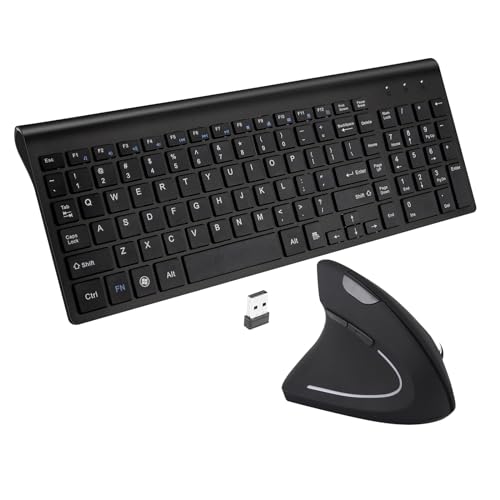
Fonicer Left-Handed Wireless Keyboard and Vertical Mouse
Best for: left-handed Mac users wanting vertical ergonomic navigation
- Operating System
- Mac (what this guide is about)
- Connectivity
- 2.4 GHz wireless, Nano USB receiver
- Keyboard Form Factor
- Full size
- Ergonomic Features
- Vertical mouse
- Switch Type
- Scissor-key-switch
- Mouse DPI
- 1600 DPI
View on Amazon: Fonicer Left-Handed Wireless Keyboard and Vertical Mouse
This wireless desk set pairs a full-size, 101-key scissor-switch keyboard with a vertical ergonomic mouse designed specifically for left-handed use. It connects to your Mac via a single 2.4 GHz USB nano receiver with an operating range of up to 33 feet. The mouse provides three selectable optical tracking levels at 800, 1200, and 1600 DPI, making this combo suitable if you want neutral wrist posture on Mac OS.
Pros
- Ergonomic vertical mouse tailored for left-handed users
- Single 2.4 GHz nano USB receiver links both peripherals up to 33 feet
- Optical mouse tracking adjusts between 800, 1200, and 1600 DPI
- 101-key keyboard uses scissor-switch keys for quiet typing
Cons
- Keyboard hotkeys are limited to Windows and do not function on Mac OS
- Requires a USB port for the wireless receiver with no Bluetooth option
- Not compatible with iOS devices
Good fit if
- You are a left-handed user looking for a vertical ergonomic mouse
- You prefer scissor-switch keys on a full-size 101-key layout
- You want a single 2.4 GHz USB receiver to operate both devices
Skip if
- You rely on keyboard hotkeys, which only work on Windows
- You need direct Bluetooth connectivity without using a USB receiver
- You are right-handed
Verdict: Fonicer Left-Handed Wireless Ergonomic Keyboard and Mouse delivers dedicated left-handed ergonomics with adjustable DPI optical tracking over a shared 2.4 GHz USB connection. However, Mac OS users must navigate without the 12 Windows-only keyboard hotkeys.

RECCAZR Full-Size Ergonomic Wave Keyboard and Mouse
Best for: Mac users wanting full-size ergonomic wave typing
- Operating System
- Mac, Windows (what this guide is about)
- Connectivity
- 2.4 GHz USB
- Keyboard Form Factor
- Full-size
- Ergonomic Features
- Wave layout, wrist rest
- Design
- Ergonomic
- Color
- Black
View on Amazon: RECCAZR Full-Size Ergonomic Wave Keyboard and Mouse
This RECCAZR setup pairs a 104-key wave-layout keyboard with an ergonomic silent mouse over a single 2.4GHz USB receiver. You get Mac OS compatibility, an integrated wrist rest, foldable tilt legs, and spill-drain holes. The mouse provides three DPI settings from 800 to 1600. It suits you if you need a full-size ergonomic typing layout with dedicated number keys and quiet mouse buttons on your Mac workstation.
Pros
- Integrated wrist rest with foldable keyboard stand
- Full-size 104-key wave layout with dedicated number pad
- Mouse features adjustable 800, 1200, and 1600 DPI settings with quiet clicks
- Single shared 2.4GHz nano USB receiver operates both devices
Cons
- No Bluetooth connectivity listed; requires an available USB port for the receiver
- Drainage design requires disconnecting and complete drying before reuse after liquid spills
Good fit if
- You want an ergonomic wave keyboard layout with an integrated wrist rest and number pad.
- You need a quiet mouse with adjustable DPI and side navigation buttons.
- You have an open USB port on your Mac hardware for the shared wireless dongle.
Skip if
- You require direct Bluetooth connectivity without using a USB receiver.
- You prefer a compact keyboard layout without a numeric keypad.
Verdict: RECCAZR Full-Size Ergonomic Wave Wireless Combo delivers a curved wave layout, built-in wrist rest, and quiet three-speed mouse for Mac workstations with open USB ports. It provides a functional full-size workspace solution if you do not need Bluetooth.

Guiheng 60% Wired RGB Keyboard and Mouse Combo
Best for: space-conscious Mac desks needing wired simplicity
- Operating System
- Mac, Windows (what this guide is about)
- Connectivity
- USB wired
- Keyboard Form Factor
- 60%
- Ergonomic Features
- Palm rest
- Mouse DPI
- 3200 DPI
- Backlighting
- RGB
View on Amazon: Guiheng 60% Wired RGB Keyboard and Mouse Combo
This Guiheng combo pairs a wired 61-key keyboard with a 3200 DPI ambidextrous optical mouse for Mac. You get an ultra-compact 60 percent layout that saves desk space, paired with RGB backlighting and adjustable tilt legs. Because it uses a direct USB connection, setup requires no drivers, charging, or battery replacements. It fits you if you want a minimal wired footprint with high-DPI tracking for gaming and daily desktop work.
Pros
- Ultra-compact 61-key layout saves desk space
- Driver-free USB wired plug-and-play setup
- Ambidextrous mouse with 3200 DPI optical sensor
- RGB backlit keyboard keys
Cons
- Lacks wireless connectivity options
- Omits dedicated numeric keypad and arrow cluster
Good fit if
- You need an ultra-compact 61-key layout to preserve desk space.
- You prefer a wired USB connection without batteries or charging.
- You want an ambidextrous optical mouse with up to 3200 DPI.
Skip if
- You need wireless Bluetooth or 2.4GHz connectivity for your Mac.
- You require a full-size layout with dedicated navigation and number keys.
Verdict: Guiheng Wired 60% RGB Keyboard and Mouse Combo delivers an ultra-compact footprint and reliable wired USB operation for Mac users who want basic gaming features. Its 61-key design and 3200 DPI mouse provide essential controls while conserving desk space.

SABLUTE Full-Size Ergonomic Split Keyboard and Mouse
Best for: rechargeable ergonomic typing on Mac desks
- Operating System
- Mac, Windows (what this guide is about)
- Connectivity
- 2.4GHz wireless
- Keyboard Form Factor
- Full-Size
- Ergonomic Features
- Split layout, wrist rest, thumb rest
- Power Source
- USB-C rechargeable
- Mouse DPI
- 2400 DPI
View on Amazon: SABLUTE Full-Size Ergonomic Split Keyboard and Mouse
This wireless desktop combo pairs a full-size split keyboard with a contoured mouse designed for Mac and Windows. Both devices recharge over USB-C, offering up to 250 hours of keyboard standby and 350 hours of mouse standby. You get a dedicated Mac layout switch, a cushioned memory foam palm rest, and an included USB-C adapter. It suits you if you need an ergonomic workspace setup without buying disposable batteries.
Pros
- Internal USB-C rechargeable batteries provide up to 250 hours of keyboard standby and 350 hours of mouse standby
- Includes a separate USB-C adapter alongside the 2.4GHz USB-A wireless receiver
- Dedicated layout switch toggles key mapping between Mac and Windows
- Contoured mouse includes palm and thumb rests with four adjustable DPI settings from 800 to 2400
Cons
- Large 19 by 10.45-inch keyboard footprint requires significant desk depth and width
- Operates exclusively via 2.4GHz wireless receiver with no native Bluetooth connectivity
Good fit if
- You want a rechargeable split keyboard and mouse combo with an included USB-C adapter for Mac.
- You have adequate desk space to accommodate a 19-inch wide keyboard with an integrated wrist rest.
Skip if
- You prefer pairing peripherals directly to your Mac using Bluetooth without a receiver.
- You work on a compact desk that cannot fit a full-size ergonomic frame.
Verdict: SABLUTE Full-Size Ergonomic Split Keyboard and Mouse delivers rechargeable power and split-key ergonomics with direct USB-C compatibility for Mac hardware. It gives you long standby battery life and dedicated Mac shortcuts if you have the desk room to support its 19-inch width.

RedThunder 60% Wired Gaming Combo
Best for: compact Mac gaming desks needing high-speed tracking
- Operating System
- Mac (what this guide is about)
- Connectivity
- USB wired
- Keyboard Form Factor
- 60%
- Ergonomic Features
- Symmetrical ergonomics
- Mouse DPI
- 7200 DPI
- Backlighting
- RGB
This wired setup pairs a 61-key mini keyboard with an optical gaming mouse for your Mac. You get an ultra-compact 60 percent layout without a number pad, freeing desk space for mouse movement. The water-resistant keyboard features customizable RGB backlighting with adjustable brightness. Paired with a 65-gram honeycomb mouse offering 7200 DPI sensitivity and a 1000 Hz polling rate, it suits you if you prioritize fast tracking and a minimal footprint.
Pros
- Space-saving 60% compact layout with 61 keys
- Lightweight 65g honeycomb mouse with 7200 DPI optical sensor
- Mouse offers 1000 Hz detection rate and 400 IPS tracking
- Keyboard includes water-resistant build and braided cables
Cons
- Lacks a dedicated numeric keypad and navigation keys
- Requires wired USB connections with no wireless connectivity
Good fit if
- You want a compact 61-key keyboard to maximize desktop mouse space.
- You need a lightweight mouse with a 1000 Hz polling rate.
Skip if
- You require a built-in numeric keypad for data entry.
- You prefer a cordless wireless desk setup.
Verdict: RedThunder 60% Wired RGB Keyboard and Mouse delivers a compact 61-key design paired with high-rate optical tracking for Mac users. Its water resistance and lightweight mouse make it practical for space-constrained desks.

Logitech Signature MK650 Business Combo
Best for: outfitting multiple Mac office workstations
- Operating System
- Mac, Windows (what this guide is about)
- Connectivity
- Logi Bolt USB receiver, Bluetooth LE
- Ergonomic Features
- Integrated palm rest
- Power Source
- 2 AA (keyboard), 1 AA (mouse)
The Logitech Signature MK650 Business Combo provides four full sets of keyboards and contoured mice for macOS setups. You can connect each pair via Bluetooth Low Energy or the included Logi Bolt USB receiver with enterprise-grade security. The keyboard features an integrated palm rest and runs up to 36 months on two AA batteries, while the mouse runs up to 24 months on one AA battery. This multi-pack suits shared Mac offices.
Pros
- Up to 36 months of keyboard battery life from 2 AA batteries
- Up to 24 months of mouse battery life from 1 AA battery
- Dual connectivity via Bluetooth Low Energy or Logi Bolt USB receiver
- Keyboard includes an integrated palm rest
- Comes in a multi-pack of 4 complete combos
Cons
- Ships as a bulk 4-pack rather than a single set
- Uses replaceable AA batteries instead of built-in rechargeable cells
Good fit if
- You need to equip four Mac workstations at once
- You prefer standard AA batteries with multi-year lifespans over recharging
- You require secure connections using Logi Bolt or Bluetooth Low Energy
Skip if
- You only need a single keyboard and mouse set for personal use
- You want rechargeable hardware with USB charging cables
Verdict: Logitech Signature MK650 Business Combo equips multiple Mac desks with long-lasting AA battery power and secure dual-mode wireless connectivity.
Specifications side by side
| Spec | Seenda Full-Size Multi-Device Wireless Combo | Logitech Pebble 2 Compact Mac Keyboard and Mouse Combo | Logitech Wave Keys & Lift Left-Handed Wireless Combo | TECKNET Mini Silent Wireless Combo | Logitech MX Keys S Mac Full-Size Combo | Logitech Signature Slim Wireless Keyboard and Mouse | Fonicer Left-Handed Wireless Keyboard and Vertical Mouse | RECCAZR Full-Size Ergonomic Wave Keyboard and Mouse | Guiheng 60% Wired RGB Keyboard and Mouse Combo | SABLUTE Full-Size Ergonomic Split Keyboard and Mouse | RedThunder 60% Wired Gaming Combo | Logitech Signature MK650 Business Combo |
|---|---|---|---|---|---|---|---|---|---|---|---|---|
| Connectivity | 2.4 GHz USB, Bluetooth | Bluetooth | Wireless | 2.4GHz USB receiver | Bluetooth Low Energy | Bluetooth | 2.4 GHz wireless, Nano USB receiver | 2.4 GHz USB | USB wired | 2.4GHz wireless | USB wired | Logi Bolt USB receiver, Bluetooth LE |
| Keyboard Form Factor | Full-size | Compact | Compact | Compact | Full Size | Full-size | Full size | Full-size | 60% | Full-Size | 60% | not specified |
| Ergonomic Features | Ergonomic stand | not specified | Wave layout, palm rest, vertical mouse | not specified | not specified | not specified | Vertical mouse | Wave layout, wrist rest | Palm rest | Split layout, wrist rest, thumb rest | Symmetrical ergonomics | Integrated palm rest |
| Multi-Device Pairing | 3 devices | 3 devices | not specified | not specified | Up to 3 devices | 3 devices | not specified | not specified | not specified | not specified | not specified | not specified |
| Power Source | Built-in rechargeable battery | not specified | not specified | AAA batteries | not specified | not specified | not specified | not specified | not specified | USB-C rechargeable | not specified | 2 AA (keyboard), 1 AA (mouse) |
| Switch Type | Scissor switch | not specified | not specified | Scissor switch | not specified | not specified | Scissor-key-switch | not specified | not specified | not specified | not specified | not specified |
| Mouse DPI | 1000 / 1600 / 2400 DPI | not specified | not specified | 1600 DPI | 8K DPI | not specified | 1600 DPI | not specified | 3200 DPI | 2400 DPI | 7200 DPI | not specified |
| Backlighting | not specified | not specified | not specified | not specified | Backlit | not specified | not specified | not specified | RGB | not specified | RGB | not specified |
| Form Factor | not specified | Compact | not specified | Mini | Full-Size | not specified | not specified | Full-Size | Compact | not specified | Compact | not specified |
| Use | not specified | not specified | not specified | not specified | not specified | not specified | not specified | not specified | Gaming | not specified | Gaming | not specified |
| Design | not specified | not specified | Ergonomic, Left-Handed | not specified | not specified | not specified | Ergonomic, Left-Handed | Ergonomic | not specified | Ergonomic | not specified | not specified |
| Color | White Silver | Tonal Graphite | Graphite | Black | Space Grey | Graphite | Black | Black | Grey and black combo | Black & Gray | Black contour line | Graphite |
| Shape | not specified | not specified | Vertical | not specified | not specified | not specified | Vertical | not specified | not specified | not specified | not specified | not specified |
| Operating System | Mac, Windows | Mac | Mac, Windows | Mac, Windows | Mac | Mac, Windows | Mac | Mac, Windows | Mac, Windows | Mac, Windows | Mac | Mac, Windows |
| Noise Level | not specified | not specified | not specified | Silent | not specified | Silent | not specified | Silent | not specified | not specified | not specified | not specified |
| Dimensions | 16.9 × 4.33 × 0.79 inches | 11 × 5 × 0.5 inches | not specified | 11.2 × 4.72 × 0.79 inches | 17.7 × 5.7 × 3 inches | not specified | 14.8 × 5.4 × 1 inches | not specified | not specified | 19 × 10.5 × 1.88 inches | not specified | not specified |
| Weight | 1.43 pounds | 14.6 ounces | not specified | 12.7 ounces | 3.4 pounds | not specified | 1.7 pounds | not specified | not specified | 3.39 pounds | not specified | not specified |
| Size | Full Size | 2 Piece Set | Combo | Small | Full Size | not specified | 17.72x5.91x1.57in | not specified | not specified | Full-Size | not specified | One Size (Pack of 4) |
| Model | JP-064-3 | 920-012200 | not specified | X315 | 920-012592 | not specified | Left | not specified | not specified | MA51 | K62 | 920-010909 |
For storage upgrades alongside your desk peripherals, compare drive transfer rates among the best nvme SSDs for mac.
How to Choose a Mac Combo
-
Choose Form Factor
Keyboard dimensions dictate how much desk surface remains for mouse movement. Full-size combos often span 17 to 19 inches in width because they include dedicated number pads and navigation clusters. A model like the SABLUTE Full-Size Ergonomic Split Keyboard measures 19 inches long, requiring a spacious desk. If your workspace is constrained, compact 60 percent keyboards reduce key count to 61 keys and span roughly 11 inches. Choose full-size models when you enter frequent numerical data, or compact layouts when you need maximum open workspace.
-
Check Hand Orientation Specs
Mouse shape determines forearm posture and wrist comfort during long work sessions. Most combo mice feature standard symmetrical or right-handed shells. If you are left-handed, standard mice force awkward grip angles. Spec sheets list hand orientation and vertical angles. The Logitech Wave Keys & Lift Left-Handed Wireless Combo features a 57-degree vertical grip engineered for left-handed navigation, alongside a cushioned palm rest. Verify whether a mouse is ambidextrous, right-handed, or left-handed before buying. Selecting the correct orientation maintains forearm alignment without forcing you to adapt to opposite-hand controls.
-
Compare Power Delivery Systems
Combos rely on either internal rechargeable cells or replaceable alkaline batteries. Rechargeable setups provide integrated lithium batteries powered by USB-C cords, eliminating disposable battery replacements. However, replaceable AA batteries provide continuous operation for months or years without cable tethering. For instance, the Logitech Signature MK650 Business Combo operates on standard AA battery power, avoiding downtime from charging cycles. Check product specifications for the listed power source. If you want direct cable recharging at your desk, pick USB-C rechargeable hardware. If you prefer zero cable clutter, pick replaceable battery designs.
-
Verify Mac Shortcut Compatibility
Operating system compatibility affects functional keys and productivity shortcuts. Some wireless combos list macOS compatibility but carry Windows-centric functional layouts. For example, the Fonicer Left-Handed Wireless Keyboard and Vertical Mouse functions on Mac, but its 12 hotkeys only work under Windows environments. Look closely at key labels and published compatibility charts for dedicated Command, Option, and Mac media controls. If you rely heavily on native macOS shortcuts for screen brightness, volume, and mission control, select a combo built with an Apple-specific layout rather than a generic dual-system board.
-
Check Acoustic Noise Ratings
Acoustic feedback affects open offices and home environments. Combos with silent specifications use damped switches and quiet mouse clickers to minimize ambient typing noise. The RECCAZR Full-Size Ergonomic Wave Keyboard and Mouse lists silent operation alongside quiet mouse clicks, preventing disruption during phone calls or shared room work. If your desk sits in a quiet space or shared household, search the specifications for silent or quiet scissor switches. Standard mechanical or non-damped membrane keys produce distinct tapping noises, which suit private offices but might distract colleagues nearby.
-
Assess Key Illumination Needs
Illumination specifications determine how easily you see key labels in low-light environments. Basic combos feature non-backlit keycaps that require ambient room light. In contrast, models like the Logitech MX Keys S Mac Full-Size Combo provide smart illumination that lights up key legends as your hands approach. Other models feature gaming-oriented RGB backlights with multi-color styling. Check product attributes for backlighting specs if you work in dim rooms or evening settings. Backlit keys increase legibility in the dark, whereas non-illuminated keyboards conserve battery life and suit well-lit office setups.
Frequently asked questions
Which keyboard and mouse combos offer ergonomic designs for left-handed Mac users?
The Logitech Wave Keys and Lift Left-Handed combo and the Fonicer Left-Handed set both give you dedicated left-handed layouts. Logitech provides a 57-degree vertical mouse grip with a cushioned memory foam keyboard palm rest. Fonicer includes a left-handed vertical mouse with adjustable DPI optical tracking, though its keyboard hotkeys do not function under macOS.
Can you use a wired gaming keyboard and mouse combo with a Mac?
Yes, wired gaming combos support your Mac computer through standard USB connections. The Guiheng 60% Wired RGB combo pairs a 61-key layout with a 3200 DPI mouse for basic gaming and productivity. The RedThunder 60% Wired Gaming set also lists macOS support, providing you with a compact 61-key frame, water resistance, and high-rate optical tracking.
Do all shortcut keys on wireless keyboards work on Mac?
Not every keyboard shortcut works natively on macOS. For example, the Fonicer Left-Handed wireless combo has 12 keyboard hotkeys that only operate on Windows. Similarly, the TECKNET Mini features limited Mac hotkey compatibility. If you need consistent shortcut support, check for models with designated Mac layouts, like the Logitech MX Keys S or the SABLUTE split keyboard.
How are Mac keyboard and mouse combos powered?
Mac keyboard and mouse combos use either built-in rechargeable batteries or replaceable alkaline cells. The Seenda Full-Size combo features Type-C recharging for its slim build, and the SABLUTE Full-Size Ergonomic model offers direct USB-C charging. In contrast, models like the Logitech Signature MK650 Business Combo rely on AA battery power, giving you multi-year operation without plugging into a charger.
What mouse sensor resolutions can you get with Mac combos?
Sensor resolutions range from basic optical tracking up to high-sensitivity 8K DPI sensors depending on your precision requirements. The Logitech MX Keys S combo provides 8K DPI optical tracking capable of working on glass desk surfaces. For gaming or general desktop use, the Guiheng 60% wired set includes a 3200 DPI mouse. Other options like the Fonicer combo include adjustable DPI.
Which Mac keyboard and mouse combos operate quietly?
Several Mac combos specifically feature low-noise switches and silent clicks for quiet office environments. The TECKNET Mini and Logitech Signature Slim are both listed with silent noise levels. The Seenda Full-Size combo uses quiet scissor-switch key mechanisms, while the RECCAZR Full-Size Ergonomic Wave set includes a quiet three-speed mouse. These options reduce acoustic distraction while you type and navigate on macOS.
Do any Mac keyboard combos include backlit keys?
Yes, select Mac combos include key backlighting for low-light visibility. The Logitech MX Keys S Mac combo provides smart-illuminated keys that adapt to lighting conditions. For gaming setups, both the Guiheng 60% Wired set and the RedThunder 60% Wired combo feature integrated RGB backlighting, illuminating keycaps directly while you work or play without requiring external desk lamps.