Logitech MX Keys Mini Wireless Keyboard Review: Who It Fits and Who Should Skip It
As an Amazon Associate we earn from qualifying purchases. Links on this page are affiliate links.
The Logitech MX Keys Mini is a compact, backlit office keyboard without a number pad, made for people who want a premium typing surface that also fits in a laptop bag. Its keys are Logitech's Perfect Stroke design, dished for the fingertips, and the backlight wakes when your hands approach and adjusts to room light. It pairs with 3 devices over Bluetooth Low Energy and lists macOS, iOS, Windows, Linux and Android, with dedicated keys for dictation, mic mute and emoji. A USB-C charge is rated at up to 10 days with lighting on or up to 5 months with it off. This is the multi-OS version; a separate Mac-layout model exists. No USB receiver is listed, so it relies on Bluetooth. Our notes come from the listing and Logitech's specs, not hands-on use.
What stands out
- Proximity-sensing backlight that adjusts to room light
- 3 Bluetooth devices across Windows, Mac, Linux, iOS and Android
- USB-C rechargeable: up to 10 days lit, 5 months unlit
- Dictation, mic mute and emoji keys
- Compact body about 11.7 inches wide
Who it fits
Good fit for
Laptop and multi-device users who want backlit, low-profile office keys in a small footprint and move between operating systems.
Who should skip it
Anyone who needs a number pad, a USB receiver for a PC without Bluetooth, mechanical switches, or a Mac-only legend set.
Verdict: A polished compact office keyboard; the missing receiver and number pad are the main reasons to look elsewhere.
MX Keys Mini specs explained
Smart illumination
Backlight turns on as your hands near the keys and dims or brightens with ambient light.
Bluetooth Low Energy, 3 devices
Pair a laptop, tablet and phone and switch with the device keys; no receiver is listed.
Battery
USB-C recharge rated at up to 10 days with backlight, up to 5 months without.
Smart keys
Dedicated dictation, mic mute and emoji keys in the top row.
Logitech Flow
Paired with an MX Master 3 or MX Anywhere 3 mouse, typing follows the cursor across computers.
Compact layout
About 11.7 x 5.19 x 0.83 inches with no number pad.
Design
The Pale Gray version is a slim, flat board with dished keys and a low front edge. Its plastic parts include 12% certified recycled plastic in this color, and Logitech lists a 10.78 kg CO2e footprint. There is no tilt adjustment mentioned in the listing.
Daily use
The backlight is the reason to choose it over cheaper compact Bluetooth boards: it suits dim rooms and turns itself off to save power. Without a number pad, data entry is slower, but the mouse sits closer. Users who move between a Windows PC and a Mac or iPad get both sets of legends in one board.
Before you buy the MX Keys Mini
Weigh these first.
Check before you buy
- Every device you use has Bluetooth
- Typing without a number pad works for you
- You want backlit low-profile keys
- USB-C charging every week or two is fine with lights on
- You prefer the multi-OS legends over the Mac edition
The product at a glance
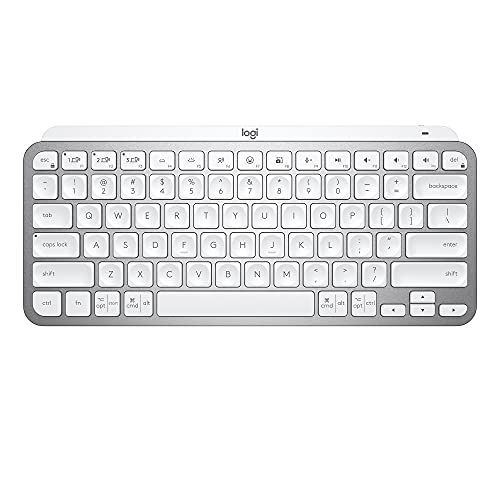
Logitech MX Keys Mini Wireless Keyboard
Best for: Compact multi-OS desks
- Form Factor
- Compact
- Connectivity
- Bluetooth Low Energy
- Backlighting
- Smart illumination
- Operating System
- Mac, Windows
- Power Source
- Rechargeable
- Dimensions
- 5.19 × 11.7 × 0.83 inches
View on Amazon: Logitech MX Keys Mini Wireless Keyboard Affiliate link
The Logitech MX Keys Mini is a compact backlit Bluetooth keyboard for 3 devices with smart keys and a USB-C battery rated up to 5 months unlit.
Pros
- Auto-adjusting backlight
- Multi-OS, 3 devices
- Long unlit battery rating
Cons
- No number pad
- No USB receiver listed
Good fit if
- You switch between OSes
- You type in dim rooms
Skip if
- You need a receiver
- You enter numbers often
Verdict: A refined compact keyboard for mixed-OS setups.
Specifications side by side
| Spec | Logitech MX Keys Mini Wireless Keyboard |
|---|---|
| Form Factor | Compact |
| Connectivity | Bluetooth Low Energy |
| Backlighting | Smart illumination |
| Operating System | Mac, Windows |
| Power Source | Rechargeable |
| Dimensions | 5.19 × 11.7 × 0.83 inches |
| Weight | 1.5 pounds |
| Size | Compact |
| Color | Pale Grey |
| Model | 920-010473 |
Frequently asked questions
Does the Logitech MX Keys Mini have a USB receiver?
No receiver is listed; it pairs over Bluetooth Low Energy.
How long does the MX Keys Mini battery last?
Up to 10 days with backlighting on and up to 5 months with it off, per Logitech.
Is the MX Keys Mini backlit?
Yes, with proximity sensing and automatic brightness.
How many devices can the MX Keys Mini pair with?
Three, across Windows, macOS, Linux, iOS and Android.
Does the MX Keys Mini have a number pad?
No, it is a compact layout without one.
See also
- logitech mx keys mini mac review
- logitech mx mechanical wireless illuminated review
- logitech signature k650 comfort full review
- logitech alto keys k98m wireless review
- logitech k750 wireless solar keyboard review
- Logitech K270 Review: Full-Size Wireless Keyboard for Windows
- Logitech K480 Multi-Device Bluetooth Keyboard Review: Specs, Pros and Cons
- Logitech Wireless Solar Keyboard for Mac Review: Who It Fits and Who Should Skip It
- smeta mini fridge lock key review
- yovecathou 0 01g 200g mini car key review