Logitech Signature Slim MK955 Keyboard and Mouse Combo Review: Who It Fits and Who Should Skip It
As an Amazon Associate we earn from qualifying purchases. Links on this page are affiliate links.
The Logitech Signature Slim MK955 (Graphite) is a full-size office set: the K950 Signature Slim keyboard and the M750 L Signature Plus mouse. The keyboard is not mechanical; it types like a laptop. Top reason to pick it: one quiet set that moves between a home desktop, a work laptop and a tablet, with the K950 switching across three devices by one tap and both pieces pairing by Bluetooth or Logi Bolt. The M750 L is a contoured mouse for larger hands with SilentTouch (90% less click noise) and a SmartWheel. Keys, buttons and shortcuts can be customized in Logi Options+ on Windows and macOS. Figures come from the MK955 listing and published specs, not hands-on testing.
What stands out
- MK955: full-size K950 Signature Slim keyboard
- M750 L Signature Plus mouse for larger hands
- K950 switches across 3 devices with one tap
- Quiet typing; SilentTouch on the M750 L
- MK955 works with Windows, macOS, ChromeOS, Linux, iOS, Android
Who it fits
Good fit for
Hybrid workers who use one desk for a personal and a work computer and want a quiet full-size set with a number pad.
Who should skip it
People with small hands (the M750 L is the large size) and anyone who wants deep key travel, backlight or mechanical switches.
Verdict: A polished, quiet full-size office combo with good multi-device support; plain office keys and a large-hand mouse are the deciding factors.
Logitech Signature Slim MK955 specs explained
Keyboard
K950 Signature Slim: full size, laptop-style quiet keys.
Mouse
M750 L Signature Plus: larger hands, SilentTouch, SmartWheel.
Switching
K950 taps between 3 devices.
Connection
Bluetooth or Logi Bolt on the MK955.
Software
Logi Options+ on Windows and macOS.
Materials
Recycled plastic: at least 48% keyboard, 25% mouse.
Logitech Signature Slim MK955 design
The K950 keyboard is a slim full-size board in Graphite with laptop-style keys, so it includes the number pad and keeps a low profile. The M750 L Signature Plus is a contoured right-hand mouse sized for larger hands, made partly of recycled plastic. The listing gives no dimensions or weight for this MK955 set, and it does not mention backlighting.
Using the Logitech Signature Slim MK955
Pair your home desktop over Logi Bolt and your work laptop over Bluetooth, then tap to move typing between them; a tablet or phone can take the third slot. SmartWheel scrolls line by line or spins quickly through long pages. Choose the MK955 if you want a full-size slim board and a large quiet mouse; choose the Logitech Wave Keys MK670 if wrist comfort matters more and you want a wave layout with a memory foam palm rest.
Logitech Signature Slim MK955: before you buy
Check these first:
Check before you buy
- The K950 in the MK955 has laptop-style, not mechanical, keys
- M750 L in the MK955 is the large-hand size
- No backlight is listed for the K950
- Options+ customization is Windows and macOS only
The product at a glance
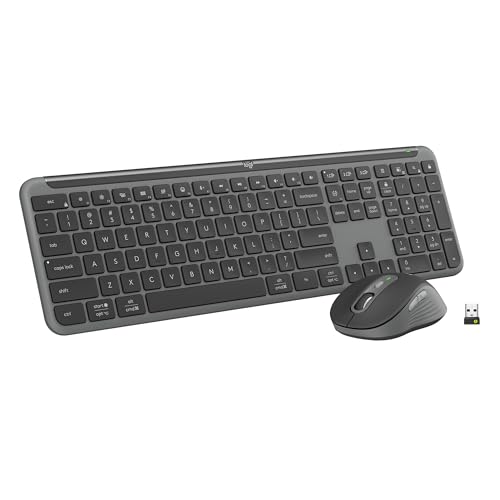
Logitech Signature Slim Full-Size Wireless Combo
Best for: Full-size office combo
- Connectivity
- Bluetooth, Logi Bolt
- Keyboard Form Factor
- Full-size
- Multi-Device Pairing
- 3 devices
- Operating System
- Mac, Windows
- Noise Level
- Silent
View on Amazon: Logitech Signature Slim Full-Size Wireless Combo Affiliate link
Logitech Signature Slim MK955 (Graphite): full-size K950 slim keyboard and M750 L Signature Plus mouse for larger hands, quiet keys and clicks, 3-device switching over Bluetooth or Logi Bolt.
Pros
- Full-size slim keyboard
- Quiet keys and SilentTouch clicks
- Switches across 3 devices
Cons
- Not mechanical
- Mouse only for larger hands
- No backlight listed
Good fit if
- You switch between work and home PCs
- You want a number pad
Skip if
- You have small hands
- You want deep key travel
Verdict: A quiet full-size multi-device office combo.
Specifications side by side
| Spec | Logitech Signature Slim Full-Size Wireless Combo |
|---|---|
| Connectivity | Bluetooth, Logi Bolt |
| Keyboard Form Factor | Full-size |
| Multi-Device Pairing | 3 devices |
| Operating System | Mac, Windows |
| Noise Level | Silent |
| Size | (Pack of 1) |
| Color | Graphite |
| Model | 920-012469 |
Frequently asked questions
Which keyboard and mouse are in the Logitech MK955?
The K950 Signature Slim keyboard and the M750 L Signature Plus mouse.
Is the Logitech MK955 keyboard full size?
Yes, the K950 is a full-size slim keyboard with laptop-style typing.
How many devices can the MK955 keyboard switch between?
Three, with a single tap, over Bluetooth or Logi Bolt.
Is the Logitech MK955 quiet?
Yes: quiet typing on the K950 and SilentTouch clicks on the M750 L, rated at 90% less click noise.
Is the MK955 mouse right for small hands?
No, the M750 L is the version for larger hands.
Featured in
- Best Bluetooth Keyboard and Mouse Combos in 2026: 10 Picks Compared
- Best Keyboard and Mouse Combos Under $150 in 2026: 9 Picks
- 8 Best Keyboard and Mouse Combos for Mac, Compared
- 8 Best Silent Keyboard and Mouse Combos, Compared
- Best Full-Size Keyboard and Mouse Combos in 2026: 10 Picks Compared
- Choosing Keyboard and Mouse Combos in 2026: The Specs That Matter and 10 Picks
See also
- logitech mx keys s combo review
- logitech signature slim mk955 business review
- logitech mk250 wireless bluetooth keyboard review
- logitech mk750 solar keyboard mouse combo review
- logitech mk270 full size wireless review
- Logitech MK470 Slim Wireless Combo Review: Who It Fits and Who Should Skip It
- Logitech MK295 Silent Wireless Keyboard and Mouse Combo Review (2026)
- Logitech Signature MK650 Combo for Business Review: Specs, Pros and Cons
- logitech zone wireless 2 business review
- logitech g602 lag free wireless gaming review