Choosing Keyboard and Mouse Combos in 2026: The Specs That Matter and 8 Picks
As an Amazon Associate we earn from qualifying purchases. Links on this page are affiliate links.
This keyboard and mouse combo buying guide helps you select hardware based on published specifications. You will decide between compact layouts, full-size frames, or solar-powered options by comparing size, weight, and connectivity. Each recommended product was chosen strictly from its official data sheet. We focus on what each spec means for your daily use. You can match form factors like 75% or full-size to your desk space. You can also weigh battery life against rechargeable convenience. The list covers eight items that serve different needs. Some prioritize gaming performance, while others offer low-maintenance typing. You will find clear distinctions in dimensions and power sources. This approach removes guesswork from your purchase. You rely on facts, not marketing claims. The selections reflect practical differences in build and function. You can trust these choices to fit your specific workflow. The guide breaks down each option so you understand the trade-offs. You avoid overpaying for features you do not need. Your final decision rests on verified technical details. This method ensures you get the right tool for your setup.
Our top pick: Redragon 75% Wireless Keyboard and Mouse Combo.
Key Specs to Check First
Connectivity type
Most combos in this guide use wireless receivers that plug into a USB port. This setup offers stable connections without pairing complexity. Some models, like the Logitech MK270, provide multi-year battery life, reducing maintenance. Others, such as the Redragon S155-PRO, support multi-device pairing for switching between computers. You should check if the receiver is unified or standard. Unified receivers allow multiple devices on one dongle, saving USB ports. Standard receivers are simpler but occupy more ports. Consider your desk space and how many devices you need to connect simultaneously to choose the right wireless approach for your workflow.
- Single or unified receiver
- Multi-device pairing support
- Battery life duration
Form factor and size
Keyboard layouts range from full-size to compact. Full-size models like the Logitech MK345 include a number pad, ideal for data entry. Compact options, such as the Arteck HW086, save desk space by omitting the numpad and often feature a slim profile. The Redragon S155-PRO uses a 75% layout, retaining function keys while removing the number pad. Your choice depends on available desk real estate and whether you need numeric input. Measure your desk width if space is tight. A smaller footprint allows for more mouse movement but may require learning new key combinations if you are used to a full layout.
- Full-size or compact layout
- Included number pad
- Physical dimensions in inches
Power source and maintenance
Battery type affects long-term upkeep. Some combos, like the Logitech MK750, use solar charging for the keyboard, eliminating battery changes for years. Others rely on replaceable AA or AAA batteries, offering simple swaps when drained. Rechargeable models, such as the Arteck HW086, require periodic charging via cable. Solar options demand adequate light exposure to function. Replaceable batteries offer immediate power but create ongoing waste. Rechargeable units need a cable and charging time. Choose based on your preference for convenience versus environmental impact and your access to charging ports or spare batteries.
- Solar or replaceable batteries
- Rechargeable via cable
- Battery type (AA or AAA)
Mouse weight and tracking
Mouse specifications vary significantly across combos. The Logitech MK750 mouse is noted for its marathon battery life, suitable for low-maintenance use. The Redragon S155-PRO mouse offers high-DPI tracking, beneficial for gaming precision. Weight also matters; the Logitech MK235 mouse is lightweight at 2.49 ounces, while the MK750 combo weighs 3 pounds total. Heavier mice may feel more stable, while lighter ones reduce fatigue. Check the DPI range if you use a high-resolution monitor. Lower DPI is sufficient for standard office work. Consider your grip style and whether you prioritize speed or precision for your daily tasks.
- Mouse DPI range
- Mouse weight in ounces
- Battery life for mouse
Operating system compatibility
Not all combos work with every system. The Arteck HW086 and Logitech Solar Keyboard are specified for Windows. Ensure the hardware supports your computer’s operating system before purchasing. Some wireless receivers use proprietary drivers that may not install on macOS or Linux. Standard HID-compliant devices often work universally. Check the product specifications for listed compatible systems. If you use a non-Windows computer, verify driver availability. Incompatibility can lead to missing keys or non-functional buttons. Stick to products explicitly stating support for your device to avoid configuration issues.
- Windows, macOS, or Linux support
- Driver requirements
- HID-compliant standard
Build quality and weight
Total combo weight indicates build materials. The Logitech MK750 weighs 3 pounds, suggesting sturdy construction. The Logitech MK270 weighs 1.05 pounds, offering a lighter feel. Heavier keyboards may resist sliding during vigorous typing. Lighter models are more portable but may shift on smooth desks. Check the weight specifications to gauge stability. Some compact models, like the Arteck HW086, prioritize slimness over mass. If you type heavily, a stable base prevents movement. For travel, lighter weight is advantageous. Balance portability needs with the desire for a solid, non-moving typing surface during use.
- Total weight in pounds
- Non-slip base features
- Material construction type
Types of Keyboards and Mice
Compact Wireless Combos
Compact wireless setups like the Redragon 75% model save desk space while maintaining gaming performance. These units often feature high-DPI tracking and rechargeable batteries. You get a smaller footprint without sacrificing core functionality. The trade-off is fewer keys, which may require learning new layouts. This type suits users with limited desk area or those who prioritize a clean workspace. It is ideal for multi-device environments where portability and space efficiency matter most.
Full-Size Standard Combos
Full-size wireless combos provide a traditional layout with a number pad, ideal for data entry and office work. Models like the Logitech MK345 offer standard layouts that fit most home or office desks. They prioritize durability and long battery life over advanced features. You get a familiar typing experience with dedicated numeric keys. The main trade-off is larger physical size, which requires more desk space. This type is best for users who need a complete keyboard layout for spreadsheets or heavy typing tasks.
Solar-Powered Wireless Combos
Solar-powered wireless combos eliminate battery changes by harvesting light energy for continuous operation. The Logitech MK750 and similar models use solar charging for the keyboard and long-life batteries for the mouse. You benefit from low-maintenance operation, as the keyboard rarely needs external power. This setup is perfect for well-lit desks where natural or artificial light is consistent. The trade-off is a dependency on light sources, which may limit placement options. It suits users who want to avoid frequent battery replacements entirely.
Common Mistakes in Combo Buying
Ignoring polling rates for gaming
Assume wireless stability equals zero latency. While USB receivers offer reliable connections, they do not guarantee instant response times for competitive gaming. Check the polling rate specification to ensure the device updates its position frequently enough for your needs. Higher polling rates reduce input lag significantly.
Overlooking physical keyboard dimensions
Overlook the physical dimensions of the keyboard layout. Compact designs save desk space but may reduce typing comfort or omit number pads. Measure your available surface area before purchasing. Verify that the key spacing matches your hand size and typing style to avoid strain during long sessions.
Ignoring battery type and maintenance
Neglect the battery type and replacement cost. Some wireless combos use disposable AA batteries, while others rely on internal rechargeable cells. Rechargeable units require charging cables and time. Disposable batteries need frequent replacement. Calculate the long-term maintenance effort based on the power source specified in the product data.
Assuming all mouse sensors are equal
Assume all wireless mice have identical sensor quality. DPI ranges vary widely, but sensor consistency matters more for precision. A high DPI number does not always mean better tracking. Look for specific sensor types and acceleration settings in the specifications to ensure smooth cursor movement without jitter or skipping.
Quick picks
Our 8 picks
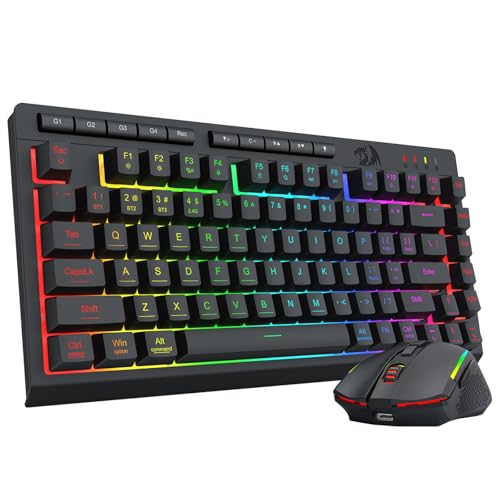
Redragon 75% Wireless Keyboard and Mouse Combo
Best for: compact multi-device desktop and gaming setups
- Connectivity
- Bluetooth 5.0, 2.4GHz, USB-C wired
- Keyboard Form Factor
- 75%
- Power Source
- Built-in rechargeable battery
- Mouse DPI
- 12800 DPI
- Backlighting
- 16.8M RGB
- Use
- Gaming
View on Amazon: Redragon 75% Wireless Keyboard and Mouse Combo
This Redragon setup pairs a compact 75% tenkeyless keyboard with a programmable gaming mouse. You connect both devices through Bluetooth 5.0, a shared 2.4GHz USB receiver, or USB-C cables. The keyboard includes a 4000mAh rechargeable battery, 26-key anti-ghosting, and RGB backlighting, while the mouse reaches up to 12800 DPI with a 1000Hz polling rate. It suits you if you need a multi-device wireless desktop setup without a dedicated number pad.
Pros
- Tri-mode connection via Bluetooth 5.0, 2.4GHz wireless, and USB-C
- Single 2-in-1 2.4GHz receiver controls both peripherals
- Built-in rechargeable batteries with 4000mAh keyboard and 700mAh mouse
- Mouse adjustable from 100 to 12800 DPI with 1000Hz polling
Cons
- No physical numeric keypad on the 75% tenkeyless layout
- Anti-ghosting limited to 26 keys instead of full N-key rollover
Good fit if
- You want a compact desk footprint with extra clearance for mouse movement.
- You switch between PC, console, or mobile devices using multiple wireless modes.
Skip if
- You frequently enter numbers and need a physical numeric keypad.
- You demand full N-key rollover across all keys simultaneously.
Verdict: Redragon 75% Wireless Gaming Combo provides versatile multi-device pairing and high-DPI tracking in a space-saving format. Its large rechargeable batteries and unified wireless receiver keep your workspace tidy without sacrificing core gaming specifications.
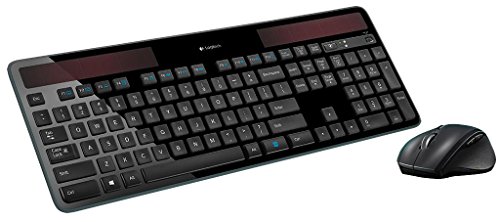
Logitech MK750 Wireless Solar Combo
Best for: low-maintenance solar typing and long battery life
- Connectivity
- Advanced wireless Unifying
- Power Source
- Solar (keyboard)
- Color
- Black
- Dimensions
- 19 × 7.9 × 1.4 inches
- Weight
- 3 pounds
This black wireless desktop setup pairs a light-powered keyboard with a marathon mouse using Logitech Unifying wireless technology. The keyboard operates without disposable battery swaps by drawing power from light, while the mouse provides an estimated 3-year battery life. At 19 inches long and three pounds total, it suits you if you want a full-sized wireless workstation focused entirely on low-maintenance daily power efficiency.
Pros
- Keyboard is powered by light to reduce battery maintenance
- Mouse features a 3-year battery life specification
- Uses Logitech Unifying advanced wireless technology
Cons
- No Bluetooth or wired connectivity options listed
- Requires 19 inches of desk length for placement
Good fit if
- You want a keyboard powered by light.
- You prioritize an extended 3-year mouse battery life.
- You prefer Logitech Unifying wireless connectivity.
Skip if
- You need Bluetooth support for your setup.
- You lack desk space for a 19-inch-long unit.
Verdict: Logitech MK750 Solar Wireless Combo delivers low-maintenance desktop operation using light-powered typing and an efficient 3-year mouse. It serves you well if you want a standard wireless setup without regular battery changes.

Logitech MK345 Full-Size Wireless Combo
Best for: standard home or office desks
- Connectivity
- 2.4 GHz USB receiver
- Keyboard Form Factor
- Full-size
- Ergonomic Features
- Palm rest
- Power Source
- AA batteries
- Color
- Black
- Dimensions
- 20 × 7.52 × 1.73 inches
The Logitech MK345 is a full-size wireless keyboard and mouse combo designed for reliable daily use. It uses 2.4 GHz connectivity with a range up to 10 meters. The keyboard includes a palm rest and spill-resistant design. Battery life lasts up to 3 years for the keyboard and 18 months for the mouse. It works with Windows, macOS, and ChromeOS.
Pros
- Full-size layout with integrated palm rest
- Spill-resistant keyboard design
- Up to 3 years keyboard battery life
- 2.4 GHz wireless connection up to 10 meters
- Contoured right-handed mouse for comfort
Cons
- Only supports right-handed mouse use
- No Bluetooth connectivity listed
- Lacks programmable macro keys
Good fit if
- You need a full-size keyboard with a palm rest
- You want long battery life without frequent changes
- You use Windows, macOS, or ChromeOS
Skip if
- You require Bluetooth connectivity
- You need a compact or portable layout
- You want a left-handed mouse option
Verdict: Logitech MK345 Full-Size Wireless Combo suits users who prioritize a traditional layout and long battery life. It is a solid choice for standard home or office desks.

Logitech MK235 Full-Size Wireless Combo
Best for: Users needing a durable full-size layout
- Keyboard Form Factor
- Full-size
- Power Source
- AA batteries
- Connectivity
- Wireless
- Color
- Grey
- Dimensions
- 5.41 × 0.81 × 17.2 inches
- Weight
- 2.49 ounces
The Logitech MK235 is a full-size wireless keyboard and mouse combo featuring a number pad and 15 shortcut keys. It uses a USB receiver for a reliable connection up to 33 feet away without pairing software. The keyboard offers spill resistance and anti-fading treatment, while the ambidextrous optical mouse fits either hand. You get up to 3 years of battery life for the keyboard and 1 year for the mouse. This grey combo suits users needing a durable, no-fuss setup for home or office desks.
Pros
- Full-size layout with number pad and 15 shortcut keys
- USB receiver provides connection up to 33 feet away
- Up to 3 years battery life for keyboard and 1 year for mouse
- Spill-resistant design with anti-fading treatment
- Ambidextrous compact optical mouse
Cons
- Uses AA batteries instead of rechargeable cells
- Optical mouse lacks programmable buttons
- No Bluetooth connectivity for multi-device pairing
Good fit if
- You need a full-size keyboard with a number pad
- You want a simple plug-and-play wireless setup
- You prefer long battery life over charging cables
Skip if
- You require a rechargeable battery system
- You need a compact or portable form factor
- You want Bluetooth connectivity for multiple devices
Verdict: Logitech MK235 Full-Size Wireless Combo offers a reliable, durable typing experience with a number pad and long battery life. It fits users who prioritize simplicity and a full layout over rechargeable convenience or Bluetooth flexibility.

ThreeBulls 120-Piece Keyboard Switch Dampener O-Rings
Best for: quieting Cherry MX mechanical keyboard switches
- Color
- White
- Dimensions
- 3.8 × 2.7 × 0.4 inches
- Weight
- 1.44 ounces
View on Amazon: ThreeBulls 120-Piece Keyboard Switch Dampener O-Rings
This package contains 120 white rubber O-rings designed for Cherry MX and compatible mechanical keyboards. Each ring measures 0.31 inches by 0.2 inches by 0.06 inches to dampen keystroke sound and absorb shock. If you already use a mechanical keyboard setup and want to soften bottom-out impact or reduce typing noise, these dampeners fit directly onto your keycap stems. Note that this pack includes switch accessories only, not a keyboard or mouse.
Pros
- Includes 120 rubber dampeners per pack
- Compatible with Cherry MX and standard mechanical keycaps
- Measures 0.31 inches by 0.2 inches by 0.06 inches per ring
- Reduces typing sound and absorbs switch bottom-out shock
Cons
- Contains only switch dampener rings, not an actual keyboard or mouse
- Requires manual installation beneath individual keycaps
Good fit if
- You already own a compatible mechanical keyboard and want quieter keystrokes.
- You want switch dampening to soften finger impact during typing.
Skip if
- You need a complete keyboard and mouse combo hardware package.
- You type on non-mechanical or low-profile membrane keyboards.
Verdict: ThreeBulls 120-Piece Rubber Keycap O-Rings provide mechanical switch dampening to soften key strikes and reduce noise. They serve as an add-on keyboard accessory rather than a standalone keyboard and mouse combo.

Logitech MK270 Full-Size Wireless Combo
Best for: everyday office tasks and low-maintenance wireless setups
- Connectivity
- Wireless USB receiver
- Keyboard Form Factor
- Full-size
- Color
- Black
- Dimensions
- 20.1 × 6.22 × 1.81 inches
- Weight
- 1.05 pounds
The Logitech MK270 Full-Size Wireless Combo provides a complete desktop setup with a USB receiver operating up to 33 feet. You get a full-size keyboard featuring a standard number pad, eight dedicated media hotkeys, spill resistance, and up to 36 months of battery life. Paired with an ambidextrous compact mouse rated for 12 months, this set suits everyday workstations needing basic wireless navigation.
Pros
- Keyboard battery life up to 36 months and mouse up to 12 months
- Full-size layout with standard number pad and 8 multimedia hotkeys
- Spill-resistant keyboard frame with adjustable tilt legs
- Ambidextrous compact mouse for left- or right-handed use
Cons
- Mouse features a compact body rather than a full-size grip
- Lacks an integrated palm rest
- No customizable shortcut keys listed
Good fit if
- You want a full-size layout with a dedicated number pad for data entry.
- You need multi-year battery life with minimal maintenance.
- You need an ambidextrous mouse suitable for left- or right-hand use.
Skip if
- You require an integrated palm rest or scooped keycaps for ergonomic typing.
- You prefer a full-size mouse over a compact mobile profile.
Verdict: Logitech MK270 Full-Size Wireless Combo delivers standard desktop data entry with low-profile keys and multi-year battery life. It covers everyday typing and pointing tasks without requiring complex configuration.

Arteck Ultra Compact Wireless Combo
Best for: Saving USB ports and desk space
- Connectivity
- 2.4 GHz USB receiver
- Keyboard Form Factor
- Ultra Compact Slim
- Ergonomic Features
- Ergonomic mouse
- Power Source
- Built-in rechargeable battery
- Color
- Black
- Operating System
- Windows
This Arteck combo features a stainless steel keyboard and ergonomic mouse designed for space-saving efficiency. It uses a single 2.4G wireless receiver for both devices, preserving USB ports. The rechargeable lithium batteries offer up to six months of keyboard life and four months for the mouse. Its ultra-compact, slim profile suits users prioritizing desk space and portability.
Pros
- Single nano USB receiver connects both keyboard and mouse
- Stainless steel keyboard material provides a heavy-duty feel
- Rechargeable lithium batteries last up to six months for the keyboard
- Ergonomic mouse design reduces stress during use
Cons
- Ultra-compact size limits key spacing compared to full-size layouts
- No Bluetooth connectivity; requires a USB port
- Stainless steel surface may feel cold or slippery
Good fit if
- You need to save USB ports on your computer
- You prefer a slim, portable keyboard for travel
- You want a durable stainless steel keyboard surface
Skip if
- You require a full-size keyboard with a numpad
- You need wireless connectivity without a USB receiver
- You prefer mechanical switches for tactile feedback
Verdict: Arteck Ultra Compact Slim Keyboard and Mouse Combo is a space-saving solution for users who value portability and long battery life. It fits those who need a durable, slim keyboard and do not require a numpad or Bluetooth connection.
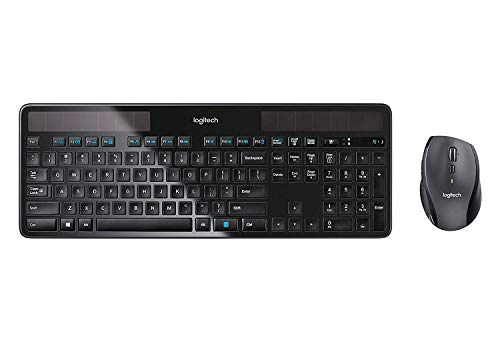
Logitech Wireless Solar Keyboard and Mouse
Best for: low-maintenance Windows desk setups
- Connectivity
- Wireless Unifying
- Power Source
- Solar-powered (keyboard)
- Color
- Black
- Operating System
- Windows
- Dimensions
- 18 × 8 × 2 inches
- Weight
- 3 pounds
Logitech Solar Keyboard and Marathon Mouse Combo pairs a light-powered keyboard with a long-lasting wireless mouse. The keyboard charges using indoor or outdoor ambient light, removing regular battery replacements. You connect both devices through Logitech Unifying wireless technology. The mouse provides up to three years of battery life. It suits you if you need a dependable Windows desktop setup that minimizes charging downtime.
Pros
- Keyboard charges under indoor and outdoor light to eliminate battery swaps
- Wireless mouse provides up to a 3-year battery life
- Single Logitech Unifying wireless connection links both devices
- Power management system keeps keyboard operating in low-light environments
Cons
- Key layout is limited to Windows systems
- Large footprint measuring 18 inches long by 8 inches wide
Good fit if
- You want a keyboard that charges via indoor desk lighting
- You need a mouse with a three-year battery lifespan
- You use a Windows computer
Skip if
- You require an operating system layout other than Windows
- You need a compact travel setup smaller than 18 inches
Verdict: Logitech Solar Keyboard and Marathon Mouse Combo delivers continuous light-powered typing alongside a low-maintenance wireless mouse. It works reliably for dedicated Windows workstations where you want minimal battery upkeep.
Specifications side by side
| Spec | Redragon 75% Wireless Keyboard and Mouse Combo | Logitech MK750 Wireless Solar Combo | Logitech MK345 Full-Size Wireless Combo | Logitech MK235 Full-Size Wireless Combo | ThreeBulls 120-Piece Keyboard Switch Dampener O-Rings | Logitech MK270 Full-Size Wireless Combo | Arteck Ultra Compact Wireless Combo | Logitech Wireless Solar Keyboard and Mouse |
|---|---|---|---|---|---|---|---|---|
| Connectivity | Bluetooth 5.0, 2.4GHz, USB-C wired | Advanced wireless Unifying | 2.4 GHz USB receiver | not specified | not specified | Wireless USB receiver | 2.4 GHz USB receiver | Wireless Unifying |
| Keyboard Form Factor | 75% | not specified | Full-size | Full-size | not specified | Full-size | Ultra Compact Slim | not specified |
| Ergonomic Features | not specified | not specified | Palm rest | not specified | not specified | not specified | Ergonomic mouse | not specified |
| Power Source | Built-in rechargeable battery | Solar (keyboard) | AA batteries | AA batteries | not specified | not specified | Built-in rechargeable battery | Solar-powered (keyboard) |
| Mouse DPI | 12800 DPI | not specified | not specified | not specified | not specified | not specified | not specified | not specified |
| Backlighting | 16.8M RGB | not specified | not specified | not specified | not specified | not specified | not specified | not specified |
| Form Factor | 75% | not specified | Full-Size | Full-Size | not specified | Full-Size | Compact | not specified |
| Use | Gaming | not specified | not specified | not specified | not specified | not specified | not specified | not specified |
| Design | not specified | not specified | not specified | not specified | not specified | not specified | Ergonomic | not specified |
| Color | Gaming Combo | Black | Black | Grey | White | Black | Black | Black |
| Operating System | not specified | not specified | not specified | not specified | not specified | not specified | Windows | Windows |
| Weight | 1.13 pounds | 3 pounds | 1.1 pounds | 2.49 ounces | 1.44 ounces | 1.05 pounds | not specified | 3 pounds |
| Dimensions | not specified | 19 × 7.9 × 1.4 inches | 20 × 7.52 × 1.73 inches | 5.41 × 0.81 × 17.2 inches | 3.8 × 2.7 × 0.4 inches | 20.1 × 6.22 × 1.81 inches | 11.1 × 5.28 × 0.55 inches | 18 × 8 × 2 inches |
| Size | TKL | not specified | 1 Pack | Handheld | not specified | 1 Pack | Ultra Compact Slim | not specified |
| Model | S155-PRO | 920-004861 | 920-006481 | 920-007897 | 8541647655 | 920-008813 | HW086 | not specified |
If you need beverage hardware for your desk, our combo coffee maker buying guide covers dual-purpose appliance specifications.
Frequently asked questions
Do wireless keyboard and mouse combos require Bluetooth?
No, most units use a dedicated USB receiver instead. The Redragon 75% and Logitech MK270 rely on this unified wireless receiver to maintain a stable connection. This method avoids the pairing complexity of Bluetooth while keeping your workspace tidy. You only need one free USB port for the entire set.
Which combo is best for saving desk space?
The Arteck Ultra Compact Slim model is designed for portability and tight areas. It features a slim profile and does not include a number pad. The Logitech MK235 also offers a durable, space-efficient layout. These options help you maximize your available surface area for other tasks or accessories.
How do solar-powered keyboards work?
These devices use light-powered typing technology to charge their internal batteries. The Logitech MK750 and the Logitech Solar Combo harvest energy from ambient light. This feature allows for low-maintenance desktop operation without regular battery changes. You can rely on them for continuous use as long as they receive adequate illumination.
Is a full-size layout necessary for office work?
It depends on your data entry needs. The Logitech MK345 and MK270 provide standard full-size layouts with number pads. These are ideal for users who prioritize traditional layouts and frequent numeric input. If you rarely use numbers, a compact or tenkeyless design might offer better comfort and space efficiency.
Can I use these combos for gaming?
Yes, some models are built for gaming performance. The Redragon 75% Wireless Gaming Combo includes high-DPI tracking and rechargeable batteries suitable for competitive setups. While other combos focus on typing, this specific model prioritizes core gaming specifications. You should check the DPI rating and battery type to ensure it meets your gaming demands.
What is the weight difference between options?
Weights vary significantly based on materials and battery size. The Logitech MK235 is extremely light at 2.49 ounces, making it highly portable. In contrast, the Logitech MK750 weighs 3 pounds due to its larger build and solar components. The Redragon combo sits in the middle at 1.13 pounds, balancing sturdiness with mobility.
Are there accessories to reduce keyboard noise?
Yes, you can add dampening rings to mechanical switches. The ThreeBulls 120-Piece O-Rings are designed to quiet Cherry MX mechanical keyboard switches. They soften key strikes and reduce noise by adding rubber dampeners. This is an add-on accessory rather than a standalone combo, but it improves the typing experience for noisy environments.