Best Ducky Mini Mechanical Keyboards: 13 Spec-Based Picks
As an Amazon Associate we earn from qualifying purchases. Links on this page are affiliate links.
Choosing the best ducky mini mechanical keyboards requires focusing on the specs that matter most to your setup. We compared 13 models using only the published specifications on their listings. Our top pick is the Ducky One 3 Mini Pure White Cherry MX Brown because it offers hot-swap customization in a compact wired format. This feature allows you to change switches without soldering, which adds long-term flexibility. The list covers various switch types and layouts to match your needs. Use this guide to decide which compact board fits your desk and typing style.
Quick picks
The best fit for you
- You want the best overall compact keyboard Ducky One 3 Mini Pure White Cherry MX Brown It features hot-swap sockets and integrated sound dampening for modular customization.
- You need a wireless keyboard with analog switches Ducky One X Mini Wireless Keyboard It offers tri-mode connectivity and analog inductive switches for wireless use.
- You prefer firm linear switches for gaming Ducky One 3 Mini 60% Mechanical Keyboard It uses Cherry MX Black switches and hot-swap Kailh sockets.
- You want silent typing in a small space Ducky One 3 Mini Aura Silent Red It provides silent Cherry Silent Red switches and acoustic dampening.
- You want to build your own 60 percent layout Ducky One 3 Mini Barebones 60% Keyboard It is a barebones board with hot-swap sockets for custom switches.
Our 13 picks

Ducky One 3 Mini Pure White Cherry MX Brown
Best for: hot-swap customization in a compact wired format
- Form Factor
- Mini (what this guide is about)
- Switch Type
- Cherry MX Brown
- Connectivity
- USB-C
- Backlighting
- RGB
- Keycap Material
- Double-shot PBT
- Dimensions
- 12.2 × 4.33 × 1.57 inches
The Ducky One 3 Mini Pure White Cherry MX Brown is a compact 60 percent mechanical keyboard designed for streamlined desk spaces. It features a dual-layer hot-swap PCB with Kailh yellow sockets, Cherry MX Brown switches, and dual-layer silicone and EVA foam sound dampeners. Thick PBT double-shot keycaps and per-key programmable RGB lighting finish the build. You get three-level adjustable feet and a detachable braided USB-C cable for flexible desk positioning.
Pros
- Dual-layer hot-swap PCB with Kailh yellow sockets
- Dual-layer silicone and EVA foam sound dampeners
- Thick seamless double-shot PBT keycaps
- Per-key programmable RGB backlighting
- Detachable braided USB-C cable with three-level adjustable feet
Cons
- No wireless connectivity options listed
- Lacks dedicated arrow keys and dedicated navigation cluster
Good fit if
- You want a compact 60 percent layout with hot-swappable switch sockets.
- You prefer seamless double-shot PBT keycaps and per-key RGB illumination.
- You want integrated silicone and EVA foam sound dampening.
Skip if
- You need dedicated arrow keys, a numpad, or a dedicated function row.
- You require wireless connectivity such as Bluetooth or 2.4 GHz.
Verdict: Ducky One 3 Mini Pure White Cherry MX Brown delivers a hot-swappable 60 percent layout equipped with integrated sound dampening and durable double-shot PBT keycaps. It offers a clean, compact foundation if you prioritize switch modularity and wired USB-C connectivity.

Ducky One 3 Mini 60% Mechanical Keyboard
Best for: compact gaming setups needing firm linear switches
- Form Factor
- Mini (what this guide is about)
- Switch Type
- Cherry MX Black
- Backlighting
- RGB
- Keycap Material
- Double-shot PBT
- Use
- Gaming
- Dimensions
- 19.7 × 19.7 × 11 inches
The Ducky One 3 Mini is a compact 60% mechanical gaming keyboard equipped with Cherry MX Black switches and RGB backlighting. It features a dual-layer hot-swappable PCB with Kailh yellow sockets, thick PBT double-shot seamless keycaps, and dual-layer silicone and EVA foam dampeners. If you want a space-saving keyboard with swappable switches and firm linear keys for gaming, this layout fits your desk.
Pros
- Dual-layer hot-swappable PCB with Kailh yellow sockets
- Thick PBT double-shot seamless keycaps
- Dual-layer silicone and EVA foam sound dampeners
- Full RGB backlighting
Cons
- Lacks dedicated arrow keys and navigation cluster
- No wireless connectivity option listed
Good fit if
- You want a compact 60% layout with hot-swappable switch sockets.
- You prefer linear Cherry MX Black switches for gaming inputs.
- You need internal silicone and EVA foam sound dampening.
Skip if
- You rely on dedicated arrow keys or a numeric keypad.
- You require a wireless connection for your setup.
Verdict: Ducky One 3 Mini 60% Cherry MX Black combines a space-saving form factor with hot-swap Kailh sockets and built-in acoustic dampening. It provides a durable base for gamers who prefer firm linear key switches.

Ducky One 3 Mini Aura Silent Red
Best for: quiet typing in compact workspaces
- Form Factor
- Mini (what this guide is about)
- Switch Type
- Cherry MX Silent Red
- Connectivity
- Detachable braided USB-C cable
- Backlighting
- Per-key programmable RGB
- Keycap Material
- Double-shot PBT
- Dimensions
- 12.2 × 4.33 × 1.57 inches
This 60% mini keyboard pairs Cherry MX Silent Red switches with dual-layer silicone and EVA foam sound dampeners to keep keystrokes quiet. You get hot-swappable Kailh sockets across a dual-layer PCB, allowing switch changes without soldering. It connects through a detachable braided USB-C cable and includes thick double-shot PBT keycaps. It suits you if you need a compact desk footprint and minimal typing noise for quiet environments.
Pros
- Cherry MX Silent Red switches with dual-layer silicone and EVA foam dampening
- Dual-layer hotswap PCB with Kailh yellow sockets
- Thick PBT double-shot keycaps
- Detachable braided USB-C cable and 3-level adjustable feet
Cons
- Wired-only connection with no wireless support listed
- Mini 60% layout lacks dedicated arrow and navigation keys
Good fit if
- You want quiet typing via silent switches and multi-layer internal dampening.
- You plan to replace switches using the hot-swap PCB sockets.
- You need a small 60% form factor with adjustable typing angles.
Skip if
- You require dedicated arrow keys or a numeric keypad.
- You need wireless connectivity for cable-free setups.
Verdict: Ducky One 3 Mini Aura Silent Red Keyboard delivers silent operation and acoustic dampening within a space-saving 60% layout. Its hot-swappable Kailh sockets and detachable USB-C connection offer practical hardware modularity.

Ducky One 3 Mini Aura 60% Keyboard
Best for: hotswap customization with clicky typing
- Form Factor
- Mini (what this guide is about)
- Switch Type
- Cherry MX Blue
- Connectivity
- Detachable braided USB-C cable
- Backlighting
- Per-key programmable RGB
- Keycap Material
- Double-shot PBT
- Dimensions
- 12.2 × 4.33 × 1.57 inches
The Ducky One 3 Mini Aura is a wired 60% mechanical keyboard built with Cherry MX Blue switches and Kailh yellow hotswap sockets. Its compact frame measures 12.2 by 4.33 inches, saving desk space while offering full N-key rollover. You get dual-layer sound dampening using silicone and EVA foam, plus PBT double-shot keycaps with translucent sides for per-key RGB lighting. It suits you if you want customizable hardware in a minimal footprint.
Pros
- Dual-layer hotswap PCB with Kailh yellow sockets
- Dual-layer silicone and EVA foam sound dampeners
- Thick PBT double-shot keycaps with translucent sides
- Per-key programmable RGB and N-key rollover
Cons
- No wireless connectivity options listed
- Lacks dedicated arrow keys and numeric keypad
Good fit if
- You want hotswappable switches without soldering.
- You prefer clicky Cherry MX Blue switches.
- You want built-in silicone and EVA foam sound dampening.
Skip if
- You need dedicated arrow keys or a numpad.
- You require a wireless connection.
Verdict: Ducky One 3 Mini Aura 60% Keyboard delivers Kailh hotswap sockets and dual-layer dampening in a compact layout. It provides solid acoustic layers and switch flexibility if you want a customizable wired typing platform.

Ducky One 2 Pro Mini Cherry Speed Silver
Best for: compact desks needing Cherry Speed Silver switches
- Form Factor
- Mini (what this guide is about)
- Switch Type
- Cherry Speed Silver
- Backlighting
- RGB LED
- Keycap Material
- Double-shot PBT
- Dimensions
- 5.51 × 3.15 × 0.79 inches
- Weight
- 1.31 pounds
The Ducky One 2 Pro Mini is a mechanical keyboard built in a Mini form factor. It features Cherry Speed Silver switches and RGB backlighting. The board includes True PBT doubleshot keycaps with a frosted surface designed to resist stains. Weighing about 1.31 pounds, it leaves extra space on your desk. This keyboard suits you if you need a compact footprint with Cherry Silver switches.
Pros
- Cherry Speed Silver switches
- True PBT doubleshot keycaps with a frosted, stain-resistant surface
- RGB backlighting
- Compact Mini frame weighing 1.31 pounds
Cons
- No wireless connectivity listed in specifications
- Mini layout omits a dedicated number pad and arrow cluster
Good fit if
- You want Cherry Speed Silver switches in a space-saving Mini layout.
- You prioritize durable True PBT doubleshot keycaps.
- You want integrated RGB lighting on a lightweight board.
Skip if
- You need dedicated arrow keys or a full numpad.
- You require wireless connectivity options.
Verdict: Ducky One 2 Pro Mini Cherry Silver pairs fast Cherry switches with durable PBT keycaps in a compact Mini design. It provides a focused layout and RGB backlighting without taking up excessive desk space.

Ducky One 3 Mini Barebones 60% Keyboard
Best for: custom 60% builds using your own switches
- Form Factor
- Mini (what this guide is about)
- Connectivity
- USB-C wired
- Backlighting
- Per-key RGB
- Hot-Swap Support
- Hot-Swappable
The Ducky One 3 Mini Barebones 60% Keyboard is a compact foundation designed for custom builds. It features Kailh yellow hot-swap sockets on a dual-layer PCB, letting you install your own switches without soldering. Dual-layer silicone and EVA foam provide internal sound dampening alongside V2 stabilizers and per-key RGB backlighting. Because this barebones unit excludes switches and keycaps, you get complete freedom to supply your preferred components from day one.
Pros
- Kailh yellow hot-swap sockets for solderless switch installation
- Dual-layer silicone and EVA foam sound dampeners
- Per-key programmable RGB backlighting
- Detachable braided USB-C cable and three-level adjustable feet
Cons
- Does not include switches
- Does not include keycaps
Good fit if
- You already have or plan to purchase custom switches and keycaps.
- You want a 60% hot-swappable base with internal acoustic dampening.
Skip if
- You want an out-of-the-box working keyboard with pre-installed switches and keycaps.
- You need dedicated navigation arrows or a number pad.
Verdict: Ducky One 3 Mini Barebones 60% Keyboard provides a customizable hot-swap platform with dual-layer acoustic dampening and programmable RGB lighting. It is an ideal base if you want to install your own switches and keycaps immediately.

Ducky One 3 Mini Cosmic Blue MX Brown
Best for: users wanting hot-swappable tactile switches
- Form Factor
- Mini (what this guide is about)
- Switch Type
- Cherry MX Brown
- Backlighting
- Per-key RGB
- Dimensions
- 19.7 × 19.7 × 11 inches
- Weight
- 1.32 pounds
The Ducky One 3 Cosmic Blue Mini is a compact mechanical keyboard built with Cherry MX Brown switches and a mini footprint. It features a dual-layer hot-swappable PCB with Kailh yellow sockets, allowing you to swap switches easily. Inside, dual-layer silicone and EVA foam dampeners reduce typing noise, paired with per-key programmable RGB lighting. This keyboard suits you if you want a customizable compact setup with factory-installed acoustic dampening.
Pros
- Dual-layer hot-swappable PCB with Kailh yellow sockets
- Dual-layer silicone and EVA foam sound dampeners
- Per-key programmable RGB backlighting
- Equipped with V2 stabilizers and remapped macro layout
Cons
- Mini form factor lacks dedicated arrow and navigation keys
- No wireless connectivity options listed in specifications
Good fit if
- You want Cherry MX Brown tactile switches in a mini footprint.
- You need a hot-swappable PCB for easy switch changes.
- You prefer built-in silicone and foam acoustic dampening.
Skip if
- You need dedicated arrow keys or a number pad.
- You require wireless connectivity.
Verdict: Ducky One 3 Cosmic Blue Mini delivers hot-swappable versatility and integrated acoustic dampening in a space-saving footprint. It provides per-key RGB customization and upgraded stabilizers for desktop setups.
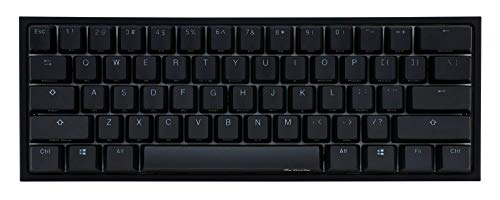
Ducky One 2 Mini Silent Red
Best for: quiet typing in a compact layout
- Form Factor
- Mini (what this guide is about)
- Switch Type
- Cherry MX Silent Red
- Backlighting
- RGB
- Keycap Material
- PBT Double Shot
- Weight
- 1.31 pounds
The Ducky One 2 Mini is a 60% mechanical keyboard featuring Cherry MX Silent Red switches. It uses PBT double-shot keycaps for durability and includes a detachable USB-C cable. The design offers a lightweight build at 1.31 pounds. It supports Ducky Macro 2.0 for hardware-level customization. This model suits users who prioritize quiet typing and portability.
Pros
- Cherry MX Silent Red switches for reduced noise
- PBT double-shot seamless keycaps
- Detachable USB-C cable
- Supports Ducky Macro 2.0
Cons
- No wireless connectivity
- Heavier than some competitors
- Limited to 60% form factor
Good fit if
- You need a quiet typing experience
- You want a portable 60% layout
- You prefer wired reliability
Skip if
- You require wireless freedom
- You need a full-size layout
- You prefer tactile feedback
Verdict: Ducky One 2 Mini Silent Red offers quiet performance and durable keycaps for users who value a compact, wired setup. It is ideal for those who prioritize silent operation in a portable form factor.

Ducky One 2 Mini 60% PBT
Best for: Tactile typists needing a compact wired board
- Form Factor
- Mini (what this guide is about)
- Switch Type
- Cherry MX Blue
- Backlighting
- RGB
- Keycap Material
- Double Shot PBT
- Dimensions
- 0.63 × 6.69 × 5.28 inches
- Weight
- 1.3 pounds
This Ducky One 2 Mini v2 is a 60% mechanical keyboard featuring Cherry MX Blue switches. It uses PBT double-shot keycaps for durability and includes detachable USB-C connectivity. The dual-layer PCB and adjustable feet add stability. It offers RGB lighting and Ducky Macro 2.0 support. This compact layout suits users who need a portable, tactile typing experience without extra keys.
Pros
- Cherry MX Blue mechanical switches
- PBT double-shot seamless keycaps
- Detachable USB-C cable
- Ducky Macro 2.0 support
- Dual-layer PCB for stability
Cons
- No wireless connectivity option
- Fixed 60% layout lacks arrow keys
- Heavier at 1.3 pounds than some peers
Good fit if
- You want tactile feedback from Cherry MX Blue switches
- You need a compact 60% layout for portability
- You prefer durable PBT keycaps over ABS
Skip if
- You require wireless or Bluetooth connectivity
- You need a full-size keyboard with number pad
- You prefer linear switches over tactile clicks
Verdict: Ducky One 2 Mini 60% Cherry MX Blue is a solid choice for typists who value tactile feedback and a compact footprint. It fits those who prioritize build quality and switch feel over wireless convenience.

Ducky One 3 Mini Strawberry Frog Cherry MX Brown
Best for: hot-swap tactile typing on a mini layout
- Form Factor
- Mini (what this guide is about)
- Switch Type
- Cherry MX Brown
- Connectivity
- Braided USB-C
- Backlighting
- Per-key programmable RGB
- Keycap Material
- Dye-sub PBT
View on Amazon: Ducky One 3 Mini Strawberry Frog Cherry MX Brown
The Ducky One 3 Mini Strawberry Frog Cherry MX Brown is a mini mechanical keyboard equipped with tactile Cherry MX Brown switches and hot-swappable Kailh yellow sockets. You get dye-sublimated PBT keycaps in an XDA profile, layered silicone and EVA foam sound dampening, and per-key programmable RGB lighting. It suits you if you need a compact desk footprint with swappable switches, three-level adjustable feet, and custom themed keycaps.
Pros
- Dual-layer hot-swap PCB with Kailh yellow sockets
- Dye-sublimated PBT keycaps in an XDA profile
- QUACK Mechanics dual-layer silicone and EVA foam dampening
- Per-key programmable RGB lighting and V2 stabilizers
Cons
- Mini form factor lacks dedicated arrow keys and a number pad
- No wireless functionality listed; requires a wired USB-C connection
Good fit if
- You want hot-swappable Kailh sockets to swap mechanical switches without soldering.
- You prefer dye-sub PBT keycaps shaped in a uniform XDA profile.
- You need a compact Mini keyboard featuring internal silicone and foam sound dampening.
Skip if
- You need dedicated arrow keys, navigation clusters, or a numeric keypad.
- You require wireless Bluetooth or 2.4 GHz connectivity.
Verdict: Ducky One 3 Mini Strawberry Frog Cherry MX Brown delivers hot-swappable Kailh sockets, tactile Cherry switches, and dual sound dampening in a compact layout. It provides complete switch customizability alongside durable XDA profile dye-sub PBT keycaps.

Ducky One 2 Pro Mini White Cherry Silver
Best for: compact setups requiring responsive linear switches
- Form Factor
- Mini (what this guide is about)
- Switch Type
- Cherry MX Silver
- Connectivity
- Detachable USB-C
- Backlighting
- RGB
- Keycap Material
- Double-shot PBT
The Ducky One 2 Pro Mini White Cherry Silver is a 60% mechanical keyboard equipped with Cherry MX Silver switches and RGB backlighting. It features dual-layer sound dampening with EVA foam and Q-Bounce synthetic padding, paired with seamless PBT double-shot keycaps. With a 1000 Hz polling rate, detachable USB-C connectivity, and onboard Ducky Macro 2.0 configuration, this keyboard suits you if you want a compact typing layout built for rapid linear keystrokes.
Pros
- Cherry MX Silver linear mechanical switches
- PBT double-shot seamless keycaps with 10 extra colorful keycaps
- EVA sound dampening foam and Q-Bounce synthetic padding
- 1000 Hz polling rate with detachable USB-C connection
- Three-level adjustable feet
Cons
- No dedicated arrow keys or navigation cluster
- No wireless connectivity listed
- Random color selection for the 10 bonus keycaps
Good fit if
- You want linear Cherry Silver switches in a compact 60% layout.
- You prefer built-in sound dampening with EVA foam and Q-Bounce padding.
- You configure macros directly on hardware using Ducky Macro 2.0.
Skip if
- You need dedicated arrow keys, a number pad, or function row keys.
- You require wireless connectivity for your setup.
Verdict: Ducky One 2 Pro Mini White Cherry Silver combines rapid linear switches with multi-layer acoustic dampening in a minimal 60% design. It provides hardware macro configuration and a 1000 Hz polling rate for compact workspaces.

Ducky One X Mini Wireless Keyboard
Best for: compact wireless setups wanting analog inductive switches
- Form Factor
- Mini (what this guide is about)
- Switch Type
- Linear inductive
- Connectivity
- Bluetooth, 2.4 GHz RF, USB wired
- Keycap Material
- Double-shot PBT
- Mounting Style
- Gasket Mount
- Color
- White
The Ducky One X Mini Wireless Keyboard is a 60% compact unit featuring linear inductive switches and gasket mounting. You get tri-mode connectivity covering USB wired, 2.4 GHz RF, and Bluetooth, paired with 85% PBT double-shot keycaps and seven-layer dampening. Web-based software manages your settings across platforms without computer storage demands. It suits you if you want a compact wireless desk setup with rapid-trigger analog switches.
Pros
- Tri-mode connectivity with USB wired, 2.4 GHz RF, and Bluetooth
- Gasket-mount structure paired with seven-layer dampening
- Analog linear inductive switches with rapid trigger support
- 85% high-purity PBT double-shot keycaps
- Web-based configuration software requires no local installation
Cons
- Compact 60% layout omits dedicated arrow and navigation keys
- Switch options limited to linear inductive variants
Good fit if
- You need tri-mode wireless flexibility across multiple devices.
- You want analog inductive switches with rapid trigger support.
- You prefer configuring settings via a browser without installing software.
Skip if
- You need dedicated arrow keys or a physical number pad.
- You prefer clicky or tactile mechanical switch feedback.
Verdict: Ducky One X Mini Wireless Keyboard combines tri-mode wireless connectivity, gasket mounting, and analog inductive switches in a compact 60% footprint. It gives you flexible pairing and multi-layer dampening on a clutter-free desk.

Ducky One 2 Pro Mini Kailh Box Brown
Best for: tactile typing in compact mini desk setups
- Form Factor
- Mini (what this guide is about)
- Switch Type
- Kailh BOX Brown
- Backlighting
- RGB LED
- Keycap Material
- True PBT Doubleshot
- Dimensions
- 13 × 6.14 × 2.17 inches
The Ducky One 2 Pro Mini is a compact mini keyboard equipped with Kailh BOX Brown switches and customizable RGB backlighting. It features stain-resistant True PBT doubleshot keycaps with a frosted surface finish. Measuring roughly 13 inches long and 6.1 inches wide, it saves desk space while retaining full typing functionality. You will find this keyboard fits your setup if you need tactile feedback inside a dedicated mini footprint.
Pros
- Kailh BOX Brown mechanical switches
- True PBT doubleshot keycaps with frosted finish
- Built-in RGB LED backlighting
- Compact mini form factor
Cons
- No wireless connectivity option listed
- Relatively tall 2.17-inch height profile
Good fit if
- You want tactile Kailh BOX Brown switches in a mini keyboard layout.
- You prefer stain-resistant True PBT doubleshot keycaps with a frosted texture.
- You need integrated RGB backlighting on your desk.
Skip if
- You require wireless connectivity for your setup.
- You prefer linear or clicky switches rather than tactile Kailh BOX Browns.
Verdict: Ducky One 2 Pro Mini Kailh Box Brown delivers tactile feedback and durable PBT keycaps in a space-saving mini chassis. It suits users who prioritize RGB illumination and compact desktop dimensions.
Specifications side by side
| Spec | Ducky One 3 Mini Pure White Cherry MX Brown | Ducky One 3 Mini 60% Mechanical Keyboard | Ducky One 3 Mini Aura Silent Red | Ducky One 3 Mini Aura 60% Keyboard | Ducky One 2 Pro Mini Cherry Speed Silver | Ducky One 3 Mini Barebones 60% Keyboard | Ducky One 3 Mini Cosmic Blue MX Brown | Ducky One 2 Mini Silent Red | Ducky One 2 Mini 60% PBT | Ducky One 3 Mini Strawberry Frog Cherry MX Brown | Ducky One 2 Pro Mini White Cherry Silver | Ducky One X Mini Wireless Keyboard | Ducky One 2 Pro Mini Kailh Box Brown |
|---|---|---|---|---|---|---|---|---|---|---|---|---|---|
| Switch Type | Cherry MX Brown | Cherry MX Black | Cherry MX Silent Red | Cherry MX Blue | Cherry Speed Silver | not specified | Cherry MX Brown | Cherry MX Silent Red | Cherry MX Blue | Cherry MX Brown | Cherry MX Silver | Linear inductive | Kailh BOX Brown |
| Form Factor | 60% | 60% | 60% | 60% | not specified | 60% | Mini | 60% | 60% | not specified | 60% | 60% | Mini |
| Connectivity | USB-C | not specified | Detachable braided USB-C cable | Detachable braided USB-C cable | not specified | USB-C wired | not specified | not specified | not specified | Braided USB-C | Detachable USB-C | Bluetooth, 2.4 GHz RF, USB wired | not specified |
| Backlighting | RGB | RGB | Per-key programmable RGB | Per-key programmable RGB | RGB LED | Per-key RGB | Per-key RGB | RGB | RGB | Per-key programmable RGB | RGB | not specified | RGB LED |
| Keycap Material | Double-shot PBT | Double-shot PBT | Double-shot PBT | Double-shot PBT | Double-shot PBT | not specified | not specified | PBT Double Shot | Double Shot PBT | Dye-sub PBT | Double-shot PBT | Double-shot PBT | True PBT Doubleshot |
| Hot-Swap Support | not specified | not specified | not specified | not specified | not specified | Hot-Swappable | not specified | not specified | not specified | not specified | not specified | not specified | not specified |
| Mounting Style | not specified | not specified | not specified | not specified | not specified | not specified | not specified | not specified | not specified | not specified | not specified | Gasket Mount | not specified |
| Use | not specified | Gaming | not specified | not specified | not specified | not specified | not specified | not specified | not specified | not specified | not specified | not specified | not specified |
| Color | Cherry MX Brown | Cherry Mx Black | Cherry MX Silent Red | Cherry MX Blue | not specified | not specified | Cherry MX Brown | not specified | Cherry MX Blue | Cherry MX Brown | Cherry MX Silver | White | Kailh BOX Brown |
| Noise Level | not specified | not specified | Silent | not specified | not specified | not specified | not specified | Silent | not specified | not specified | not specified | not specified | not specified |
| Dimensions | 12.2 × 4.33 × 1.57 inches | 19.7 × 19.7 × 11 inches | 12.2 × 4.33 × 1.57 inches | 12.2 × 4.33 × 1.57 inches | 5.51 × 3.15 × 0.79 inches | not specified | 19.7 × 19.7 × 11 inches | not specified | 0.63 × 6.69 × 5.28 inches | not specified | not specified | 12.1 × 4.9 × 1.5 inches | 13 × 6.14 × 2.17 inches |
| Weight | 1.31 pounds | not specified | not specified | not specified | 1.31 pounds | not specified | 1.32 pounds | 1.31 pounds | 1.3 pounds | not specified | not specified | 2.02 pounds | not specified |
| Size | 60% | Cherry MX Black | Cherry Silent Red | Cherry MX Blue | Cherry Speed Silver | Compact | Cherry MX Brown | not specified | 60% | not specified | Cherry Speed Silver | Ducky AI Switch Linear | Kailh Brown |
| Model | DKON2161ST-BUSPDPWWWSC1 | DKON2161ST-AUSPDCLAWSC1 | DKON2161ST-SUSPDABAAAC1 | DKON2161ST-CUSPDAWWWWC1 | DKON2061ST-PUSPDAZT1 | 4711394385791 | DKON2161ST-BUSPDCOVVVC2 | not specified | DKON2061ST-CUSPDAZT1 | 6fb2de11-b29f-4d44-af58-cdef630be0e9 | not specified | not specified | DKON2061ST-KUSPDAZTK2 |
If you want a compact desk setup, pair your keyboard with the best MINISFORUM mini PCs to save desktop space.
Choosing Your Ideal Ducky Mini Keyboard
-
Match Switch Actuation Characteristics
Ducky mini keyboards use various mechanical switches to deliver different typing sensations. Linear switches like Cherry MX Black or Cherry Speed Silver move straight down without tactile resistance, making them popular for rapid inputs. Tactile options like Cherry MX Brown provide a distinct bump when actuated. Clicky options like Cherry MX Blue add an audible click. If you type in shared offices, choose silent linear switches. The Ducky One 3 Mini Aura Silent Red uses Cherry MX Silent Red switches to reduce noise output.
-
Check Hot-Swap Socket Support
Hot-swappable sockets let you change key switches without soldering. Models featuring integrated Kailh hot-swap sockets allow you to pull out existing switches and install replacements directly into the board. This modularity lets you test different switches or replace broken units easily. If you already own preferred key switches and keycap sets, consider an unpopulated base. The Ducky One 3 Mini Barebones 60% Keyboard supplies the chassis, programmable RGB backlighting, and hot-swap PCB, letting you install your own parts right away.
-
Inspect Keycap Plastics and Profiles
Keycap construction determines physical durability and surface feel across a compact keyboard. Check the published specifications for PBT keycaps rather than standard plastics. Double-shot PBT construction provides durable key legends, while dye-sub PBT offers alternate visual styles. You should also check the keycap profile specification to see how keys are sculpted. For example, the Ducky One 3 Mini Strawberry Frog Cherry MX Brown includes dye-sub PBT keycaps with an XDA profile, providing a uniform height across every row.
-
Review Acoustic Dampening Design
Miniature keyboards concentrate sound within a small interior cavity, which can cause typing noise. Compare the dampening materials listed in the published specifications. Several models integrate dual-layer acoustic dampening to absorb sound inside the case and reduce hollow acoustics. For physical isolation, check the mounting style. The Ducky One X Mini Wireless Keyboard combines multi-layer dampening with a gasket mount structure, separating the internal plate from rigid chassis contact to dampen keystrokes across the entire mini layout.
-
Evaluate Polling Rate and Macros
Processing hardware defines how fast a keyboard transmits keystroke data to your computer. Look at the polling rate spec if you need rapid responsiveness for competitive play. A 1000 Hz polling rate reports key actuations every millisecond, reducing input latency. Additionally, check for hardware macro support if you rely on complex key sequences without running background desktop software. The Ducky One 2 Pro Mini White Cherry Silver lists a 1000 Hz polling rate alongside onboard hardware macro configuration directly on the mini chassis.
Frequently asked questions
Which Ducky mini keyboard is best for quiet typing?
The Ducky One 3 Mini Aura Silent Red is designed for quiet operation. It features Cherry Silent Red switches that reduce noise significantly. The keyboard also includes acoustic dampening layers to further minimize sound. This makes it ideal for shared workspaces or late-night sessions where silence is a priority.
Does the Ducky One 3 Mini support hot-swappable switches?
Yes, most Ducky One 3 Mini models support hot-swappable switches. The Ducky One 3 Mini Pure White and the Ducky One 3 Mini Barebones both feature hot-swap sockets. This allows you to change switches without soldering. The Barebones version lets you install your own switches immediately.
What is the difference between Cherry MX Brown and Black switches?
Cherry MX Brown switches offer tactile feedback without a loud click. Cherry MX Black switches are firm linear switches with no tactile bump. Brown switches are often preferred for typing, while Black switches are favored by gamers for rapid, uninterrupted key presses. The Ducky One 3 Mini offers both options.
Which Ducky mini keyboard supports wireless connectivity?
The Ducky One X Mini Wireless Keyboard is the only model in this list with wireless connectivity. It supports tri-mode wireless connections, allowing you to pair with multiple devices. It also features analog inductive switches and gasket mounting for a comfortable typing experience on a clutter-free desk.
Are the keycaps made of PBT or ABS plastic?
Several Ducky mini models use durable PBT keycaps. The Ducky One 3 Mini Pure White, Ducky One 2 Pro Mini Cherry Speed Silver, and Ducky One X Mini Wireless Keyboard all feature PBT keycaps. PBT plastic is known for being resistant to shine and wear over time, providing a textured feel.
What size layout do Ducky mini keyboards use?
Ducky mini keyboards use a 60% layout. This format condenses all essential keys into a compact footprint, removing the number pad and function row. The Ducky One 3 Mini Pure White measures 12.2 inches in length. This size maximizes desk space while retaining core typing functionality.