Best Keyboard and Mouse Combos Under $30 in 2026: 9 Picks Ranked by Specs
As an Amazon Associate we earn from qualifying purchases. Links on this page are affiliate links.
Finding the best keyboard and mouse combos under $30 requires looking at the details that matter most. We compared 9 options based on the specifications published on the listings. The Logitech MK270 Full-Size Wireless Combo leads because it offers a standard full-size layout with a number pad and long battery life. This guide helps you decide which form factor and connectivity type fits your desk space. You can also choose between silent keys or Bluetooth flexibility. Read on to see how each spec impacts your daily typing and clicking experience.
Quick picks
The best fit for you
- You need a full-size layout with a number pad Logitech MK270 Full-Size Wireless Combo It offers a standard full-size form factor with a dedicated number pad for reliable daily use.
- You want the most compact model on the list Arteck Ultra Compact Wireless Combo Its ultra-compact slim design and stainless steel build provide a durable, space-saving solution for Windows users.
- You prioritize a small footprint and quiet typing Macally Compact Wireless Keyboard and Mouse This mini combo features silent keys and a compact footprint, making it ideal for small desks.
- You need Bluetooth connectivity with a compact layout Logitech MK250 Bluetooth Keyboard and Mouse Combo It provides Bluetooth connectivity and a compact layout that includes a number pad for clutter-free setups.
- You want multi-device support with a numeric keypad Seenda Full Size Ergonomic Keyboard and Mouse Combo Its Bluetooth connectivity and full-size ergonomic design allow for easy switching between devices while using a numpad.
Our 9 picks

Logitech MK270 Full-Size Wireless Combo
Best for: Users needing a full-size layout with a number pad
- Connectivity
- Wireless USB receiver
- Keyboard Form Factor
- Full-size
- Color
- Black
- Dimensions
- 20.1 × 6.22 × 1.81 inches
- Weight
- 1.05 pounds
The Logitech MK270 is a full-size wireless keyboard and mouse combo. It connects via a USB receiver with a range up to 33 feet. The keyboard features low-profile keys, a number pad, and multimedia hotkeys. Battery life lasts 36 months for the keyboard and 12 months for the mouse. It includes a spill-resistant design and adjustable tilt legs. This combo suits users who need a reliable, standard layout for daily computing tasks.
Pros
- Full-size layout with number pad and arrow keys
- 36-month keyboard and 12-month mouse battery life
- Wireless connection up to 33 feet
- Spill-resistant design and adjustable tilt legs
Cons
- Uses AA batteries requiring periodic replacement
- No Bluetooth connectivity, only USB receiver
- Basic mouse with no adjustable DPI settings
Good fit if
- You need a full-size keyboard with a number pad
- You want long battery life without frequent charging
- You prefer a reliable USB receiver connection
Skip if
- You require Bluetooth connectivity
- You need a compact or portable design
- You want a mouse with adjustable sensitivity
Verdict: Logitech MK270 Full-Size Wireless Combo offers a standard layout and long battery life for users who prioritize reliability and a full number pad over portability or Bluetooth features.

Arteck Ultra Compact Wireless Combo
Best for: Windows users wanting a durable compact combo
- Connectivity
- 2.4 GHz USB receiver
- Keyboard Form Factor
- Ultra Compact Slim
- Ergonomic Features
- Ergonomic mouse
- Power Source
- Built-in rechargeable battery
- Color
- Black
- Operating System
- Windows
The Arteck HW086 is an ultra-compact wireless keyboard and mouse combo featuring a stainless steel body. It uses a single nano USB receiver for both devices, saving a port. The rechargeable lithium battery offers up to six months of keyboard life and four months for the mouse with daily use. This slim design suits users seeking a durable, space-saving setup for Windows.
Pros
- Single nano USB receiver connects both keyboard and mouse
- Stainless steel keyboard body for heavy-duty feel
- Rechargeable lithium battery lasts up to six months
- Ergonomic mouse design reduces stress
Cons
- Only supports Windows operating systems
- No Bluetooth connectivity option
- 24-month warranty is shorter than industry standards
Good fit if
- You need a single receiver for both devices
- You prefer a stainless steel keyboard surface
- You want long battery life between charges
Skip if
- You use a Mac or Linux computer
- You require Bluetooth wireless connectivity
- You need a full-size keyboard layout
Verdict: Arteck Ultra Compact Wireless Combo is a practical choice for Windows users who value a durable stainless steel build and a single USB receiver for their compact setup.
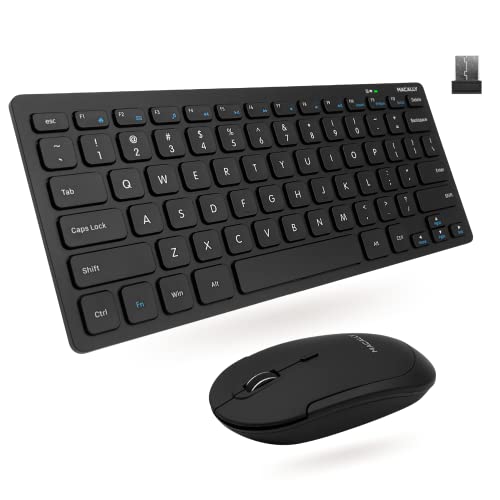
Macally Compact Wireless Keyboard and Mouse
Best for: small desktops and quiet workspaces
- Connectivity
- 2.4 GHz RF (USB dongle)
- Keyboard Form Factor
- Compact
- Switch Type
- Slim scissor flex
- Mouse DPI
- 800 / 1200 / 1600 DPI
- Color
- Black
- Noise Level
- Silent
This Macally combo uses 2.4 GHz wireless technology with a single USB dongle for a 30-foot range. The keyboard features 78 slim scissor flex keys and LED indicators. The mouse offers three DPI settings: 800, 1200, and 1600. It is a compact, silent duo designed for PC users who need a small footprint. The set includes lifetime support and a two-year warranty.
Pros
- 2.4 GHz RF connectivity with 30ft range
- 78 slim scissor flex keys for quiet typing
- Mouse features 800/1200/1600 DPI options
- Compact form factor saves desk space
Cons
- Only 78 keys, limiting full-size functionality
- No Bluetooth connectivity option available
- Two-year warranty is shorter than some competitors
Good fit if
- You need a small keyboard and mouse set
- You prefer a single USB dongle connection
- You want silent typing and clicking
Skip if
- You require a full-size keyboard layout
- You need Bluetooth connectivity for multiple devices
- You want a longer warranty period
Verdict: Macally Compact Wireless Keyboard and Mouse is a practical pick for users who prioritize a small footprint and reliable 2.4 GHz connection over a full-sized layout or Bluetooth flexibility.
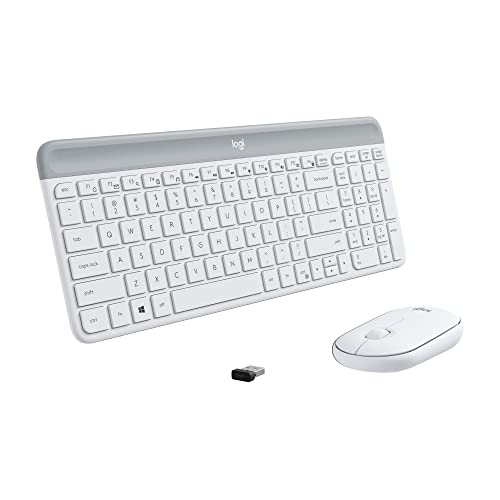
Logitech MK470 Slim Wireless Combo
Best for: compact, quiet home office setups
- Connectivity
- 2.4 GHz USB
- Keyboard Form Factor
- Compact
- Switch Type
- Scissor keys
- Mouse DPI
- 1000 DPI
- Dimensions
- 17.8 × 5.9 × 1.4 inches
- Weight
- 1.8 pounds
The Logitech MK470 is a compact wireless keyboard and mouse combo in off-white. It features low-profile scissor keys and a 1000 DPI optical mouse. The set uses a 2.4 GHz nano receiver for reliable connectivity up to 33 feet. Battery life lasts up to 36 months for the keyboard and 18 months for the mouse. It includes 12 customizable FN keys for shortcuts. This slim design suits users wanting a quiet, space-saving setup.
Pros
- Compact form factor with low-profile scissor keys
- Whisper quiet keyboard and noise-reduced mouse
- 1000 DPI precision optical sensor in mouse
- 33-foot wireless range via 2.4 GHz receiver
- Up to 36 months of keyboard battery life
Cons
- Only 1000 DPI mouse resolution
- Requires Logi Options Plus software for customization
- No Bluetooth connectivity option
Good fit if
- You need a compact keyboard for limited desk space
- You prioritize quiet operation in shared environments
- You want long battery life without frequent changes
Skip if
- You require high-DPI gaming performance
- You prefer full-size keyboards with numpads
- You need Bluetooth wireless connectivity
Verdict: Logitech MK470 Slim Wireless Combo offers a quiet, compact solution for users valuing battery longevity and space efficiency. It fits those needing a reliable 2.4 GHz connection and low-profile keys.

Logitech MK295 Full-Size Silent Wireless Combo
Best for: Quiet typing with a full numpad
- Connectivity
- 2.4 GHz USB receiver
- Keyboard Form Factor
- Full-size
- Ergonomic Features
- Adjustable tilt legs
- Noise Level
- Silent
- Dimensions
- 0.7 × 17.4 × 5.86 inches
View on Amazon: Logitech MK295 Full-Size Silent Wireless Combo
The Logitech MK295 is a full-size wireless keyboard and mouse combo featuring SilentTouch technology for 90% less noise. It uses a 2.4 GHz USB receiver for reliable connectivity with a 10 m range. You get a full numpad, eight shortcuts, and spill-resistant keys. Battery life lasts 36 months for the keyboard and 18 months for the mouse. It is designed for quiet, clutter-free desks on Windows or Chrome OS.
Pros
- SilentTouch technology reduces typing and clicking noise by 90%
- Full-size layout includes a numpad and eight convenience shortcuts
- 36-month keyboard and 18-month mouse battery life
- Spill-resistant design with adjustable tilt legs
Cons
- Lacks Bluetooth connectivity for multi-device switching
- No dedicated media keys beyond basic volume and mute
- Single USB receiver limits connection to one device at a time
Good fit if
- You need a quiet keyboard for shared spaces
- You require a full numpad for data entry
- You prefer long battery life over frequent charging
Skip if
- You need Bluetooth pairing for multiple devices
- You want a compact or portable form factor
- You require dedicated media control keys
Verdict: Logitech MK295 Silent Full-Size Wireless Combo is ideal for users who prioritize silence and a full numpad. It suits those who want long battery life and do not need Bluetooth connectivity.

Logitech MK250 Bluetooth Keyboard and Mouse Combo
Best for: Bluetooth users needing a compact layout with a number pad
- Connectivity
- Bluetooth
- Keyboard Form Factor
- Compact
- Dimensions
- 18 × 5.98 × 1.73 inches
- Weight
- 1.4 pounds
View on Amazon: Logitech MK250 Bluetooth Keyboard and Mouse Combo
This Logitech combo uses Bluetooth connectivity, so you skip the USB dongle. The compact keyboard includes a number pad, arrow keys, and F-keys. It features spill-resistant design and deep-profile keys. The mouse is small, ambidextrous, and fits in a bag. Both units run on batteries for 12 months. It suits users who want a clean desk setup without extra ports.
Pros
- Bluetooth wireless connection without a dongle
- Compact layout with number pad and F-keys
- Spill-resistant keyboard design
- 12-month battery life for keyboard and mouse
- Ambidextrous mouse shape for either hand
Cons
- No 2.4G wireless receiver included
- Only Bluetooth connectivity, no dual-mode support
- Requires separate batteries for operation
Good fit if
- You want to save USB ports on your computer
- You need a number pad in a compact form factor
- You prefer a clean desk without dongles
Skip if
- You need immediate plug-and-play without pairing
- You require a full-size keyboard without a number pad
- You want a rechargeable battery system
Verdict: Logitech MK250 Bluetooth Keyboard and Mouse is a practical choice for users who prioritize a clutter-free desk with Bluetooth connectivity and a compact layout that still includes a number pad.
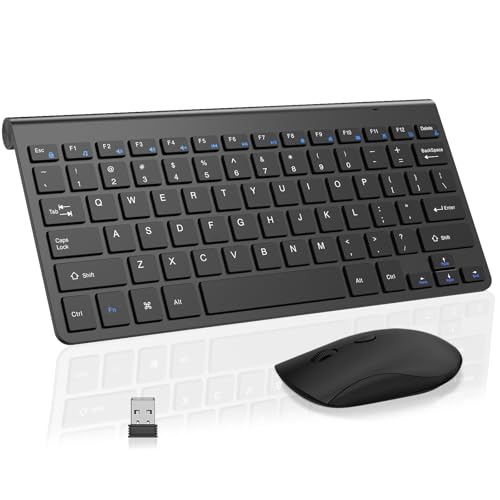
SHUNJINRUN Mini Wireless Keyboard and Mouse
Best for: small desks and quiet environments
- Connectivity
- 2.4GHz USB receiver
- Switch Type
- Scissor switch
- Mouse DPI
- 2400 DPI
- Form Factor
- Mini
- Color
- Black
- Weight
- 1.05 pounds
This mini wireless combo uses a single 2.4GHz USB receiver for both keyboard and mouse. The keyboard features scissor switches for quiet typing and an ultra-thin profile. The mouse offers three DPI levels up to 2400 for precise tracking. It includes a deep sleep mode after ten minutes of inactivity to save battery. The set weighs 1.05 pounds and fits small desks.
Pros
- Scissor switch keyboard for quiet operation
- Mouse with adjustable 1000/1600/2400 DPI
- Single USB receiver for both devices
- Deep sleep mode saves battery power
Cons
- Mini form factor lacks full-size layout
- Only supports 2.4GHz wireless connection
- No Bluetooth connectivity option listed
Good fit if
- You need a space-saving setup
- You want silent typing for shared spaces
- You prefer a simple plug-and-play connection
Skip if
- You require a full-size keyboard layout
- You need Bluetooth multi-device support
- You want a mouse with higher DPI
Verdict: SHUNJINRUN Mini Wireless Keyboard Mouse Combo suits users with limited desk space who prioritize quiet typing and simple wireless setup. It is a practical option for small workstations.
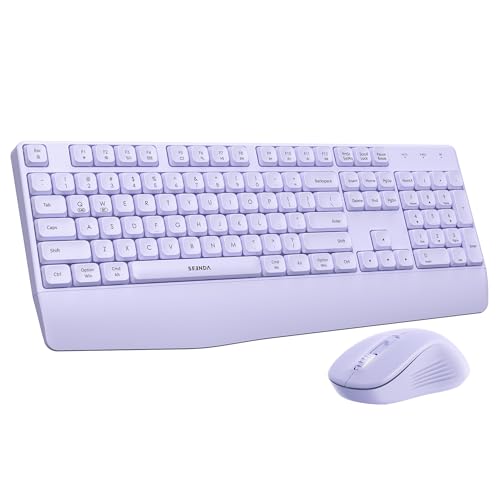
Seenda Full Size Ergonomic Keyboard and Mouse Combo
Best for: multi-device users needing a numeric keypad
- Connectivity
- Bluetooth 5.0, 2.4G USB
- Keyboard Form Factor
- Full Size
- Ergonomic Features
- Built-in keyboard wrist rest
- Multi-Device Pairing
- 2 devices
- Power Source
- 1 AAA (keyboard), 1 AA (mouse)
- Mouse DPI
- 2400 DPI
View on Amazon: Seenda Full Size Ergonomic Keyboard and Mouse Combo
This Seenda combo offers full-size input with a built-in wrist rest and a quiet purple mouse. It supports dual connectivity via Bluetooth 5.0 and a 2.4G USB receiver, allowing you to switch between two devices. The keyboard uses one AAA battery, while the mouse uses one AA. You get adjustable DPI up to 2400 and long standby times. It suits users needing numeric keypad input and multi-OS compatibility.
Pros
- Full-size layout with dedicated numeric keypad
- Dual Bluetooth 5.0 and 2.4G USB connectivity
- Built-in ergonomic wrist rest for the keyboard
- Adjustable mouse DPI up to 2400
- Supports Windows, macOS, iPadOS, and Android
Cons
- Requires two separate batteries (AAA and AA)
- No mention of included batteries in the data
- 2.4G USB mode restricted to Windows only
Good fit if
- You need a numeric keypad for data entry
- You use both Windows PCs and Macs
- You prefer a purple aesthetic for your desk
Skip if
- You want a single battery type for both devices
- You need 2.4G connectivity on non-Windows systems
- You prefer a compact or tenkeyless keyboard size
Verdict: Seenda Purple Full-Size Bluetooth Combo provides a quiet, multi-device experience with a full keypad and wrist support. It is a practical option for hybrid users who value ergonomic comfort and specific color choices.
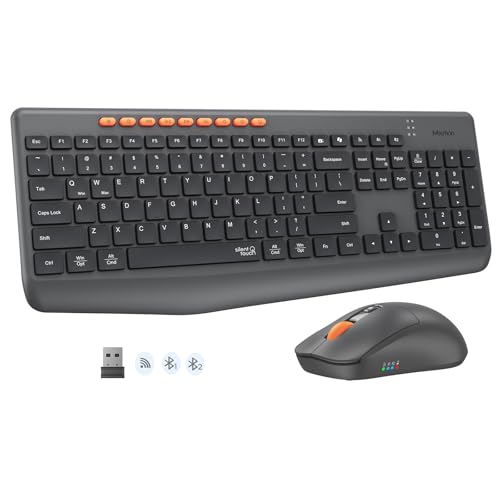
MEETION Full-Size Silent Wireless Combo
Best for: Users needing a number pad and quiet typing
- Connectivity
- Bluetooth, 2.4G wireless
- Keyboard Form Factor
- Full-size
- Power Source
- Dry battery
- Mouse DPI
- 3200 DPI
- Color
- Black
- Noise Level
- Silent
The MEETION C4133 is a full-size wireless keyboard and mouse combo featuring dual-mode connectivity via Bluetooth and 2.4G wireless. It offers silent operation for both typing and clicking, reducing noise by over 90%. The mouse provides four adjustable DPI levels up to 3200. The keyboard includes a numeric keypad and nine multimedia hotkeys. It runs on dry batteries with auto-sleep technology.
Pros
- Dual-mode Bluetooth and 2.4G wireless connectivity
- Full-size layout with dedicated numeric keypad
- Mouse supports up to 3200 DPI
- Silent design reduces noise by over 90%
- Nine dedicated multimedia hotkeys
Cons
- Uses dry batteries instead of rechargeable power
- Full-size footprint requires more desk space
- No mention of included carrying case
Good fit if
- You need a numeric keypad for data entry
- You want silent typing in shared spaces
- You prefer switching between multiple devices
Skip if
- You require a compact or tenkeyless layout
- You prefer rechargeable battery systems
- You need a portable travel-friendly design
Verdict: The MEETION C4133 Full-Size Silent Combo suits users who need a full keyboard with a number pad and quiet operation for office or home use.
Specifications side by side
| Spec | Logitech MK270 Full-Size Wireless Combo | Arteck Ultra Compact Wireless Combo | Macally Compact Wireless Keyboard and Mouse | Logitech MK470 Slim Wireless Combo | Logitech MK295 Full-Size Silent Wireless Combo | Logitech MK250 Bluetooth Keyboard and Mouse Combo | SHUNJINRUN Mini Wireless Keyboard and Mouse | Seenda Full Size Ergonomic Keyboard and Mouse Combo | MEETION Full-Size Silent Wireless Combo |
|---|---|---|---|---|---|---|---|---|---|
| Connectivity | Wireless USB receiver | 2.4 GHz USB receiver | 2.4 GHz RF (USB dongle) | 2.4 GHz USB | 2.4 GHz USB receiver | Bluetooth | 2.4GHz USB receiver | Bluetooth 5.0, 2.4G USB | Bluetooth, 2.4G wireless |
| Keyboard Form Factor | Full-size | Ultra Compact Slim | Compact | Compact | Full-size | Compact | not specified | Full Size | Full-size |
| Ergonomic Features | not specified | Ergonomic mouse | not specified | not specified | Adjustable tilt legs | not specified | not specified | Built-in keyboard wrist rest | not specified |
| Multi-Device Pairing | not specified | not specified | not specified | not specified | not specified | not specified | not specified | 2 devices | not specified |
| Power Source | not specified | Built-in rechargeable battery | not specified | not specified | not specified | not specified | not specified | 1 AAA (keyboard), 1 AA (mouse) | Dry battery |
| Switch Type | not specified | not specified | Slim scissor flex | Scissor keys | not specified | not specified | Scissor switch | not specified | not specified |
| Mouse DPI | not specified | not specified | 800 / 1200 / 1600 DPI | 1000 DPI | not specified | not specified | 2400 DPI | 2400 DPI | 3200 DPI |
| Form Factor | Full-Size | Compact | Mini | Compact | Full-Size | not specified | Mini | Full-Size | Full-Size |
| Design | not specified | Ergonomic | not specified | not specified | not specified | not specified | not specified | Ergonomic | not specified |
| Color | Black | Black | Black | Off White | Off-White | Graphite | Black | Purple | Black |
| Operating System | not specified | Windows | not specified | not specified | not specified | not specified | not specified | not specified | not specified |
| Noise Level | not specified | not specified | Silent | not specified | Silent | not specified | not specified | not specified | Silent |
| Dimensions | 20.1 × 6.22 × 1.81 inches | 11.1 × 5.28 × 0.55 inches | 0.79 × 1.18 × 0.5 inches | 17.8 × 5.9 × 1.4 inches | 0.7 × 17.4 × 5.86 inches | 18 × 5.98 × 1.73 inches | not specified | not specified | not specified |
| Weight | 1.05 pounds | not specified | 12 ounces | 1.8 pounds | not specified | 1.4 pounds | 1.05 pounds | not specified | not specified |
| Size | 1 Pack | Ultra Compact Slim | Compact Combo | not specified | (Pack of 1) | 1.90 | not specified | Full Size | standard |
| Model | 920-008813 | HW086 | RFCOMPACTKEYCB | 920-009443 | 920-009783 | 920-013510 | not specified | COE200 | C4133 |
If you build a PC alongside your desk peripherals, specs in best heatsinks under 30 list standard thermal dimensions.
How to choose the right one
-
Check connectivity type
Decide between a 2.4 GHz USB receiver or Bluetooth. The Logitech MK270 uses a wireless receiver, which offers stable plug-and-play performance without draining device Bluetooth resources. If you prefer a clutter-free desk, the Logitech MK250 provides Bluetooth connectivity. This allows you to connect to multiple devices easily. Choose the receiver method for simplicity or Bluetooth for flexibility with modern laptops and tablets that have limited USB ports.
-
Select the form factor
Match the layout to your desk space and typing habits. Full-size models like the Logitech MK270 include a dedicated number pad, essential for data entry. Compact options like the Arteck Ultra Compact save space on small desks. Mini keyboards, such as the Macally Compact, offer the smallest footprint for tight workstations. Consider whether you need numeric keys or just the main typing area. Your choice directly impacts the physical size and portability of your setup.
-
Consider noise levels
Silent keyboards are vital for shared offices or quiet home environments. The Logitech MK295 and Macally Compact both feature silent key switches to reduce typing noise. The SHUNJINRUN Mini also prioritizes quiet operation. If you work late or share a space, look for the silent attribute in the specs. Standard keyboards produce more audible clicks. Choosing a silent model helps maintain a peaceful workspace without disturbing others nearby during long work sessions.
-
Evaluate battery options
Look at the power source to determine maintenance frequency. The Arteck Ultra Compact features a rechargeable battery, which reduces the need for frequent battery replacements. Most other models, like the Logitech MK270, use standard replaceable batteries. Rechargeable options offer convenience and lower long-term waste. Standard batteries provide immediate power and easy swaps. Check the power source spec to ensure the maintenance level fits your routine and usage patterns effectively.
-
Review physical dimensions
Measure your available desk space before buying. The Logitech MK270 measures 20.1 inches in length, requiring significant desk area. In contrast, the Macally Compact is much smaller, fitting easily into tight spaces. The Arteck Ultra Compact is also slim and space-efficient. Compare the width, height, and length specs to ensure the combo fits your desk. Portability matters if you move your setup often. Smaller dimensions offer better flexibility for travel or small workstations.
-
Check operating system support
Ensure compatibility with your primary computer. The Arteck Ultra Compact is optimized for Windows users, offering a tailored experience. Most other models support standard Windows and macOS layouts. The Logitech MK250 works well with Bluetooth-enabled devices across platforms. Verify the operating system attribute if you have specific software needs. Some layouts may include Windows-specific keys. Matching the OS ensures all function keys and shortcuts work as expected without extra configuration.
Frequently asked questions
Which wireless keyboard and mouse combo is best for a full-size layout with a number pad?
The Logitech MK270 Full-Size Wireless Combo is the top choice for users needing a standard layout with a dedicated number pad. It features a wireless connection and a black finish. The device measures 20.1 inches in length and weighs 1.05 pounds, providing a stable presence on your desk without requiring Bluetooth pairing.
Is there a durable compact keyboard and mouse combo for Windows users?
The Arteck Ultra Compact Wireless Combo is designed for Windows users who value durability and a small footprint. It features a stainless steel build and an ergonomic design. This ultra-compact slim model measures 11.1 inches in length and 0.55 inches in height, making it ideal for tight spaces while maintaining a reliable wireless connection.
What is the quietest keyboard and mouse combo for a small workspace?
The Macally Compact Wireless Keyboard and Mouse is a practical pick for quiet workspaces due to its silent noise level. It offers a mini form factor with a small footprint. The black combo weighs just 12 ounces and connects via a reliable 2.4 GHz wireless signal, prioritizing quiet operation over a full-sized layout.
Which keyboard and mouse combo offers the best battery life for a home office?
The Logitech MK470 Slim Wireless Combo is a strong option for users valuing battery longevity and space efficiency. It features a compact form factor with quiet keys. The off-white device connects via 2.4 GHz wireless and measures 17.8 inches in length, fitting neatly into compact home office setups while minimizing desk clutter.
Can I get a silent full-size keyboard and mouse combo with a number pad?
Yes, the Logitech MK295 Full-Size Silent Wireless Combo is ideal for users who prioritize silence and a full numpad. It features a silent noise level and a full-size form factor. The off-white device connects wirelessly and does not require Bluetooth, making it a practical choice for those who want reliable daily typing without disturbing others.
Which keyboard and mouse combo supports Bluetooth connectivity for a clutter-free desk?
The Logitech MK250 Bluetooth Keyboard and Mouse Combo is a practical choice for users prioritizing a clutter-free desk. It features Bluetooth connectivity and a compact layout that still includes a number pad. The graphite-colored device weighs 1.4 pounds and connects wirelessly, offering flexibility without the need for a dedicated USB receiver.
Is there a mini wireless keyboard and mouse combo for small desks?
The SHUNJINRUN Mini Wireless Keyboard and Mouse suits users with limited desk space who prioritize quiet typing. It features a mini form factor and a simple wireless setup. The black combo weighs 1.05 pounds, providing a practical option for small workstations where space is at a premium but functionality remains essential for daily tasks.
Which ergonomic keyboard and mouse combo supports multiple devices via Bluetooth?
The Seenda Full Size Ergonomic Keyboard and Mouse Combo provides a quiet, multi-device experience with a full keypad. It features Bluetooth connectivity and an ergonomic design with wrist support. The purple full-size model is a practical option for hybrid users who value ergonomic comfort and specific color choices while needing a numeric keypad for data entry.