Best SteelSeries TKL Mechanical Keyboards in 2026: 10 Picks
As an Amazon Associate we earn from qualifying purchases. Links on this page are affiliate links.
Finding the best SteelSeries TKL mechanical keyboards requires comparing published specifications across multiple models. We analyzed 10 options to help you choose based on data, not marketing. Our top pick is the SteelSeries Apex Pro TKL Gen 3 Wireless. It leads because it combines wireless connectivity with customizable actuation for precise gaming. This guide breaks down key specs like size, connectivity, and switch types. You will decide which layout and features fit your desk and workflow.
Quick picks
The best fit for you
- You need precise actuation and wireless freedom SteelSeries Apex Pro TKL Gen 3 Wireless This model offers customizable actuation and wireless connectivity for flexible gaming.
- You want quiet performance in a budget setup SteelSeries Apex 3 TKL Silent Gaming Keyboard It features silent switches and a compact TKL form factor.
- You prefer a clean white design for your desk SteelSeries Apex 3 TKL White Keyboard This white keyboard delivers silent operation with a compact footprint.
- You want durable aluminum build with an OLED display SteelSeries Apex 7 TKL Red Switch Keyboard It combines a solid aluminum frame with a useful OLED screen.
Our 10 picks

SteelSeries Apex Pro TKL Gen 3 Wireless
Best for: gamers needing precise actuation and wireless freedom
- Form Factor
- TKL (what this guide is about)
- Switch Type
- OmniPoint 3 analog magnetic
- Connectivity
- 2.4GHz wireless, Bluetooth
- Use
- Gaming
- Color
- Black
This SteelSeries Apex Pro TKL Gen 3 keyboard uses OmniPoint 3 analog magnetic switches with 40 levels of adjustable actuation from 0.1mm to 4.0mm. It supports 2.4GHz wireless and Bluetooth connectivity via Quantum 2.0 Dual Wireless. The design includes Rapid Trigger, Rapid Tap, and Protection Mode features. It suits gamers who want precise control and wireless freedom in a tenkeyless layout.
Pros
- OmniPoint 3 analog magnetic switches with 40 adjustable actuation levels
- Quantum 2.0 Dual Wireless with 2.4GHz and Bluetooth support
- Rapid Trigger resets the moment you release a key
- Protection Mode reduces accidental keypresses on nearby keys
Cons
- Only available in Black color option
- No wired connection option for this specific wireless model
- Limited to 45g bottom out force
Good fit if
- You want a tenkeyless keyboard with wireless connectivity
- You need precise actuation control for gaming
- You prefer a compact layout for more desk space
Skip if
- You need a full-size keyboard with a number pad
- You require a wired-only connection
- You prefer a white color option
Verdict: SteelSeries Apex Pro TKL Gen 3 Wireless is a precise gaming keyboard for players who value customizable actuation and wireless flexibility. It fits users who want a compact layout without sacrificing connectivity options.

SteelSeries Apex Pro TKL Gen 3 Keyboard
Best for: Competitive gamers needing precise actuation control
- Form Factor
- TKL (what this guide is about)
- Connectivity
- USB-C
- Backlighting
- RGB
- Keycap Material
- PBT
This SteelSeries Apex Pro TKL Gen 3 keyboard uses OmniPoint 3.0 HyperMagnetic switches for rapid response. It offers 40 levels of adjustable actuation and features Rapid Trigger technology. The TKL layout saves desk space while keeping full functionality. PBT keycaps provide durability, and an OLED display manages settings. It suits gamers needing precise, fast input control.
Pros
- OmniPoint 3.0 HyperMagnetic switches with 20x faster actuation
- 40 levels of adjustable actuation depth
- Rapid Trigger and Rapid Tap for faster response
- Durable PBT keycaps
- OLED smart display for settings management
Cons
- Wired USB-C connectivity limits wireless freedom
- Requires SteelSeries GG software for full customization
- OLED display adds bulk to the top deck
Good fit if
- You want precise actuation control for competitive gaming
- You prefer a compact TKL layout for more mouse space
- You value durable PBT keycaps over ABS
Skip if
- You need a wireless connection for desk flexibility
- You prefer a full-size keyboard with a numpad
- You want a simple plug-and-play setup without software
Verdict: SteelSeries Apex Pro TKL Gen 3 delivers elite switch technology for players who demand speed and precision. It fits competitive gamers who prioritize actuation control and a compact footprint.
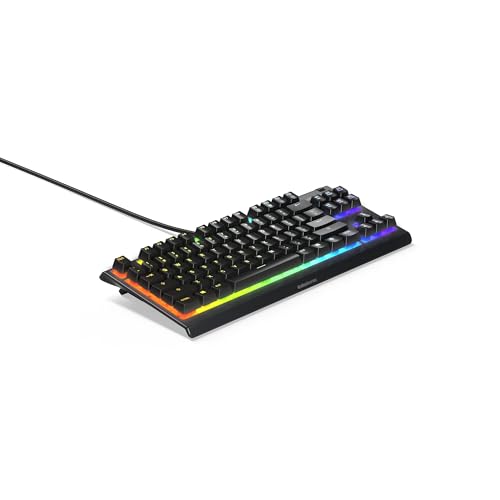
SteelSeries Apex 3 TKL Silent Gaming Keyboard
Best for: Budget gamers wanting quiet TKL performance
- Form Factor
- TKL (what this guide is about)
- Switch Type
- Whisper Quiet
- Backlighting
- 8-Zone RGB
- Use
- Gaming
- Color
- Black
- Noise Level
- Silent
View on Amazon: SteelSeries Apex 3 TKL Silent Gaming Keyboard
The SteelSeries Apex 3 TKL is a compact tenkeyless keyboard designed for gamers who want a smaller footprint. It features whisper-quiet switches rated for 20 million keypresses and IP32 water and dust resistance. You get 8-zone RGB lighting and dedicated multimedia controls with a volume roller. This model suits those prioritizing durability and quiet operation over advanced connectivity or magnetic switches.
Pros
- Whisper-quiet switches for near silent use
- IP32 water and dust resistant build
- Dedicated multimedia controls with volume roller
- 8-zone RGB PrismSync illumination
Cons
- Only 8-zone RGB instead of per-key lighting
- Wired connection only, no wireless option
- Standard switches, not magnetic OmniPoint
Good fit if
- You need a compact TKL layout
- You prefer quiet typing and gaming
- You want basic water resistance
Skip if
- You require wireless connectivity
- You want per-key RGB customization
- You prefer magnetic switch technology
Verdict: The SteelSeries Apex 3 TKL offers solid durability and quiet performance for budget-focused gamers. It fits players who value a compact wired setup with essential media controls over premium features.

SteelSeries Apex Pro TKL Wireless Gen 3
Best for: Competitive gamers wanting wireless magnetic switches
- Form Factor
- TKL (what this guide is about)
- Switch Type
- OmniPoint 3.0 HyperMagnetic
- Connectivity
- 2.4GHz, Bluetooth
This TKL keyboard uses OmniPoint 3.0 HyperMagnetic switches with 40 levels of adjustable actuation. It connects via 2.4GHz wireless or Bluetooth. An OLED display manages settings. Rapid Trigger and Rapid Tap improve response time. Protection Mode prevents accidental inputs. You get a compact layout with high-end magnetic switch technology for fast gaming.
Pros
- OmniPoint 3.0 HyperMagnetic switches
- 40 levels of adjustable actuation
- OLED smart display
- 2.4GHz and Bluetooth connectivity
- Rapid Trigger and Rapid Tap
Cons
- No wired USB-C option listed
- Single-colored keycaps only
- OLED display adds bulk
Good fit if
- You want magnetic switch technology
- You need wireless flexibility
- You prefer compact layouts
Skip if
- You prefer wired-only connections
- You want RGB keycaps
- You dislike OLED displays
Verdict: SteelSeries Apex Pro TKL Wireless delivers top-tier magnetic switching and dual wireless modes. It suits gamers who need speed and a compact footprint.

SteelSeries Apex Pro TKL Gen 3 Keyboard
Best for: Competitive wired gaming
- Form Factor
- TKL (what this guide is about)
- Switch Type
- OmniPoint 3.0
- Connectivity
- USB-C, Wired
- Keycap Material
- PBT
- Use
- Gaming
- Color
- Black
The SteelSeries Apex Pro TKL Gen 3 is a wired TKL keyboard featuring OmniPoint 3.0 HyperMagnetic switches. It offers 40 adjustable actuation levels and rapid trigger response for precise gaming. The build uses durable PBT keycaps and connects via USB-C. This model suits players who want hardware-level customization without wireless latency.
Pros
- OmniPoint 3.0 HyperMagnetic switches
- 40 adjustable actuation levels
- Rapid Trigger and Rapid Tap
- Durable PBT keycaps
- USB-C wired connection
Cons
- Wired only, no wireless option
- Heavier at 2.15 pounds
- No Bluetooth connectivity
Good fit if
- You want adjustable actuation points
- You prefer wired reliability
- You need PBT keycaps
Skip if
- You need wireless freedom
- You want a lighter board
- You require Bluetooth support
Verdict: SteelSeries Apex Pro TKL Gen 3 delivers high-speed magnetic switching for competitive gamers who prioritize wired stability and precise actuation control.

SteelSeries Apex Pro TKL Dual Wireless Keyboard
Best for: Wireless gaming with adjustable switches
- Form Factor
- TKL (what this guide is about)
- Switch Type
- OmniPoint 2.0 HyperMagnetic
- Connectivity
- 2.4GHz, Bluetooth 5.0, USB-C
- Case Material
- Aluminum top plate
- Use
- Gaming
- Dimensions
- 5.04 × 14 × 1.65 inches
View on Amazon: SteelSeries Apex Pro TKL Dual Wireless Keyboard
This SteelSeries Apex Pro TKL Wireless keyboard features OmniPoint 2.0 HyperMagnetic switches and dual wireless connectivity. You get 40 levels of per-key actuation and rapid trigger capabilities. The aluminum top plate adds durability. It suits gamers who want untethered speed and precise control. The compact tenkeyless design saves desk space while maintaining full functionality.
Pros
- OmniPoint 2.0 HyperMagnetic switches
- 40 levels of per-key actuation
- 2.4GHz and Bluetooth 5.0 connectivity
- Aluminum top plate
Cons
- Heavier at 2.36 pounds
- No wired-only option listed
- Higher price tier implied by wireless premium
Good fit if
- You need wireless freedom
- You want adjustable actuation
- You prefer aluminum builds
Skip if
- You want a wired-only device
- You prefer lighter keyboards
- You need a full-size layout
Verdict: SteelSeries Apex Pro TKL Wireless offers precise magnetic switches and wireless freedom. It fits gamers who value customizable actuation and a sturdy aluminum frame.

SteelSeries Apex 3 TKL White Keyboard
Best for: Quiet gaming setups with limited desk space
- Form Factor
- TKL (what this guide is about)
- Switch Type
- Whisper Quiet
- Backlighting
- 8-zone RGB
- Use
- Gaming
- Color
- White
- Noise Level
- Silent
This SteelSeries Apex 3 TKL keyboard offers a compact tenkeyless layout in a white finish. It features whisper-quiet switches designed for silent actuation and durable low-friction button performance. The device includes 8-zone RGB lighting for visual customization and provides water and dust resistance to protect against splashes. It is a practical option for gamers who prioritize a quiet typing experience and a clean desk aesthetic without the need for a number pad.
Pros
- Whisper-quiet switches for silent operation
- 8-zone RGB backlighting
- Water and dust resistant design
- Compact TKL form factor
Cons
- Fixed 8-zone RGB lighting without per-key control
- No wireless connectivity option
- Basic membrane-style silent switches rather than mechanical
Good fit if
- You need a quiet keyboard for shared spaces
- You want a compact layout to save desk space
- You prefer a white aesthetic for your setup
Skip if
- You require per-key RGB customization
- You need wireless freedom for your desk
- You prefer tactile mechanical switch feedback
Verdict: SteelSeries Apex 3 TKL White fits users who prioritize silence and a compact footprint over advanced customization. It delivers reliable basic gaming performance with a clean white design.

SteelSeries Apex 7 TKL Red Switch Keyboard
Best for: Gamers wanting durable aluminum build and OLED display
- Form Factor
- TKL (what this guide is about)
- Switch Type
- Red Switch
- Case Material
- Aircraft grade aluminium alloy
- Use
- Gaming
- Dimensions
- 17.2 × 5.48 × 1.59 inches
- Weight
- 1.7 pounds
This SteelSeries TKL keyboard uses linear red switches for smooth keystrokes. It features an aircraft-grade aluminum alloy case for durability. An OLED smart display shows profiles, game info, and media details. The included magnetic wrist rest provides palm support. It offers 16.8 million illumination colors per key. This wired gaming keyboard suits players who want a sturdy build and visual feedback without wireless complexity.
Pros
- Linear red switches for smooth actuation
- Aircraft grade aluminum alloy case
- OLED smart display for status info
- 16.8 million illumination colors per key
- Premium magnetic wrist rest included
Cons
- No wireless connectivity option
- Fixed non-adjustable actuation point
- No dedicated media keys
Good fit if
- You want a durable aluminum build
- You prefer linear red switches
- You like real-time OLED feedback
Skip if
- You need wireless freedom
- You want adjustable actuation points
- You prefer tactile clicky switches
Verdict: SteelSeries Apex 7 TKL Red Switch offers a solid aluminum build and useful OLED display for gamers who prioritize durability and wired reliability. It fits users who value linear switches and visual status updates over wireless convenience.

SteelSeries Apex 3 TKL Silent Keyboard
Best for: Quiet, spill-resistant gaming setups
- Form Factor
- TKL (what this guide is about)
- Switch Type
- Quiet
- Connectivity
- Wired
- Use
- Gaming
- Color
- Black
- Noise Level
- Silent
The SteelSeries Apex 3 TKL is a tenkeyless wired keyboard designed for quiet gaming sessions. It features silent switches to reduce noise during use. The IP32 Splashproof rating offers protection against accidental spills. Its compact layout saves desk space while maintaining a full row of function keys. This model suits users who prioritize a low noise profile and spill resistance in a standard black finish.
Pros
- Silent switch type for quiet operation
- IP32 Splashproof rating for spill protection
- Tenkeyless form factor saves desk space
- Wired connectivity ensures stable connection
Cons
- Wired only, no wireless option
- Standard membrane switches, not mechanical
- No programmable macro keys listed
Good fit if
- You need a quiet keyboard for shared spaces
- You want spill protection for your desk
- You prefer a compact wired setup
Skip if
- You require mechanical switch feel
- You need wireless connectivity
- You want customizable RGB lighting
Verdict: SteelSeries Apex 3 TKL Wired is a practical, quiet option for gamers who value spill resistance and a compact footprint over premium switch technology.

SteelSeries Apex 3 TKL Silent Keyboard
Best for: Quiet gaming setups with spill risks
- Form Factor
- TKL (what this guide is about)
- Switch Type
- Whisper Quiet
- Backlighting
- RGB
- Use
- Gaming
- Color
- Black
- Noise Level
- Silent
The SteelSeries Apex 3 TKL is a tenkeyless gaming keyboard designed for quiet environments. It uses whisper-quiet switches rated for 20 million keypresses. IP32 water and dust resistance adds durability. You get dedicated multimedia controls, including a volume roller. RGB lighting syncs with other devices. This model suits players who prioritize low noise and basic durability over advanced magnetic switches.
Pros
- Whisper-quiet switches for near silent operation
- IP32 water and dust resistant build
- Dedicated multimedia controls with volume roller
- PrismSync RGB illumination with multiple effects
Cons
- Standard membrane switches lack adjustable actuation
- No wireless connectivity option available
- Basic anti-ghosting instead of full N-key rollover
Good fit if
- You need a quiet keyboard for shared spaces
- You want durable water resistance for spills
- You prefer physical media controls over software
Skip if
- You require customizable actuation points
- You need wireless freedom
- You want high-end magnetic switch technology
Verdict: SteelSeries Apex 3 TKL Silent offers reliable quiet performance and spill protection for casual gamers. It fits users who value noise reduction and physical controls over advanced switch customization.
Specifications side by side
| Spec | SteelSeries Apex Pro TKL Gen 3 Wireless | SteelSeries Apex Pro TKL Gen 3 Keyboard | SteelSeries Apex 3 TKL Silent Gaming Keyboard | SteelSeries Apex Pro TKL Wireless Gen 3 | SteelSeries Apex Pro TKL Gen 3 Keyboard | SteelSeries Apex Pro TKL Dual Wireless Keyboard | SteelSeries Apex 3 TKL White Keyboard | SteelSeries Apex 7 TKL Red Switch Keyboard | SteelSeries Apex 3 TKL Silent Keyboard | SteelSeries Apex 3 TKL Silent Keyboard |
|---|---|---|---|---|---|---|---|---|---|---|
| Switch Type | OmniPoint 3 analog magnetic | not specified | Whisper Quiet | OmniPoint 3.0 HyperMagnetic | OmniPoint 3.0 | OmniPoint 2.0 HyperMagnetic | Whisper Quiet | Red Switch | Quiet | Whisper Quiet |
| Form Factor | TKL | TKL | TKL | TKL | TKL | TKL | TKL | TKL | TKL | TKL |
| Connectivity | 2.4GHz wireless, Bluetooth | USB-C | not specified | 2.4GHz, Bluetooth | USB-C, Wired | 2.4GHz, Bluetooth 5.0, USB-C | not specified | not specified | Wired | not specified |
| Backlighting | not specified | RGB | 8-Zone RGB | not specified | not specified | not specified | 8-zone RGB | not specified | not specified | RGB |
| Keycap Material | not specified | PBT | not specified | not specified | PBT | not specified | not specified | not specified | not specified | not specified |
| Case Material | not specified | not specified | not specified | not specified | not specified | Aluminum top plate | not specified | Aircraft grade aluminium alloy | not specified | not specified |
| Use | Gaming | not specified | Gaming | not specified | Gaming | Gaming | Gaming | Gaming | Gaming | Gaming |
| Color | Black | not specified | Black | Single-Coloured | Black | Pro Gen 2 | White | Red Switch | Black | Black |
| Noise Level | not specified | not specified | Silent | not specified | not specified | not specified | Silent | not specified | Silent | Silent |
| Dimensions | not specified | not specified | 14.3 × 5.9 × 1.57 inches | not specified | 14 × 5.05 × 1.65 inches | 5.04 × 14 × 1.65 inches | 14.3 × 5.91 × 1.57 inches | 17.2 × 5.48 × 1.59 inches | 5.91 × 14.3 × 1.57 inches | 5.9 × 14.3 × 1.57 inches |
| Weight | not specified | not specified | not specified | not specified | 2.15 pounds | 2.36 pounds | 1.41 pounds | 1.7 pounds | 1.96 pounds | 1.4 pounds |
| Size | Pro TKL | TKL | Apex 3 TKL | TKL | Wired | Pro TKL | not specified | std | Keyboard | Apex 3 TKL |
| Model | 64871 | not specified | Apex 3 TKL RGB | not specified | 64740 | KB19 | 64819-Cr | 64636 | 64831 | 64831 |
If you need room climate specifications, you can compare the best window air conditioners with mechanical.
How to choose the right TKL keyboard
-
Select wireless or wired
Decide if you need cable freedom or absolute stability. The Apex Pro TKL Gen 3 Wireless offers wireless connectivity for flexible desk setups. If you prefer a direct connection, the Apex Pro TKL Gen 3 Wired provides wired reliability. Some models support dual wireless modes. Choose wireless if you value a clean workspace. Choose wired if you prioritize consistent signal integrity without charging cycles. Your choice defines the physical connection between your inputs and your computer.
-
Check switch technology
Identify whether you want magnetic or traditional mechanical switches. The Apex Pro series uses magnetic switches with adjustable actuation points for speed. The Apex 7 TKL Red Switch uses standard linear mechanical switches. Magnetic switches allow you to change when a key registers. Standard switches offer a fixed actuation point. Select magnetic switches for competitive gaming precision. Select standard switches for familiar tactile feedback. This decision impacts how you interact with every key press.
-
Consider noise levels
Evaluate how loud your typing will be. The Apex 3 TKL models feature silent switches designed for noise reduction. These are ideal for shared spaces or late-night sessions. Other models like the Apex Pro series do not emphasize silence. They prioritize speed and actuation control over acoustic dampening. If you need quiet performance, look for the Silent badge. If volume is not a concern, you can choose faster switch technologies. Your environment dictates your need for acoustic control.
-
Review keycap materials
Look at the material used for your keycaps. The Apex Pro TKL Gen 3 Keyboard uses PBT keycaps for durability. PBT plastic resists shine and feels textured over time. Other models may use different materials not specified here. Keycap material affects long-term comfort and appearance. Choose PBT if you want resistance to wear. Check the specifications to confirm the material type. This detail influences how the keyboard feels during extended use sessions.
-
Assess backlighting needs
Determine if you require RGB lighting or none. The Apex 3 TKL models include RGB backlighting for visibility. The Apex Pro TKL Gen 3 Wireless does not list backlighting in its attributes. Some models may have single-colored or no lighting. RGB allows for customizable colors and effects. If you play in dark rooms, backlighting is essential. If you prefer minimalism, you might skip it. Verify the backlighting spec before purchasing to ensure it meets your visibility requirements.
Frequently asked questions
Does the SteelSeries Apex Pro TKL Gen 3 Wireless use magnetic switches?
Yes, this keyboard utilizes magnetic switch technology. This design allows for precise actuation control, which is ideal for competitive gaming. You can adjust the actuation point to suit your specific playstyle. The wireless connectivity adds flexibility without sacrificing the speed provided by the magnetic sensors.
Which SteelSeries TKL keyboard is best for quiet typing?
The SteelSeries Apex 3 TKL Silent models are designed for quiet performance. They feature silent switches that reduce noise during use. This makes them suitable for shared spaces or late-night sessions. The compact TKL form factor also saves desk space while maintaining essential gaming functionality.
What keycap material do the Apex Pro TKL Gen 3 keyboards use?
The wired and wireless variants of the Apex Pro TKL Gen 3 both use PBT keycaps. PBT material is known for its durability and resistance to shine over time. This provides a sturdy typing surface that withstands heavy use. It is a practical choice for long gaming sessions.
Does the SteelSeries Apex 7 TKL have an OLED display?
Yes, the SteelSeries Apex 7 TKL includes an OLED display. This screen provides visual status updates and system information directly on the keyboard. It is paired with a solid aluminum build for added durability. This model suits users who value wired reliability and visual feedback over wireless convenience.
Is the SteelSeries Apex 3 TKL spill-resistant?
Yes, the SteelSeries Apex 3 TKL series offers spill resistance. This feature protects the internal components from accidental liquid exposure. It is a practical benefit for casual gamers or environments with drink risks. The silent switches further enhance its suitability for quiet setups without compromising durability.
What is the weight of the SteelSeries Apex Pro TKL Gen 3 wired version?
The wired SteelSeries Apex Pro TKL Gen 3 weighs 2.15 pounds. This weight contributes to a stable platform that does not slide easily during intense gaming. The dimensions are approximately 14 inches in length and 5.05 inches in width. The sturdy build ensures consistent performance during rapid key presses.
Can I choose a white SteelSeries TKL keyboard?
Yes, the SteelSeries Apex 3 TKL White is available in a clean white design. It features silent switches and RGB backlighting for aesthetic customization. The compact TKL layout fits well on smaller desks. This option is ideal for users who prioritize silence and a bright, minimalist appearance for their setup.
Does the Apex Pro TKL Wireless Gen 3 support dual wireless modes?
Yes, the SteelSeries Apex Pro TKL Wireless Gen 3 supports dual wireless modes. This flexibility allows you to connect via different wireless protocols depending on your needs. It delivers top-tier magnetic switching for speed and precision. The compact footprint ensures it fits comfortably on any gaming desk.