8 Best Gaming Mice with 12 Buttons, Compared
As an Amazon Associate we earn from qualifying purchases. Links on this page are affiliate links.
A dedicated gaming mouse with 12 Buttons gives you direct thumb access to complex macros, keybinds, and item rotations. This guide evaluates 8 models strictly using the specifications published on their product listings.
The Redragon Impact Ergonomic MMO Mouse takes the top spot because it pairs 12 programmable buttons with a tunable weight cartridge and a maximum sensitivity of 12400 DPI. Use this guide to decide which button design, connectivity type, and total weight match your grip and desk setup.
Quick picks
The best fit for you
- You want an ergonomic wired mouse with adjustable weight. Redragon Impact Ergonomic MMO Mouse It combines wired connectivity, a 12400 DPI sensor, and a tunable weight cartridge with 12 programmable buttons.
- You want a wireless mouse with a rechargeable battery. Redragon Wireless 12-Button MMO Mouse This mouse offers wireless operation powered by an internal 1000mAh rechargeable battery alongside 12 programmable buttons.
- You need a dedicated left-handed mouse for MMOs. Razer Naga Left-Handed MMO Mouse It features a dedicated left-handed ergonomic build with an 8200 DPI laser sensor and 12 programmable buttons.
- You prefer an upright vertical design with high DPI. Attoe Vertical Wireless Gaming Mouse This wireless model features an upright vertical shape, 12 programmable buttons, and a 24000 DPI sensor.
Our 8 picks

Redragon Impact Ergonomic MMO Mouse
Best for: Windows MMO players wanting tunable mouse weight
- Programmable Buttons
- 12 Buttons (what this guide is about)
- Connectivity
- Wired USB
- Maximum DPI
- 12400 DPI
- Sensor
- PixArt PAW3327
- Polling Rate
- 1000 Hz
- Backlighting
- RGB
The Redragon Impact Wired MMO Mouse gives you 12 programmable side buttons alongside an optical Pixart PAW3327 sensor reaching up to 12,400 DPI. It features an adjustable weight system with eight 2.4-gram inserts, a 1000 Hz polling rate, and onboard storage for five profiles. If you play MMOs on a Windows setup and want customizable thumb controls with physical weight tuning, this wired ergonomic mouse covers your core gaming needs.
Pros
- 12 dedicated programmable thumb buttons
- Includes an 8-piece weight tuning set (2.4g each)
- Pixart PAW3327 sensor with up to 12,400 DPI and 1000 Hz polling
- Onboard memory stores 5 individual user profiles
Cons
- Software programming features are not supported on Mac OS
- Tethered to a 6-foot wired USB connection without wireless capability
Good fit if
- You play MMO titles requiring 12 dedicated macro thumb buttons.
- You want to balance mouse weight using removable tuning weights.
- You use a Windows PC and need onboard profile switching.
Skip if
- You use macOS and require full button-programming software.
- You need a wireless mouse to keep your desk clear of cables.
Verdict: Redragon Impact Wired MMO Mouse delivers extensive macro coverage with 12 thumb buttons and a tunable weight cartridge. It provides reliable wired precision for Windows MMO players seeking deep physical and software customization.

Redragon Wireless 12-Button MMO Mouse
Best for: wireless MMO play with rechargeable battery power
- Programmable Buttons
- 12 Buttons (what this guide is about)
- Connectivity
- Wireless, wired
- Maximum DPI
- 16000 DPI
- Polling Rate
- 1000Hz
- Battery Life
- 70 hours
- Backlighting
- RGB
This wireless MMO gaming mouse gives you 12 programmable side buttons alongside 16 total remappable controls. You get adjustable sensitivity up to 16,000 DPI, a polling rate between 125Hz and 1000Hz, and 40G acceleration. An integrated 1000mAh rechargeable battery provides over 70 hours of standby with RGB lighting off, and works wired while charging. It suits you if you need cordless MMO macros.
Pros
- 1000mAh rechargeable battery with over 70 hours runtime with RGB off
- 12 remappable side buttons out of 16 total programmable buttons
- Adjustable tracking from 100 to 16,000 DPI with 40G acceleration
- 5 onboard memory profiles and 2 switchable working modes
Cons
- Listed weight is relatively heavy at approximately 0.64 pounds
- RGB lighting adjustments require downloading external software
Good fit if
- You want a cordless MMO mouse with 12 dedicated thumb buttons.
- You prefer an integrated rechargeable battery over disposable batteries.
Skip if
- You want an ultralight mouse instead of a 0.64-pound frame.
- You prefer configuring lighting without installing manufacturer software.
Verdict: Redragon Wireless Rechargeable MMO Mouse delivers 12 dedicated side buttons and wireless operation backed by an internal 1000mAh battery. It gives you flexible macro storage across 5 onboard profiles without tethering you to a desk cable.
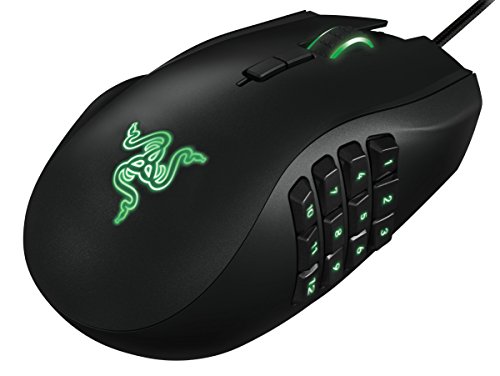
Razer Naga Left-Handed MMO Mouse
Best for: left-handed MMO players needing 12 thumb buttons
- Programmable Buttons
- 12 Buttons (what this guide is about)
- Maximum DPI
- 8,200 DPI
- Weight
- 4.8 ounces
- Sensor
- 4G Laser Sensor
- Use
- Gaming
- Design
- Ergonomic, Left-Handed
The Razer Naga Left-Handed MMO Gaming Mouse gives you a dedicated left-handed ergonomic design equipped with 12 programmable thumb buttons. It features an 8200 DPI 4G laser sensor, an onboard 32-bit ARM processor, and a tilt-click scroll wheel that moves up, down, left, and right. You can assign macros and hotkeys through an in-game configurator overlay, making it a tailored setup if you need complex input controls for MMO games with your left hand.
Pros
- Dedicated left-handed ergonomic shape
- 12 programmable thumb buttons
- Scroll wheel with horizontal tilt and vertical click inputs
- 8200 DPI 4G laser sensor
- Onboard 32-bit ARM processor
Cons
- Left-handed ergonomic shape is unusable for right-handed users
- No wireless connectivity option listed
- Maximum resolution caps at 8200 DPI
Good fit if
- You need a dedicated left-handed layout for MMO gaming.
- You want 12 dedicated thumb buttons alongside a tilt-click scroll wheel.
- You prefer configuring macros and keybinds via an in-game overlay.
Skip if
- You play with your right hand.
- You require a wireless connection.
- You want an optical sensor or sensitivity higher than 8200 DPI.
Verdict: Razer Naga Left-Handed MMO Gaming Mouse delivers dedicated left-hand ergonomics paired with 12 programmable thumb buttons and an 8200 DPI laser sensor. It provides extensive macro execution and tilt-wheel navigation specifically for left-handed setups.
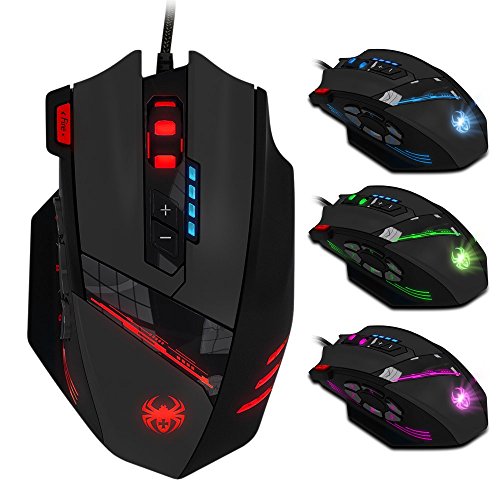
AFUNTA C12 Wired MMO Gaming Mouse
Best for: custom weight tuning and MMO macros
- Programmable Buttons
- 12 Buttons (what this guide is about)
- Connectivity
- USB
- Maximum DPI
- 8000 DPI
- Weight
- 9.92 ounces
- Use
- Gaming
- Length
- 5.12 inches
The AFUNTA C12 is a wired MMO gaming mouse equipped with 12 programmable buttons, including six thumb buttons on the left. It features four preset levels from 1000 to 4000 DPI, reaching 8000 DPI using double-speed adjustment. You get eight built-in weights to balance handling, a dedicated triple-click fire key, and a six-foot braided cable. It suits you if you need macro bindings and custom physical weight.
Pros
- Eight built-in adjustable tuning weights
- Hardware DPI adjustment up to 8000 DPI
- Dedicated triple-click fire button
- Braided six-foot cable with gold-plated USB connector
Cons
- Preset levels limited to four settings before double-speed mode
- Right-handed layout with side buttons fixed on the left
Good fit if
- You want a dedicated triple-click button alongside side thumb keys.
- You prefer tuning overall mouse heft using an internal eight-weight system.
- You require a long six-foot braided USB cable for your desk setup.
Skip if
- You need a wireless mouse for your setup.
- You play left-handed, as the thumb cluster sits on the left side.
Verdict: AFUNTA C12 Wired MMO Gaming Mouse delivers 12 programmable controls and custom weight tuning for multi-action gameplay. It provides practical macro flexibility with dedicated thumb keys and adjustable DPI up to 8000 DPI.
Zelotes 12-Button Wired Gaming Mouse
Best for: Mac gamers wanting customizable mouse weight
- Programmable Buttons
- 12 Buttons (what this guide is about)
- Connectivity
- Wired USB
- Maximum DPI
- 8000 DPI
- Sensor
- A3050
- Use
- Gaming
- Design
- Ergonomic
The Zelotes Wired 12-Button Gaming Mouse gives you 12 programmable buttons paired with an adjustable weight system. You can fine-tune the mouse using eight 2.5-gram removable weights to match your preferred hand feel. It features four onboard DPI presets ranging from 1000 to 4000 DPI, powered by an A3050 optical sensor. If you use macOS or Windows and want multi-button utility with custom physical heft, this wired design covers your core inputs.
Pros
- 12 programmable buttons for custom bindings
- Eight 2.5 g removable weights for balance adjustments
- Four onboard DPI levels: 1000, 1500, 2000, and 4000 DPI
- Ergonomic rubberized grip with built-in LED lighting
Cons
- Configuration software is not fully compatible with Mac OS
- Wired-only connection without wireless functionality
Good fit if
- You want 12 programmable buttons alongside physical weight tuning.
- You switch sensitivity on the fly using dedicated hardware DPI steps.
- You need standard mouse compatibility across Windows and Mac OS systems.
Skip if
- You require full software remapping support on Mac OS.
- You want a cordless mouse setup.
Verdict: Zelotes Wired 12-Button Gaming Mouse provides extensive control through 12 programmable buttons and an eight-piece weight cartridge. It functions across major platforms, though Mac users must operate without full software customization.

IOGEAR 12-Button MMO Mouse
Best for: MMO gaming with custom multi-profile keybindings
- Programmable Buttons
- 12 Buttons (what this guide is about)
- Use
- Gaming
- Color
- Black
- Game Genre
- MMO
- Dimensions
- 4.9 × 3.1 × 1.65 inches
- Weight
- 9.6 ounces
The IOGEAR 12-Button MMO Gaming Mouse gives you 12 programmable buttons for macros and keybindings. You can store custom profiles for work and play, switch across five dedicated DPI settings with a button press, and adjust RGB backlighting between custom hues or seven preset breathing colors. Measuring 4.9 by 3.1 by 1.65 inches and weighing 0.6 pounds, it fits you if you want customizable inputs in a standard black shell.
Pros
- 12 programmable buttons for macros and custom keybindings
- Stores five programmable DPI settings with instant button switching
- Dedicated profiles for work and gaming setups
- RGB backlighting with custom colors and a 7-color breathing preset
Cons
- Heavy 0.6-pound listed weight
- Maximum DPI ceiling not provided in specifications
Good fit if
- You need 12 programmable inputs for MMO macros and keybinds.
- You switch between five specific DPI tiers using a single button.
- You want separate profiles configured for both work and play.
Skip if
- You prefer a lightweight mouse under 0.6 pounds.
- You require verified maximum DPI figures prior to purchasing.
Verdict: IOGEAR 12-Button MMO Gaming Mouse delivers 12 programmable inputs and five quick-shift DPI levels for versatile gaming setups. Its customizable profiles make switching between work and MMO gaming straightforward.
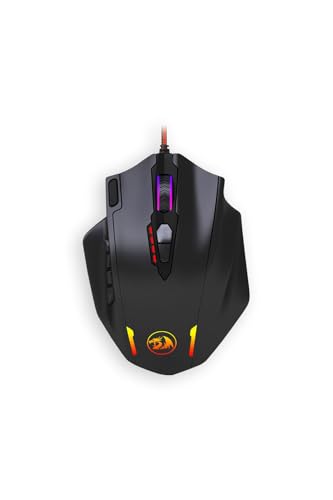
Redragon Impact MMO Gaming Mouse
Best for: MMO players needing 12 customizable thumb buttons
- Programmable Buttons
- 12 Buttons (what this guide is about)
- Maximum DPI
- 12400 DPI
- Polling Rate
- Up to 1000 Hz
- Use
- Gaming
- Game Genre
- MMO
- Dimensions
- 7.88 × 5.91 × 1.94 inches
The Redragon Impact MMO Gaming Mouse gives you an optical sensor with up to 12,400 DPI and switchable polling rates between 125 Hz and 1000 Hz. You get 18 programmable buttons overall, featuring 12 dedicated side buttons for macros and complex MMO bindings. A weight tuning cartridge lets you adjust its heft. This mouse suits you if you need extensive keybinds under your thumb alongside adjustable sensitivity settings.
Pros
- 12 programmable side buttons for dedicated thumb inputs
- Adjustable optical tracking up to 12400 DPI
- Switchable polling rate from 125 Hz to 1000 Hz
- Includes an integrated weight tuning cartridge
Cons
- Base weight of roughly 0.39 pounds makes it heavy
- Fine 100-DPI incremental steps require configuration software
Good fit if
- You need 12 dedicated side buttons for macro-heavy MMO games.
- You prefer adjusting mouse balance using a weight tuning cartridge.
- You want polling rates switchable up to 1000 Hz.
Skip if
- You prefer an ultralight build lighter than 0.39 pounds.
- You want full 100-step DPI customization without installing software.
Verdict: Redragon Impact MMO Gaming Mouse pairs 12 side buttons with an optical sensor reaching 12400 DPI. It provides deep macro configuration and physical weight adjustments for demanding MMO setups.

Attoe Vertical Wireless Gaming Mouse
Best for: right-handed players seeking vertical ergonomic macro control
- Programmable Buttons
- 12 Buttons (what this guide is about)
- Connectivity
- Bluetooth 5.0, 2.4GHz wireless, USB-C
- Maximum DPI
- 24000 DPI
- Sensor
- PMW3325
- Use
- Gaming
- Color
- Black
The Attoe Vertical Wireless Gaming Mouse pairs a handshake posture with 12 programmable inputs and a 5-direction thumb rocker. You get tri-mode connectivity covering dual Bluetooth 5.0, 2.4GHz wireless, and USB-C wired links, paired with a 24,000 DPI optical sensor. It suits you if you want high-DPI tracking and multi-button macros while maintaining an upright grip during long gaming or productivity sessions.
Pros
- Tri-mode connectivity: dual Bluetooth 5.0, 2.4GHz wireless, and USB-C wired
- 12 programmable buttons with onboard memory for saving settings
- Thumb-operated 5-direction rocker adds five directional input options
- High-sensitivity PMW3325 sensor with presets up to 24,000 DPI
Cons
- Asymmetrical vertical shape is built only for right-handed users
- Configuration software may trigger unrecognized app warnings during setup
Good fit if
- You want an upright ergonomic handshake grip to relieve wrist strain during gameplay.
- You alternate across multiple devices using Bluetooth, 2.4GHz, and wired connections.
- You want thumb rocker directional controls alongside standard programmable mouse clicks.
Skip if
- You are a left-handed gamer.
- You prefer a traditional flat, low-profile mouse shape.
Verdict: Attoe Vertical Wireless Gaming Mouse combines an upright ergonomic body with extensive macro options and tri-mode flexibility. It gives right-handed users full MMO-style control without forcing a flat wrist position.
Specifications side by side
| Spec | Redragon Impact Ergonomic MMO Mouse | Redragon Wireless 12-Button MMO Mouse | Razer Naga Left-Handed MMO Mouse | AFUNTA C12 Wired MMO Gaming Mouse | Zelotes 12-Button Wired Gaming Mouse | IOGEAR 12-Button MMO Mouse | Redragon Impact MMO Gaming Mouse | Attoe Vertical Wireless Gaming Mouse |
|---|---|---|---|---|---|---|---|---|
| Connectivity | Wired USB | Wireless, wired | not specified | USB | Wired USB | not specified | not specified | Bluetooth 5.0, 2.4GHz wireless, USB-C |
| Maximum DPI | 12400 DPI | 16000 DPI | 8,200 DPI | 8000 DPI | 8000 DPI | not specified | 12400 DPI | 24000 DPI |
| Weight | not specified | not specified | 4.8 ounces | 9.92 ounces | not specified | not specified | not specified | not specified |
| Programmable Buttons | 18 | 16 | not specified | 12 | 12 | 12 | 18 | 12 |
| Sensor | PixArt PAW3327 | not specified | 4G Laser Sensor | not specified | A3050 | not specified | not specified | PMW3325 |
| Polling Rate | 1000 Hz | 1000Hz | not specified | not specified | not specified | not specified | Up to 1000 Hz | not specified |
| Battery Life | not specified | 70 hours | not specified | not specified | not specified | not specified | not specified | not specified |
| Backlighting | RGB | RGB | not specified | not specified | not specified | not specified | not specified | not specified |
| Use | Gaming | Gaming | Gaming | Gaming | Gaming | Gaming | Gaming | Gaming |
| Design | Ergonomic | not specified | Ergonomic, Left-Handed | not specified | Ergonomic | not specified | not specified | not specified |
| Color | White | Black | Black | C12-Mouse | Black | Black | Black Red | Black |
| Shape | not specified | not specified | not specified | not specified | not specified | not specified | not specified | Vertical |
| Game Genre | MMO | MMO | MMO | not specified | not specified | MMO | MMO | not specified |
| Operating System | not specified | not specified | not specified | not specified | Mac | not specified | not specified | not specified |
| Power Source | not specified | Rechargeable | not specified | not specified | not specified | not specified | not specified | not specified |
| Dimensions | 5.12 × 3.94 × 1.57 inches | not specified | 4.87 × 2.94 × 1.69 inches | not specified | not specified | 4.9 × 3.1 × 1.65 inches | 7.88 × 5.91 × 1.94 inches | not specified |
| Length | not specified | not specified | not specified | 5.12 inches | not specified | not specified | not specified | 4.3 inches |
| Width | not specified | not specified | not specified | 3.21 inches | not specified | not specified | not specified | 2.8 inches |
| Size | Wired M908 | M901PKS | Mouse | not specified | not specified | not specified | One Size | not specified |
| Model | M908 | M901P-KS | RZ01-01050100-R3M1 | F1022-C12Mouse | C-12 | GME680 | M908 | F-18 |
If you plan a full system build, evaluate the best motherboards for gaming by their chipset and port specifications.
How to Choose a 12-Button Mouse
-
Compare Maximum DPI Ratings
A mouse sensor's maximum DPI rating dictates how far your cursor travels relative to physical movement. If you use multi-monitor arrangements or ultra-high-resolution screens, higher sensitivity helps you cross desktop space with less physical hand movement. The mice in this guide range from 8000 DPI up to 24000 DPI. The Attoe Vertical Wireless Gaming Mouse reaches 24000 DPI for high-sensitivity pointer control. Standard resolutions often require far lower settings, but a higher ceiling gives you finer adjustment steps to match your preferred cursor tracking speed.
-
Evaluate Mouse Weight Options
Mouse weight alters hand fatigue during long gaming sessions and influences how easily you start or stop cursor movement. Some fixed units weigh over 0.6 pounds, which provides planted, deliberate motion. Lighter designs drop closer to 0.24 pounds for rapid, low-effort swipes. If you are unsure which mass suits your handling, look for models with customizable weights. The AFUNTA C12 Wired MMO Gaming Mouse provides custom weight tuning. This hardware feature lets you install or remove individual physical slugs to adjust the overall heft until the balance feels stable in your hand.
-
Verify Operating System Compatibility
Most 12-button mice offer full macro assignment and key mapping through dedicated Windows configuration software. If you play games on macOS, you must verify how the manufacturer supports that platform before purchasing. Some hardware operates as a basic pointer on Mac systems without full configuration software. The Zelotes 12-Button Wired Gaming Mouse explicitly lists Mac operating system support, though it functions without full software customization on that system. Check whether you require platform-specific utility software or if basic default button reporting is sufficient for your gaming setup.
-
Check Onboard Memory Profiles
Onboard memory stores key bindings and custom macro sequences directly on internal mouse memory chips. Stored profiles travel with the peripheral, allowing you to connect to different computers without installing configuration tools. The Redragon Wireless 12-Button MMO Mouse provides five onboard profiles for storing custom bindings. If you play several MMO characters or switch between gaming and production tasks, multiple profiles let you swap thumb-grid configurations immediately. Review the profile count in product specifications to ensure you can toggle your key configurations without opening background software.
-
Look for DPI Switching
Many 12-button mice include dedicated hardware controls to shift between pre-programmed sensitivity steps instantly. This feature allows you to lower tracking speed for precise targeting or raise it for sweeping cursor navigation without opening control panels during play. The IOGEAR 12-Button MMO Mouse provides five quick-shift DPI levels for rapid sensitivity changes. Check the specifications for the number of available stages and step intervals. Having multiple sensitivity presets assigned to quick-access controls ensures you can adapt pointer responsiveness to different games or tasks instantly.
-
Assess RGB Backlighting Options
Integrated backlighting provides visual illumination across the mouse casing and helps you locate thumb keys in low-light environments. Some models feature unlit surfaces, while others provide customizable multicolor RGB illumination zones. The Redragon Impact Ergonomic MMO Mouse incorporates RGB backlighting into its physical design. If you want visual feedback for active profiles, or if you prefer hardware that matches the lighting theme of your other desk peripherals, check the backlighting specification. Verifying RGB support ensures the mouse delivers the specific aesthetic and illumination control you want.
Frequently asked questions
What is the highest DPI available on a 12-button gaming mouse?
The Attoe Vertical Wireless Gaming Mouse offers the highest sensitivity on this list at 24000 DPI. High DPI ratings let your cursor travel greater screen distances with minimal hand movement. By contrast, models like the AFUNTA C12 reach 8000 DPI, while the Razer Naga Left-Handed tops out at 8200 DPI.
Are there wireless 12-button gaming mice with rechargeable batteries?
Yes, models like the Redragon Wireless 12-Button MMO Mouse provide cordless connectivity using an internal 1000mAh rechargeable battery. It stores five onboard profiles for keybinds without requiring a constant cable connection. If you prefer upright ergonomics, the Attoe Vertical Wireless also delivers wireless operation alongside its 12 programmable buttons.
Can you adjust the physical weight of a 12-button mouse?
Several wired models include dedicated weight-tuning systems to adjust overall mass. The Redragon Impact Ergonomic MMO Mouse features a tunable weight cartridge to modify its 6.17-ounce base weight. Similarly, the Zelotes 12-Button Wired Gaming Mouse includes an eight-piece weight cartridge, and the AFUNTA C12 provides built-in custom weight tuning.
Which 12-button gaming mouse is the lightest?
The Attoe Vertical Wireless Gaming Mouse is the lightest model on this list, weighing 3.88 ounces. For conventional horizontal designs, the Razer Naga Left-Handed weighs 4.8 ounces, while the wired Redragon Impact weighs 6.17 ounces. Heavier options reach up to 10.2 ounces, seen on the Redragon Wireless rechargeable model.
Do 12-button gaming mice work on Mac operating systems?
Yes, but software compatibility varies by model. The Zelotes 12-Button Wired Gaming Mouse lists Mac operating system support for standard functionality across major platforms. However, running it on macOS requires operating without full software customization for button mapping. Other models, such as the Redragon Impact, explicitly focus software support on Windows.
Are there 12-button gaming mice made specifically for left-handed players?
Yes, the Razer Naga Left-Handed MMO Mouse is built exclusively for left-handed ergonomics. It positions its 12 programmable thumb buttons on the right side of the chassis for left-thumb control. It also features tilt-wheel navigation and an 8200 DPI laser sensor within a 4.8-ounce body measuring 4.87 inches long.
How do the dimensions of 12-button gaming mice compare?
Sizes range from compact shapes to oversized designs. The Attoe Vertical Wireless measures 4.3 inches long and 2.8 inches wide, making it relatively compact. In contrast, the Black Red Redragon Impact M908 measures 7.88 inches long, 5.91 inches wide, and 1.94 inches high. Most standard models measure around 4.8 to 5.12 inches long.