8 Best Keyboard and Mouse Combos Under $50, Compared
As an Amazon Associate we earn from qualifying purchases. Links on this page are affiliate links.
Finding the best keyboard and mouse combos under $50 requires looking past marketing claims. You need gear that matches your specific workflow, whether that is gaming or office work. We compared 8 options based strictly on the specifications published on their listings. The Redragon 75% Wireless Keyboard and Mouse Combo leads this list because its compact form factor and tri-mode connectivity offer versatile use for both gaming and multi-device office tasks. This guide helps you decide which combo fits your desk space and connectivity needs.
Quick picks
The best fit for you
- You need a compact layout with tri-mode connectivity Redragon 75% Wireless Keyboard and Mouse Combo The Redragon S155PRO uses a 75% form factor and supports multiple wireless modes for versatile use.
- You require full-size keys for multi-device pairing Seenda Full-Size Multi-Device Wireless Combo The Seenda SKM64-3 offers a full-size layout and Bluetooth support for Windows and Mac systems.
- You want a silent setup for Mac and iPad Logitech Pebble 2 Compact Mac Keyboard and Mouse Combo The Logitech Pebble 2 is designed for Mac users and features a compact, quiet design.
- You are left-handed and need ergonomic support Fonicer Left-Handed Wireless Keyboard and Vertical Mouse The Fonicer combo includes a vertical mouse and left-handed keyboard layout for ergonomic comfort.
Our 8 picks
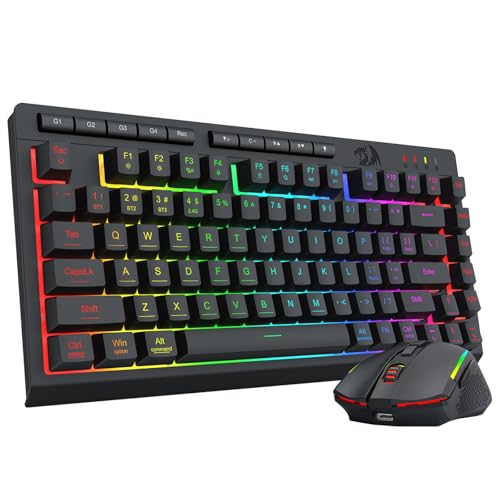
Redragon 75% Wireless Keyboard and Mouse Combo
Best for: Compact gaming and multi-device office use
- Connectivity
- Bluetooth 5.0, 2.4GHz, USB-C wired
- Keyboard Form Factor
- 75%
- Power Source
- Built-in rechargeable battery
- Mouse DPI
- 12800 DPI
- Backlighting
- 16.8M RGB
- Use
- Gaming
View on Amazon: Redragon 75% Wireless Keyboard and Mouse Combo
This Redragon combo pairs a 75% tenkeyless keyboard with a high-DPI mouse for flexible desk setups. It supports tri-mode connectivity via Bluetooth 5.0, 2.4GHz, and USB-C wired. The keyboard features a 4000mAh battery, while the mouse reaches 12800 DPI. RGB lighting and full programmability suit gamers and office users who need multi-device switching and precise control.
Pros
- Tri-mode connectivity with Bluetooth 5.0, 2.4GHz, and USB-C wired options
- 75% TKL form factor saves desk space for wider mouse movement
- Mouse supports up to 12800 DPI with adjustable polling rates
- 16.8 million RGB color options with custom DIY backlighting modes
- Built-in 4000mAh keyboard battery provides up to 300 hours of use
Cons
- Requires driver software for full customization and DPI adjustments
- Heavier at 1.13 pounds compared to ultra-portable alternatives
- No dedicated number pad for data entry tasks
Good fit if
- You need a compact 75% layout to maximize mouse space
- You want to switch between PC, Mac, and consoles easily
- You prefer full programmability for gaming and office work
Skip if
- You require a full-sized keyboard with a number pad
- You want a plug-and-play setup without installing software
- You prioritize ultra-lightweight portability for frequent travel
Verdict: Redragon S155PRO 75% Wireless Gaming Combo fits gamers and multitaskers who value a compact layout and tri-mode connectivity. Its high DPI mouse and customizable RGB lighting make it ideal for those who need precision and style.
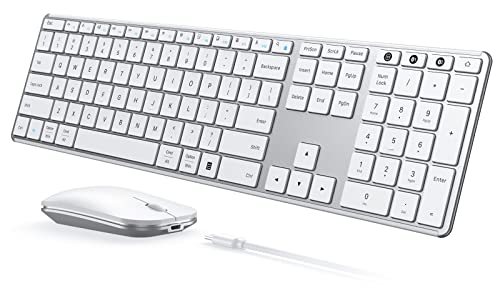
Seenda Full-Size Multi-Device Wireless Combo
Best for: multi-OS users needing triple device pairing
- Connectivity
- 2.4 GHz USB, Bluetooth
- Keyboard Form Factor
- Full-size
- Ergonomic Features
- Ergonomic stand
- Multi-Device Pairing
- 3 devices
- Power Source
- Built-in rechargeable battery
- Switch Type
- Scissor switch
View on Amazon: Seenda Full-Size Multi-Device Wireless Combo
The Seenda SKM64-3 is a full-size wireless keyboard and mouse combo built for multi-OS environments. It supports 2.4 GHz USB and dual Bluetooth connections, allowing you to pair three devices simultaneously. The keyboard uses scissor switches for quiet typing and includes an ergonomic stand. The mouse offers adjustable DPI levels up to 2400 and silent clicks. A built-in rechargeable battery provides up to 200 hours of use, making it suitable for users who switch between Windows and Mac systems.
Pros
- Triple device connectivity via 2.4 GHz USB and two Bluetooth channels
- Full-size layout with scissor-switch keys and ergonomic stand
- Adjustable mouse DPI settings at 1000, 1600, and 2400
- Built-in rechargeable battery lasting up to 200 hours
- Compatible with Windows, macOS, iOS, and Android
Cons
- 2.4 GHz USB mode is limited to Windows systems only
- Full-size footprint requires more desk space than compact options
- Mouse clicks are silent but may feel less tactile for some users
Good fit if
- You frequently switch between Windows and Mac computers
- You need to connect three devices simultaneously
- You prefer a full-size keyboard with quiet typing
Skip if
- You require 2.4 GHz connectivity on non-Windows devices
- You need a compact or 60% keyboard layout
- You prefer mechanical switches for tactile feedback
Verdict: Seenda SKM64-3 Wireless Combo is a practical choice for users who need multi-OS support and triple-device pairing in a full-size package. It fits buyers who value quiet typing and long battery life across Windows and Mac systems.

Logitech Pebble 2 Compact Mac Keyboard and Mouse Combo
Best for: Silent Mac and iPad users
- Connectivity
- Bluetooth
- Keyboard Form Factor
- Compact
- Multi-Device Pairing
- 3 devices
- Operating System
- Mac
- Dimensions
- 11 × 5 × 0.5 inches
- Weight
- 14.6 ounces
View on Amazon: Logitech Pebble 2 Compact Mac Keyboard and Mouse Combo
The Logitech Pebble 2 is a compact wireless keyboard and mouse combo designed for Mac, iPad, and iOS. It connects via Bluetooth to up to three Apple devices simultaneously. The set features quiet typing and silent clicking for focused work. It includes a three-year battery life for the keyboard and two years for the mouse. The build uses recycled plastic and fits easily into bags.
Pros
- Bluetooth connectivity for up to 3 devices
- Quiet laptop-like typing and silent mouse clicks
- Three-year keyboard battery life
- Compact and lightweight design for portability
- Made with certified post-consumer recycled plastic
Cons
- Optimized for Mac, iPad, and iOS only
- No 2.4GHz USB dongle included for Windows
- Requires Logi Options Plus app for customization
Good fit if
- You use a Mac, iPad, or iPhone
- You need to switch between three Apple devices
- You prioritize silent operation in shared spaces
Skip if
- You use a Windows PC
- You need a 2.4GHz USB receiver
- You want full cross-platform compatibility
Verdict: Logitech Pebble 2 Compact Mac Keyboard & Mouse is the right pick for Apple users who value silence and portability. It suits those who frequently switch between Mac, iPad, and iPhone without needing Windows support.

Logitech Pebble 2 Silent Compact Combo
Best for: quiet office work and multi-device switching
- Connectivity
- Bluetooth, Logi Bolt USB receiver
- Keyboard Form Factor
- Compact
- Multi-Device Pairing
- Up to 3 devices
- Noise Level
- Silent
- Dimensions
- 11 × 4.88 × 0.63 inches
- Weight
- 1.08 pounds
The Logitech Pebble 2 is a silent, ultra-slim wireless combo built from recycled plastic. It connects via Bluetooth or the included Logi Bolt receiver, supporting up to three devices. The keyboard features quiet, laptop-like keys, while the mouse uses Silent Touch Technology. You get three years of battery life for the keyboard and two for the mouse. This compact set suits users who prioritize quiet operation and portability over gaming performance.
Pros
- Silent typing and clicking for quiet environments
- Connects to up to 3 devices via Bluetooth or Logi Bolt
- Built with certified post-consumer recycled plastic
- 3-year battery life for the keyboard
Cons
- Not designed for gaming with low DPI mouse
- No dedicated media keys for quick control
- Requires Logi Options+ app for full customization
Good fit if
- You work in a shared space and need quiet operation
- You switch between multiple computers frequently
- You want a portable setup for travel
Skip if
- You need a mechanical keyboard for gaming
- You prefer a full-sized layout with numpad
- You want a wired connection for zero latency
Verdict: Logitech Pebble 2 Silent Wireless Combo is a practical choice for office workers who value silence and multi-device switching over gaming features.
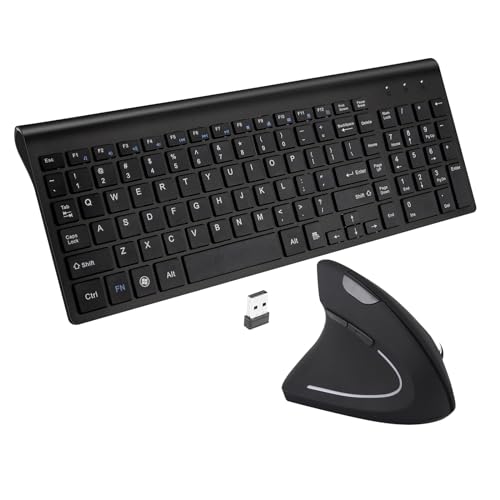
Fonicer Left-Handed Wireless Keyboard and Vertical Mouse
Best for: left-handed users needing ergonomic support
- Connectivity
- 2.4 GHz wireless, Nano USB receiver
- Keyboard Form Factor
- Full size
- Ergonomic Features
- Vertical mouse
- Switch Type
- Scissor-key-switch
- Mouse DPI
- 1600 DPI
- Design
- Ergonomic, Left-Handed
View on Amazon: Fonicer Left-Handed Wireless Keyboard and Vertical Mouse
This Fonicer combo targets left-handed users with a vertical ergonomic mouse and a full-size keyboard. It connects via a 2.4 GHz nano receiver for stable wireless performance up to 33 feet. The keyboard uses scissor-key switches for quiet, smooth typing. The mouse offers 1600 DPI optical tracking. It works with Windows and Mac, though hotkeys are Windows-only. The ultra-thin design fits easily in bags.
Pros
- Vertical mouse design supports a neutral handshake posture
- Full-size keyboard with 101 scissor-key switches
- 1600 DPI adjustable optical tracking
- Single nano receiver connects both devices
- Ultra-thin and portable build
Cons
- Left-handed mouse excludes right-handed users
- Hotkeys only work on Windows systems
- Not compatible with iOS devices
Good fit if
- You are left-handed and need ergonomic support
- You prefer a full-size keyboard layout
- You use Windows or Mac computers
Skip if
- You are right-handed
- You need hotkey functionality on Mac
- You use an iOS device
Verdict: Fonicer Left-Handed Vertical Mouse and Keyboard is a practical solution for left-handed users seeking ergonomic comfort. It suits those who need a full-size keyboard and stable wireless connectivity on Windows or Mac.
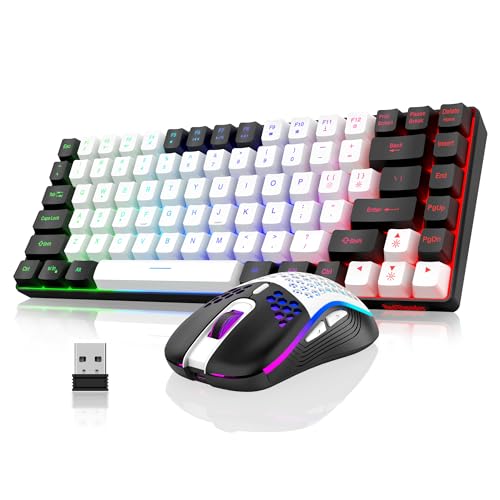
RedThunder 75% Wireless Keyboard and Honeycomb Mouse
Best for: compact desks needing arrow keys and rechargeable power
- Connectivity
- 2.4 GHz USB
- Keyboard Form Factor
- 75%
- Power Source
- Rechargeable (1850 mAh / 500 mAh)
- Mouse DPI
- 3200 DPI
- Backlighting
- RGB rainbow LED
- Use
- Gaming
View on Amazon: RedThunder 75% Wireless Keyboard and Honeycomb Mouse
The RedThunder K84 is a 75% layout wireless keyboard and mouse combo designed for compact desks. It uses a 2.4 GHz USB receiver for stable connectivity. The keyboard features a large 1850 mAh rechargeable battery, while the mouse has a 500 mAh unit. Both devices offer RGB lighting and a honeycomb shell mouse weighing 65 grams. This set suits users who want a full arrow key row and media controls without the bulk of a full-size board.
Pros
- 75% layout includes arrow keys and media controls
- Rechargeable 1850 mAh keyboard battery
- Ultra-light 65 gram honeycomb mouse
- 2.4 GHz wireless connection
- RGB rainbow LED backlighting
Cons
- No Bluetooth connectivity option
- Mouse RGB colors cycle automatically without manual adjustment
- Single shared USB receiver for both devices
Good fit if
- You want a compact keyboard with dedicated arrow keys
- You prefer a lightweight mouse for extended sessions
- You need rechargeable batteries for both devices
Skip if
- You require Bluetooth connectivity for multiple devices
- You want to customize mouse lighting colors manually
- You need separate receivers for keyboard and mouse
Verdict: RedThunder K84 Rechargeable 75% Keyboard Mouse Combo fits users who need a compact 75% layout with dedicated media keys and a lightweight mouse, provided you are comfortable with a single USB receiver.
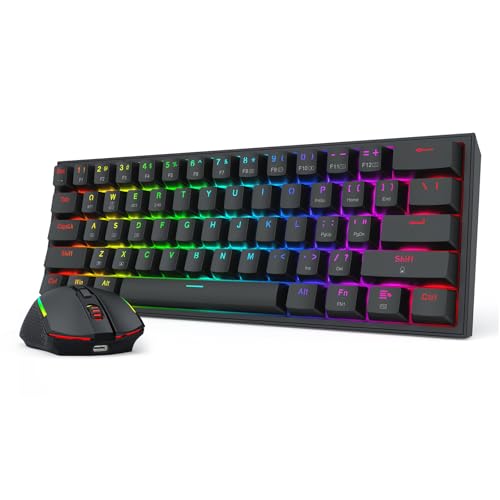
Redragon S144 60% Wireless Combo
Best for: Compact gaming setups with limited desk space
- Connectivity
- 2.4 GHz USB receiver
- Keyboard Form Factor
- 60%
- Mouse DPI
- 7200 DPI
- Use
- Gaming
The Redragon S144 is a 60% wireless keyboard and mouse combo designed for gaming. It features a 7200 DPI mouse with onboard switching and a keyboard with hot-swappable switches. A single 2.4GHz dongle connects both devices. The included software allows custom lighting and macro programming. This compact set frees up desk space for wider mouse movements.
Pros
- 7200 DPI adjustable mouse for precise aim
- Hot-swappable keyboard switches for customization
- Single 2.4GHz dongle connects both devices
- Software controls lighting and macros
Cons
- 60% layout lacks a numpad
- No Bluetooth connectivity mentioned
- Requires software for full customization
Good fit if
- You need a compact keyboard for wide mouse swipes
- You want to customize switch feel without soldering
- You prefer using one USB dongle for both devices
Skip if
- You require a full-size keyboard with numpad
- You need Bluetooth connectivity for multiple devices
- You prefer hardware-only controls without software
Verdict: Redragon S144 60% Wireless Combo suits gamers who value desk space and switch customization. It fits users who want a single dongle for their setup.

RedThunder 60% Wired Gaming Combo
Best for: compact gaming setups and FPS players
- Connectivity
- USB wired
- Keyboard Form Factor
- 60%
- Ergonomic Features
- Symmetrical ergonomics
- Mouse DPI
- 7200 DPI
- Backlighting
- RGB
- Use
- Gaming
This wired combo features a 60% keyboard and a lightweight mouse. The keyboard offers RGB backlighting with adjustable brightness and breathing modes. It includes water-resistant core protection and durable braided USB cables. The mouse provides 7200 DPI sensitivity and a 1000Hz polling rate. Its symmetrical design fits left or right hands. You get a compact setup for gaming or general use.
Pros
- 60% compact layout saves desk space
- RGB backlighting with adjustable brightness
- Water-resistant keyboard core
- Lightweight 65g honeycomb mouse shell
- 7200 DPI optical sensor
Cons
- Wired connection limits mobility
- No number pad for data entry
- Mouse weight includes +/- 5g variance
Good fit if
- You need a compact keyboard for FPS gaming
- You prefer wired stability over wireless
- You want adjustable RGB lighting effects
Skip if
- You require a full-size keyboard with numpad
- You need wireless connectivity for freedom
- You prefer a larger ergonomic mouse
Verdict: RedThunder 60% Wired Gaming Keyboard and Mouse Combo suits gamers who prioritize desk space and wired reliability. It offers solid specs for fast-paced play but lacks the number pad needed for heavy typing tasks.
Specifications side by side
| Spec | Redragon 75% Wireless Keyboard and Mouse Combo | Seenda Full-Size Multi-Device Wireless Combo | Logitech Pebble 2 Compact Mac Keyboard and Mouse Combo | Logitech Pebble 2 Silent Compact Combo | Fonicer Left-Handed Wireless Keyboard and Vertical Mouse | RedThunder 75% Wireless Keyboard and Honeycomb Mouse | Redragon S144 60% Wireless Combo | RedThunder 60% Wired Gaming Combo |
|---|---|---|---|---|---|---|---|---|
| Connectivity | Bluetooth 5.0, 2.4GHz, USB-C wired | 2.4 GHz USB, Bluetooth | Bluetooth | Bluetooth, Logi Bolt USB receiver | 2.4 GHz wireless, Nano USB receiver | 2.4 GHz USB | 2.4 GHz USB receiver | USB wired |
| Keyboard Form Factor | 75% | Full-size | Compact | Compact | Full size | 75% | 60% | 60% |
| Ergonomic Features | not specified | Ergonomic stand | not specified | not specified | Vertical mouse | not specified | not specified | Symmetrical ergonomics |
| Multi-Device Pairing | not specified | 3 devices | 3 devices | Up to 3 devices | not specified | not specified | not specified | not specified |
| Power Source | Built-in rechargeable battery | Built-in rechargeable battery | not specified | not specified | not specified | Rechargeable (1850 mAh / 500 mAh) | not specified | not specified |
| Switch Type | not specified | Scissor switch | not specified | not specified | Scissor-key-switch | not specified | not specified | not specified |
| Mouse DPI | 12800 DPI | 1000 / 1600 / 2400 DPI | not specified | not specified | 1600 DPI | 3200 DPI | 7200 DPI | 7200 DPI |
| Backlighting | 16.8M RGB | not specified | not specified | not specified | not specified | RGB rainbow LED | not specified | RGB |
| Form Factor | 75% | not specified | Compact | Compact | not specified | Compact | 60% | Compact |
| Use | Gaming | not specified | not specified | not specified | not specified | Gaming | Gaming | Gaming |
| Design | not specified | not specified | not specified | not specified | Ergonomic, Left-Handed | not specified | not specified | not specified |
| Color | Gaming Combo | White Silver | Tonal Graphite | Tonal Rose | Black | White Black | K617 + M693 | Black contour line |
| Shape | not specified | not specified | not specified | not specified | Vertical | not specified | not specified | not specified |
| Shell Design | not specified | not specified | not specified | not specified | not specified | Honeycomb | not specified | not specified |
| Operating System | not specified | Mac, Windows | Mac | not specified | Mac | not specified | not specified | Mac |
| Noise Level | not specified | not specified | not specified | Silent | not specified | not specified | not specified | not specified |
| Weight | 1.13 pounds | 1.43 pounds | 14.6 ounces | 1.08 pounds | 1.7 pounds | 1.43 pounds | not specified | not specified |
| Dimensions | not specified | 16.9 × 4.33 × 0.79 inches | 11 × 5 × 0.5 inches | 11 × 4.88 × 0.63 inches | 14.8 × 5.4 × 1 inches | not specified | not specified | not specified |
| Size | TKL | Full Size | 2 Piece Set | One Size | 17.72x5.91x1.57in | not specified | 4.88× 2.56 × 1.61 inches | not specified |
| Model | S155-PRO | JP-064-3 | 920-012200 | 920-012199 | Left | K84 | S144 | K62 |
If you want ergonomic support away from your desk, our guide to best pillows under 50 compares fill specs.
Key Specs to Check Before Buying
-
Check Connectivity Modes
Wireless combos vary in connection type. Tri-mode devices support Bluetooth, 2.4GHz dongles, and wired links. This offers flexibility for multi-device setups. The Redragon S155PRO includes these modes for gaming and office work. Some models, like the RedThunder K84, use only a single USB receiver. This limits device switching but reduces clutter. Wired options, such as the RedThunder K62, eliminate latency concerns entirely. Choose based on how many devices you switch between daily.
-
Match Form Factor to Desk
Keyboard size dictates available mouse space. Sixty percent layouts remove arrow keys and function rows to maximize desk area. The Redragon S144 and RedThunder K62 use this compact design. Seventy-five percent models retain arrow keys while remaining small. The Redragon S155PRO and RedThunder K84 fit this category. Full-size keyboards, like the Seenda SKM64-3, include number pads for data entry. Compact models suit gamers with limited space. Full-size units serve office workers needing numeric input.
-
Verify Operating System Support
Not all combos work with every system. The Logitech Pebble 2 Compact Mac is designed specifically for Apple devices. It lacks Windows support, so check compatibility first. The Seenda SKM64-3 supports both Mac and Windows, offering broader utility. The Fonicer vertical mouse combo also lists Mac compatibility. Always confirm the product listing specifies your OS. Using a non-compatible device may require complex workarounds or result in missing keys.
-
Assess Noise Levels
Office environments benefit from quiet typing. The Logitech Pebble 2 Silent features silent switches for discreet use. It suits shared workspaces where noise matters. The standard Pebble 2 Compact Mac focuses on silence for Apple users. Most gaming combos prioritize speed over quietness. If you type in a library or open office, look for explicit silent switch ratings. This spec ensures you avoid disturbing colleagues during late-night work sessions.
-
Consider Ergonomic Design
Comfort matters for long work sessions. The Fonicer combo offers a vertical mouse and left-handed layout. This design reduces wrist strain for specific users. Standard mice and keyboards may cause discomfort over time. Ergonomic options cater to users with existing pain or those seeking prevention. Check the shape and handedness before buying. Most combos use standard right-handed designs. If you are left-handed or need vertical support, verify the listing details the specific ergonomic features.
Frequently asked questions
Which keyboard and mouse combo is best for compact gaming setups?
The RedThunder 60% Wired Gaming Combo is a strong option for gamers who prioritize desk space and wired reliability. It features a compact 60% layout that leaves ample room for mouse movement. This model includes RGB backlighting and is designed for fast-paced play. It connects via a single USB cable for stable performance without wireless interference.
What is the best ergonomic keyboard and mouse combo for left-handed users?
The Fonicer Left-Handed Wireless Keyboard and Vertical Mouse is designed specifically for left-handed users seeking ergonomic comfort. It includes a full-size keyboard and a vertical mouse to support natural hand positioning. The set offers stable wireless connectivity and is compatible with both Mac and Windows operating systems. This combination helps reduce strain during long typing sessions.
Which combo supports the most devices for multi-OS users?
The Seenda Full-Size Multi-Device Wireless Combo is ideal for users needing triple-device pairing across different operating systems. It supports both Mac and Windows, allowing you to switch between computers easily. The full-size layout includes a number pad for data entry. It uses Bluetooth connectivity for a clutter-free desk setup while maintaining quiet typing performance.
Is there a silent keyboard and mouse combo for quiet offices?
The Logitech Pebble 2 Silent Compact Combo is built for quiet office work and multi-device switching. It features silent keys to minimize noise during typing. The compact design fits well on smaller desks. This set is wireless and includes a mouse that complements the low-noise keyboard. It is a practical choice for shared workspaces where silence is a priority.
Which combo has a honeycomb mouse design?
The RedThunder 75% Wireless Keyboard and Honeycomb Mouse is the top choice for users who prefer a lightweight mouse. The honeycomb shell design reduces weight for faster movements. The keyboard offers a 75% layout with dedicated media keys and rechargeable power. This combo suits compact desks and provides a balance of gaming features and everyday utility.
What is the best 60% keyboard and mouse combo?
The Redragon S144 60% Wireless Combo is the best option for those who value maximum desk space. It uses a compact 60% layout that removes the number pad and function row. This wireless set connects via a single dongle for simplicity. It is suited for gamers who want a clean setup and easy customization options for their keys.
Which combo is best for Apple users who need silence?
The Logitech Pebble 2 Compact Mac Keyboard and Mouse Combo is the right pick for Apple users. It is optimized for Mac, iPad, and iPhone without needing Windows support. The set features silent keys for quiet operation. Its compact tonal graphite design is portable and fits well with Apple devices. It is ideal for users who frequently switch between Mac products.
Which keyboard and mouse combo offers tri-mode connectivity?
The Redragon 75% Wireless Keyboard and Mouse Combo supports tri-mode connectivity for versatile use. It allows connections via Bluetooth, a 2.4GHz wireless receiver, and a wired link. This flexibility is ideal for multitaskers who switch between gaming and office work. The 75% layout saves space while retaining essential keys like arrow keys and function rows.